



想通过 curl 查看 log_0 索引中 res.host_ip 字段的实际值(即:有哪些 IP 地址出现在日志中)。
这需要使用 Elasticsearch 的搜索(Search)和聚合(Aggregations)功能。
kibana查看
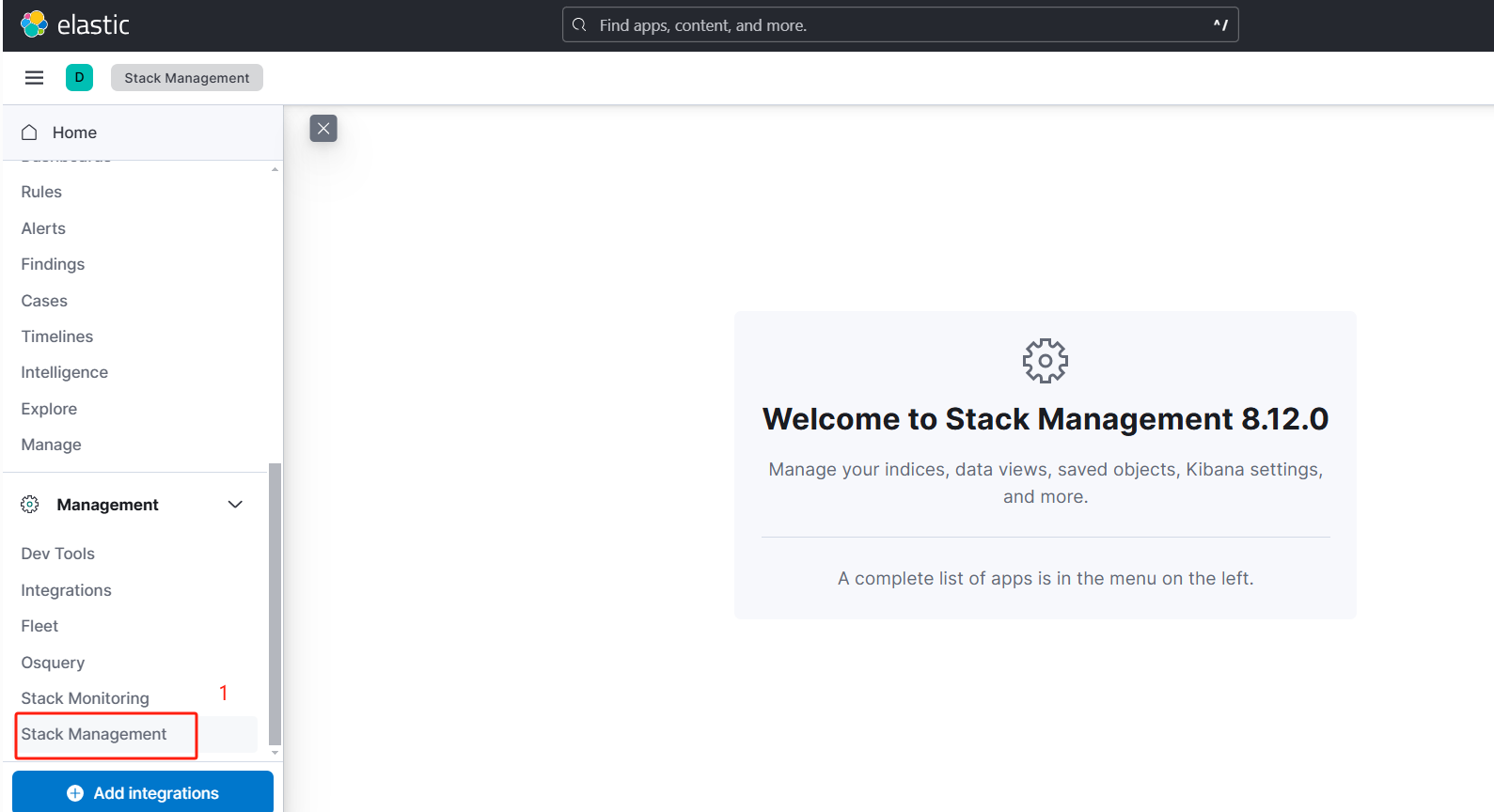
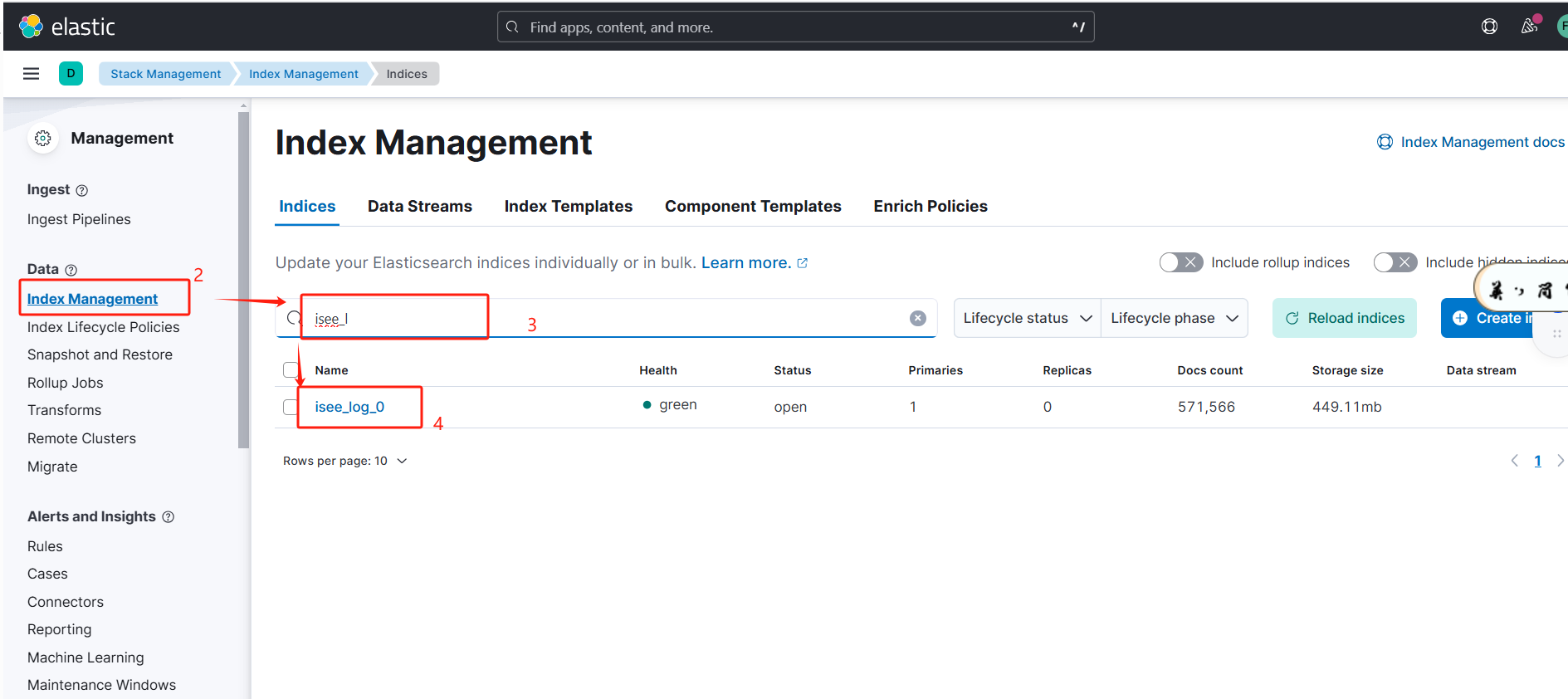
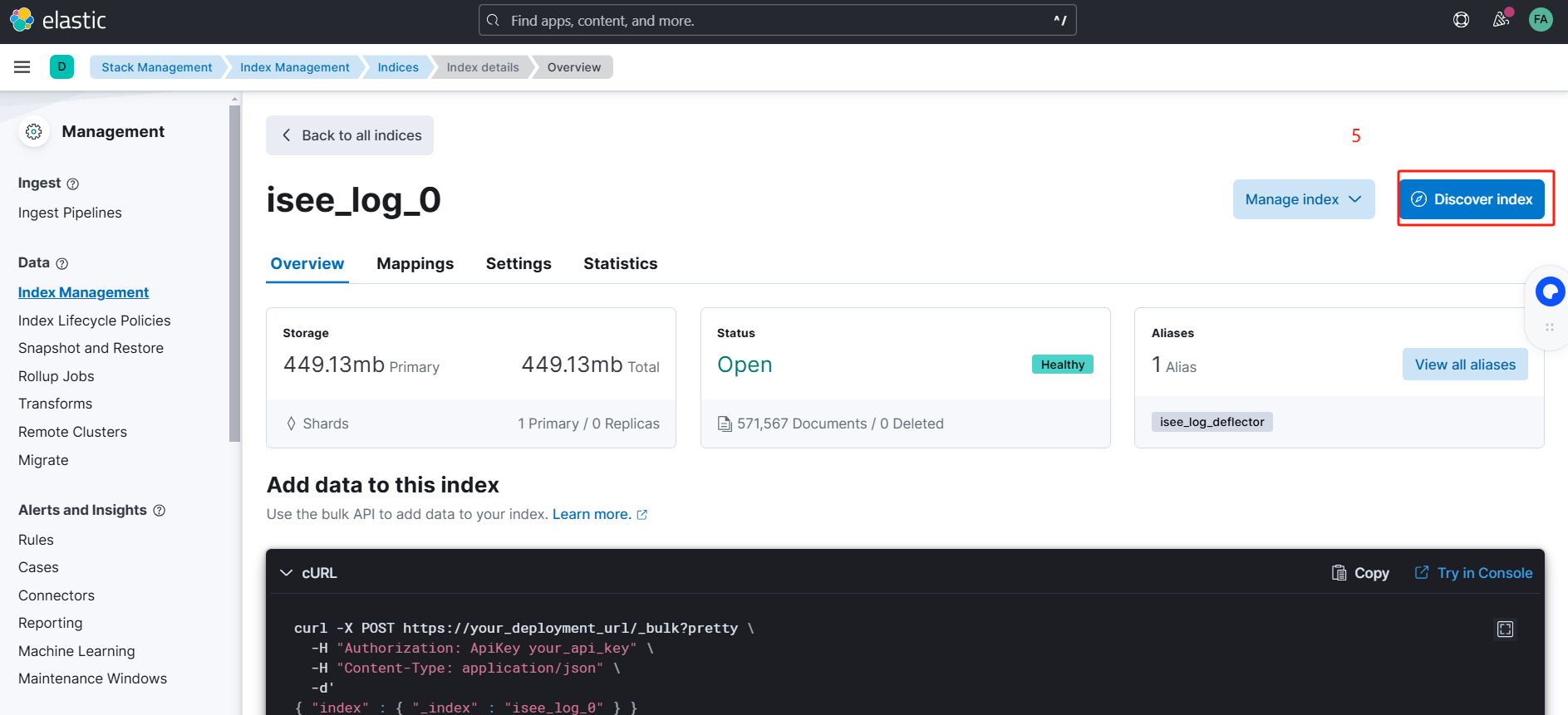
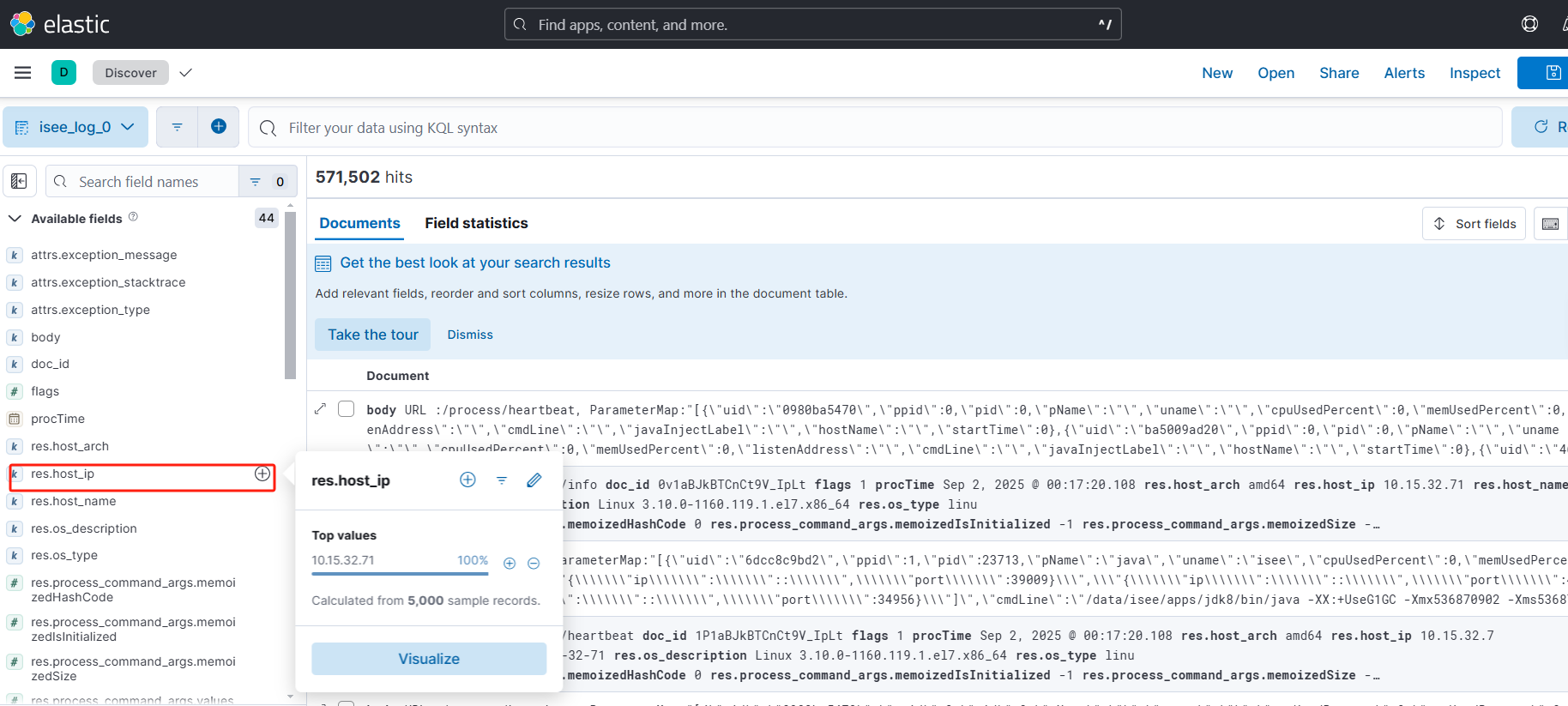
curl命令查看
最终效果
可以看到log索引中,有多少条host_ip的数据。
# curl -u "elastic:9yZWp=3UnEVkBxYBhnlS" -X GET "http://10.10.10.10:9200/log_0/_search?pretty" -H "Content-Type: application/json" -d '{
  "size": 0,
  "query": {
    "range": {
      "procTime": {
        "gte": "2025-10-09 00:00:00.000"
      }
    }
  },
  "aggs": {
    "ip_count": {
      "terms": {
        "field": "res.host_ip",
        "size": 10
      }
    }
  }
}'
{
  "took" : 2,
  "timed_out" : false,
  "_shards" : {
    "total" : 1,
    "successful" : 1,
    "skipped" : 0,
    "failed" : 0
  },
  "hits" : {
    "total" : {
      "value" : 1674,
      "relation" : "eq"
    },
    "max_score" : null,
    "hits" : [ ]
  },
  "aggregations" : {
    "ip_count" : {
      "doc_count_error_upper_bound" : 0,
      "sum_other_doc_count" : 0,
      "buckets" : [
        {
          "key" : "10.10.10.10",
          "doc_count" : 1674
        }
      ]
    }
  }
}
分析1:
# curl -u "elastic:9yZWp=3UnEVkBxYBhnlS" -X GET "http://10.10.10.10:9200/log_0/_search?pretty" \
> -H "Content-Type: application/json" \
> -d '{
>   "size": 0,
>   "aggs": {
>     "unique_ips": {
>       "terms": {
>         "field": "res.host_ip.keyword",
>         "size": 100
>       }
>     }
>   }
> }'
{
  "took" : 1,
  "timed_out" : false,
  "_shards" : {
    "total" : 1,
    "successful" : 1,
    "skipped" : 0,
    "failed" : 0
  },
  "hits" : {
    "total" : {
      "value" : 10000,
      "relation" : "gte"
    },
    "max_score" : null,
    "hits" : [ ]
  },
  "aggregations" : {
    "unique_ips" : {
      "doc_count_error_upper_bound" : 0,
      "sum_other_doc_count" : 0,
      "buckets" : [ ]
    }
  }
}
实际查询结果为空。
参数说明
| 部分 | 说明 |
|---|---|
http://10.10.10.0:9200/log_0/_search | 在 isee_log_0 索引中执行搜索 |
size: 0 | 不返回具体文档,只返回聚合结果 |
aggs | 定义聚合操作 |
field: "res.host_ip.keyword" | 使用 .keyword 精确匹配 IP 地址(即使字段是 text 也能查) |
size: 100 | 最多返回 100 个唯一 IP(可调大,最大 10000) |
返回示例
{
  "aggregations": {
    "unique_ips": {
      "buckets": [
        { "key": "10.15.32.10", "doc_count": 1200 },
        { "key": "10.15.32.11", "doc_count": 980 },
        { "key": "10.15.32.12", "doc_count": 870 }
      ]
    }
  }
}
key:就是res.host_ip的值(IP 地址)doc_count:该 IP 出现的日志条数
分析2:
使用聚合(Aggregations)精确统计
curl -u "elastic:9yZWp=3UnEVkBxYBhnlS" \
> -X GET "http://10.10.10.10:9200/log_0/_search?pretty" \
> -H "Content-Type: application/json" \
> -d '{
>   "size": 0,
>   "aggs": {
>     "ip_count": {
>       "terms": {
>         "field": "res.host_ip.keyword",
>         "size": 10000
>       }
>     }
>   }
> }'
{
  "took" : 0,
  "timed_out" : false,
  "_shards" : {
    "total" : 1,
    "successful" : 1,
    "skipped" : 0,
    "failed" : 0
  },
  "hits" : {
    "total" : {
      "value" : 10000,
      "relation" : "gte"
    },
    "max_score" : null,
    "hits" : [ ]
  },
  "aggregations" : {
    "ip_count" : {
      "doc_count_error_upper_bound" : 0,
      "sum_other_doc_count" : 0,
      "buckets" : [ ]
    }
  }
}
实际操作返回为空
返回示例
{
  "aggregations": {
    "ip_count": {
      "buckets": [
        { "key": "10.15.32.71", "doc_count": 571478 }
      ]
    }
  }
}
terms聚合只对 非空、非 null 的字段生效。如果某个文档没有res.host_ip,它不会出现在聚合结果中。
分析3:
1.先查看文档总数
curl -u "elastic:9yZWp=3UnEVkBxYBhnlS" \
-X GET "http://10.10.10.10:9200/isee_log_0/_stats?pretty"
结果
      "total" : {
        "docs" : {
          "count" : 571542,
          "deleted" : 0
        }
2.确认索引中是否有数据
 curl -u "elastic:9yZWp=3UnEVkBxYBhnlS" \
> -X GET "http://10.10.10.10:9200/isee_log_0/_count?pretty"
{
  "count" : 571542,
  "_shards" : {
    "total" : 1,
    "successful" : 1,
    "skipped" : 0,
    "failed" : 0
  }
}
3.确认res.host_ip字段是否存在且有值
 curl -u "elastic:9yZWp=3UnEVkBxYBhnlS" \
> -X GET "http://10.10.10.10:9200/isee_log_0/_search?pretty" \
> -H "Content-Type: application/json" \
> -d '{
>   "size": 1,
>   "_source": ["res.host_ip"]
> }'
{
  "took" : 1,
  "timed_out" : false,
  "_shards" : {
    "total" : 1,
    "successful" : 1,
    "skipped" : 0,
    "failed" : 0
  },
  "hits" : {
    "total" : {
      "value" : 10000,
      "relation" : "gte"
    },
    "max_score" : 1.0,
    "hits" : [
      {
        "_index" : "isee_log_0",
        "_id" : "VVVaBJkBuABxW5BdJAmy",
        "_score" : 1.0,
        "_source" : {
          "res" : {
            "host_ip" : "10.10.10.10"
          }
        }
      }
    ]
  }
}
结果有值
预计返回
"hits": {
  "hits": [
    {
      "_source": {
        "res": {
          "host_ip": "10.10.10.10"
        }
      }
    }
  ]
}
4.检查字段映射(Mapping)
# curl -u "elastic:9yZWp=3UnEVkBxYBhnlS" \
> -X GET "http://10.10.10.10:9200/isee_log_0/_mapping?pretty"
在返回值中找到查询的字段
"res" : {
          "properties" : {
            "host_arch" : {
              "type" : "keyword",
              "ignore_above" : 32766
            },
            "host_ip" : {
              "type" : "keyword",
              "ignore_above" : 32766
            },
            "host_name" : {
              "type" : "keyword",
              "ignore_above" : 32766
            }
        }
✅ 如果是 "type": "keyword",那 res.host_ip.keyword 应该能聚合。
❌ 但如果字段是 "type": "text",即使有 .keyword 子字段,也可能因为未启用 fielddata 而无法聚合。
5.尝试不加keyword或错误使用其他类型
# curl -u "elastic:9yZWp=3UnEVkBxYBhnlS" \
> -X PUT "http://10.10.10.10:9200/isee_log_0/_mapping?pretty" \
> -H "Content-Type: application/json" \
> -d '{
>   "properties": {
>     "res.host_ip": {
>       "type": "text",
>       "fielddata": true
>     }
>   }
> }'
{
  "error" : {
    "root_cause" : [
      {
        "type" : "illegal_argument_exception",
        "reason" : "mapper [res.host_ip] cannot be changed from type [keyword] to [text]"
      }
    ],
    "type" : "illegal_argument_exception",
    "reason" : "mapper [res.host_ip] cannot be changed from type [keyword] to [text]"
  },
  "status" : 400
}
keyword类型和text类型,不能随意替换。
6.判断字段是否存在
# curl -u "elastic:9yZWp=3UnEVkBxYBhnlS" \
> -X GET "http://10.10.10.10:9200/isee_log_0/_search?pretty" \
> -H "Content-Type: application/json" \
> -d '{
>   "query": {
>     "exists": {
>       "field": "res.host_ip"
>     }
>   },
>   "size": 0
> }'
{
  "took" : 1,
  "timed_out" : false,
  "_shards" : {
    "total" : 1,
    "successful" : 1,
    "skipped" : 0,
    "failed" : 0
  },
  "hits" : {
    "total" : {
      "value" : 10000,
      "relation" : "gte"
    },
    "max_score" : null,
    "hits" : [ ]
  }
}
exists,判断是否存在。
7.使用cardinality聚合查看唯一值个数
 curl -u "elastic:9yZWp=3UnEVkBxYBhnlS" \
> -X GET "http://10.10.10.10:9200/isee_log_0/_search?pretty" \
> -H "Content-Type: application/json" \
> -d '{
>   "size": 0,
>   "aggs": {
>     "unique_ips_count": {
>       "cardinality": {
>         "field": "res.host_ip.keyword"
>       }
>     }
>   }
> }'
{
  "took" : 1,
  "timed_out" : false,
  "_shards" : {
    "total" : 1,
    "successful" : 1,
    "skipped" : 0,
    "failed" : 0
  },
  "hits" : {
    "total" : {
      "value" : 10000,
      "relation" : "gte"
    },
    "max_score" : null,
    "hits" : [ ]
  },
  "aggregations" : {
    "unique_ips_count" : {
      "value" : 0
    }
  }
}
8.检查时间范围
默认情况,es查询只查最近15分钟,1小时或24小时的数据。需要显示指定时间范围
查询指定时间到目前的所有数据
curl -u "elastic:9yZWp=3UnEVkBxYBhnlS" \
> -X GET "http://10.10.10.10:9200/isee_log_0/_search?pretty" \
> -H "Content-Type: application/json" \
> -d '{
>   "size": 0,
>   "query": {
>     "range": {
>       "procTime": {
>         "gte": "2024-01-01T00:00:00.000Z"
>       }
>     }
>   },
>   "aggs": {
>     "ip_count": {
>       "terms": {
>         "field": "res.host_ip.keyword",
>         "size": 10
>       }
>     }
>   }
> }'
{
  "error" : {
    "root_cause" : [
      {
        "type" : "parse_exception",
        "reason" : "failed to parse date field [2024-01-01T00:00:00.000Z] with format [yyyy-MM-dd HH:mm:ss.SSS]: [failed to parse date field [2024-01-01T00:00:00.000Z] with format [yyyy-MM-dd HH:mm:ss.SSS]]"
      }
    ],
    "type" : "search_phase_execution_exception",
    "reason" : "all shards failed",
    "phase" : "query",
    "grouped" : true,
    "failed_shards" : [
      {
        "shard" : 0,
        "index" : "isee_log_0",
        "node" : "ub4-HPY2RxSV01OPuI3gQQ",
        "reason" : {
          "type" : "parse_exception",
          "reason" : "failed to parse date field [2024-01-01T00:00:00.000Z] with format [yyyy-MM-dd HH:mm:ss.SSS]: [failed to parse date field [2024-01-01T00:00:00.000Z] with format [yyyy-MM-dd HH:mm:ss.SSS]]",
          "caused_by" : {
            "type" : "illegal_argument_exception",
            "reason" : "failed to parse date field [2024-01-01T00:00:00.000Z] with format [yyyy-MM-dd HH:mm:ss.SSS]",
            "caused_by" : {
              "type" : "date_time_parse_exception",
              "reason" : "Text '2024-01-01T00:00:00.000Z' could not be parsed at index 10"
            }
          }
        }
      }
    ]
  },
  "status" : 400
}
遇到的错误是
"reason": "failed to parse date field [2025-10-09T00:00:00.000Z] with format [yyyy-MM-dd HH:mm:ss.SSS]"
procTime 字段在 mapping 中定义的格式是:
"format": "yyyy-MM-dd HH:mm:ss.SSS"
但你传入的日期字符串是:
"2025-10-09T00:00:00.000Z"
这个字符串使用的是 ISO8601 格式,其中:
• T 是时间分隔符
• Z 表示 UTC 时区
而你的字段 只接受 yyyy-MM-dd HH:mm:ss.SSS 这种空格分隔、无 T 和 Z 的格式! 所以 Elasticsearch 在解析到第 10 个字符(即 T)时失败了:
正确方式,将T 和Z 去掉,用空格替代T,并去掉Z
 curl -u "elastic:9yZWp=3UnEVkBxYBhnlS" \
> -X GET "http://10.10.10.10:9200/isee_log_0/_search?pretty" \
> -H "Content-Type: application/json" \
> -d '{
>   "size": 0,
>   "query": {
>     "range": {
>       "procTime": {
>         "gte": "2025-10-09 00:00:00.000"
>       }
>     }
>   },
>   "aggs": {
>     "ip_count": {
>       "terms": {
>         "field": "res.host_ip.keyword",
>         "size": 10
>       }
>     }
>   }
> }'
{
  "took" : 1,
  "timed_out" : false,
  "_shards" : {
    "total" : 1,
    "successful" : 1,
    "skipped" : 0,
    "failed" : 0
  },
  "hits" : {
    "total" : {
      "value" : 1723,
      "relation" : "eq"
    },
    "max_score" : null,
    "hits" : [ ]
  },
  "aggregations" : {
    "ip_count" : {
      "doc_count_error_upper_bound" : 0,
      "sum_other_doc_count" : 0,
      "buckets" : [ ]
    }
  }
}
结果,还是没查出来,但已经很接近了。
"hits" : {
"total" : {
"value" : 1723,
"relation" : "eq"
}
聚合结果为空,说明res.host_ip.keyword字段,在这些文档中“不可用于聚合”
8.为什么buckets是空值
a.res.host_ip字段在这些文档中不存在或为空
即使hits已经有值,也不代表这些文档中都有res.host_ip字段
查看一条真实的文档内容
 curl -u "elastic:9yZWp=3UnEVkBxYBhnlS" \
> -X GET "http://10.10.10.10:9200/isee_log_0/_search?pretty" \
> -H "Content-Type: application/json" \
> -d '{
>   "size": 1,
>   "query": {
>     "range": {
>       "procTime": {
>         "gte": "2025-10-09 00:00:00.000"
>       }
>     }
>   },
>   "_source": ["res.host_ip", "res", "procTime"]
> }'
{
  "took" : 1,
  "timed_out" : false,
  "_shards" : {
    "total" : 1,
    "successful" : 1,
    "skipped" : 0,
    "failed" : 0
  },
  "hits" : {
    "total" : {
      "value" : 1723,
      "relation" : "eq"
    },
    "max_score" : 1.0,
    "hits" : [
      {
        "_index" : "isee_log_0",
        "_id" : "bDvDxJkBULLjKpTK_5vN",
        "_score" : 1.0,
        "_source" : {
          "res" : {
            "sys_code" : "product",
            "host_ip" : "10.10.10.10",
            "telemetry_sdk_language" : "java",
            "telemetry_sdk_version" : "1.50.0",
            "service_name" : "71serviceTest",
            "os_description" : "Linux 3.10.0-1160.119.1.el7.x86_64",
            "service_instance_id" : "2a131b1c-04e7-4509-b846-a5ed54ad4e21",
            "service_namespace" : "71isee",
            "service_version" : "1.1.0",
            "process_pid" : 4815,
            "process_command_args" : {
              "values_" : [
                {
                  "valueCase_" : 1,
                  "value_" : "/data/isee/apps/jdk17/bin/java",
                  "memoizedIsInitialized" : -1,
                  "unknownFields" : {
                    "fields" : { }
                  },
                  "memoizedSize" : -1,
                  "memoizedHashCode" : 0
                },
                {
                  "valueCase_" : 1,
                  "value_" : "-javaagent:/data/isee/apps/isee-apm-agent/isee-apm-agent-3.2.0-all.jar",
                  "memoizedIsInitialized" : -1,
                  "unknownFields" : {
                    "fields" : { }
                  },
                  "memoizedSize" : -1,
                  "memoizedHashCode" : 0
                },
                {
                  "valueCase_" : 1,
                  "value_" : "-Dotel.javaagent.extensions=/data/isee/apps/isee-apm-agent/isee-apm-extensions-2.0-all.jar",
                  "memoizedIsInitialized" : -1,
                  "unknownFields" : {
                    "fields" : { }
                  },
                  "memoizedSize" : -1,
                  "memoizedHashCode" : 0
                },
                {
                  "valueCase_" : 1,
                  "value_" : "-Dotel.javaagent.configuration-file=/data/isee/apps/isee-apm-agent/isee-apm-agent.properties",
                  "memoizedIsInitialized" : -1,
                  "unknownFields" : {
                    "fields" : { }
                  },
                  "memoizedSize" : -1,
                  "memoizedHashCode" : 0
                },
                {
                  "valueCase_" : 1,
                  "value_" : "--add-exports",
                  "memoizedIsInitialized" : -1,
                  "unknownFields" : {
                    "fields" : { }
                  },
                  "memoizedSize" : -1,
                  "memoizedHashCode" : 0
                },
                {
                  "valueCase_" : 1,
                  "value_" : "java.base/sun.security.action=ALL-UNNAMED",
                  "memoizedIsInitialized" : -1,
                  "unknownFields" : {
                    "fields" : { }
                  },
                  "memoizedSize" : -1,
                  "memoizedHashCode" : 0
                },
                {
                  "valueCase_" : 1,
                  "value_" : "--add-opens",
                  "memoizedIsInitialized" : -1,
                  "unknownFields" : {
                    "fields" : { }
                  },
                  "memoizedSize" : -1,
                  "memoizedHashCode" : 0
                },
                {
                  "valueCase_" : 1,
                  "value_" : "java.base/java.util.regex=ALL-UNNAMED",
                  "memoizedIsInitialized" : -1,
                  "unknownFields" : {
                    "fields" : { }
                  },
                  "memoizedSize" : -1,
                  "memoizedHashCode" : 0
                },
                {
                  "valueCase_" : 1,
                  "value_" : "-jar",
                  "memoizedIsInitialized" : -1,
                  "unknownFields" : {
                    "fields" : { }
                  },
                  "memoizedSize" : -1,
                  "memoizedHashCode" : 0
                },
                {
                  "valueCase_" : 1,
                  "value_" : "./isee-apm-service-1.1.0.jar",
                  "memoizedIsInitialized" : -1,
                  "unknownFields" : {
                    "fields" : { }
                  },
                  "memoizedSize" : -1,
                  "memoizedHashCode" : 0
                }
              ],
              "memoizedIsInitialized" : -1,
              "unknownFields" : {
                "fields" : { }
              },
              "memoizedSize" : -1,
              "memoizedHashCode" : 0
            },
            "process_runtime_version" : "17.0.10+11-LTS-240",
            "process_runtime_description" : "Oracle Corporation Java HotSpot(TM) 64-Bit Server VM 17.0.10+11-LTS-240",
            "telemetry_sdk_name" : "opentelemetry",
            "service_type" : "backend",
            "os_type" : "linux",
            "process_executable_path" : "/data/isee/apps/jdk17/bin/java",
            "process_runtime_name" : "Java(TM) SE Runtime Environment",
            "host_arch" : "amd64",
            "service_instance_name" : "71serviceTest-a5ed54ad4e21",
            "telemetry_distro_name" : "opentelemetry-java-instrumentation",
            "host_name" : "host-10-15-32-71",
            "telemetry_distro_version" : "ISeeAgent-3.3.0, Otel-2.16.0"
          },
          "procTime" : "2025-10-09 01:00:03.403"
        }
      }
    ]
  }
}
📌 查看返回中是否有 res.host_ip 字段。
• 如果返回 "res": {} 或没有 host_ip,说明字段没写入。
• 如果返回 "res": { "host_ip": "10.15.32.71" },继续下一步。
b.字段映射mapping问题
查看字段mapping
curl -u "elastic:9yZWp=3UnEVkBxYBhnlS" \
> -X GET "http://10.10.10.10:9200/isee_log_0/_mapping?pretty"
结果
 "res" : {
          "properties" : {
            "host_arch" : {
              "type" : "keyword",
              "ignore_above" : 32766
            },
            "host_ip" : {
              "type" : "keyword",
              "ignore_above" : 32766
            },
            "host_name" : {
              "type" : "keyword",
              "ignore_above" : 32766
            }
        }
9.对8.a的验证结果
"res" : {
            "sys_code" : "product",
            "host_ip" : "10.10.10.10",
            "telemetry_sdk_language" : "java"
        }
✅ 说明:
isee_log_0索引中 确实存在res.host_ip字段- 值为
"10.15.32.71" - 字段类型应为
keyword(因为你在 mapping 中定义过)
但之前聚合查询返回的 "buckets": [],这就非常奇怪了 —— 文档存在,字段存在,但聚合为空。
10. 深度排查
为什么 terms 聚合返回空?虽然字段存在,但聚合为空,可能原因如下:
🚫 可能原因 1:字段被自动创建为 text,且 .keyword 未正确生成
即使你在 mapping 中定义为 keyword,但如果 有文档先写入,ES 可能自动创建为 text,导致 .keyword 不可用。
完整查看maaping
 curl -u "elastic:9yZWp=3UnEVkBxYBhnlS" \
> -X GET "http://10.10.10.10:9200/isee_log_0/_mapping?pretty"
结果
 "res" : {
          "properties" : {
            "host_arch" : {
              "type" : "keyword",
              "ignore_above" : 32766
            },
            "host_ip" : {
              "type" : "keyword",
              "ignore_above" : 32766
            },
            "host_name" : {
              "type" : "keyword",
              "ignore_above" : 32766
            }
        }
11.尝试直接聚合,不加.keyword
curl -u "elastic:9yZWp=3UnEVkBxYBhnlS" \
> -X GET "http://10.10.10.10:9200/isee_log_0/_search?pretty" \
> -H "Content-Type: application/json" \
> -d '{
>   "size": 0,
>   "query": {
>     "range": {
>       "procTime": {
>         "gte": "2025-10-09 00:00:00.000"
>       }
>     }
>   },
>   "aggs": {
>     "ip_count": {
>       "terms": {
>         "field": "res.host_ip",
>         "size": 10
>       }
>     }
>   }
> }'
{
  "took" : 2,
  "timed_out" : false,
  "_shards" : {
    "total" : 1,
    "successful" : 1,
    "skipped" : 0,
    "failed" : 0
  },
  "hits" : {
    "total" : {
      "value" : 1734,
      "relation" : "eq"
    },
    "max_score" : null,
    "hits" : [ ]
  },
  "aggregations" : {
    "ip_count" : {
      "doc_count_error_upper_bound" : 0,
      "sum_other_doc_count" : 0,
      "buckets" : [
        {
          "key" : "10.10.10.10",
          "doc_count" : 1734
        }
      ]
    }
  }
}
至此完成查询索引中某个字段的值
12.绕过 .keyword,直接使用 res.host_ip
因为你的字段是 keyword 类型(不是 text),所以 不需要加 .keyword!
⚠️ 加
.keyword是用于text字段的子字段,对原生keyword字段是多余的,甚至可能导致问题!
同11.📌 注意:field 是 "res.host_ip",不是 "res.host_ip.keyword"
总结:
你之前使用:
"field": "res.host_ip.keyword"
但你的 res.host_ip 是原生 keyword 类型,不应该加 .keyword!
加了之后,ES 会尝试查找一个不存在的子字段,导致聚合为空。
📌 建议
- 对
keyword字段:直接使用field: "res.host_ip" - 对
text字段:使用field: "res.host_ip.keyword" - 用
_field_caps或_mapping确认字段类型和可聚合性






 扫一扫
扫一扫


 410
410

 被折叠的 条评论
为什么被折叠?
被折叠的 条评论
为什么被折叠?
 到【灌水乐园】发言





