


 本文深入探讨了JavaScript的单线程特性及其原因,解释了同步任务、异步任务、宏任务和微任务的区别,并详细阐述了Event Loop的工作原理。通过实例展示了任务队列的执行顺序,帮助理解JavaScript如何处理并执行各种任务。
js为什么是单线程
javascript 是单线程的,因为js 主要用来进行页面的交互以及操作dom,否则,一个线程要删除,一个线程要添加,浏览器就不知道要听谁的,浏览器是多核的,HTML5 提出的Web Worker 标准允许javascript可以创建多个子线程。子线程是受主线程控制的,且不能操作DOM,
同步任务和异步任务
同步任务是:前一个任务执行完毕,再执行下一个任务,程序执行的顺序与任务的排列顺序是一致的,是在主线程排队执行的任务
异步任务: 异步任务是由js 委托给宿主环境进行执行,当异步任务完成的时候,会通知js,主线程执行异步任务的回调函数
宏任务和微任务
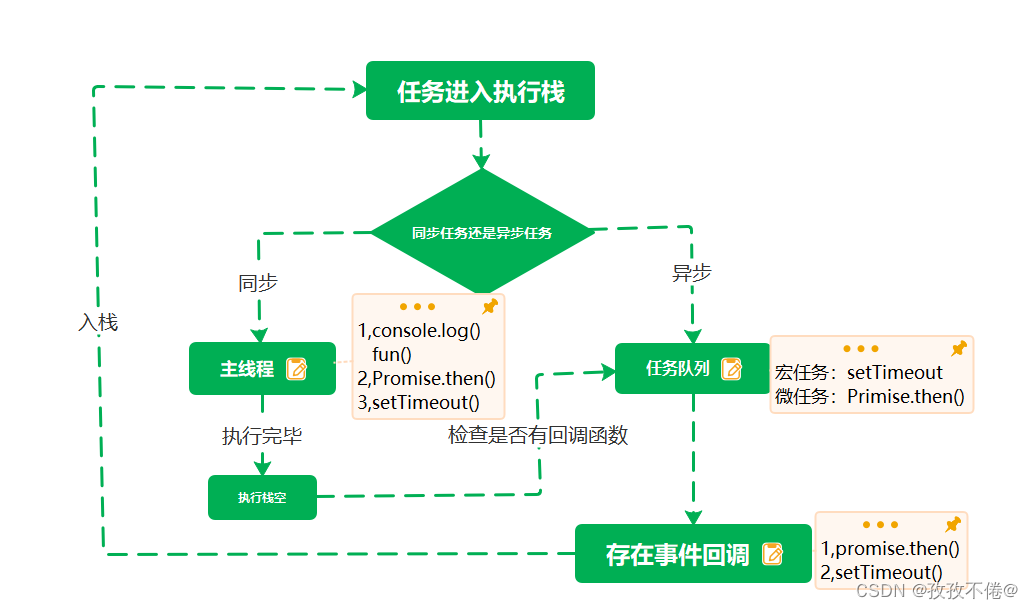
宏任务和微任务都是异步任务,当主线程的任务执行完毕之后,就会检查异步任务的宏任务和微任务,执行完微任务之后再指向宏任务
宏任务:script,异步请求Ajax,setTimeOut,setInterval,dom事件,其他宏任务
微任务 Promise(.then, .catch, .finally),process.nextTick,其他微任务、
js 执行机制先执行宏任务再执行微任务,因为script 是宏任务,先执行宏任务里面的同步代码,然后是微任务,执行完毕之后,开启新的宏任务
Event-Loop(事件循环)
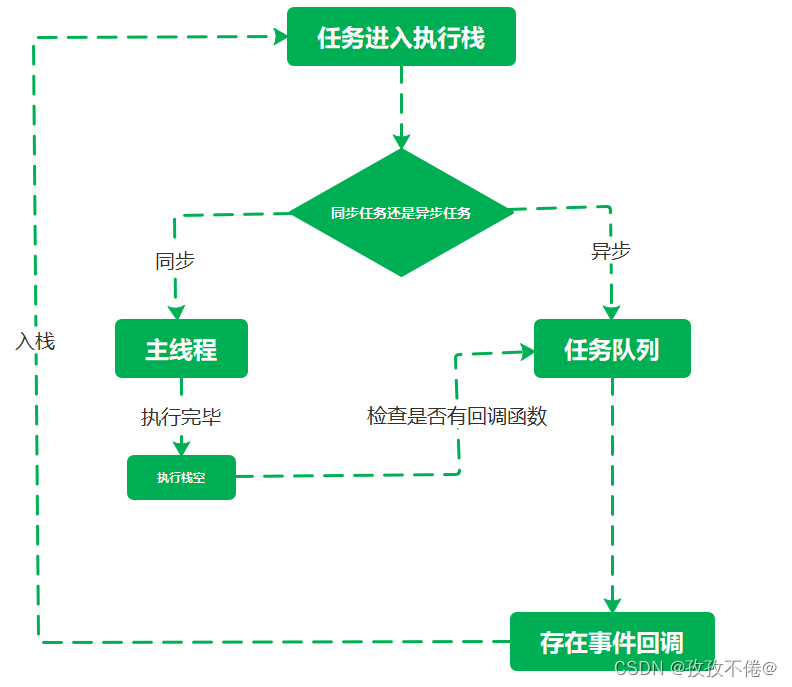
1,所有的同步任务都在主线程上执行,行成一个执行栈,异步任务挂在后台运行
2,主线程之外,还存在一个任务队列,只要异步有了结果,就会在任务队列注册一个回调函数
3, 一旦执行栈的所有同步任务都执行完毕,系统就会读取任务队列的回调函数,将可运行的异步任务添加到执行栈中,开始执行
4,主线程不断重复上面的三步
console.log('window')
setTimeout(function(){
console.log('setTimeout')},0)
function fun(){
console.log('fun函数')
}
fun()
new Promise((res)=>{res('promise')}).then(res=>console.log(res))
window ,fun函数,promise ,setTimeout
console.log('script start')
function fun(){
console.log('fun')
fun1.then(res=>console.log(res))
}
setTimeout(function(){console.log('settimeout')},0)
 let fun1= new Promise((res)=>{
 console.log('promise start')
 res('promise end')
 })
 fun()
 console.log('script end')
script start, promise, fun,start ,script end ,peomise end ,settimeout
let fun1= new Promise((res)=>{
console.log(‘promise start’)//立即执行
res(‘promise end’) //.then()才能执行
})
console.log('script start')
function async1(mac){
console.log('async1')
if(mac){
console.log(mac)
}
return new Promise((res)=>{
console.log('promise start')
res('promise end')
})
}
setTimeout (()=>{
console.log('setTimeout1')
setTimeout(()=>{
console.log('setTimeout2')
},0)
async1('setTimeout3').then(res=>console.log(res))
},0)
async1().then(res=>console.log(res))
console.log('script end')
script start
async1
promise start
script end
promise end
setTimeout1
async1
setTimeout3
promise start
promise end
setTimeout2
function async1(){
console.log("1")
return new Promise(function(resolve){
console.log('2')
resolve('3')
})
}
async function async2(){
await setTimeout(function(){console.log('4')},0)
await async1().then(res=>console.log(res))
await setTimeout(function(){
console.log('5')
})
console.log('6')
}
async2()
console.log('7')
7,1,2,3,6,4,5
await 是promise 对象的时候才会阻塞后面代码的执行
function async1(){
console.log("1")
return new Promise(function(resolve){
console.log('2')
resolve('3')
})
}
async function async2(){
await new Promise(res=>setTimeout(()=>{res('4')},0)).then(res=>console.log(res))
await async1().then(res=>console.log(res))
await new Promise(res=> setTimeout(function(){
res('5')
}),0).then(res=>console.log(res))
console.log('6')
}
async2()
console.log('7')
7,4,1,2,3,5,6
function async1(){
console.log("1")
return new Promise(function(resolve){
console.log('2')
resolve('3')
})
}
 function async2(){
 setTimeout(function(){console.log('4')},0)
 async1().then(res=>console.log(res))
 setTimeout(function(){
console.log('5')
})
console.log('6')
}
async2()
console.log('7')
1,2,6,7,3,4,5
function fooLoop() {
  for (var i = 0; i < 3; i++) {
   setTimeout(function(i){
   console.log(i)
   },i*1000,i)
  }
}
function as() {
  return new Promise(function (res) {
    console.log('12')
    res('13')
  })
}
let test = async () => {
  await fooLoop()
  await as().then(res => console.log(res))
  console.log('14')
}
test()
console.log('11')
11,12,13,14,0,1,2,
function Person(val){
this.a=val
this.show=()=>{
console.log(this.a,this.c)
}
}
function Child(val){
this.a=val
this.change=function(){
this.a=val+1
this.c=++a
}
}
Child.prototype=new Person(2)
const child1=new Child(1)
child1.change
function async1(){
return new Promise((res)=>res('promise'))
}
async function async2(){
await child.show()
await async1().then(res=>console.log(res))
console.log('async2')
}
async2()
console.log('script')
2 undefined script promise async2
child.show()立即执行,show 函数是箭头函数,指向Child.prototype





 扫一扫
扫一扫


 1996
1996

 被折叠的 条评论
为什么被折叠?
被折叠的 条评论
为什么被折叠?
 到【灌水乐园】发言





