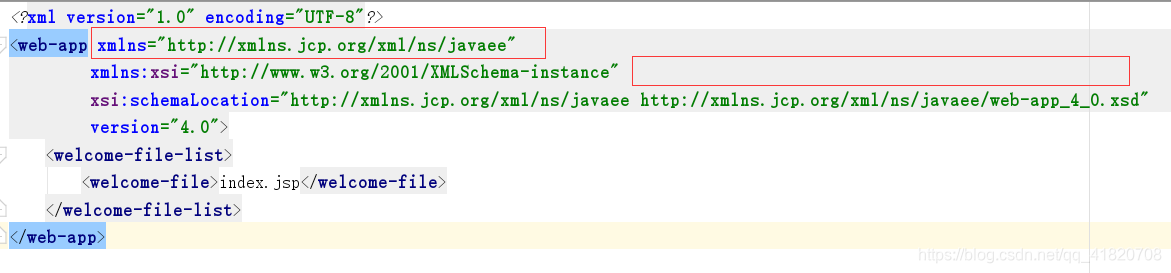
Attribute "xmlns" was already specified for element "web-app".解决方法

本文解决在启动Servlet过程中遇到的严重错误,包括BaseModelMBean.invokeException及xmlns属性重复指定问题,详细介绍了如何在web.xml中查找并修正错误。

在学习servlet的过程中,当启动服务时,控制台有错误信息输出为:
严重 [RMI TCP Connection(3)-127.0.0.1] org.apache.tomcat.util.modeler.BaseModelMBean.invoke Exception
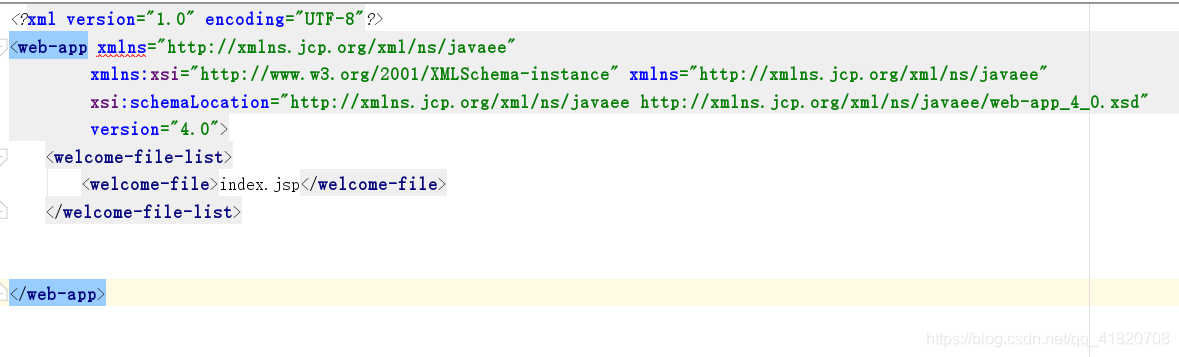
确定主体代码没问题后,在web.xml配置文件中发现了问题所在:
在这里插入图片描述
如图:xmlns下有明显的错误标识,将鼠标放上去之后,错误提示为:
Attribute “xmlns” was already specified for element “web-app”.
即xmlns已经存在。
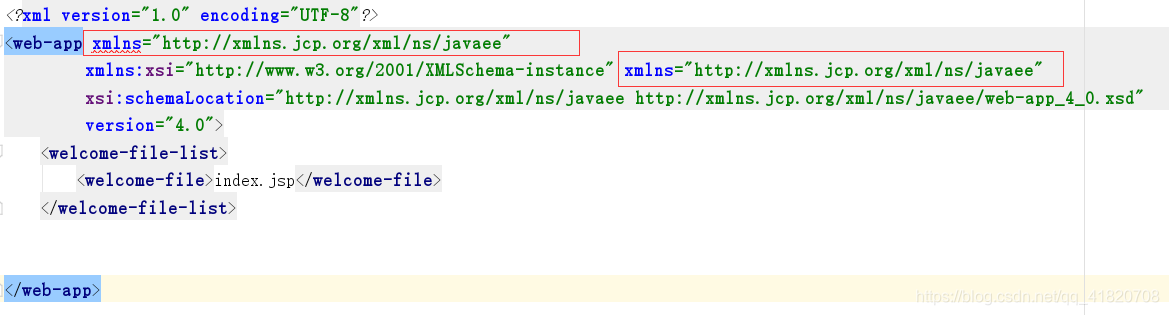
此时,我们仔细看头文件就会发现以下俩个xmlns一模一样:
在这里插入图片描述
这是因为我把原来的项目复制后重新改进代码时,Idea重新指定了xmlns="http://xmlns.jcp.org/xml/ns/javaee"
但是又未删除原来的xmlns,俩者重复,人工删除一个即可
修改后:
在这里插入图片描述
总结一下遇见的俩个错误:
错误一:
严重 [RMI TCP Connection(3)-127.0.0.1] org.apache.tomcat.util.modeler.BaseModelMBean.invoke Exception
此错误多为配置文件有误,需要认真检查配置文件,个人觉得Idea的错误提示功能是真的强大。
错误二:
Attribute “xmlns” was already specified for element “web-app”.
此错误多是因为项目重命名或 复制重建时xmlns重复,人工删除一个即可。

D:\AwesomeProject>npm run android > AwesomeProject@0.0.1 android > react-native run-android info Running jetifier to migrate libraries to AndroidX. You can disable it using "--no-jetifier" flag. Jetifier found 1696 file(s) to forward-jetify. Using 12 workers... info JS server already running. info Installing the app... > Configure project :react-native-reanimated AAR for react-native-reanimated has been found D:\AwesomeProject\node_modules\react-native-reanimated\android\react-native-reanimated-68-jsc.aar > Task :jcore-react-native:processDebugManifest FAILED package="cn.jiguang.plugins.core" found in source AndroidManifest.xml: D:\AwesomeProject\node_modules\jcore-react-native\android\src\main\AndroidManifest.xml. Setting the namespace via a source AndroidManifest.xml's package attribute is deprecated. Please instead set the namespace (or testNamespace) in the module's build.gradle file, as described here: https://developer.android.com/studio/build/configure-app-module#set-namespace This migration can be done automatically using the AGP Upgrade Assistant, please refer to https://developer.android.com/studio/build/agp-upgrade-assistant for more information. See http://g.co/androidstudio/manifest-merger for more information about the manifest merger. > Task :react-native-background-timer:processDebugManifest package="com.ocetnik.timer" found in source AndroidManifest.xml: D:\AwesomeProject\node_modules\react-native-background-timer\android\src\main\AndroidManifest.xml. Setting the namespace via a source AndroidManifest.xml's package attribute is deprecated. Please instead set the namespace (or testNamespace) in the module's build.gradle file, as described here: https://developer.android.com/studio/build/configure-app-module#set-namespace This migration can be done automatically using the AGP Upgrade Assistant, please refer to https://developer.android.com/studio/build/agp-upgrade-assistant for more information. > Task :react-native-community_cameraroll:processDebugManifest package="com.reactnativecommunity.cameraroll" found in source AndroidManifest.xml: D:\AwesomeProject\node_modules\@react-native-community\cameraroll\android\src\main\AndroidManifest.xml. Setting the namespace via a source AndroidManifest.xml's package attribute is deprecated. Please instead set the namespace (or testNamespace) in the module's build.gradle file, as described here: https://developer.android.com/studio/build/configure-app-module#set-namespace This migration can be done automatically using the AGP Upgrade Assistant, please refer to https://developer.android.com/studio/build/agp-upgrade-assistant for more information. > Task :react-native-async-storage_async-storage:processDebugManifest package="com.reactnativecommunity.asyncstorage" found in source AndroidManifest.xml: D:\AwesomeProject\node_modules\@react-native-async-storage\async-storage\android\src\main\AndroidManifest.xml. Setting the namespace via a source AndroidManifest.xml's package attribute is deprecated. Please instead set the namespace (or testNamespace) in the module's build.gradle file, as described here: https://developer.android.com/studio/build/configure-app-module#set-namespace This migration can be done automatically using the AGP Upgrade Assistant, please refer to https://developer.android.com/studio/build/agp-upgrade-assistant for more information. > Task :jpush-react-native:processDebugManifest package="cn.jiguang.plugins.push" found in source AndroidManifest.xml: D:\AwesomeProject\node_modules\jpush-react-native\android\src\main\AndroidManifest.xml. Setting the namespace via a source AndroidManifest.xml's package attribute is deprecated. Please instead set the namespace (or testNamespace) in the module's build.gradle file, as described here: https://developer.android.com/studio/build/configure-app-module#set-namespace This migration can be done automatically using the AGP Upgrade Assistant, please refer to https://developer.android.com/studio/build/agp-upgrade-assistant for more information. > Task :react-native-camera:processGeneralDebugManifest package="org.reactnative.camera" found in source AndroidManifest.xml: D:\AwesomeProject\node_modules\react-native-camera\android\src\main\AndroidManifest.xml. Setting the namespace via a source AndroidManifest.xml's package attribute is deprecated. Please instead set the namespace (or testNamespace) in the module's build.gradle file, as described here: https://developer.android.com/studio/build/configure-app-module#set-namespace This migration can be done automatically using the AGP Upgrade Assistant, please refer to https://developer.android.com/studio/build/agp-upgrade-assistant for more information. Deprecated Gradle features were used in this build, making it incompatible with Gradle 8.0. You can use '--warning-mode all' to show the individual deprecation warnings and determine if they come from your own scripts or plugins. See https://docs.gradle.org/7.6/userguide/command_line_interface.html#sec:command_line_warnings 181 actionable tasks: 175 executed, 6 up-to-date Warning: This version only understands SDK XML versions up to 3 but an SDK XML file of version 4 was encountered. This can happen if you use versions of Android Studio and the command-line tools that were released at different times. D:\AwesomeProject\node_modules\jcore-react-native\android\src\main\AndroidManifest.xml:41:9-45:19 Error: android:exported needs to be explicitly specified for element <service#cn.jiguang.plugins.service.JCoreModuleService>. Apps targeting Android 12 and higher are required to specify an explicit value for `android:exported` when the corresponding component has an intent filter defined. See https://developer.android.com/guide/topics/manifest/activity-element#exported for details. FAILURE: Build failed with an exception. * What went wrong: Execution failed for task ':jcore-react-native:processDebugManifest'. > A failure occurred while executing com.android.build.gradle.tasks.ProcessLibraryManifest$ProcessLibWorkAction > Manifest merger failed with multiple errors, see logs * Try: > Run with --stacktrace option to get the stack trace. > Run with --info or --debug option to get more log output. > Run with --scan to get full insights. * Get more help at https://help.gradle.org BUILD FAILED in 2m 18s error Failed to install the app. Make sure you have the Android development environment set up: https://reactnative.dev/docs/environment-setup. Error: Command failed: gradlew.bat app:installDebug -PreactNativeDevServerPort=8081 Warning: This version only understands SDK XML versions up to 3 but an SDK XML file of version 4 was encountered. This can happen if you use versions of Android Studio and the command-line tools that were released at different times. D:\AwesomeProject\node_modules\jcore-react-native\android\src\main\AndroidManifest.xml:41:9-45:19 Error: android:exported needs to be explicitly specified for element <service#cn.jiguang.plugins.service.JCoreModuleService>. Apps targeting Android 12 and higher are required to specify an explicit value for `android:exported` when the corresponding component has an intent filter defined. See https://developer.android.com/guide/topics/manifest/activity-element#exported for details. FAILURE: Build failed with an exception. * What went wrong: Execution failed for task ':jcore-react-native:processDebugManifest'. > A failure occurred while executing com.android.build.gradle.tasks.ProcessLibraryManifest$ProcessLibWorkAction > Manifest merger failed with multiple errors, see logs * Try: > Run with --stacktrace option to get the stack trace. > Run with --info or --debug option to get more log output. > Run with --scan to get full insights. * Get more help at https://help.gradle.org BUILD FAILED in 2m 18s at makeError (D:\AwesomeProject\node_modules\execa\index.js:174:9) at D:\AwesomeProject\node_modules\execa\index.js:278:16 at process.processTicksAndRejections (node:internal/process/task_queues:95:5) at async runOnAllDevices (D:\AwesomeProject\node_modules\@react-native-community\cli-platform-android\build\commands\runAndroid\runOnAllDevices.js:109:5) at async Command.handleAction (D:\AwesomeProject\node_modules\@react-native-community\cli\build\index.js:192:9) info Run CLI with --verbose flag for more details.
08-09
这个错误信息表明在 JSF 页面中,某个 `<div>` 标签重复定义了 `class` 属性,导致页面解析失败。具体错误如下: ``` Attribute "class" was already specified for element "div" ``` ### 错误原因 在你的 JSF 页面(`axisPocess.jsf`)第 46 行中,某个 `<div>` 标签中重复写了 `class` 属性,例如: ```xhtml <div class="ui-g-12" class="#{condition ? 'some-class' : ''}"> ``` HTML 规范不允许为同一个元素的同一个属性写多次,所以 JSF 解析器会报错。 --- ### 解决方案 #### ✅ 方法一:使用 `styleClass` 替代 `class`(适用于 JSF) JSF 的 Facelets 引擎使用 `styleClass` 属性来指定 HTML 的 `class`,所以你应该将重复的 `class` 改为使用 `styleClass`: ```xhtml <h:panelGroup layout="block" styleClass="#{monitor.dataMap.get('五轴精框').size() > 0 ? 'ui-g-12 ui-md-6 ui-lg-6' : ''}"> <!-- 内容 --> </h:panelGroup> ``` 或者: ```xhtml <div class="ui-g-12" styleClass="#{monitor.dataMap.get('五轴精框').size() > 0 ? 'ui-md-6 ui-lg-6' : ''}"> ``` #### ✅ 方法二:使用 `ui:fragment` 或条件判断避免重复 你可以使用 `<ui:fragment>` 或者逻辑判断来动态决定使用哪个 class,避免重复: ```xhtml <div class="#{monitor.dataMap.get('五轴精框').size() > 0 ? 'ui-g-12 ui-md-6 ui-lg-6' : 'ui-g-12'}"> ``` #### ✅ 方法三:检查标签是否重复定义 class 检查你的页面中是否有如下写法: ```xhtml <div class="class1" class="class2"> <!-- ❌ 错误 --> ``` 改为: ```xhtml <div class="class1 class2"> <!-- ✅ 正确 --> ``` --- ### 建议 - 使用 `styleClass` 而不是 `class` 是 JSF 的推荐做法。 - 使用 `<h:panelGroup layout="block">` 或 `<h:outputText>` 等组件代替原生 HTML 标签,可以避免很多语法错误。 - 使用 IDE(如 IntelliJ IDEA、Eclipse)的 JSF 插件可以帮助你提前发现此类语法错误。 ---
评论 1
成就一亿技术人!
拼手气红包6.0元
还能输入1000个字符
 
红包 添加红包
表情包 插入表情
 条评论被折叠 查看
添加红包

请填写红包祝福语或标题

红包个数最小为10个

红包金额最低5元

当前余额3.43前往充值 >
需支付:10.00
成就一亿技术人!
领取后你会自动成为博主和红包主的粉丝 规则
hope_wisdom
发出的红包
实付
使用余额支付
点击重新获取
扫码支付
钱包余额 0

抵扣说明:

1.余额是钱包充值的虚拟货币,按照1:1的比例进行支付金额的抵扣。
2.余额无法直接购买下载,可以购买VIP、付费专栏及课程。

余额充值