
SpringBoot配置监听器的三种方式

本文详细介绍了如何在SpringBoot项目中使用内置监听器,包括实现`ApplicationListener`接口、在`spring.factories`中配置、以及使用`@EventListener`注解来响应不同阶段的事件。

初始化一个SpringBoot项目

打开官方在线项目生成地址(https://start.spring.io/)

了解SpringBoot提供的内置监听器

  1. ApplicationStartingEvent:应用程序开始启动时触发
  2. ApplicationEnvironmentPreparedEvent:应用程序环境准备好时触发,此时上下文还没有创建
  3. ApplicationContextInitializedEvent:应用程序上下文创建之前触发
  4. ApplicationPreparedEvent:应用程序上下文创建完成后触发,此时所有的bean已经加载完成
  5. ApplicationStartedEvent:应用程序启动完成时触发
  6. ApplicationReadyEvent:应用程序已经准备好接收请求时触发
  7. ApplicationFailedEvent:应用程序启动失败时触发

方式一:实现ApplicationListener并添加listeners

新增监听器

创建监听器文件夹,把自定义的监听器都放在里面:
自定义的监听器需要实现ApplicationListener接口,传入的泛型是“SpringBoot提供的内置监听器”中的类,然后重写onApplicationEvent方法,实现哪个类就会在哪一步骤调用,比如我下面实现的是ApplicationStartedEvent,就会在程序启动完成时触发onApplicationEvent方法

public class StartedListener implements ApplicationListener<ApplicationStartedEvent> {

    @Override
    public void onApplicationEvent(ApplicationStartedEvent event) {
        System.out.println("程序启动成功");
    }
}

使监听器生效

要使监听器生效,还需要在启动类中添加监听器

@SpringBootApplication
public class DemoApplication {

	public static void main(String[] args) {
		new SpringApplicationBuilder(DemoApplication.class).listeners(new StartedListener()).run(args);
	}

}

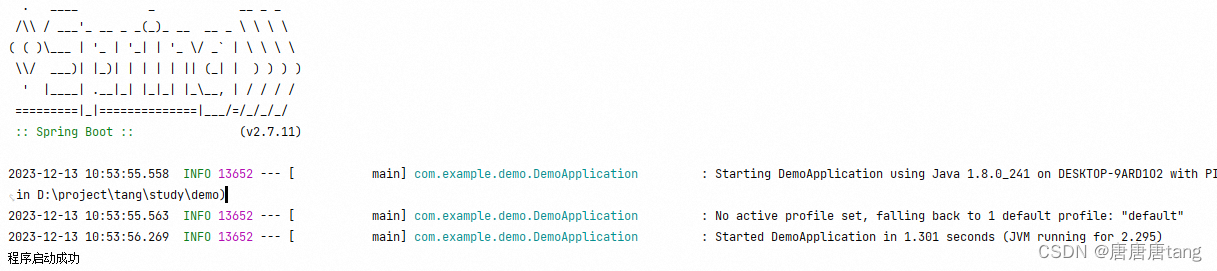
测试运行效果

启动完成时,打印“程序启动成功”
在这里插入图片描述

方式二:在META-INF/spring.factories中配置监听器

新增监听器

package com.example.demo.listener;
import org.springframework.boot.context.event.ApplicationPreparedEvent;
import org.springframework.context.ApplicationListener;
public class PreparedListener implements ApplicationListener<ApplicationPreparedEvent> {

    @Override
    public void onApplicationEvent(ApplicationPreparedEvent event) {
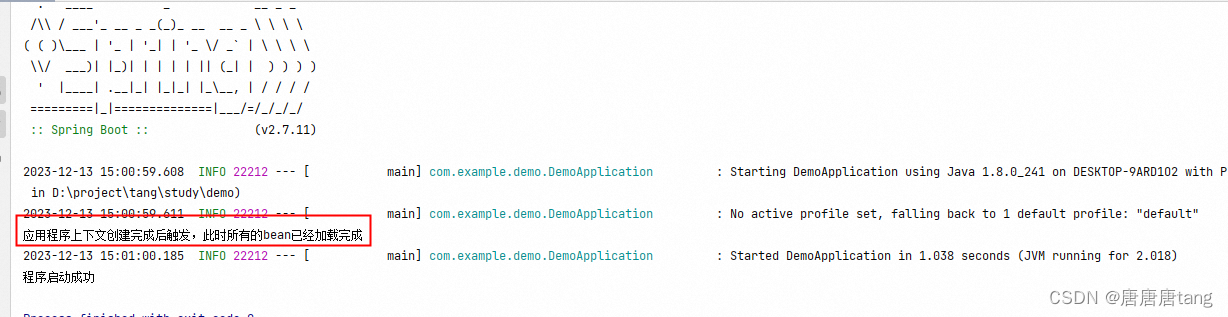
        System.out.println("应用程序上下文创建完成后触发,此时所有的bean已经加载完成");
    }
}

配置spring.factories使监听器生效

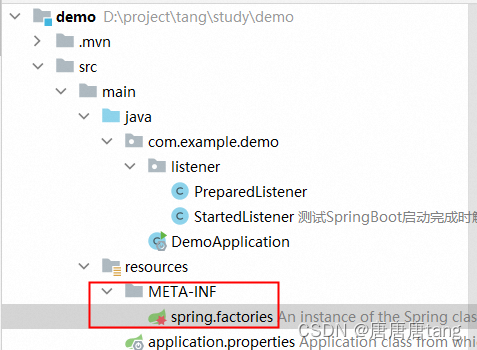
在resource文件夹下创建META-INF/spring.factories文件:
在这里插入图片描述
文件内容:

org.springframework.context.ApplicationListener=com.example.demo.listener.PreparedListener

运行效果
在这里插入图片描述

方式三:使用@EventListener注解

@Component
public class MyApplicationListener {

    //监听单个事件
    @EventListener
    public void listenerApplicationStarted(ApplicationStartedEvent event) {
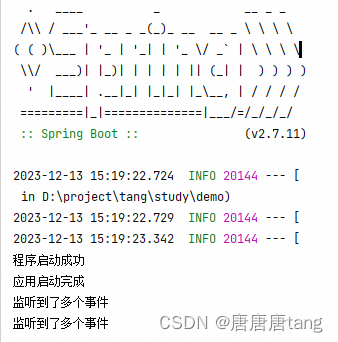
        System.out.println("应用启动完成");
    }


    //监听多个事件
    @EventListener({ApplicationReadyEvent.class, ApplicationStartedEvent.class})
    public void listenerApplication() {
        System.out.println("监听到了多个事件");
    }


}

运行效果:
在这里插入图片描述

参考博客:https://blog.youkuaiyun.com/weixin_40972073/article/details/131073017?ops_request_misc=%257B%2522request%255Fid%2522%253A%2522170243810216800213034294%2522%252C%2522scm%2522%253A%252220140713.130102334…%2522%257D&request_id=170243810216800213034294&biz_id=0&utm_medium=distribute.pc_search_result.none-task-blog-2allsobaiduend~default-2-131073017-null-null.142v96pc_search_result_base9&utm_term=springboot%E7%9B%91%E5%90%AC%E5%99%A8&spm=1018.2226.3001.4187

Spring Boot配置动态监听器,可根据不同的场景和需求采用不同的方式。 ### 使用`@WebListener`注解 对于简单场景,可使用`@WebListener`注解来配置监听器。创建自定义监听器类,并使用该注解标记。示例代码如下: ```java import javax.servlet.ServletContextEvent; import javax.servlet.ServletContextListener; import javax.servlet.annotation.WebListener; @WebListener public class SimpleListener implements ServletContextListener { @Override public void contextInitialized(ServletContextEvent sce) { System.out.println("ServletContext 初始化"); } @Override public void contextDestroyed(ServletContextEvent sce) { System.out.println("ServletContext 销毁"); } } ``` 这种方式适合于静态监听器配置,不过通过一些手段也可以实现一定程度的动态性,比如在监听器内部根据配置文件或环境变量进行不同的处理。 ### 实现接口并通过配置类注册 在Spring Boot中,配置监听器需要实现`ServletContextListener`或`ServletRequestListener`接口,并重写其中的监听方法。然后通过配置类将监听器注册到Spring容器中。以下是详细实例: 首先,创建一个监听器类`MyListener`,实现`ServletContextListener`接口,并在其中重写`contextInitialized()`和`contextDestroyed()`方法: ```java import javax.servlet.ServletContextEvent; import javax.servlet.ServletContextListener; public class MyListener implements ServletContextListener { @Override public void contextInitialized(ServletContextEvent sce) { System.out.println("ServletContext 初始化"); } @Override public void contextDestroyed(ServletContextEvent sce) { System.out.println("ServletContext 销毁"); } } ``` 接着,创建一个配置类来注册这个监听器: ```java import org.springframework.boot.web.servlet.ServletListenerRegistrationBean; import org.springframework.context.annotation.Bean; import org.springframework.context.annotation.Configuration; @Configuration public class ListenerConfig { @Bean public ServletListenerRegistrationBean<MyListener> myListenerRegistration() { ServletListenerRegistrationBean<MyListener> registration = new ServletListenerRegistrationBean<>(); registration.setListener(new MyListener()); return registration; } } ``` 要实现动态配置,可以在配置类中根据条件动态创建和注册不同的监听器。例如,根据配置文件中的某个属性值来决定是否注册某个监听器: ```java import org.springframework.beans.factory.annotation.Value; import org.springframework.boot.web.servlet.ServletListenerRegistrationBean; import org.springframework.context.annotation.Bean; import org.springframework.context.annotation.Configuration; @Configuration public class DynamicListenerConfig { @Value("${enable.my.listener:false}") private boolean enableMyListener; @Bean public ServletListenerRegistrationBean<MyListener> myListenerRegistration() { if (enableMyListener) { ServletListenerRegistrationBean<MyListener> registration = new ServletListenerRegistrationBean<>(); registration.setListener(new MyListener()); return registration; } return null; } } ``` ### 动态添加监听器 在运行时,可以通过`ServletContext`动态添加监听器。示例代码如下: ```java import javax.servlet.ServletContext; import javax.servlet.ServletContextEvent; import javax.servlet.ServletContextListener; import javax.servlet.annotation.WebListener; @WebListener public class DynamicAddListener implements ServletContextListener { @Override public void contextInitialized(ServletContextEvent sce) { ServletContext context = sce.getServletContext(); // 动态添加监听器 context.addListener(new AnotherListener()); } @Override public void contextDestroyed(ServletContextEvent sce) { // 可以进行一些清理操作 } } class AnotherListener implements ServletContextListener { @Override public void contextInitialized(ServletContextEvent sce) { System.out.println("AnotherListener: ServletContext 初始化"); } @Override public void contextDestroyed(ServletContextEvent sce) { System.out.println("AnotherListener: ServletContext 销毁"); } } ```
评论
添加红包

请填写红包祝福语或标题

红包个数最小为10个

红包金额最低5元

当前余额3.43前往充值 >
需支付:10.00
成就一亿技术人!
领取后你会自动成为博主和红包主的粉丝 规则
hope_wisdom
发出的红包
实付
使用余额支付
点击重新获取
扫码支付
钱包余额 0

抵扣说明:

1.余额是钱包充值的虚拟货币,按照1:1的比例进行支付金额的抵扣。
2.余额无法直接购买下载,可以购买VIP、付费专栏及课程。

余额充值


