



文章目录
Matlab常用图像处理命令108例(四)
37. fwind1
功能:用一维窗口方法设计二维 FIR 滤波器。
语法:
h = fwind1(Hd, win)
h = fwind1(Hd, win1, win2)
h = fwind1(f1, f2, Hd, ...)
举例:
[f1, f2] = freqspace(21, 'meshgrid');
Hd = ones(21);
r = sqrt(f1.^2 + f2.^2);
Hd((r < 0.1) | (r > 0.5)) = 0;
colormap(jet(64));
mesh(f1, f2, Hd);
相关命令:conv2, filter2, fsamp2, freqspace, ftrans2, fwind2
38. fwind2
功能:用二维窗口方法设计二维 FIR 滤波器。
语法:
h = fwind2(Hd, win)
h = fwind2(f1, f2, Hd, win)
举例:
[f1, f2] = freqspace(21, 'meshgrid');
Hd = ones(21);
r = sqrt(f1.^2 + f2.^2);
Hd((r < 0.1) | (r > 0.5)) = 0;
colormap(jet(64));
mesh(f1, f2, Hd);
相关命令:conv2, filter2, fsamp2, freqspace, ftrans2, fwind1
39. getimage
功能:从坐标轴中获取图像数据。
语法:
A = getimage(h)
[x, y, A] = getimage(h)
[..., A, flag] = getimage(h)
[...] = getimage
举例:
imshow('rice.tif');
I = getimage;
40. gray2ind
功能:将灰度图像转换为索引图像。
语法:
[X, map] = gray2ind(I, n)
相关命令:ind2gray
41. grayslice
功能:从灰度图像创建索引图像。
语法:
X = grayslice(I, n)
X = grayslice(I, v)
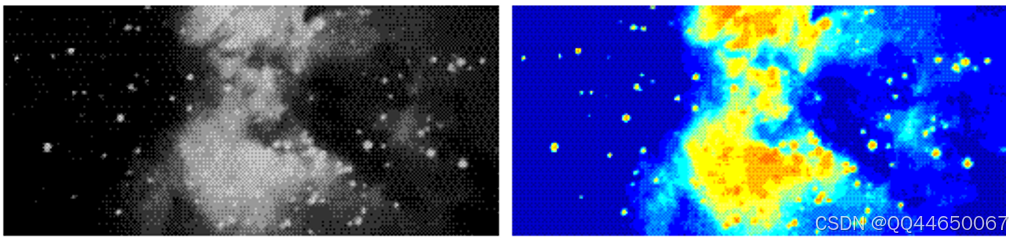
举例:
I = imread('ngc4024m.tif');
X = grayslice(I, 16);
imshow(I);
figure, imshow(X, jet(16));
相关命令:gray2ind
42. histeq
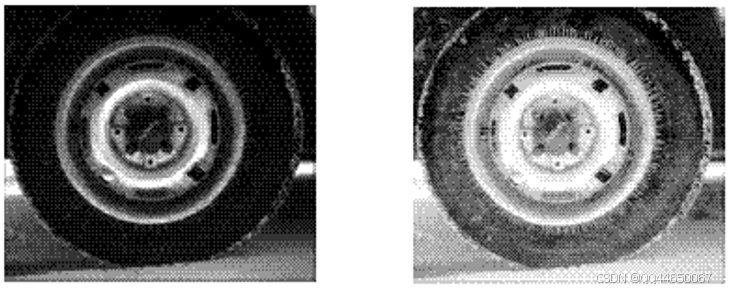
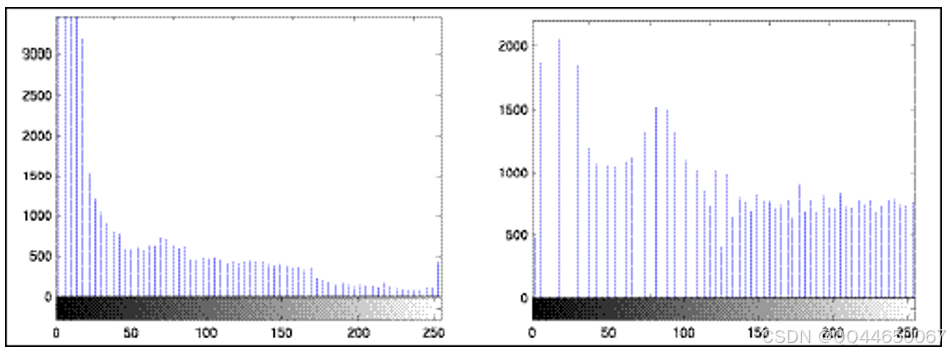
功能:通过直方图均衡化增强图像对比度。
语法:
J = histeq(I, hgram)
J = histeq(I, n)
[J, T] = histeq(I, ...)
举例:
I = imread('tire.tif');
J = histeq(I);
imshow(I);
figure, imshow(J);

imhist(I, 64);
figure, imhist(J, 64);
相关命令:brighten, imadjust, imhist
43. hsv2rgb
功能:将 HSV 值转换为 RGB 颜色空间。
语法:
rgbmap = hsv2rgb(hsvmap)
RGB = hsv2rgb(HSV)
相关命令:rgb2hsv, rgbplot
44. idct2
功能:计算二维离散反余弦变换。
语法:
B = idct2(A)
B = idct2(A, m, n)
B = idct2(A, [m n])
相关命令:dct2, fft2, ifft2
45. ifft2
功能:计算二维快速傅里叶反变换。
语法:
B = ifft2(A)
B = ifft2(A, m, n)
相关命令:fft2, fftshift, idct2
46. ifftn
功能:计算 N 维快速傅里叶反变换。
语法:
B = ifftn(A)
B = ifftn(A, siz)
相关命令:fft2, fftn, ifft2
47. im2bw
功能:将图像转换为二值图像。
语法:
BW = im2bw(I, level)
BW = im2bw(X, map, level)
BW = im2bw(RGB, level)
举例:
load trees;
BW = im2bw(X, map, 0.4);
imshow(X, map);
figure, imshow(BW);
相关命令:ind2gray, rgb2gray
48. im2col
功能:将图像块重新排列为列向量。
语法:
B = im2col(A, [m n], block_type)
B = im2col(A, [m n])
B = im2col(A, 'indexed', ...)
相关命令:blkproc, col2im, colfilt, nlfilter
49. im2double
功能:将图像矩阵转换为双精度类型。
语法:
I2 = im2double(I1)
RGB2 = im2double(RGB1)
BW2 = im2double(BW1)
X2 = im2double(X1, 'indexed')
相关命令:double, im2uint8, uint8
50. im2uint8
功能:将图像矩阵转换为 8 位无符号整数类型。
语法:
I2 = im2uint8(I1)
RGB2 = im2uint8(RGB1)
BW2 = im2uint8(BW1)
X2 = im2uint8(X1, 'indexed')
相关命令:im2uint16, im2double, uint8
51. im2uint16
功能:将图像矩阵转换为 16 位无符号整数类型。
语法:
I2 = im2uint16(I1)
RGB2 = im2uint16(RGB1)
X2 = im2uint16(X1, 'indexed')
相关命令:im2uint8, im2double, uint16
52. imadjust
功能:调整图像灰度值或颜色映射表。
语法:
J = imadjust(I, [low high], [bottom top], gamma)
newmap = imadjust(map, [low high], [bottom top], gamma)
举例:
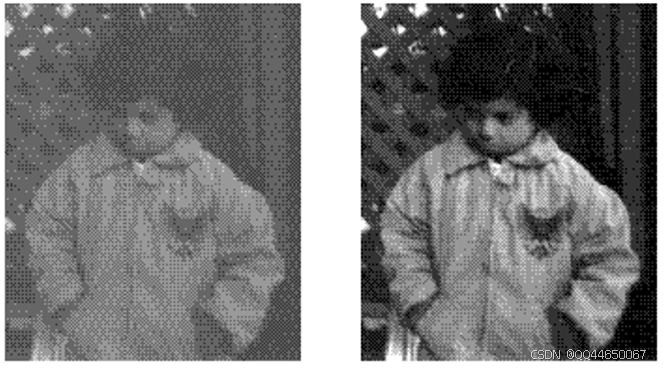
I = imread('pout.tif');
J = imadjust(I, [0.3 0.7], []);
imshow(I);
figure, imshow(J);
相关命令:brighten, histeq
53. imapprox
功能:对索引图像进行近似处理。
语法:
[Y, newmap] = imapprox(X, map, n)
[Y, newmap] = imapprox(X, map, tol)
Y = imapprox(X, map, newmap)
相关命令:cmunique, dither, rgb2ind






 扫一扫
扫一扫


 被折叠的 条评论
为什么被折叠?
被折叠的 条评论
为什么被折叠?
 到【灌水乐园】发言





