


目录结构
mcp-http/
├── client-http.py # 客户端
├── mymcp-http.py # 服务端
├── servers_config.json # 客户端服务配置文件
└── .env # 环境变量配置文件
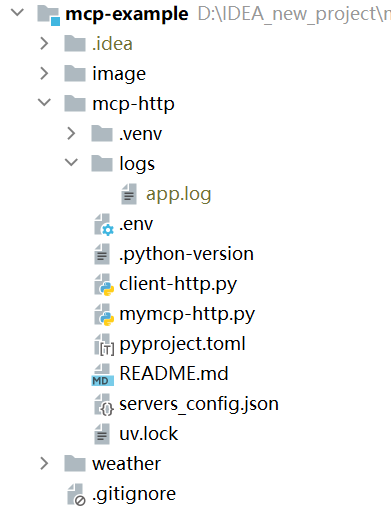
脚本
#### 初始化:
#### 为我们的项目创建一个新 directory
uv init mcp-http
cd mcp-http
#### 创建 virtual environment 并激活它
uv venv
.venv\Scripts\activate
#### 安装 dependencies
uv add mcp[cli]
uv add mcp[cli] httpx
uv add requests
uv add pymongo

uv add fastapi uvicorn jinja2 python-dotenv openai mcp httpx


cd mcp-http
.venv\Scripts\activate
uv run mymcp-http.py


cd mcp-http
.venv\Scripts\activate
uv run client-http.py
服务端 mymcp-http.py
from mcp.server.fastmcp import FastMCP
from pymongo import MongoClient
from dotenv import load_dotenv
from typing import Optional
import logging
import platform # 用于识别操作系统类型
import subprocess # 用于执行外部命令
import requests
import os
# 加载 .env 文件中的环境变量
load_dotenv()
# 动态获取环境变量中的配置
devops_cookie = os.getenv('DEVOPS_COOKIE')
api_url_base = os.getenv('API_URL_BASE')
jenkins_cookies = {
"http://xx.xx.xx": os.getenv('JENKINS_COOKIE_1'),
"http://xx.xx.xx": os.getenv('JENKINS_COOKIE_2'),
}
mongo_client_url = os.getenv('MONGO_CLIENT_URL')
# 设置日志级别为DEBUG,以便捕捉详细信息
logging.basicConfig(level=logging.DEBUG)
# 初始化 FastMCP 实例
mcp = FastMCP(
name="SimpleServer",
port=5050,
stateless_http=False,
json_response=False,
streamable_http_path="/mcp"
)
# 测试联通
@mcp.tool()
def hello() -> str:
"""
测试联通
返回:
hello world 字符串
"""
return "hello world"
# 定义 ping 工具
@mcp.tool()
def ping(host: str) -> dict:
"""
使用系统的 ping 命令来检查指定主机是否可达。
参数:
host (str): 要 ping 的 IP 地址或主机名
返回:
dict: 包含 'reachable'(是否可达)和 'output'(命令输出)的字典
"""
# 根据不同的操作系统调整 ping 命令参数
param = '-n' if platform.system().lower() == 'windows' else '-c'
command = ['ping', param, '1', host]
try:
# 执行 ping 命令并捕获输出
output = subprocess.run(command, stdout=subprocess.PIPE, stderr=subprocess.PIPE, text=True)
# 判断是否成功到达目标主机
reachable = output.returncode == 0
return {
'reachable': reachable,
'output': output.stdout if reachable else output.stderr
}
except Exception as e:
return {
'reachable': False,
'output': str(e)
}
# 定义 queryDataBase 工具
@mcp.tool()
def queryDataBase(database: str, collection: str, query: dict = None) -> list:
"""
连接 MongoDB,查询指定数据库和集合的数据。
参数:
database (str): 数据库名称
collection (str): 集合名称
query (dict): 查询条件,默认为空,表示返回所有数据
返回:
list: 查询结果列表
"""
if query is None:
query = {
}
# MongoDB 连接 URI
client = MongoClient(mongo_client_url)
try:
# 连接数据库和集合
db = client[database]
col = db[collection]
# 执行查询并打印查询语句
results = list(col.find(query))
# 将 ObjectId 转换为字符串以便序列化
for result in results:
if '_id' in result:
result['_id'] = str(result['_id'])
return results
except Exception as e:
logging.error(f"Error querying database: {
e}")
return []
finally:
client.close()
# 新建构建
@mcp.tool()
def runBuild(appId: int, branch: str) -> dict:
"""
根据 appId 和 branch 查询 commit 信息,提取 shortId 并触发构建任务。
参数:
appId (int): 应用 ID
branch (str): 分支名称
返回:
dict: 包含构建结果或错误信息
"""
# Step 1: 查询 commit 接口获取 shortId
commits_url = f"{
api_url_base}/api/v1/apps/{
appId}/commits"
headers = {
"Cookie": devops_cookie
}
params = {
"current": 1,
"pageSize": 10,
"branch": branch
}
try:
logging.info(f"Fetching commit info from {
commits_url} with branch={
branch}")
response = requests.get(commits_url, headers=headers, params=params)
response.raise_for_status()
data = response.json()
if not data.get("list"):
return {
"error": "No commits found for the given appId and branch"}
first_commit = data["list"][0]
short_id = first_commit.get("shortId")
if not short_id:
return {
"error": "shortId not found in the first commit record"}
logging.info(f"Found shortId: {
short_id}")
except requests.RequestException as e:
logging.error(f"Failed to fetch commit info: {
e}")
return {
"error": str(e)}
# Step 2: 调用构建接口
build_url = f"{
api_url_base}/api/v1/apps/{
appId}/builds"
build_payload = {
"appId": appId,
"branch": branch,
"commit": short_id,
"buildFile": "build.sh",
"isPackage": "full",
"isSonar": "no",
"gitBranch": branch,
"gitCommit": short_id
}
try:
logging.info(f"Triggering build at {
build_url}")
build_response = requests.post(build_url, headers=headers, json 最低0.47元/天 解锁文章






 扫一扫
扫一扫


 351
351

 被折叠的 条评论
为什么被折叠?
被折叠的 条评论
为什么被折叠?
 到【灌水乐园】发言





