


 本文介绍如何使用Java调用百度翻译开放平台API实现翻译功能,包括必要的依赖库、MD5加密工具类及主工具类代码,适用于职场新人快速上手。
Java调用百度翻译openapi实现简单翻译功能
本人职场小白,代码不足之处很多,希望指教。
准备工作
首先得去百度翻译开发者平台申请一个账号,注册,填完信息后才能使用账号,申请获得的APPID和密钥是必不可少滴。
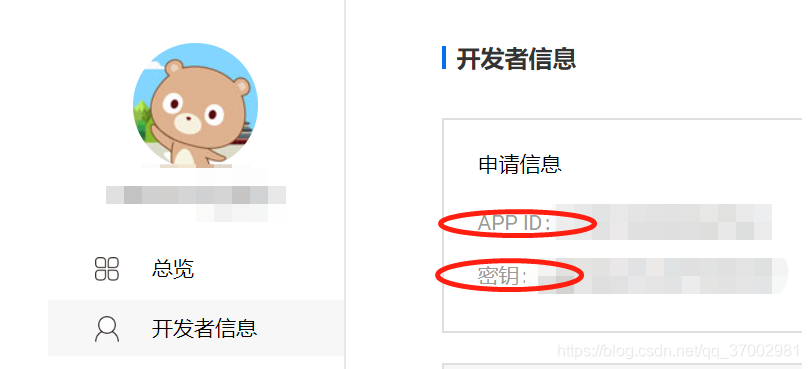
需要添加的依赖
	<!-- Json Support -->
	<dependency>
	    <groupId>com.alibaba</groupId>
	    <artifactId>fastjson</artifactId>
	    <version>1.1.43</version>
	</dependency>
	<dependency>
	    <groupId>org.apache.httpcomponents</groupId>
	    <artifactId>httpclient</artifactId>
	    <version>4.5.10</version>
	</dependency>
需要用到的工具类(MD5加密)
package com.fxy.utils;

import java.math.BigInteger;
import java.security.MessageDigest;
import java.security.NoSuchAlgorithmException;

public class MD5Util {
	/** * 使用md5的算法进行加密 */
	public static String md5(String plainText) {
		if(plainText!=null){
			//存放哈希值结果的 byte 数组。
			byte[] secretBytes = null;
			try {
				//getInstance("md5"):返回实现指定摘要算法的 MessageDigest 对象
				//digest(byte[] ..)使用指定的 byte 数组对摘要进行最后更新,然后完成摘要计算
				secretBytes = MessageDigest.getInstance("md5").digest(
						plainText.getBytes());
			} catch (NoSuchAlgorithmException e) {
				throw new RuntimeException("没有md5这个算法!");
			}
			String md5code = new BigInteger(1, secretBytes).toString(16);
			for (int i = 0; i < 32 - md5code.length(); i++) {
				md5code = "0" + md5code;
			}
			return md5code;
		}else{
			return null;
		}
	}
	public static void main(String[] args) {
		System.out.println(md5("123"));
	}
}
主工具类代码:
package com.fxy.utils;

import com.alibaba.fastjson.JSON;
import com.alibaba.fastjson.JSONArray;
import com.alibaba.fastjson.JSONObject;
import org.apache.http.HttpEntity;
import org.apache.http.client.methods.CloseableHttpResponse;
import org.apache.http.client.methods.HttpGet;
import org.apache.http.impl.client.CloseableHttpClient;
import org.apache.http.impl.client.HttpClients;
import org.apache.http.util.EntityUtils;

import java.io.IOException;
import java.util.Random;

/**
 * @author fuxingyun
 * @version 1.0.0
 * 通过调用百度翻译openapi完成翻译功能,更多语种的翻译可参阅:http://fanyi-api.baidu.com/api/trans/product/apidoc
 */
public class BT {
    /**
     * 自动检测语言
     */
    public static final String AUTO = "auto";
    /**
     * 中文
     */
    public static final String ZH = "zh";
    /**
     * 英语
     */
    public static final String EN = "en";
    /**
     * 繁体中文
     */
    public static final String CHT = "cht";

    /**
     * 要翻译的词条
     */
    private String q;
    private String from;
    private String to;
    /**
     * 百度翻译开发者信息的APP ID
     * 上面图片上的APP ID
     */
    private final String APPID = "xxxx";
    private String salt = new Random().nextInt(99999)+"";
    /**
     * 百度翻译开发者信息的密钥:上面图片上的密钥
     */
    private final String KEY = "xxxx";
    //    private String sign = MD5Util.md5(APPID + q + salt + KEY);
    private String sign;

    private String url;

    private static BT bt = new BT();

    private BT(){}

    /**
     *
     * @return BT,获取本类实例
     */
    public static BT getInstance(){
        return bt;
    }

    /**
     *
     * @param word:要翻译的词条
     * @param from:源语种
     * @param to:目标语种
     * @return 获取翻译的结果
     */
    public String translate(String word, String from, String to){
        this.q = word;
        this.from = from;
        this.to = to;
        this.sign = MD5Util.md5(APPID + this.q + salt + KEY);
        this.url = "http://api.fanyi.baidu.com/api/trans/vip/translate?q="+this.q+"&from="+this.from+"&to="+this.to+"&appid="+APPID+"&salt="+this.salt+"&sign="+this.sign;
        String result = null;
        try {
            result = doGet(url);
        } catch (IOException e) {
            e.printStackTrace();
            throw new RuntimeException("发送doGet请求时,出现错误");
        }
        return result;
    }

    /**
     *
     * @param url 调用百度翻译openapi的url
     * @return 返回的字符串结果
     * @throws IOException
     */
    private String doGet(String url) throws IOException {
        CloseableHttpClient httpClient = HttpClients.createDefault();
        HttpGet httpGet = new HttpGet(url);
        CloseableHttpResponse response = httpClient.execute(httpGet);
//        System.out.println("StatusLine:"+response.getStatusLine());
        HttpEntity entity = response.getEntity();
        String str = EntityUtils.toString(entity);
//        System.out.println(str);
        JSONObject jsonObject = (JSONObject) JSON.parse(str);
        JSONArray jsonArray = (JSONArray) jsonObject.get("trans_result");
        JSONObject result = (JSONObject)jsonArray.get(0);
        return result.get("dst").toString();
    }
}





 扫一扫
扫一扫


 6098
6098

 被折叠的 条评论
为什么被折叠?
被折叠的 条评论
为什么被折叠?
 到【灌水乐园】发言





