



 本文介绍了Kotlin中Coroutine的基本用法,包括协程切换、异步执行、超时限制及协程流等内容,并通过示例代码展示了不同场景下的具体应用。
Kotlin Coroutine 初探(二)
针对Coroutine的一些常用方法进行说明。
切换协程
使用withContext来进行协程的切换。
    fun testChangeContext() {
        launch {
            Log.e("ViewModel", "launch--start:${Thread.currentThread().name};${Thread.currentThread().id};${coroutineContext[Job]}")

            withContext(Dispatchers.IO) {
                delay(1000)
                Log.e("ViewModel", "withContext--IO:${Thread.currentThread().name};${Thread.currentThread().id};${coroutineContext[Job]}")
            }

            withContext(mChangeCoroutineContext) {
                delay(1000)
                Log.e("ViewModel", "withContext--self:${Thread.currentThread().name};${Thread.currentThread().id};${coroutineContext[Job]}")
            }

            mChangeCoroutineContext.close()
            Log.e("ViewModel", "launch--after:${Thread.currentThread().name};${Thread.currentThread().id};${coroutineContext[Job]}")
        }
    }
输出:
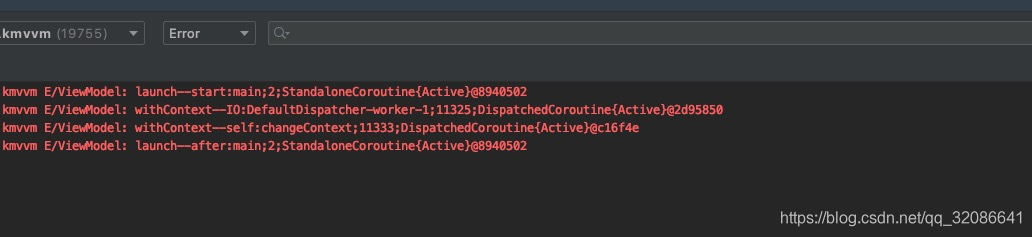
注意:协程的切换,还和构建时指定的模式相关。
异步执行
使用async+await,来进行异步任务。
    fun testAsync() {
        launch {
            Log.e("ViewModel", "launch--start:${Thread.currentThread().name};${Thread.currentThread().id};${coroutineContext[Job]}")

            withContext(Dispatchers.IO) {
                delay(1000)
                Log.e("ViewModel", "withContext--IO:${Thread.currentThread().name};${Thread.currentThread().id};${coroutineContext[Job]}")
            }

            val deferred = async {
                delay(3000)
                Log.e("ViewModel", "launch--async:${Thread.currentThread().name};${Thread.currentThread().id};${coroutineContext[Job]}")
                "async"
            }

            Log.e("ViewModel", "launch--after:${deferred.await()};${Thread.currentThread().name};${Thread.currentThread().id};${coroutineContext[Job]}")
        }
    }
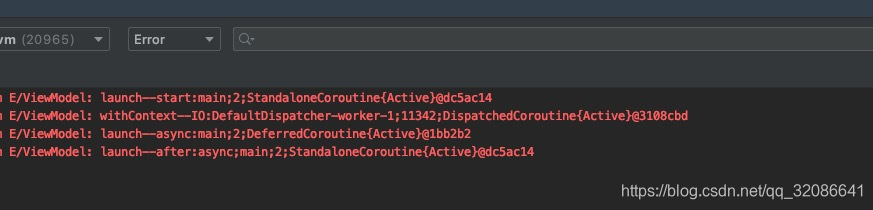
输出:
超时限制
使用withTimeout来限制任务的执行时间。
    var acquired = 0

    inner class Resource {
        init {
            acquired++
        } // Acquire the resource

        fun close() {
            acquired--
        } // Release the resource
    }

    fun testConcurrence() {
        runBlocking {
//            repeat(10) { // Launch 100K coroutines
                launch(Dispatchers.IO) {
                    Log.e("ViewModel", "launch:$acquired;${Thread.currentThread().id}")
                    val resource = withTimeout(200) { // Timeout of 200 ms
                        Log.e("ViewModel", "withTimeout:$acquired;${Thread.currentThread().id}")
                        delay(500) // Delay for 500 ms
                        val r = Resource() // Acquire a resource and return it from withTimeout block
                        Log.e("ViewModel","withTimeout--delay:$acquired;${Thread.currentThread().id}")
                        r
                    }
                    resource.close() // Release the resource
                    Log.e("ViewModel", "launch--close:$acquired;${Thread.currentThread().id}")
                }
//            }
            Log.e("ViewModel", "runBlocking:$acquired;${Thread.currentThread().id}")
        }
        // Outside of runBlocking all coroutines have completed
        Log.e("ViewModel", "acquired:$acquired") // Print the number of resources still acquired
    }
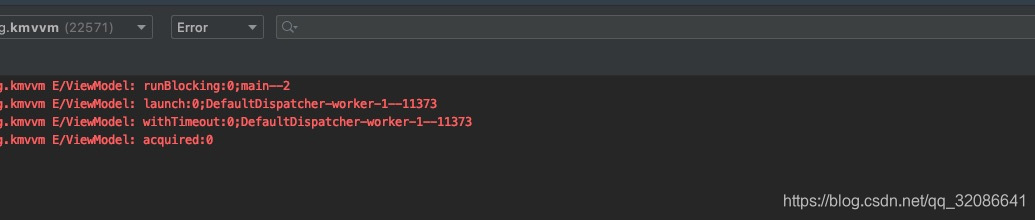
输出:
协程流
目前包含flow和channelFlow。
    fun testFlow() = launch {
        try {
            val flowCost = measureTimeMillis {
                flow<Int> {
                    Log.e("ViewModel", "flow")
                    for (i in 1..5) {
                        delay(1000)
                        emit(i)
                    }
                }.collect {
                    Thread.sleep(1000)
//                delay(1000)
                    Log.e("ViewModel", "flow:$it")
                }
            }
            Log.e("ViewModel", "flow--cost:$flowCost")

            delay(10000)
            Log.e("ViewModel", "flow--done")
        } catch (e: Exception) {
            e.printStackTrace()
        }
    }
输出:

    fun testChannel() {
        launch {
            try {
                val channelCost = measureTimeMillis {
                    channelFlow<Int> {
                        Log.e("ViewModel", "channelFlow")
                        for (i in 1..5) {
                            delay(1000)
                            send(i)
                        }

                    }.collect {
//                        delay(100)
                        Thread.sleep(1000)
                        Log.e("ViewModel", "channelFlow:$it")
                    }
                }
                Log.e("ViewModel", "channelFlow--cost:$channelCost")

                delay(10000)//防止parentScope已经完成
                Log.e("ViewModel", "channelFlow--done")
            } catch (e: Exception) {
                e.printStackTrace()
            }
        }
    }
输出:
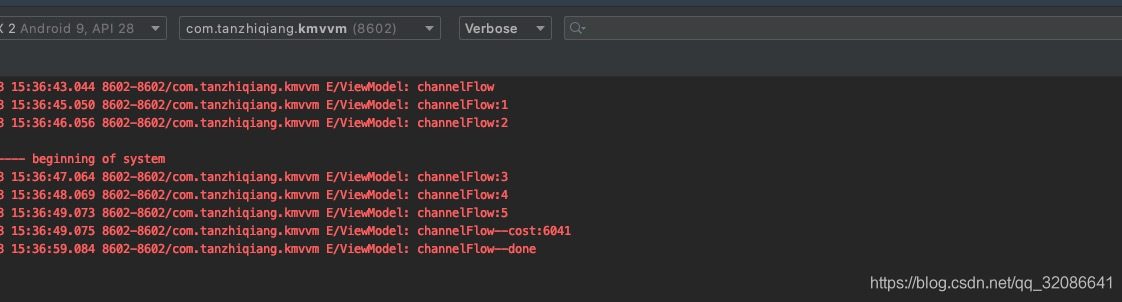
区别:在默认的构建和接收模式下:flow 是 Cold Stream,在没有切换线程的情况下,生产者和消费者是同步非阻塞的;channel 是 Hot Stream,实现了生产者和消费者异步非阻塞模型。





 扫一扫
扫一扫


 604
604

 被折叠的 条评论
为什么被折叠?
被折叠的 条评论
为什么被折叠?
 到【灌水乐园】发言





