



MyBatis
ORMapping: Object Relationship Mapping 对象关系映射
对象指⾯向对象
关系指关系型数据库
Java 到 MySQL 的映射,开发者可以以⾯向对象的思想来管理数据库。
如何使⽤
- 新建 Maven ⼯程,pom.xm
<dependencies>
    <dependency>
      <groupId>org.mybatis</groupId>
      <artifactId>mybatis</artifactId>
      <version>3.4.5</version>
    </dependency>

    <dependency>
      <groupId>mysql</groupId>
      <artifactId>mysql-connector-java</artifactId>
      <version>8.0.25</version>
    </dependency>

    <dependency>
      <groupId>org.projectlombok</groupId>
      <artifactId>lombok</artifactId>
      <version>1.18.12</version>
    </dependency>
  </dependencies>
- 新建数据库表
use mybatis;
create table t_account(
 id int primary key auto_increment,
 username varchar(11),
 password varchar(11),
 age int
);
- 新建数据表对应的实体类 Account
package com.southwind.entity;

import lombok.AllArgsConstructor;
import lombok.Data;
import lombok.NoArgsConstructor;

@Data
@NoArgsConstructor
@AllArgsConstructor
public class Account {
    private long id;
    private String username;
    private String password;
    private int age;
}
- 创建 MyBatis 的配置⽂件 config.xml,⽂件名可⾃定义
<?xml version="1.0" encoding="UTF-8"?>
<!DOCTYPE configuration PUBLIC "-//mybatis.org//DTD Config 3.0//EN"
"http://mybatis.org/dtd/mybatis-3-config.dtd">
<configuration>
<!-- 配置Mybatis运行环境 -->
<environments default="development">
<environment id="development">
<!--配置JDBC事务管理-->
<transactionManager type="JDBC"></transactionManager>
<!--POOLED配置JDBC数据源连接池-->
<dataSource type="POOLED">
<property name="driver" value="com.mysql.cj.jdbc.Driver"/>
<property name="url" value="jdbc:mysql://localhost:3306/sell?useUnicode=true&characterEncoding=UTF-8"/>
<property name="username" value="root"/>
<property name="password" value="root"/>
</dataSource>
</environment>
</environments>
</configuration>
使用原生接口
1、MyBatis 框架需要开发者⾃定义 SQL 语句,写在 Mapper.xml ⽂件中,实际开发中,会为每个实体类创建对应的 Mapper.xml ,定义管理该对象数据的 SQL。
<?xml version="1.0" encoding="UTF-8" ?>
<!DOCTYPE mapper PUBLIC "-//mybatis.org//DTD Mapper 3.0//EN"
        "http://mybatis.org/dtd/mybatis-3-mapper.dtd">
<mapper namespace="com.southwind.mapper.AccountMapper">
    <insert id="save" parameterType="com.southwind.entity.Account">
        insert into t_account(username, password, age)
        values (#{username}, #{password}, #{age})
    </insert>
</mapper>
- namespace 通常设置为⽂件所在包+⽂件名的形式,来寻找mybatis的xml文件
- insert 标签表示执⾏添加操作。
- select 标签表示执⾏查询操作。
- update 标签表示执⾏更新操作。
- delete 标签表示执⾏删除操作。
- id 是实际调⽤ MyBatis ⽅法时需要⽤到的参数。
- parameterType 是调⽤对应⽅法时参数的数据类型
2、在全局配置⽂件 config.xml 中注册 AccountMapper.xml
<?xml version="1.0" encoding="UTF-8"?>
<!DOCTYPE configuration PUBLIC "-//mybatis.org//DTD Config 3.0//EN"
"http://mybatis.org/dtd/mybatis-3-config.dtd">
<configuration>
<!-- 配置Mybatis运行环境 -->
<environments default="development">
<environment id="development">
<!--配置JDBC事务管理-->
<transactionManager type="JDBC"></transactionManager>
<!--POOLED配置JDBC数据源连接池-->
<dataSource type="POOLED">
<property name="driver" value="com.mysql.cj.jdbc.Driver"/>
<property name="url" value="jdbc:mysql://localhost:3306/sell?useUnicode=true&characterEncoding=UTF-8"/>
<property name="username" value="root"/>
<property name="password" value="root"/>
</dataSource>
</environment>
</environments>
<!--注册AccountMapper.xml-->
<mappers>
<mapper resource="com/southwind/mapper/AccountMapper.xml"></mapper>
</mappers>
</configuration>
3、调⽤ MyBatis 的原⽣接⼝执⾏添加操作
package com.southwind.test;

import com.southwind.entity.Account;
import org.apache.ibatis.session.SqlSession;
import org.apache.ibatis.session.SqlSessionFactory;
import org.apache.ibatis.session.SqlSessionFactoryBuilder;

import java.io.InputStream;

public class Test {
    public static void main(String[] args) {
        //加载mybatis配置文件
        InputStream inputStream = Test.class.getClassLoader().getResourceAsStream("config.xml");
        SqlSessionFactoryBuilder sqlSessionFactoryBuilder = new SqlSessionFactoryBuilder();
        SqlSessionFactory sqlSessionFactory = sqlSessionFactoryBuilder.build(inputStream);
        SqlSession sqlSession = sqlSessionFactory.openSession();
        String statement = "com.southwind.mapper.AccountMapper.save";
        Account account = new Account(1L, "张三", "123123", 22);
        sqlSession.insert(statement, account);
        sqlSession.commit();
        //关闭资源
        sqlSession.close();
    }
}
4、直接运行上述代码,会出现找不到mapper.xml文件的错误。因为我们的mapper是放在java目录下面了,程序无法找到,只能找resources文件下面的。要想实现读取java目录下的mapper.xml文件,需要在pom.xml添加如下配置:
<build>
  <resources>
    <resource>
      <directory>src/main/java</directory>
      <includes>
        <include>**/*.xml</include>
      </includes>
    </resource>
  </resources>
</build>
通过 Mapper 代理实现⾃定义接口
- ⾃定义接⼝,定义相关业务⽅法。
- 编写与⽅法相对应的 Mapper.xml
1、⾃定义接口
public interface AccountRepository {
    public int save(Account account);
    public int update(Account account);
    public int deleteById(long id);
    public List<Account> findAll();
    public Account findById(long id);
}
2、创建接⼝对应的 Mapper.xml,定义接⼝⽅法对应的 SQL 语句。
statement 标签可根据 SQL 执⾏的业务选择 insert、delete、update、select。
MyBatis 框架会根据规则⾃动创建接⼝实现类的代理对象。
规则:
- Mapper.xml 中 namespace 为接⼝的全类名。
- Mapper.xml 中 statement 的 id 为接⼝中对应的⽅法名。
- Mapper.xml 中 statement 的 parameterType 和接⼝中对应⽅法的参数类型⼀致。
- Mapper.xml 中 statement 的 resultType 和接⼝中对应⽅法的返回值类型⼀致。
<?xml version="1.0" encoding="UTF-8" ?>
<!DOCTYPE mapper PUBLIC "-//mybatis.org//DTD Mapper 3.0//EN"
        "http://mybatis.org/dtd/mybatis-3-mapper.dtd">
<mapper namespace="com.southwind.repository.AccountRepository">
    <insert id="save" parameterType="com.southwind.entity.Account">
        insert into t_account(username, password, age)
        values (#{username}, #{password}, #{age})
    </insert>

    <update id="update"  parameterType="com.southwind.entity.Account">
        update  t_account
        set username = #{username}, password=#{password},  age=#{age}
        where id=#{id}
    </update>

    <delete id="deleteById" parameterType="long">
        delete from t_account
        where id=#{id}
    </delete>

    <select id="findAll" resultType="com.southwind.entity.Account">
        select id, username, password, age from t_account
    </select>

    <select id="findById" parameterType="long" resultType="com.southwind.entity.Account">
        select id, username, password, age
        from t_account
        where id=#{id}
    </select>
</mapper>
3、在 config.xml 中注册 AccountRepository.xml
<!--注册AccountMapper.xml-->
    <mappers>
        <mapper resource="com/southwind/mapper/AccountMapper.xml"></mapper>
        <mapper resource="com/southwind/repository/AccountRepository.xml"></mapper>
    </mappers>
4、调⽤接⼝的代理对象完成相关的业务操作
package com.southwind.test;

import com.southwind.entity.Account;
import com.southwind.repository.AccountRepository;
import org.apache.ibatis.session.SqlSession;
import org.apache.ibatis.session.SqlSessionFactory;
import org.apache.ibatis.session.SqlSessionFactoryBuilder;

import java.io.InputStream;
import java.util.List;

public class Test2 {
    public static void main(String[] args) {
        //加载mybatis配置文件
        InputStream inputStream = Test2.class.getClassLoader().getResourceAsStream("config.xml");
        SqlSessionFactoryBuilder sqlSessionFactoryBuilder = new SqlSessionFactoryBuilder();
        SqlSessionFactory sqlSessionFactory = sqlSessionFactoryBuilder.build(inputStream);
        SqlSession sqlSession = sqlSessionFactory.openSession();
        //获取实现接口的代理对象
        AccountRepository accountRepository = sqlSession.getMapper(AccountRepository.class);
        List<Account> list = accountRepository.findAll();
        for(Account account : list){
            System.out.println(account);
        }

        Account account = new Account(2L, "李四",  "123123", 33);
        accountRepository.save(account);
        sqlSession.commit();
        sqlSession.close();
    }
}
Mapper.xml
- statement 标签:select、update、delete、insert 分别对应查询、修改、删除、添加操作。
- parameterType:参数数据类型
1、基本数据类型,通过 id 查询 Account
<select id="findById" parameterType="long" resultType="com.southwind.entity.Account">
    select id, username, password, age
    from t_account
    where id=#{id}
</select>
2、String 类型,通过 name 查询 Account
<select id="findById" parameterType="java.lang.String" resultType="com.southwind.entity.Account">
    select id, username, password, age
    from t_account
    where username=#{username}
</select>
3、包装类,通过 id 查询 Account。注意:基本数据类型不能接收null,遇到null会报错,但是包装类不会。所以建议写成包装类的
<select id="findById" parameterType="java.lang.Long" resultType="com.southwind.entity.Account">
    select id, username, password, age
    from t_account
    where id=#{id}
</select>
4、多个参数,通过 name 和 age 查询 Account
<select id="findByNameAndAge" resultType="com.southwind.entity.Account">
    select id, username, password, age
    from t_account
    where username=#{param1} and age=#{param2}
</select>
或者
<select id="findByNameAndAge" resultType="com.southwind.entity.Account">
    select id, username, password, age
    from t_account
    where username=#{arg0} and age=#{arg1}
</select>
5、Java Bean
<update id="update"  parameterType="com.southwind.entity.Account">
    update  t_account
    set username = #{username}, password=#{password},  age=#{age}
    where id=#{id}
</update>
- resultType:结果类型
1、基本数据类型,统计 Account 总数
<select id="count" resultType="int">
    select count(id) from t_account
</select>
2、包装类,统计 Account 总数
<select id="count" resultType="java.lang.Integer">
    select count(id) from t_account
</select>
3、String 类型,通过 id 查询 Account 的 name
<select id="findNameById" resultType="java.lang.String">
 select username from t_account where id = #{id}
</select>
4、Java Bean
<select id="findById" parameterType="long" resultType="com.southwind.entity.Account">
 select * from t_account where id = #{id}
</select>
级联查询
- 一对多。一个学生对应一个班级,一个班级对应多个学生。
通过学生id查询学生信息及对应班级信息
1、建表语句
create table classes(
 id int primary key auto_increment,
 name varchar(11)
);

create table student(
 id int primary key auto_increment,
 name varchar(11),
 cid int references classes(id)
);
2、实体类
Student
@Data
public class Student {
    private long id;
    private String name;
    //一个学生对应一个班级
    private Classes classes;
}
Classes
@Data
public class Classes {
    private long  id;
    private String name;
    //一个班级有多个学生
    private List<Student> students;
}
3、StudentReporitory
public interface StudentRepository {
    public Student findById(long id);
}
4、StudentReporitory.xml。注意resultMap的写法
<?xml version="1.0" encoding="UTF-8" ?>
<!DOCTYPE mapper PUBLIC "-//mybatis.org//DTD Mapper 3.0//EN"
        "http://mybatis.org/dtd/mybatis-3-mapper.dtd">
<mapper namespace="com.southwind.repository.StudentRepository">
    <resultMap id="studentMap" type="com.southwind.entity.Student">
        <!--将查询结果的id赋值给实体类的id-->
        <id column="id" property="id"></id>
        <result column="name" property="name"></result>
        <association property="classes" javaType="com.southwind.entity.Classes">
            <id column="cid" property="id"></id>
            <result column="cname" property="name"></result>
        </association>
    </resultMap>

    <select id="findById" parameterType="long" resultMap="studentMap">
        select s.id, s.name ,c.id as cid ,c.name as cname
        from student s, classes c
        where s.id =#{id} and s.cid = c.id ;
    </select>
</mapper>
5、注册mapper
<!--注册AccountMapper.xml-->
<mappers>
    <mapper resource="com/southwind/mapper/AccountMapper.xml"></mapper>
    <mapper resource="com/southwind/repository/AccountRepository.xml"></mapper>
    <mapper resource="com/southwind/repository/StudentRepository.xml"></mapper>
</mappers>
6、测试类
package com.southwind.test;

import com.southwind.repository.StudentRepository;
import org.apache.ibatis.session.SqlSession;
import org.apache.ibatis.session.SqlSessionFactory;
import org.apache.ibatis.session.SqlSessionFactoryBuilder;

import java.io.InputStream;

public class Test3 {
    public static void main(String[] args) {
        //加载mybatis配置文件
        InputStream inputStream = Test3.class.getClassLoader().getResourceAsStream("config.xml");
        SqlSessionFactoryBuilder sqlSessionFactoryBuilder = new SqlSessionFactoryBuilder();
        SqlSessionFactory sqlSessionFactory = sqlSessionFactoryBuilder.build(inputStream);
        SqlSession sqlSession = sqlSessionFactory.openSession();
        //获取实现接口的代理对象
        StudentRepository studentRepository = sqlSession.getMapper(StudentRepository.class);
        System.out.println(studentRepository.findById(1L));
        sqlSession.close();
    }
}
通过班级id查询出班级信息及班级内的学生信息
1、ClassesReporitory
public interface ClassesRepository {
    public Classes findById(long id);
}
2、ClassesRepository.xml
<?xml version="1.0" encoding="UTF-8" ?>
<!DOCTYPE mapper PUBLIC "-//mybatis.org//DTD Mapper 3.0//EN"
        "http://mybatis.org/dtd/mybatis-3-mapper.dtd">
<mapper namespace="com.southwind.repository.ClassesRepository">
    <resultMap id="classesMap" type="com.southwind.entity.Classes">
        <id column="cid" property="id"></id>
        <result column="cname" property="name"></result>
        <collection property="students" ofType="com.southwind.entity.Student">
            <id column="id" property="id"></id>
            <result column="name" property="name"></result>
        </collection>
    </resultMap>

    <select id="findById" parameterType="long" resultMap="classesMap">
        select s.id, s.name ,c.id as cid ,c.name as cname
        from student s, classes c
        where c.id =#{id} and s.cid = c.id ;
    </select>
</mapper>
3、注册mapper
<mapper>
	<mapper resource="com/southwind/repository/ClassesRepository.xml"></mapper>
</maper
4、测试类
package com.southwind.test;

import com.southwind.repository.ClassesRepository;
import com.southwind.repository.StudentRepository;
import org.apache.ibatis.session.SqlSession;
import org.apache.ibatis.session.SqlSessionFactory;
import org.apache.ibatis.session.SqlSessionFactoryBuilder;

import java.io.InputStream;

public class Test3 {
    public static void main(String[] args) {
        //加载mybatis配置文件
        InputStream inputStream = Test3.class.getClassLoader().getResourceAsStream("config.xml");
        SqlSessionFactoryBuilder sqlSessionFactoryBuilder = new SqlSessionFactoryBuilder();
        SqlSessionFactory sqlSessionFactory = sqlSessionFactoryBuilder.build(inputStream);
        SqlSession sqlSession = sqlSessionFactory.openSession();
        //获取实现接口的代理对象
        ClassesRepository classesRepository = sqlSession.getMapper(ClassesRepository.class);
        System.out.println(classesRepository.findById(2L));
        sqlSession.close();
    }
}
- 多对多。客户与商品,一个客户可以买多个商品,一个商品可以被多个客户购买。
1、建表语句
create table customer(
 id int primary key auto_increment,
 name varchar(11)
);

create table goods(
 id int primary key auto_increment,
 name varchar(11)
);
create table customer_goods(
 id int primary key auto_increment,
 cid int references customer(id),
 gid int references goods(id)
);
2、实体类
Customer
@Data
public class Customer {
    private long id;
    private String name;
    private List<Goods> goods;
}
Goods
@Data
public class Goods {
    private long id;
    private String name;
    private List<Customer> customers;
}
3、CustomerReporitory
public interface CustomerRepository {
    public Customer findById(long  id);
}
GoodsReporitory
public interface GoodsRepository {
    public Goods findById(long id);
}
4、CustomerReporitory.xml
<?xml version="1.0" encoding="UTF-8" ?>
<!DOCTYPE mapper PUBLIC "-//mybatis.org//DTD Mapper 3.0//EN"
        "http://mybatis.org/dtd/mybatis-3-mapper.dtd">
<mapper namespace="com.southwind.repository.CustomerRepository">
    <resultMap id="customerMap" type="com.southwind.entity.Customer">
        <!--将查询结果的id赋值给实体类的id-->
        <id column="cid" property="id"></id>
        <result column="cname" property="name"></result>
        <collection property="goods" ofType="com.southwind.entity.Goods">
            <id column="gid" property="id"></id>
            <result column="gname" property="name"></result>
        </collection>
    </resultMap>

    <select id="findById" parameterType="long" resultMap="customerMap">
        select c.id as cid, c.name as cname, g.id as gid, g.name as gname
        from   customer c, goods g, customer_goods cg
        where c.id =#{id} and c.id = cg.cid and g.id = cg.gid ;
    </select>
</mapper>
GoodsRepository.xml
<?xml version="1.0" encoding="UTF-8" ?>
<!DOCTYPE mapper PUBLIC "-//mybatis.org//DTD Mapper 3.0//EN"
        "http://mybatis.org/dtd/mybatis-3-mapper.dtd">
<mapper namespace="com.southwind.repository.GoodsRepository">
    <resultMap id="goodsMap" type="com.southwind.entity.Goods">
        <!--将查询结果的id赋值给实体类的id-->
        <id column="gid" property="id"></id>
        <result column="gname" property="name"></result>
        <collection property="customers" ofType="com.southwind.entity.Customer">
            <id column="cid" property="id"></id>
            <result column="cname" property="name"></result>
        </collection>
    </resultMap>

    <select id="findById" parameterType="long" resultMap="goodsMap">
        select c.id as cid, c.name as cname, g.id as gid, g.name as gname
        from   customer c, goods g, customer_goods cg
        where g.id =#{id} and c.id = cg.cid and g.id = cg.gid ;
    </select>
</mapper>
5、注册CustomerReporitory.xml
<mapper>
	<mapper resource="com/southwind/repository/CustomerRepository.xml"></mapper>
    <mapper resource="com/southwind/repository/GoodsRepository.xml"></mapper>
</mapper>
6、测试类
package com.southwind.test;

import com.southwind.repository.ClassesRepository;
import com.southwind.repository.CustomerRepository;
import com.southwind.repository.GoodsRepository;
import com.southwind.repository.StudentRepository;
import org.apache.ibatis.session.SqlSession;
import org.apache.ibatis.session.SqlSessionFactory;
import org.apache.ibatis.session.SqlSessionFactoryBuilder;

import java.io.InputStream;

public class Test3 {
    public static void main(String[] args) {
        //加载mybatis配置文件
        InputStream inputStream = Test3.class.getClassLoader().getResourceAsStream("config.xml");
        SqlSessionFactoryBuilder sqlSessionFactoryBuilder = new SqlSessionFactoryBuilder();
        SqlSessionFactory sqlSessionFactory = sqlSessionFactoryBuilder.build(inputStream);
        SqlSession sqlSession = sqlSessionFactory.openSession();
        //获取实现接口的代理对象
        CustomerRepository customerRepository = sqlSession.getMapper(CustomerRepository.class);
        System.out.println(customerRepository.findById(1L));

        GoodsRepository goodsRepository = sqlSession.getMapper(GoodsRepository.class);
        System.out.println(goodsRepository.findById(1L));
        sqlSession.close();
    }
}
逆向工程
MyBatis 框架需要:实体类、⾃定义 Mapper 接⼝、Mapper.xml
传统的开发中上述的三个组件需要开发者⼿动创建,逆向⼯程可以帮助开发者来⾃动创建三个组件,减轻开发者的⼯作量,提⾼⼯作效率。
如何使用
MyBatis Generator,简称 MBG,是⼀个专⻔为 MyBatis 框架开发者定制的代码⽣成器,可⾃动⽣成MyBatis 框架所需的实体类、Mapper 接⼝、Mapper.xml,⽀持基本的 CRUD 操作,但是⼀些相对复杂的 SQL 需要开发者⾃⼰来完成。
- 新建 Maven ⼯程,pom.xml
<dependencies>
  <dependency>
    <groupId>org.mybatis</groupId>
    <artifactId>mybatis</artifactId>
    <version>3.4.5</version>
  </dependency>

  <dependency>
    <groupId>mysql</groupId>
    <artifactId>mysql-connector-java</artifactId>
    <version>8.0.25</version>
  </dependency>

  <dependency>
    <groupId>org.mybatis.generator</groupId>
    <artifactId>mybatis-generator-core</artifactId>
    <version>1.4.2</version>
  </dependency>
</dependencies>
- 创建 MBG 配置⽂件 generatorConfig.xml
1、jdbcConnection 配置数据库连接信息。
2、javaModelGenerator 配置 JavaBean 的⽣成策略。
3、sqlMapGenerator 配置 SQL 映射⽂件⽣成策略。
4、javaClientGenerator 配置 Mapper 接⼝的⽣成策略。
5、table 配置⽬标数据表(tableName:表名,domainObjectName:JavaBean 类名)
<?xml version="1.0" encoding="UTF-8"?>
<!DOCTYPE generatorConfiguration
PUBLIC "-//mybatis.org//DTD MyBatis Generator Configuration 1.0//EN"
"http://mybatis.org/dtd/mybatis-generator-config_1_0.dtd">
<generatorConfiguration>
<context id="testTables" targetRuntime="MyBatis3">
<jdbcConnection
driverClass="com.mysql.cj.jdbc.Driver"
connectionURL="jdbc:mysql://localhost:3306/sell?useUnicode=true&characterEncoding=UTF-8"
userId="root"
password="root"
>
</jdbcConnection>
<!--javaBean的存放目录,从./src/main/java开始找,在com.southwind.entity目录下面-->
<javaModelGenerator targetPackage="com.southwind.entity" targetProject="./src/main/java"></javaModelGenerator>
<sqlMapGenerator targetPackage="com.southwind.repository" targetProject="./src/main/java"></sqlMapGenerator>
<javaClientGenerator type="XMLMAPPER" targetPackage="com.southwind.repository" targetProject="./src/main/java"></javaClientGenerator>
<!--要绑定的数据库表为t_user,要生成的实体类entity为User-->
<table tableName="t_user" domainObjectName="User"></table>
</context>
</generatorConfiguration>
- 建表语句
create table t_user(
 id int primary key auto_increment,
 username varchar(11),
 password varchar(11),
 age int
);
- 创建 Generator 执⾏类
package com.southwind.test;

import org.mybatis.generator.api.MyBatisGenerator;
import org.mybatis.generator.config.Configuration;
import org.mybatis.generator.config.xml.ConfigurationParser;
import org.mybatis.generator.exception.InvalidConfigurationException;
import org.mybatis.generator.exception.XMLParserException;
import org.mybatis.generator.internal.DefaultShellCallback;

import java.io.File;
import java.io.IOException;
import java.sql.SQLException;
import java.util.ArrayList;
import java.util.List;

public class Main {
    public static void main(String[] args) {
        List<String> warings = new ArrayList<>();
        boolean overwrite = true;
        //配置文件路径
        String genCig =  "/generatorConfig.xml";
        //获取配置文件
        File configFile = new File(Main.class.getResource(genCig).getFile());
        ConfigurationParser configurationParser = new ConfigurationParser(warings);
        Configuration configuration = null;
        try {
            configuration = configurationParser.parseConfiguration(configFile);
        } catch (IOException e) {
            throw new RuntimeException(e);
        } catch (XMLParserException e) {
            throw new RuntimeException(e);
        }
        DefaultShellCallback callback = new DefaultShellCallback(overwrite);
        MyBatisGenerator myBatisGenerator =   null;
        try {
            myBatisGenerator = new MyBatisGenerator(configuration, callback, warings);
        } catch (InvalidConfigurationException e) {
            throw new RuntimeException(e);
        }
        try {
            myBatisGenerator.generate(null);
        } catch (SQLException e) {
            throw new RuntimeException(e);
        } catch (IOException e) {
            throw new RuntimeException(e);
        } catch (InterruptedException e) {
            throw new RuntimeException(e);
        }
    }
}
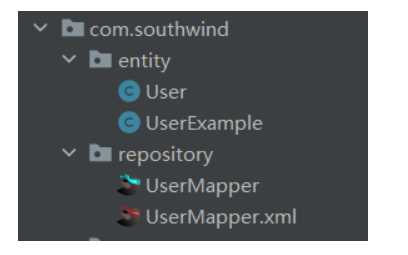
- 执行上述方法,就会自动生成entity、mapper接口和对应的xml文件
MyBatis 延迟加载
- 什么是延迟加载?
什么是延迟加载?
延迟加载也叫懒加载、惰性加载,使⽤延迟加载可以提⾼程序的运⾏效率,针对于数据持久层的操作,在某些特定的情况下去访问特定的数据库,在其他情况下可以不访问某些表,从⼀定程度上减少了 Java应⽤与数据库的交互次数。
查询学⽣和班级的时,学⽣和班级是两张不同的表,如果当前需求只需要获取学⽣的信息,那么查询⽣单表即可,如果需要通过学⽣获取对应的班级信息,则必须查询两张表。
不同的业务需求,需要查询不同的表,根据具体的业务需求来动态减少数据表查询的⼯作就是延迟加载。
- 在 config.xml 中开启延迟加载
<settings>
    <!--打印sql-->
    <setting name="logImpl" value="STDOUT_LOGGING"/>
    <!--开启延时加载-->
    <setting name="lazyLoadingEnabled" value="true"/>
</settings>
- 将多表关联查询拆分成多个单表查询
StudentRepository
public interface StudentRepository {
    public Student findByIdLazy(long id);
}
StudentRepository.xml
<resultMap id="studentMapLazy" type="com.southwind.entity.Student">
    <!--将查询结果的id赋值给实体类的id-->
    <id column="id" property="id"></id>
    <result column="name" property="name"></result>
    <association property="classes" javaType="com.southwind.entity.Classes" select="com.southwind.repository.ClassesRepository.findByIdLazy" column="cid">

    </association>
</resultMap>

<select id="findByIdLazy" parameterType="long" resultMap="studentMapLazy">
    select id, name, cid
    from student
    where id =#{id}
</select>
ClassesRepository
public interface ClassesRepository {
    public Classes findByIdLazy(long id);
}
ClassesRepository.xml
<select id="findByIdLazy" parameterType="long" resultType="com.southwind.entity.Classes">
    select id, name
    from classes
    where id =#{id}
</select>
- 测试类
我们要获取学生的班级信息,这时需要查询两张表student和classes。通过学生id查询出班级id,然后再进行一次查询。
public class Test2 {
    public static void main(String[] args) {
        //加载mybatis配置文件
        InputStream inputStream = Test2.class.getClassLoader().getResourceAsStream("config.xml");
        SqlSessionFactoryBuilder sqlSessionFactoryBuilder = new SqlSessionFactoryBuilder();
        SqlSessionFactory sqlSessionFactory = sqlSessionFactoryBuilder.build(inputStream);
        SqlSession sqlSession = sqlSessionFactory.openSession();
        //获取实现接口的代理对象
        StudentRepository studentRepository = sqlSession.getMapper(StudentRepository.class);
        Student student = studentRepository.findByIdLazy(1L);
        System.out.println(student.getClasses());
    }
}
输出结果:
==>  Preparing: select id, name, cid from student where id =?
==> Parameters: 1(Long)
<==    Columns: id, name, cid
<==        Row: 1, 张三, 1
<==      Total: 1
==>  Preparing: select id, name from classes where id =?
==> Parameters: 1(Long)
<==    Columns: id, name
<==        Row: 1, 1班
<==      Total: 1
Classes(id=1, name=1班, students=null)
我们要获取学生的姓名,这时只需要查询一张表student
public class Test2 {
    public static void main(String[] args) {
        //加载mybatis配置文件
        InputStream inputStream = Test2.class.getClassLoader().getResourceAsStream("config.xml");
        SqlSessionFactoryBuilder sqlSessionFactoryBuilder = new SqlSessionFactoryBuilder();
        SqlSessionFactory sqlSessionFactory = sqlSessionFactoryBuilder.build(inputStream);
        SqlSession sqlSession = sqlSessionFactory.openSession();
        //获取实现接口的代理对象
        StudentRepository studentRepository = sqlSession.getMapper(StudentRepository.class);
        Student student = studentRepository.findByIdLazy(1L);
        System.out.println(student.getName());
    }
}
输出结果:
==>  Preparing: select id, name, cid from student where id =?
==> Parameters: 1(Long)
<==    Columns: id, name, cid
<==        Row: 1, 张三, 1
<==      Total: 1
张三
MyBatis 缓存
- 什么是 MyBatis 缓存
使⽤缓存可以减少 Java 应⽤与数据库的交互次数,从⽽提升程序的运⾏效率。⽐如查询出 id = 1 的对象,第⼀次查询出之后会⾃动将该对象保存到缓存中,当下⼀次查询时,直接从缓存中取出对象即可,⽆需再次访问数据库。
- MyBatis 缓存分类
1、⼀级缓存:SqlSession 级别,默认开启,并且不能关闭。
操作数据库时需要创建 SqlSession 对象,在对象中有⼀个 HashMap ⽤于存储缓存数据,不同的SqlSession 之间缓存数据区域是互不影响的。
⼀级缓存的作⽤域是 SqlSession 范围的,当在同⼀个 SqlSession 中执⾏两次相同的 SQL 语句时,第⼀次执⾏完毕会将结果保存到缓存中,第⼆次查询时直接从缓存中获取。
需要注意的是,如果 SqlSession 执⾏了 DML 操作(insert、update、delete),MyBatis 必须将缓存清空以保证数据的准确性。
2、⼆级缓存:Mapper 级别,默认关闭,可以开启。
使⽤⼆级缓存时,多个 SqlSession 使⽤同⼀个 Mapper 的 SQL 语句操作数据库,得到的数据会存在⼆级缓存区,同样是使⽤ HashMap 进⾏数据存储,相⽐较于⼀级缓存,⼆级缓存的范围更⼤,多个SqlSession 可以共⽤⼆级缓存,⼆级缓存是跨 SqlSession 的。
⼆级缓存是多个 SqlSession 共享的,其作⽤域是 Mapper 的同⼀个 namespace,不同的 SqlSession两次执⾏相同的 namespace 下的 SQL 语句,参数也相等,则第⼀次执⾏成功之后会将数据保存到⼆级缓存中,第⼆次可直接从⼆级缓存中取出数据。
代码
- 一级缓存
public class Test4 {
    public static void main(String[] args) {
        //加载mybatis配置文件
        InputStream inputStream = Test4.class.getClassLoader().getResourceAsStream("config.xml");
        SqlSessionFactoryBuilder sqlSessionFactoryBuilder = new SqlSessionFactoryBuilder();
        SqlSessionFactory sqlSessionFactory = sqlSessionFactoryBuilder.build(inputStream);
        SqlSession sqlSession = sqlSessionFactory.openSession();
        //获取实现接口的代理对象
        AccountRepository accountRepository = sqlSession.getMapper(AccountRepository.class);
        Account account = accountRepository.findById(1L);
        System.out.println(account);
        Account account1 = accountRepository.findById(1L);
        System.out.println(account1);
        sqlSession.close();
    }
}
输出结果:从输出结果中我们看到,前后执行两次同样的sql,只打印了一次sql。因为涉及到了一级缓存。
==>  Preparing: select id, username, password, age from t_account where id=?
==> Parameters: 1(Long)
<==    Columns: id, username, password, age
<==        Row: 1, 张三, 123123, 22
<==      Total: 1
Account(id=1, username=张三, password=123123, age=22)
Account(id=1, username=张三, password=123123, age=22)
如果我们把代码改成这样,重新实例化sqlSession和accountRepository,就会查询两次,因为是两个sqlSession,一级缓存失效了。二级缓存默认是关闭的,就会查询两次。
public class Test4 {
    public static void main(String[] args) {
        //加载mybatis配置文件
        InputStream inputStream = Test4.class.getClassLoader().getResourceAsStream("config.xml");
        SqlSessionFactoryBuilder sqlSessionFactoryBuilder = new SqlSessionFactoryBuilder();
        SqlSessionFactory sqlSessionFactory = sqlSessionFactoryBuilder.build(inputStream);
        SqlSession sqlSession = sqlSessionFactory.openSession();
        //获取实现接口的代理对象
        AccountRepository accountRepository = sqlSession.getMapper(AccountRepository.class);
        Account account = accountRepository.findById(1L);
        System.out.println(account);
        sqlSession.close();
        sqlSession = sqlSessionFactory.openSession();
        accountRepository = sqlSession.getMapper(AccountRepository.class);
        Account account1 = accountRepository.findById(1L);
        System.out.println(account1);
        sqlSession.close();
    }
}
输出结果:
==>  Preparing: select id, username, password, age from t_account where id=?
==> Parameters: 1(Long)
<==    Columns: id, username, password, age
<==        Row: 1, 张三, 123123, 22
<==      Total: 1
Account(id=1, username=张三, password=123123, age=22)
Resetting autocommit to true on JDBC Connection [com.mysql.cj.jdbc.ConnectionImpl@4c402120]
Closing JDBC Connection [com.mysql.cj.jdbc.ConnectionImpl@4c402120]
Returned connection 1279271200 to pool.
Opening JDBC Connection
Checked out connection 1279271200 from pool.
Setting autocommit to false on JDBC Connection [com.mysql.cj.jdbc.ConnectionImpl@4c402120]
==>  Preparing: select id, username, password, age from t_account where id=?
==> Parameters: 1(Long)
<==    Columns: id, username, password, age
<==        Row: 1, 张三, 123123, 22
<==      Total: 1
Account(id=1, username=张三, password=123123, age=22)
- 二级缓存
1、MyBatis ⾃带的⼆级缓存
- config.xml 配置开启⼆级缓存
<settings>
    <!--开启二级缓存-->
    <setting name="cacheEnabled" value="true"/>
</settings>
- Mapper.xml 中配置⼆级缓存
<cache></cache>
- 实体类实现序列化接⼝
package com.southwind.entity;

import lombok.AllArgsConstructor;
import lombok.Data;
import lombok.NoArgsConstructor;

import java.io.Serializable;

@Data
@NoArgsConstructor
@AllArgsConstructor
public class Account implements Serializable {
    private long id;
    private String username;
    private String password;
    private int age;
}
- 测试类
public class Test4 {
    public static void main(String[] args) {
        //加载mybatis配置文件
        InputStream inputStream = Test4.class.getClassLoader().getResourceAsStream("config.xml");
        SqlSessionFactoryBuilder sqlSessionFactoryBuilder = new SqlSessionFactoryBuilder();
        SqlSessionFactory sqlSessionFactory = sqlSessionFactoryBuilder.build(inputStream);
        SqlSession sqlSession = sqlSessionFactory.openSession();
        //获取实现接口的代理对象
        AccountRepository accountRepository = sqlSession.getMapper(AccountRepository.class);
        Account account = accountRepository.findById(1L);
        System.out.println(account);
        sqlSession.close();
        sqlSession = sqlSessionFactory.openSession();
        accountRepository = sqlSession.getMapper(AccountRepository.class);
        Account account1 = accountRepository.findById(1L);
        System.out.println(account1);
        sqlSession.close();
    }
}
输出结果:这里是两个sqlSession,一级缓存失效,触发了二级缓存。
==>  Preparing: select id, username, password, age from t_account where id=?
==> Parameters: 1(Long)
<==    Columns: id, username, password, age
<==        Row: 1, 张三, 123123, 22
<==      Total: 1
Account(id=1, username=张三, password=123123, age=22)
Resetting autocommit to true on JDBC Connection [com.mysql.cj.jdbc.ConnectionImpl@139982de]
Closing JDBC Connection [com.mysql.cj.jdbc.ConnectionImpl@139982de]
Returned connection 328827614 to pool.
Cache Hit Ratio [com.southwind.repository.AccountRepository]: 0.5
Account(id=1, username=张三, password=123123, age=22)
2、ehcache ⼆级缓存
- pom.xml 添加相关依赖
<dependency>
  <groupId>org.mybatis</groupId>
  <artifactId>mybatis-ehcache</artifactId>
  <version>1.0.0</version>
</dependency>

<dependency>
  <groupId>net.sf.ehcache</groupId>
  <artifactId>ehcache-core</artifactId>
  <version>2.0.0</version>
</dependency>
- 添加 ehcache.xml
<ehcache xmlns:xsi="http://www.w3.org/2001/XMLSchema-instance"
         xsi:noNamespaceSchemaLocation="../config/ehcache.xsd">
    <diskStore/>
    <defaultCache
            maxElementsInMemory="1000"
            maxElementsOnDisk="10000000"
            eternal="false"
            overflowToDisk="false"
            timeToIdleSeconds="120"
            timeToLiveSeconds="120"
            diskExpiryThreadIntervalSeconds="120"
            memoryStoreEvictionPolicy="LRU">
    </defaultCache>
</ehcache>
- config.xml 配置开启⼆级缓存
<settings>
    <!--开启二级缓存-->
    <setting name="cacheEnabled" value="true"/>
</settings>
- Mapper.xml 中配置⼆级缓存
<cache type="org.mybatis.caches.ehcache.EhcacheCache">
    <!-- 缓存创建之后,最后一次访问缓存的时间至缓存失效的时间间隔 -->
    <property name="timeToIdleSeconds" value="3600"/>
    <!-- 缓存⾃创建时间起⾄失效的时间间隔 -->
    <property name="timeToLiveSeconds" value="3600"/>
    <!-- 缓存回收策略,LRU表示移除近期使⽤最少的对象 -->
    <property name="memoryStoreEvictionPolicy" value="LRU"/>
</cache>
- 实体类不需要实现序列化接⼝
package com.southwind.entity;

import lombok.AllArgsConstructor;
import lombok.Data;
import lombok.NoArgsConstructor;

@Data
@NoArgsConstructor
@AllArgsConstructor
public class Account {
    private long id;
    private String username;
    private String password;
    private int age;
}
- 测试类
public class Test4 {
    public static void main(String[] args) {
        //加载mybatis配置文件
        InputStream inputStream = Test4.class.getClassLoader().getResourceAsStream("config.xml");
        SqlSessionFactoryBuilder sqlSessionFactoryBuilder = new SqlSessionFactoryBuilder();
        SqlSessionFactory sqlSessionFactory = sqlSessionFactoryBuilder.build(inputStream);
        SqlSession sqlSession = sqlSessionFactory.openSession();
        //获取实现接口的代理对象
        AccountRepository accountRepository = sqlSession.getMapper(AccountRepository.class);
        Account account = accountRepository.findById(1L);
        System.out.println(account);
        sqlSession.close();
        sqlSession = sqlSessionFactory.openSession();
        accountRepository = sqlSession.getMapper(AccountRepository.class);
        Account account1 = accountRepository.findById(1L);
        System.out.println(account1);
        sqlSession.close();
    }
}
输出结果:这里是两个sqlSession,一级缓存失效,触发了二级缓存。
==>  Preparing: select id, username, password, age from t_account where id=?
==> Parameters: 1(Long)
<==    Columns: id, username, password, age
<==        Row: 1, 张三, 123123, 22
<==      Total: 1
Account(id=1, username=张三, password=123123, age=22)
Resetting autocommit to true on JDBC Connection [com.mysql.cj.jdbc.ConnectionImpl@139982de]
Closing JDBC Connection [com.mysql.cj.jdbc.ConnectionImpl@139982de]
Returned connection 328827614 to pool.
Cache Hit Ratio [com.southwind.repository.AccountRepository]: 0.5
Account(id=1, username=张三, password=123123, age=22)
MyBatis 动态 SQL
使⽤动态 SQL 可简化代码的开发,减少开发者的⼯作量,程序可以⾃动根据业务参数来决定 SQL 的组成。
- if标签
<select id="findByAccount" parameterType="com.southwind.entity.Account" resultType="com.southwind.entity.Account">
    select id, username, password, age
    from t_account
    where
    <if test="id != 0">
        id=#{id}
    </if>
    <if test="username != null">
        and username=#{username}
    </if>
    <if test="password != null">
        and password=#{password}
    </if>
    <if test="age !=  0">
        and age=#{age}
    </if>
</select>
if 标签可以⾃动根据表达式的结果来决定是否将对应的语句添加到 SQL 中,如果条件不成⽴则不添加,如果条件成⽴则添加。
上面的sql语句,当id为空,但是username不为空时,sql为select id, username, password, age from t_Account where and username=xxx,会出现语法错误,需要结合where标签优化。
- where标签
<select id="findByAccount" parameterType="com.southwind.entity.Account" resultType="com.southwind.entity.Account">
    select id, username, password, age
    from t_account
    <where>
        <if test="id != 0">
            id=#{id}
        </if>
        <if test="username != null">
            and username=#{username}
        </if>
        <if test="password != null">
            and password=#{password}
        </if>
        <if test="age !=  0">
            and age=#{age}
        </if>
    </where>
</select>
where 标签可以⾃动判断是否要删除语句块中的 and 关键字,如果检测到 where 直接跟 and 拼接,则⾃动删除 and,通常情况下 if 和 where 结合起来使⽤。
- choose、when标签
<select id="findByAccount" parameterType="com.southwind.entity.Account" resultType="com.southwind.entity.Account">
    select *
    from t_account
    <where>
        <choose>
            <when test="id != 0">
                id=#{id}
            </when>
            <when test="username!=null">
                and username=#{username}
            </when>
            <when test="password!=null">
                and password=#{password}
            </when>
            <when test="age!=0">
                and age=#{age}
            </when>
        </choose>
    </where>
</select>
- trim标签
trim 标签中的 prefix 和 suffix 属性会被⽤于⽣成实际的 SQL 语句,会和标签内部的语句进⾏拼接,如果语句前后出现了 prefixOverrides 或者 suffixOverrides 属性中指定的值,MyBatis 框架会⾃动将其删除。
<select id="findByAccount" parameterType="com.southwind.entity.Account" resultType="com.southwind.entity.Account">
    select *
    from t_account
    <trim prefix="where" prefixOverrides="and">
        <if test="id!=0">
            id=#{id}
        </if>
        <if test="username!=null">
            and username=#{username}
        </if>
        <if test="password!=null">
            and password=#{password}
        </if>
        <if test="age!=0">
            and age=#{age}
        </if>
    </trim>
</select>
上述代码,如果where和and标签直接相连,就会把and删掉。
- set标签
set 标签⽤于 update 操作,会⾃动根据参数选择⽣成 SQL 语句。
<update id="update"  parameterType="com.southwind.entity.Account">
    update  t_account
    <set>
        <if test="username!=null">
            username = #{username},
        </if>
        <if test="password!=null">
            password=#{password},
        </if>
        <if test="age!=0">
            age=#{age}
        </if>
    </set>
    where id=#{id}
</update>
- foreach 标签
foreach 标签可以迭代⽣成⼀系列值,这个标签主要⽤于 SQL 的 in 语句。
<select id="findByIds" parameterType="com.southwind.entity.Account" resultType="com.southwind.entity.Account">
    select *
    from t_account
    <where>
        <foreach collection="ids" open="id in (" close=")" item="id" separator=",">
            #{id}
        </foreach>
    </where>
</select>
解决使用mybatis写入数据库时中文乱码报错问题
报错信息:
Cause: java.sql.SQLException: Incorrect string value: '\xE5\xBC\xA0\xE4\xB8\x89' for column 'username' at row 1
原因:mysql的库、表、字段字符集默认是latin1(ISO_8859_1),就算在建表的时候指定编码格式也会失效。
解决方法:
修改字符编码格式为utf-8。

1.使用命令行操作:
进入mysql->
2.查看库使用的字符集:
SHOW CREATE DATABASE 数据库名;
修改库使用的字符集:
ALTER DATABASE 数据库名 DEFAULT CHARACTER SET utf8;
3.查看表使用的字符集:
SHOW CREATE TABLE 数据库名.表名;
查看字段编码:
SHOW FULL COLUMNS FROM 数据库名.表名;
修改表、字段字符集:
ALTER TABLE 数据库名.表名 CONVERT TO CHARACTER SET utf8 COLLATE utf8_unicode_ci;





 扫一扫
扫一扫


 1万+
1万+

 被折叠的 条评论
为什么被折叠?
被折叠的 条评论
为什么被折叠?
 到【灌水乐园】发言





