


本节引言:
本节给大家带来的是Andoird基本UI控件中的RadioButton和Checkbox; 先说下本节要讲解的内容是:RadioButton和Checkbox的
1.基本用法
2.事件处理;
3.自定义点击效果;
4.改变文字与选择框的相对位置;
5.修改文字与选择框的距离
其实这两个控件有很多地方都是类似的,除了单选和多选,事件处理,其他的都是类似的! 另外还有一个ListView上Checkbox的错位的问题,我们会在ListView那一章对这个问题进行 解决,好的,开始本节内容~ 本节官方文档API:RadioButton;CheckBox;
1.基本用法与事件处理:
1)RadioButton(单选按钮)
如题单选按钮,就是只能够选中一个,所以我们需要把RadioButton放到RadioGroup按钮组中,从而实现 单选功能!先熟悉下如何使用RadioButton,一个简单的性别选择的例子: 另外我们可以为外层RadioGroup设置orientation属性然后设置RadioButton的排列方式,是竖直还是水平~
效果图:
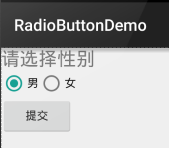
PS:笔者的手机是Android 5.0.1的,这里的RadioButton相比起旧版本的RadioButton,稍微好看一点~
布局代码如下:
<LinearLayout xmlns:android="http://schemas.android.com/apk/res/android"
xmlns:tools="http://schemas.android.com/tools"
android:id="@+id/LinearLayout1"
android:layout_width="match_parent"
android:layout_height="match_parent"
android:orientation="vertical"
tools:context=".MainActivity" >
<TextView
android:layout_width="wrap_content"
android:layout_height="wrap_content"
android:text="请选择性别"
android:textSize="23dp"
/>
<RadioGroup
android:id="@+id/radioGroup"
android:layout_ 最低0.47元/天 解锁文章






 扫一扫
扫一扫


 1424
1424

 被折叠的 条评论
为什么被折叠?
被折叠的 条评论
为什么被折叠?
 到【灌水乐园】发言





