


 本文详细介绍了在Linux环境下SPI驱动的架构及其实现过程,特别聚焦于RC522 RFID模块的驱动开发。从SPI核心层、设备注册到RC522设备的初始化、通信函数的使用,涵盖了spi_board_info和spi_device结构体解析,以及字符设备的注册与卸载等关键步骤。
一、Linux下SPI驱动介绍
内核版本:2.6.35
Linux下SPI驱动和I2C驱动很类似,他们都是一种总线,且都不支持热拔插,因为一般情况下spi或者i2c设备都是直接焊接在板子上的,不像USB设备那样随时插拔,所以根据总线——设备——驱动模型,spi和i2c设备都可以通过xxx_board_info结构体进行注册,Linux下spi驱动的架构如下:
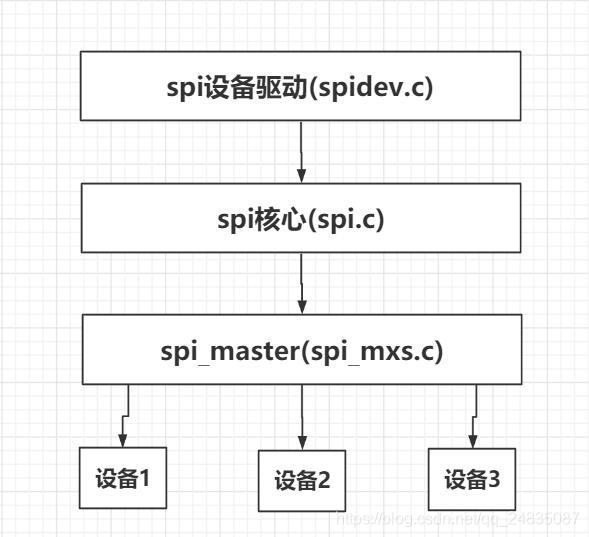
spi核心层提供spi master、spi设备和驱动的注册、卸载函数,以及spi通信函数。
spi master是Linux虚拟处理的一个概念,实际上就是spi主机,一般是在芯片内部,芯片有多少个spi接口,就代表有几个master,每个master下面可以挂多个spi设备,但是每个设备都需要一个单独的片选信号。spi master就相当于i2c的adapter,spi master的驱动芯片厂商已经写好,不需要我们去编写,它会操作芯片内部寄存器实现和挂在该master下面的设备进行spi通信。
应用层和挂在某个master下的spi设备通信流程如下:
用户层操作spi设备驱动(open、write、read)——spi设备驱动调用spi核心层提供的通信函数sync或async——调用对应spi master的transfer函数,最终实现和spi设备的通信。
下面就开始编写一个Linux下spi驱动——RC522驱动
二、RC522设备
根据总线——设备——驱动模型,首先需要注册一个spi设备——rc522设备:
首先介绍下几个比较重要的结构体:
1. spi_board_info
struct spi_board_info {


	char		modalias[SPI_NAME_SIZE];//spi设备名 驱动的名字需和设备名保持一致
	const void	*platform_data;
	void		*controller_data;
	int		irq;
	u32		max_speed_hz;//spi最大时钟频率
	u16		bus_num;//spi主机序号,表明该设备是挂在哪一个spi master下
	u16		chip_select;//片选脚
	u8		mode;//spi模式  SPI_CPHA SPI_CPOL共有四种组合方式
};
spi_board_info用来描述一个spi板级设备信息,其中包括设备名、要使用哪一个spi主机、spi模式以及使用哪个片选脚,这里的片选是由spi 主机自动控制的,一个设备只能对应一个片选,但是也可以不使用这个片选,可以申请一个普通IO口当作片选,最后再调用spi_new_device注册设备即可。
SPI_CPHA选择对数据线采样的时机,0选择每个时钟周期的第一个沿跳变时采样数据,1选择第二个时钟沿采样数据;SPI_CPOL选择每个时钟周期开始的极性,0表示时钟以低电平开始,1选择高电平开始。这两个比特位有四种组合,对应SPI_MODE_0~SPI_MODE_3。
2. spi_device
spi_device结构体用来描述一个spi设备,可以根据前面板级设备信息注册一个spi设备。
struct spi_device {


	struct device		dev;
	struct spi_master	*master;
	u32			max_speed_hz;//spi最大时钟频率
	u8			chip_select;//片选脚
	u8			mode;//spi 模式
	#define	SPI_CPHA	0x01			/* clock phase */
	#define	SPI_CPOL	0x02			/* clock polarity */
	#define	SPI_MODE_0	(0|0)			/* (original MicroWire) */
	#define	SPI_MODE_1	(0|SPI_CPHA)
	#define	SPI_MODE_2	(SPI_CPOL|0)
	#define	SPI_MODE_3	(SPI_CPOL|SPI_CPHA)
	#define	SPI_CS_HIGH	0x04			/* chipselect active high? */
	#define	SPI_LSB_FIRST	0x08			/* per-word bits-on-wire */
	#define	SPI_3WIRE	0x10			/* SI/SO signals shared */
	#define	SPI_LOOP	0x20			/* loopback mode */
	#define	SPI_NO_CS	0x40			/* 1 dev/bus, no chipselect */
	#define	SPI_READY	0x80			/* slave pulls low to pause */
	u8			bits_per_word;
	int			irq;
	void			*controller_state;
	void			*controller_data;
	char			modalias[SPI_NAME_SIZE];//spi设备名
};
rc522_dev.c:
#include <linux/kernel.h>
#include <linux/module.h>
#include <linux/platform_device.h>
#include <linux/spi/spi.h>

static struct spi_board_info rc522_board_info =
{


   .modalias = "rc522",
   .max_speed_hz = 8000000,
   .bus_num = 1,
   .chip_select = 0,
   .mode = SPI_MODE_0,
};

static struct spi_device* rc522_dev = NULL;
static int rc522_dev_init(void)
{


   struct spi_master *rc522_master = NULL;
   rc522_master = spi_busnum_to_master(rc522_board_info.bus_num);//根据spi总线编号获取一个spi master
   if(rc522_master != NULL)
   {


      rc522_dev = spi_new_device(rc522_master,&rc522_board_info);//注册spi设备
      if(rc522_dev != NULL)
      {


         printk("module init ok \n");
         return 0;
	  }
	  else
	  {


		printk("create rc522_dev error \n");
		return -1;
	  }
   }
   else
   {


     	printk("rc522_master not found \n");
		return -1;
   }
}

static void rc522_dev_exit(void)
{


   spi_unregister_device(rc522_dev);
   printk("module exit ok \n");
}
module_init(rc522_dev_init);
module_exit(rc522_dev_exit);

MODULE_LICENSE("GPL");
MODULE_AUTHOR("xzx2020");
三、RC522驱动
rc522驱动有个重要的结构体spi_driver:
struct spi_driver {


	const struct spi_device_id *id_table;
	int			(*probe)(struct spi_device *spi);
	int			(*remove)(struct spi_device *spi);
	void			(*shutdown)(struct spi_device *spi);
	int			(*suspend)(struct spi_device *spi, pm_message_t mesg);
	int			(*resume)(struct spi_device *spi);
	struct device_driver	driver;
};
struct device_driver {


	const char		*name;//驱动名字,需和设备名保持一致
	struct bus_type		*bus;
	struct module		*owner;
	const char		*mod_name;	/* used for built-in modules */
	bool suppress_bind_attrs;	/* disables bind/unbind via sysfs */
#if defined(CONFIG_OF)
	const struct of_device_id	*of_match_table;
#endif
	int (*probe) (struct device *dev);
	int (*remove) (struct device *dev);
	void (*shutdown) (struct device *dev);
	int (*suspend) (struct device *dev, pm_message_t state);
	int (*resume) (struct device *dev);
	const struct attribute_group **groups;
	const struct dev_pm_ops *pm;
	struct driver_private *p;
};
我们需要实现的是spi_driver的probe和remove函数,然后在probe函数里实现字符设备注册,在remove函数里实现字符设备卸载。
spi_write:spi写入若干字节
spi_write_then_read:spi写入若干字节并读取若干字节
rc522_drv.c:
这里的片选脚由spi_master自动控制。
#include <linux/kernel.h>
#include <linux/module.h>
#include <linux/platform_device.h>
#include <linux/spi/spi.h>
#include <linux/err.h>
#include <linux/slab.h>
#include <linux/fs.h>
#include <asm/uaccess.h>
#include <linux/cdev.h>
#include <linux/delay.h>
#include <linux/gpio.h>//gpio_request gpio_free函数
#include <../arch/arm/mach-mx28/mx28_pins.h>
#define DEVICE_NAME "rc522_drv" //驱动名称
#define RST_PIN MXS_PIN_TO_GPIO(PINID_SSP0_DATA7) //p2.7
#define CS_PIN MXS_PIN_TO_GPIO(PINID_SSP0_DATA6) //p2.6
#define RC522_RST_Enable() gpio_direction_output(RST_PIN,0)
#define RC522_RST_Disable() gpio_direction_output(RST_PIN,1)
#define RC522_CS_Enable() gpio_direction_output(CS_PIN,0)
#define RC522_CS_Disable() gpio_direction_output(CS_PIN,1)
static struct spi_device* rc522_dev = NULL;
static struct cdev *rc522_cdev = NULL;
static struct class *rc522_class = NULL;
static struct device *rc522_device = NULL;
static dev_t device_id;
static int rc522_open(struct inode *inode, struct file *filp)
{
int ret = -1,ret2 = -1;
gpio_free(RST_PIN);
gpio_free(CS_PIN);
ret = gpio_request(RST_PIN, "RC522_RST");
ret2 = gpio_request(CS_PIN, "RC522_CS");
printk("RST_PIN=%d CS_PIN=%d\n",ret,ret2);
RC522_RST_Disable();
udelay(1);
RC522_RST_Enable();
udelay(1);
RC522_RST_Disable();
return 0;
}
static int rc522_release(struct inode *inode, struct file *filp)
{
RC522_RST_Enable();
gpio_free(RST_PIN);
//gpio_free(CS_PIN);
return 0 最低0.47元/天 解锁文章






 扫一扫
扫一扫


 2428
2428


 到【灌水乐园】发言



