



学习目标:
路由嵌套使用
学习内容:
路由多层嵌套展示子路由
学习时间:
每天进步一点
学习产出:
路由嵌套实现
第一步:
创建三个组件
1.src/components/home.vue(父路由)
<template>
<div>
  <h1>
    我是首页
  </h1>
  <p>我是首页内容,哈哈哈</p>
  <router-link to="/home/news">新闻</router-link>  <!-- 这里的to不能写成"home/news" 也不能直接是"/news"-->
  <router-link to="/home/message">消息</router-link>
  <router-view></router-view>
</div>
</template>

<script>
export default {
name: "home"
}
</script>

<style scoped>

</style>
2.src/components/homemessage.vue(子路由)
<template>
  <div>
    <ul>
      <li>消息1</li>
      <li>消息2</li>
      <li>消息3</li>
      <li>消息4</li>
    </ul>
  </div>
</template>

<script>
export default {
  name: "homemessage"
}
</script>

<style scoped>

</style>
3.src/components/homenews.vue(子路由)
<template>
  <div>
    <ul>
      <li>新闻1</li>
      <li>新闻2</li>
      <li>新闻3</li>
      <li>新闻4</li>
      <li>新闻5</li>
      <li>新闻6</li>
      <li>新闻7</li>
    </ul>
  </div>
</template>

<script>
export default {
  name: "homenews"
}
</script>

<style scoped>

</style>
第二步:
路由配置:
src/router/index.js
import Vue from 'vue'
import Router from 'vue-router'
import HelloWorld from '@/components/HelloWorld'
/*import home from '../components/home'*/
import about from "../components/about";

const home = () =>import('../components/home')
const homenews = () =>import('../components/homenews')
const homemessage = () =>import('../components/homemessage')

Vue.use(Router)

export default new Router({
  routes: [
    {
      path: '/home',
      name: 'home',
      component: home,
      children:[{
        path:'news',/*这里的news前不用加/*/
        component: homenews
      },{
        path: 'message',
        component: homemessage
      },{
        path: '',
        redirect: 'news'
      }]
    },{
      path: '/about',
      name: 'about',
      component: about
    },
    {
      path: '/',
      name: 'home',
      component: home,
      redirect: '/home'
    }
  ],
  mode:'history',
  linkActiveClass:'active'
})
第五步 展示:
App.vue
<template>
  <div id="app">
<!--    <router-link to="/home" tag="button" replace >首页</router-link>
    <router-link to="/about" tag="button" replace >关于</router-link>-->
    <button @click="shouclick">首页</button>
    <button @click="guanclick">关于</button>

    <router-view></router-view>
  </div>
</template>

<script>
export default {
  name: 'App',
  methods:{
    shouclick(){
      this.$router.push('/home')
    },
    guanclick(){
      this.$router.replace('/about')
    }
  }
}
</script>

<style>
#app {
  font-family: 'Avenir', Helvetica, Arial, sans-serif;
  -webkit-font-smoothing: antialiased;
  -moz-osx-font-smoothing: grayscale;
  text-align: center;
  color: #2c3e50;
  margin-top: 60px;
}
.active{
  color: #f00;
}
</style>
效果图
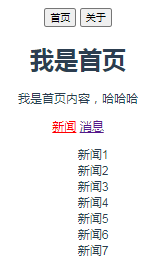
此系列文章源自视频文件总结,尽供学习使用,如有侵权,请联系博主删除,感谢。
视频出处链接:https://www.bilibili.com/video/BV15741177Eh?p=111





 扫一扫
扫一扫


 299
299

 被折叠的 条评论
为什么被折叠?
被折叠的 条评论
为什么被折叠?
 到【灌水乐园】发言





