pip安装详解

pip安装教程 python(针对于Windows系统) pip安装教程 python 阅读详情

pip是python的包管理工具,python2.7/python3.4以上的版本都已经集成了该工具,我们可以用

pip --version

命令确认是否安装。如果未安装pip的,请往下看。

下载

进入https://pypi.org/project/pip/选择红框中的文件下载

图在这里插入图片描述

windows下安装

下载完成后解压得到

在这里插入图片描述

我们用CMD进入该目录下,输入python setup.py install命令进行安装

在这里插入图片描述

码字不易废话两句:有需要python学习资料的或者有技术问题交流 “点击”即可

如果是第一次安装,我们还需要配置环境变量,如下图

在这里插入图片描述

在这里插入图片描述

这样,环境变量就配置好了。

配置完成后,在cmd中输入pip确认安装情况。

Linux下安装

tar -xzvf pip-20.2.4.tar.gz # 解压
cd pip-20.2.4 # 进入解压文件 
python setup.py install # 安装

pip的更新

python -m pip install --upgrade pip

安装包

pip install 安装包名

安装指定版本的包

pip install 包名==版本号

例如我们要安装Django的1.8版本

pip install Django==1.8

更新包

pip install --upgrade 要更新的包名

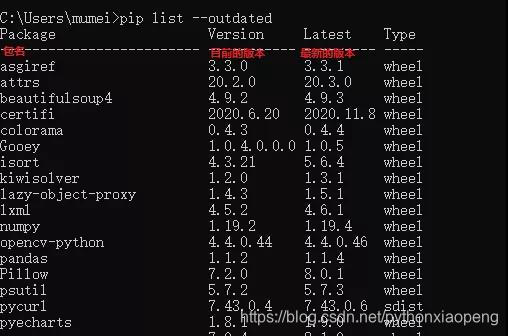
询可更新的包

pip list --outdated

在这里插入图片描述

批量更新包

(1)利用pip-review进行包的批量更新

pip install pip-review
pip-review --local --interactive(2

(2)编写如下代码进行批量更新

#!/usr/bin/env python3
# -*- coding: utf-8 -*-

import pip
from pip._internal.utils.misc import get_installed_distributions
from subprocess import call

for dist in get_installed_distributions():
    print(dist)
    if not 'pip' in str(dist):
        call('pip3 install --upgrade %s -i https://pypi.tuna.tsinghua.edu.cn/simple' % dist.project_name, shell=True)

卸载包

pip uninstall 要卸载的包名

pip在国内的下载速度非常不理想,所以我们要借助国内的镜像源来安装需要的包

临时使用

pip安装包的时候加参数-i 镜像源地址,例如

pip install bs4 -i https://pypi.tuna.tsinghua.edu.cn/simple

这样就会从清华的镜像源站安装bs4库

其他常用的镜像源地址:

阿里云:http://mirrors.aliyun.com/pypi/simple/

豆瓣:http://pypi.douban.com/simple/

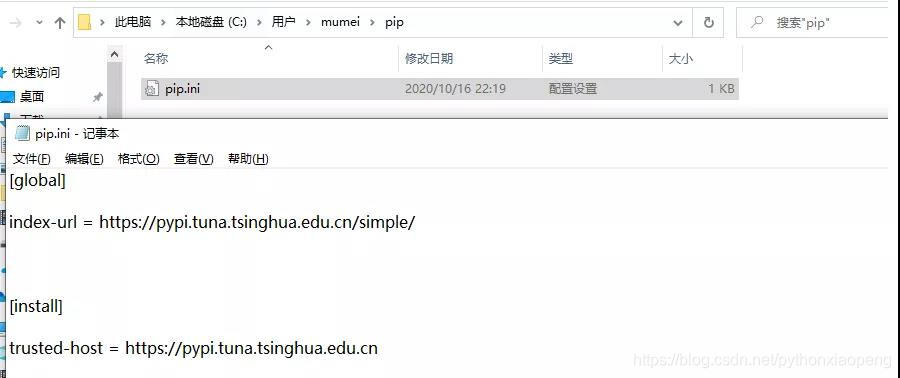
4.2 永久更改

linux

修改~/.pip/pip.conf (没有就创建一个文件夹及文件。文件夹要加“.”,表示是隐藏文件夹),文件内容如下

[global]
index-url = https://pypi.tuna.tsinghua.edu.cn/simple
[install]
trusted-host = mirrors.aliyun.com

windows

在用户目录下创建pip文件夹,再在文件夹中创建pip.ini配置文件,填写一样的内容

在这里插入图片描述

pip参数解析

Commands:
 install 安装包.
 uninstall 卸载包.
 freeze 按着一定格式输出已安装包列表
 list                       列出已安装包.
 show 显示包详细信息.
 search                     搜索包,类似yum里的search.
 wheel Buildwheelsfromyourrequirements.
 zip 不推荐.Zipindividualpackages.
 unzip 不推荐.Unzipindividualpackages.
 bundle 不推荐.Createpybundles.
 help                       当前帮助.
 
GeneralOptions:
 -h,--help                 显示帮助.
 -v,--verbose              更多的输出,最多可以使用3次
 -V,--version              现实版本信息然后退出.
 -q,--quiet 最少的输出.
 --log-file<path>          覆盖的方式记录verbose错误日志,默认文件:/root/.pip/pip.log
 --log<path>               不覆盖记录verbose输出的日志.
 --proxy<proxy>            Specifyaproxyintheform[user:passwd@]proxy.server:port.
 --timeout<sec>            连接超时时间(默认15秒).
 --exists-action<action>   Defaultactionwhenapathalreadyexists:(s)witch,(i)gnore,(w)ipe,(b)ackup.
 --cert<path>              证书.

以上就是小编今天为大家带来的内容,小编本身就是一名python开发工程师,我自己花了三天时间整理了一套python学习教程,从最基础的python脚本到web开发,爬虫,数据分析,数据可视化,机器学习,等,这些资料有想要的小伙伴 " 点击 " 即可领取

开发环境 之四 Python 中的 pip 安装 及 使用详解 pip 是 Python 的包安装程序。其实,pip 就是 Python 标准库(The Python Standard Library)中的一个包,只是这个包比较特殊,用它可以来管理 Python 标准库(The Python Standard Library)中其他的包。pip 支持从 [PyPI](https://pypi.org/ ),版本控制,本地项目以及直接从分发文件进行安装。pip 是一个命令行程序。 安装 pip 后,会向系统添加一个 pip 命令,该命令可以从命令提示符运行。 阅读详情

相关推荐

Pip报错:无法导入模块‘pip._internal’,解决方案

Pip报错:无法导入模块‘pip._internal’,解决方案你是否曾经遇到过在使用pip安装Python库时,出现了“ImportError: No module named ‘pip._internal’”的错误提示?这种错误提示通常会让人感到困惑和不知所措。但是不要担心,本文将为你提供解决方案。可能产生这种错误的原因有很多,比如你的pip版本太老,或者某些必要的依赖项不完整等等。在继续之前,请先确保你已经正确安装了Python和pip。

. 3584

Windows安装pip方法

pip是一款非常方便的python包管理工具,本文主要介绍在windows10下安装pip方法。 1. 下载pip 地址:https://pypi.python.org/pypi/pip#downloads 注意选择tar.gz压缩包,目前最新版本为9.0.1,这里选择的版本是:pip-9.0.1.tar.gz (md5, pgp) 点击...

weixin_34368949的博客 7289

【完美解决】Anaconda3安装后缺失大量文件,没有scripts、Library等目录

Anaconda3是官网下载的:https://www.anaconda.com/distribution/#download-section 我选择的是64位python 3.7的版本。 问题出现及现象: 我自己选择了一个D盘的目录D:\Tools\Anaconda3进行安装,装完后发现conda list命令无法执行,首先都到的是配置环境变量,然后发现安装目录下缺失大量文件(如下图)...

android之行 3万+

Python的包管理工具pip安装

pip是 Python 的包管理工具,用于安装和管理 Python 包

q908544703的博客 5万+

Android编译系统——Android.bp语法介绍(十五)

Android.bp 是 Android 构建系统(Android Build System)中的配置文件,用于描述如何编译和打包项目中的模块。它是用 Blueprint 编写的,其语法类似于 JSON,但专为 Android 编译系统设计,提供了更高效、灵活的模块化管理。

小旭的专栏 939

硅基半导体量子点:单电子自旋量子比特技术手册

现在我们已经了解了从硅片到容错计算的全部环节,让我们用一张总览图把碎片拼成完整拼图。fill:#333;important;important;fill:none;color:#333;color:#333;important;fill:none;fill:#333;height:1em;important;important;important;color:#000!important;important;important;important;important;color:#000!

VectorShift的博客 367

linux中安装pip_如何在Linux中安装PIP

linux中安装pipIn this tutorial, we’ll go over the steps to install pip in Linux. The pip command allows us to install Python packages from the Python Package Index or PyPI. 在本教程中,我们将介绍在Linux中安装pip的步骤。 pi...

从零开始的教程世界 3万+

Python遥感图像处理应用篇(二十三):Python+GDAL 批量拼接图像

遥感影像拼接分多种不同的情况,比如比较常用的是两幅影像拼接或者多个图像合并为一个图像。GDAL中实现影像拼接的方式也有多种,比如常用可以通过numpy读取影像数组,并计算各个图像的numpy数组范围,合并多个numpy数组为一个最终的结果,并将其重新输出为一幅新的图像,即可实现图像的拼接。另外比较方便的一种方法便是使用GDAL.warp()函数方法。这个函数的功能很多,可以实现多种不同的目的,比如用于坐标系转换、投影变换、图像合并与镶嵌、地理范围裁剪、更改分辨率、矢量裁剪等多种功能。这些功能可以通过设置Op

soderayer的博客 4641

在linux中安装pip

原因是因为:安装pip时提示setup.py中使用setuptools中的模块,但是我们开始并没有安装setuptools软件包,所以我们需要先下载并安装 setuptools!由于系统自带的pyhon中没有pip,而我们这时候恰好需要用到pip,怎么办呢?今天我就来教大家如何在linux中安装pip;需要哪个版本可以选择第二种,需要哪个版本改一下版本就好了;能查到说明安装成功,接下来我们就可以安装自己想要的包了;搭建的linux系统,安装pip,有需要的后台私信我。测试使用pip命令安装需要的包。

m0_72838865的博客 2万+

【论文翻译】YOLO26: KEY ARCHITECTURAL ENHANCEMENTS AND PERFORMANCE BENCHMARKING FOR REAL-TIME OBJECT DETEC

本研究对Ultralytics YOLO26进行了全面分析,重点阐述了其在实时边缘目标检测领域的关键架构改进与性能基准测试结果。YOLO26于2025年9月发布,是YOLO系列中最新、最先进的模型,专为在边缘设备和低功耗设备上实现高效能、高精度和部署就绪性而设计。论文依次详细介绍了YOLO26的架构创新,包括移除分布焦点损失(DFL)、采用端到端无非极大值抑制(NMS)推理、集成渐进式损失(ProgLoss)和小目标感知标签分配(STAL),以及引入MuSGD优化器以实现稳定收敛。

Limiiiing的博客 1681

YOLOv10改进策略【模型轻量化】| MoblieNetV3:基于搜索技术和新颖架构设计的轻量型网络模型

本文记录的是基于MobileNet V3的YOLOv10目标检测轻量化改进方法研究。的模型结构是通过得来的,其中的基础模块结合了的深度可分离卷积、的线性瓶颈和倒置残差结构以及MnasNet中基于挤压和激励的轻量级注意力模块,使模型在性能、效率和灵活性方面都具有显著的优势。本文在替换骨干网络中配置了原论文中的small和large2种模型,以满足不同的需求。

Limiiiing的博客 513

python安装pip-安装pip的三种方法

1.get-pip.py安装$wget https://bootstrap.pypa.io/get-pip.py$ sudo python get-pip.py # 运行安装脚本注意:用哪个版本的 Python 运行安装脚本,pip 就被关联到哪个版本,如果是 Python3 则执行以下命令:$ sudo python3 get-pip.py # 运行安装脚本。一般情况 pip 对应的...

weixin_37988176的博客 5913

在 SAP BTP 中为 SAP AI Core 创建 Service Instance 和 Service Key 的完整实战指南

摘要:本文详细介绍了在SAP BTP上创建AI Core服务实例和密钥的关键步骤,这是实现ABAP系统与Gen AI大语言模型集成的核心技术环节。文章通过一个制造业财务问答场景的案例,系统梳理了从前提条件准备、架构理解到具体操作的全过程,重点解析了service instance创建、X.509证书配置等关键节点。特别强调了Extended计划选择、证书格式等易错点,为ABAP开发人员实现Gen AI场景提供了实用指南。

2007 年 ~ 2025 年,深耕 SAP 技术 18 年 270

pip 安装_pip到底是什么——Windows下安装pip

定义:pip是Python包管理工具,该工具提供了对Python包的查找、下载、安装、卸载的功能。安装完python之后,还需要设置环境变量——手动添加环境变量:右击我的电脑->属性->高级系统设置->点击环境变量->点击PATH->新建->加入Python安装路径 3.那么问题来了:环境变量和系统变量有什么区别呢?系统环境变量,对所有用户起作用...

weixin_39569051的博客 2959

ET2012新版免狗免安装绿色软件

ET2012新版免狗免安祖昂绿色软件。,新界面,新视觉,

LinePhone3.2.7(android端最新版本) sip客户端

SIP客户端For android:LinePhone3.2.7(最新版本),官网地址:http://www.linphone.org/

pip安装详解教程

进入官网(点击Release history后选择pip 22.2.2点击Source Distribution中的pip-22.2.2.tar.gz进行下载。

weixin_62383884的博客 6598

霍尼韦尔SoftMaster使用说明

霍尼韦尔SoftMaster使用说明

Mac 安装 pip 看这里就够了,pip、pip2、pip3 再也不懵了

Mac 安装 pip 看这里就够了!

DevOps前进四 3万+

深度学习工具包 DeepLearningToolbox

深度学习工具包Deprecation notice.-----This toolbox is outdated and no longer maintained.There are much better tools available for deep learning than this toolbox, e.g. [Theano](http://deeplearning.net/software/theano/), [torch](http://torch.ch/) or [tensorflow](http://www.tensorflow.org/)I would suggest you use one of the tools mentioned above rather than use this toolbox.Best, Rasmus.DeepLearnToolbox================A Matlab toolbox for Deep Learning.Deep Learning is a new subfield of machine learning that focuses on learning deep hierarchical models of data.It is inspired by the human brain's apparent deep (layered, hierarchical) architecture.A good overview of the theory of Deep Learning theory is[Learning Deep Architectures for AI](http://www.iro.umontreal.ca/~bengioy/papers/ftml_book.pdf)For a more informal introduction, see the following videos by Geoffrey Hinton and Andrew Ng.* [The Next Generation of Neural Networks](http://www.youtube.com/watch?v=AyzOUbkUf3M) (Hinton, 2007)* [Recent Developments in Deep Learning](http://www.youtube.com/watch?v=VdIURAu1-aU) (Hinton, 2010)* [Unsupervised Feature Learning and Deep Learning](http://www.youtube.com/watch?v=ZmNOAtZIgIk) (Ng, 2011)If you use this toolbox in your research please cite [Prediction as a candidate for learning deep hierarchical models of data](http://www2.imm.dtu.dk/pubdb/views/publication_details.php?id=6284)```@MASTERSTHESIS\{IMM2012-06284, author = "R. B. Palm", title = "Prediction as a candidate for learning deep hierarchical models of data", year = "2012",}```Contact: rasmusbergpalm at gmail dot comDirectories included in the toolbox-----------------------------------`NN/` - A library for Feedforward Backpropagation Neural Networks`CNN/` - A library for Convolutional Neural Networks`DBN/` - A library for Deep Belief Networks`SAE/` - A library for Stacked Auto-Encoders`CAE/` - A library for Convolutional Auto-Encoders`util/` - Utility functions used by the libraries`data/` - Data used by the examples`tests/` - unit tests to verify toolbox is workingFor references on each library check REFS.mdSetup-----1. Download.2. addpath(genpath('DeepLearnToolbox'));Example: Deep Belief Network---------------------```matlabfunction test_example_DBNload mnist_uint8;train_x = double(train_x) / 255;test_x = double(test_x) / 255;train_y = double(train_y);test_y = double(test_y);%% ex1 train a 100 hidden unit RBM and visualize its weightsrand('state',0)dbn.sizes = [100];opts.numepochs = 1;opts.batchsize = 100;opts.momentum = 0;opts.alpha = 1;dbn = dbnsetup(dbn, train_x, opts);dbn = dbntrain(dbn, train_x, opts);figure; visualize(dbn.rbm{1}.W'); % Visualize the RBM weights%% ex2 train a 100-100 hidden unit DBN and use its weights to initialize a NNrand('state',0)%train dbndbn.sizes = [100 100];opts.numepochs = 1;opts.batchsize = 100;opts.momentum = 0;opts.alpha = 1;dbn = dbnsetup(dbn, train_x, opts);dbn = dbntrain(dbn, train_x, opts);%unfold dbn to nnnn = dbnunfoldtonn(dbn, 10);nn.activation_function = 'sigm';%train nnopts.numepochs = 1;opts.batchsize = 100;nn = nntrain(nn, train_x, train_y, opts);[er, bad] = nntest(nn, test_x, test_y);assert(er < 0.10, 'Too big error');```Example: Stacked Auto-Encoders---------------------```matlabfunction test_example_SAEload mnist_uint8;train_x = double(train_x)/255;test_x = double(test_x)/255;train_y = double(train_y);test_y = double(test_y);%% ex1 train a 100 hidden unit SDAE and use it to initialize a FFNN% Setup and train a stacked denoising autoencoder (SDAE)rand('state',0)sae = saesetup([784 100]);sae.ae{1}.activation_function = 'sigm';sae.ae{1}.learningRate = 1;sae.ae{1}.inputZeroMaskedFraction = 0.5;opts.numepochs = 1;opts.batchsize = 100;sae = saetrain(sae, train_x, opts);visualize(sae.ae{1}.W{1}(:,2:end)')% Use the SDAE to initialize a FFNNnn = nnsetup([784 100 10]);nn.activation_function = 'sigm';nn.learningRate = 1;nn.W{1} = sae.ae{1}.W{1};% Train the FFNNopts.numepochs = 1;opts.batchsize = 100;nn = nntrain(nn, train_x, train_y, opts);[er, bad] = nntest(nn, test_x, test_y);assert(er < 0.16, 'Too big error');```Example: Convolutional Neural Nets---------------------```matlabfunction test_example_CNNload mnist_uint8;train_x = double(reshape(train_x',28,28,60000))/255;test_x = double(reshape(test_x',28,28,10000))/255;train_y = double(train_y');test_y = double(test_y');%% ex1 Train a 6c-2s-12c-2s Convolutional neural network %will run 1 epoch in about 200 second and get around 11% error. %With 100 epochs you'll get around 1.2% errorrand('state',0)cnn.layers = { struct('type', 'i') %input layer struct('type', 'c', 'outputmaps', 6, 'kernelsize', 5) %convolution layer struct('type', 's', 'scale', 2) %sub sampling layer struct('type', 'c', 'outputmaps', 12, 'kernelsize', 5) %convolution layer struct('type', 's', 'scale', 2) %subsampling layer};cnn = cnnsetup(cnn, train_x, train_y);opts.alpha = 1;opts.batchsize = 50;opts.numepochs = 1;cnn = cnntrain(cnn, train_x, train_y, opts);[er, bad] = cnntest(cnn, test_x, test_y);%plot mean squared errorfigure; plot(cnn.rL);assert(er<0.12, 'Too big error');```Example: Neural Networks---------------------```matlabfunction test_example_NNload mnist_uint8;train_x = double(train_x) / 255;test_x = double(test_x) / 255;train_y = double(train_y);test_y = double(test_y);% normalize[train_x, mu, sigma] = zscore(train_x);test_x = normalize(test_x, mu, sigma);%% ex1 vanilla neural netrand('state',0)nn = nnsetup([784 100 10]);opts.numepochs = 1; % Number of full sweeps through dataopts.batchsize = 100; % Take a mean gradient step over this many samples[nn, L] = nntrain(nn, train_x, train_y, opts);[er, bad] = nntest(nn, test_x, test_y);assert(er < 0.08, 'Too big error');%% ex2 neural net with L2 weight decayrand('state',0)nn = nnsetup([784 100 10]);nn.weightPenaltyL2 = 1e-4; % L2 weight decayopts.numepochs = 1; % Number of full sweeps through dataopts.batchsize = 100; % Take a mean gradient step over this many samplesnn = nntrain(nn, train_x, train_y, opts);[er, bad] = nntest(nn, test_x, test_y);assert(er < 0.1, 'Too big error');%% ex3 neural net with dropoutrand('state',0)nn = nnsetup([784 100 10]);nn.dropoutFraction = 0.5; % Dropout fraction opts.numepochs = 1; % Number of full sweeps through dataopts.batchsize = 100; % Take a mean gradient step over this many samplesnn = nntrain(nn, train_x, train_y, opts);[er, bad] = nntest(nn, test_x, test_y);assert(er < 0.1, 'Too big error');%% ex4 neural net with sigmoid activation functionrand('state',0)nn = nnsetup([784 100 10]);nn.activation_function = 'sigm'; % Sigmoid activation functionnn.learningRate = 1; % Sigm require a lower learning rateopts.numepochs = 1; % Number of full sweeps through dataopts.batchsize = 100; % Take a mean gradient step over this many samplesnn = nntrain(nn, train_x, train_y, opts);[er, bad] = nntest(nn, test_x, test_y);assert(er < 0.1, 'Too big error');%% ex5 plotting functionalityrand('state',0)nn = nnsetup([784 20 10]);opts.numepochs = 5; % Number of full sweeps through datann.output = 'softmax'; % use softmax outputopts.batchsize = 1000; % Take a mean gradient step over this many samplesopts.plot = 1; % enable plottingnn = nntrain(nn, train_x, train_y, opts);[er, bad] = nntest(nn, test_x, test_y);assert(er < 0.1, 'Too big error');%% ex6 neural net with sigmoid activation and plotting of validation and training error% split training data into training and validation datavx = train_x(1:10000,:);tx = train_x(10001:end,:);vy = train_y(1:10000,:);ty = train_y(10001:end,:);rand('state',0)nn = nnsetup([784 20 10]); nn.output = 'softmax'; % use softmax outputopts.numepochs = 5; % Number of full sweeps through dataopts.batchsize = 1000; % Take a mean gradient step over this many samplesopts.plot = 1; % enable plottingnn = nntrain(nn, tx, ty, opts, vx, vy); % nntrain takes validation set as last two arguments (optionally)[er, bad] = nntest(nn, test_x, test_y);assert(er < 0.1, 'Too big error');```[![Bitdeli Badge](https://d2weczhvl823v0.cloudfront.net/rasmusbergpalm/deeplearntoolbox/trend.png)](https://bitdeli.com/free "Bitdeli Badge")

pip 与 pip3 安装

pip 与 pip3 安装 1. Ubuntu Python 2: sudo apt install python-pip Python 3: sudo apt install python3-venv python3-pip 2. Python 2 - pip - sudo apt install python-pip 2.1 pip deepnorth@deepnorth-amax:~$ pip The program 'pip' is currently not installed. You

程永强 1999

pip windows安装_如何在Windows中安装Pip?

pip windows安装Pip is a tool used to install Python packages and modules to the operating system. Pip is a cross-platform tool where the same commands can be used for both Linux, Windows, MacOSX, etc. I...

cunjiu9486的博客 1431

linux安装pip3教程,linux下pip的安装步骤及使用详解

前言pip类似RedHat里面的yum,安装软件非常方便。本节详细介绍pip的安装、以及使用方法,希望文章对各位了解pip的安装与使用带来帮助。下面话不多说,来看看详细的介绍:一、pip下载安装1.1 pip下载# wget "https://pypi.python.org/packages/source/p/pip/pip-1.5.4.tar.gz#md5=834b2904f92d46aaa33...

weixin_29165725的博客 8178

pip安装

1,查看是否安装pip pip --version 2,下载pip 打开下载地址:https://bootstrap.pypa.io/get-pip.py 下载文件get-pip.py,并保存到指定文件夹,我的是保存到C:\Python27文件夹下。 3,cmd中运行get-pip.py文件,就开始下载了 #cd C:\Python27 #python get-pip.py   4,...

qq_41397201的博客 5211

pip 安装

1、pip下载安装 1.1 pip下载 # wget "https://pypi.python.org/packages/source/p/pip/pip-1.5.4.tar.gz#md5=834b2904f92d46aaa333267fb1c922bb" --no-check-certificate 1.2 pip安装 # tar -xzvf pip-1.5.4.tar.gz # cd pip-1.5.4 # python setup.py install 2. pip使用详解 2.1 pip

笔记而已 6953

python不用pip安装库_python安装pip和使用pip安装Python库类比如pip安装beautifulsoup4

初学Python时,看到很多不懂得东西,比如pip, 是python 包管理工具,pip是easy_install的取代。Distribute是对标准库disutils模块的增强,我们知道disutils主要是用来更加容易的打包和分发包,特别是对其他的包有依赖的包。Distribute被创建是因为Setuptools包不再维护了。 distribute是setuptools的取代。安装Di...

weixin_39834488的博客 3574

怎么安装pip

pip指令

j1_11111的博客 7620
上一篇: 又是一个超好用的python可视化工具
下一篇: 阿里测试题之join在数据库中的区别
python程序员小'鹏
博客等级 码龄6年 163粉丝 87原创
评论 8
成就一亿技术人!
拼手气红包6.0元
还能输入1000个字符
 
 条评论被折叠 查看
添加红包

请填写红包祝福语或标题

个

红包个数最小为10个

元

红包金额最低5元

当前余额3.43元 前往充值 >
需支付:10.00元
成就一亿技术人!
领取后你会自动成为博主和红包主的粉丝 规则
hope_wisdom
发出的红包
实付元
使用余额支付
点击重新获取
扫码支付
钱包余额 0

抵扣说明:

1.余额是钱包充值的虚拟货币,按照1:1的比例进行支付金额的抵扣。
2.余额无法直接购买下载,可以购买VIP、付费专栏及课程。

余额充值