



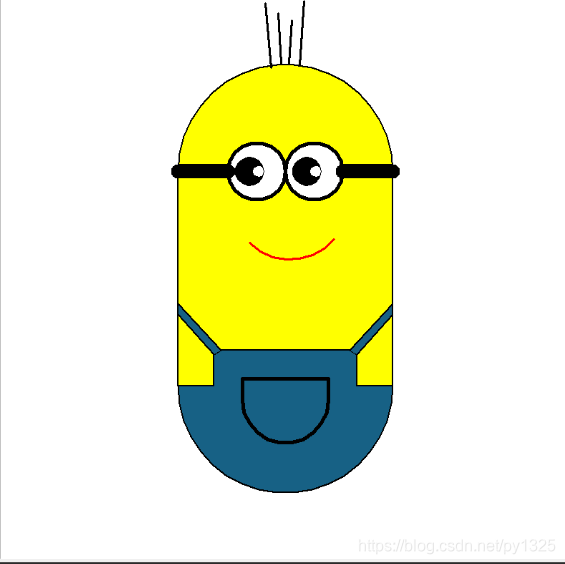
 本文介绍了Python的turtle模块基本操作,包括创建画布、设置笔、控制笔移动和方向、画圆及填充颜色。特别地,文章详细阐述了如何利用turtle绘制小黄人的方法,强调在编程过程中应发挥个人创意。
turtel的使用
1. 基本操作
1.创建画布
turtle.setup(宽度,高度)
2.设置笔
# 1)设置笔的颜色
turtle.pencolor(颜色)
# 2)设置线宽
turtle.width(线宽)
# 3)设置速度
turtle.speed(速度值)   - 速度值是1-10逐渐变大 和 0 对应的速度最快
# 4)设置海龟样式
turtle.hideturtle()/turtle.ht()		-  隐藏海龟图标
turtle.showturtle()/turtle.st()		-	显示龟图标
turtle.shape(name=None)	- 设置海龟样式(“arrow”, “turtle”, “circle”, “square”, “triangle”, “classic”)
3.控制笔移动
# 1)向前走
turtle.forward(距离)/turtle.fd(距离)
# 2) 向后走
turtle.back(距离)/turtle.bk(距离)
# 3) 移动到指定位置
turtle.goto(x坐标, y坐标)/ turtle.setx(x坐标) / turtle.sety(y坐标)
# 4) 回到开始位置
turtle.home()    # 重置画笔箭头的方向,有时候调角度找不到方向可以用这个函数重置
4.控制笔的方向
# 1)向左转
turtle.left(角度)
# 2)向右转
turtle.right(角度)
5.抬起笔和放下笔
# 1)抬起笔
turtle.up()
# 2)放下笔
turtle.down()
之间一般穿插turtle.goto((坐标))来方便移动画笔开始的位置
turtle.up()
turtle.goto((-50,50))
turtle.down()
6.程序一直运行
-
如果不在程序末尾加上这个 只会显示一下结果然后马上退出
mainloop()的作用就是保持画框一直存在
turtle.mainloop()
#####2. 画圆
- 画圆环
#1) 画一个完整的圆
turtle.circle(半径)
#2) 画圆环的一部分
turtle.circle(半径, 角度)
######## 默认逆时针画圆 如果想要顺时针画圆可以在半径前面添加一个负号
- 画实心圆
turtle.dot(直径)
#####3.填充
# 设置填充颜色
turtle.fillcolor(颜色)
# 开始填充
turtle.begin_fill()
# 结束填充
turtle.end_fill()
4. 代码不提示解决方案
打开turtle.py文件做以下修改:
# 注释掉
# __all__ = (_tg_classes + _tg_screen_functions + _tg_turtle_functions +
           # _tg_utilities + ['Terminator']) # + _math_functions)

# 新添加
__all__ = ['ScrolledCanvas', 'TurtleScreen', 'Screen', 'RawTurtle', 'Turtle', 'RawPen', 'Pen', 'Shape', 'Vec2D',
           'back','backward', 'begin_fill', 'begin_poly', 'bk', 'addshape', 'bgcolor', 'bgpic', 'bye', 'clearscreen',
         'colormode', 'delay', 'exitonclick', 'getcanvas', 'getshapes', 'listen', 'mainloop', 'mode', 'numinput',
         'onkey', 'onkeypress', 'onkeyrelease', 'onscreenclick', 'ontimer', 'register_shape', 'resetscreen',
         'screensize', 'setup', 'Terminator', 'setworldcoordinates', 'textinput', 'title', 'tracer', 'turtles',
         'update', 'window_height', 'window_width', 'write_docstringdict', 'done', 'circle', 'clear', 'clearstamp',
         'clearstamps', 'clone', 'color', 'degrees', 'distance', 'dot', 'down', 'end_fill', 'end_poly', 'fd',
         'fillcolor', 'filling', 'forward', 'get_poly', 'getpen', 'getscreen', 'get_shapepoly', 'getturtle', 'goto',
        'heading', 'hideturtle', 'home', 'ht', 'isdown', 'isvisible', 'left', 'lt', 'onclick', 'ondrag', 'onrelease',
         'pd', 'pen', 'pencolor', 'pendown', 'pensize', 'penup', 'pos', 'position', 'pu', 'radians', 'right', 'reset',
         'resizemode', 'rt', 'seth', 'setheading', 'setpos', 'setposition', 'settiltangle', 'setundobuffer', 'setx',
         'sety', 'shape', 'shapesize', 'shapetransform', 'shearfactor', 'showturtle', 'speed', 'st', 'stamp', 'tilt',
         'tiltangle', 'towards', 'turtlesize', 'undo', 'undobufferentries', 'up', 'width', 'write', 'xcor', 'ycor']
怎么画小黄人
ps:每个人的画发都不一样 尽量有自己的思路
### 怎么画小黄人:
import turtle
turtle.speed(4)
turtle.setup(800,800)
turtle.hideturtle()

# 身体
turtle.width(2)
turtle.up()
turtle.setx(150)
turtle.left(90)
turtle.down()
turtle.fillcolor('yellow')
turtle.begin_fill()
turtle.fd(150)
turtle.circle(150,180)
turtle.fd(300)
turtle.circle(150,180)
turtle.fd(150)

turtle.end_fill()

# 眼镜
turtle.width(5)
turtle.pencolor('black')
turtle.up()
turtle.goto((0,150))
turtle.fillcolor('white')
turtle.begin_fill()
turtle.down()
turtle.circle(40)
turtle.circle(-40)
turtle.end_fill()

# 眼睛
turtle.width(1)
turtle.up()
turtle.goto((50,150))
turtle.down()

turtle.fillcolor('black')
turtle.begin_fill()
turtle.circle(20)
turtle.end_fill()

turtle.fillcolor('white')
turtle.begin_fill()
turtle.circle(8)
turtle.end_fill()

turtle.up()
turtle.goto((-30,150))
turtle.down()
turtle.fillcolor('black')
turtle.begin_fill()
turtle.circle(20)
turtle.end_fill()

turtle.fillcolor('white')
turtle.begin_fill()
turtle.circle(8)
turtle.end_fill()

# 眼镜架

turtle.up()
turtle.goto((80,150))
turtle.down()
turtle.width(20)
turtle.right(90)
turtle.fd(70)

turtle.up()
turtle.goto((-80,150))
turtle.down()
turtle.width(20)
turtle.left(180)
turtle.fd(70)

# 四根头发
turtle.width(3)
turtle.up()
turtle.goto((5,301))
turtle.down()
turtle.right(94)
turtle.fd(60)

turtle.up()
turtle.goto((20,298))
turtle.down()
turtle.fd(90)


turtle.up()
turtle.goto((-6,301))
turtle.down()
turtle.left(7)
turtle.fd(70)

turtle.up()
turtle.goto((-20,295))
turtle.down()
turtle.left(2)
turtle.fd(90)

# 嘴巴
turtle.up()
turtle.goto((-50,50))
turtle.down()
turtle.pencolor('red')
turtle.right(140)
turtle.circle(80,95)

# 裤子

turtle.pencolor('black')
turtle.width(2)

turtle.up()
turtle.home()       # 回到原点并恢复默认角度
turtle.goto((150,-150))
turtle.down()
turtle.fillcolor('#176185')
turtle.begin_fill()
turtle.left(180)
turtle.fd(50)
turtle.right(90)
turtle.fd(44)
turtle.left(60)
turtle.fd(12)
turtle.left(30)
turtle.fd(179.2)
turtle.left(30)
turtle.fd(12)
turtle.left(60)
turtle.fd(44)
turtle.right(90)
turtle.goto((-150,-150))
turtle.left(90)
turtle.circle(150,180)
turtle.goto((150,-150))
turtle.up()

turtle.end_fill()

turtle.up()
turtle.goto((100,-106))
turtle.down()
turtle.fillcolor('#176185')
turtle.begin_fill()
turtle.goto((150,-50))
turtle.goto((150,-35))
turtle.goto((90,-100))
turtle.end_fill()

turtle.up()
turtle.goto((-100,-106))
turtle.down()
turtle.fillcolor('#176185')
turtle.begin_fill()
turtle.goto((-150,-50))
turtle.goto((-150,-35))
turtle.goto((-90,-100))
turtle.end_fill()


# 口袋
turtle.width(5)
turtle.up()
turtle.goto((60,-140))
turtle.down()
turtle.left(90)
turtle.fd(120)
turtle.left(90)
turtle.fd(30)
turtle.circle(60,180)
turtle.fd(30)

turtle.mainloop()
- 结果:





 扫一扫
扫一扫


 1212
1212

 被折叠的 条评论
为什么被折叠?
被折叠的 条评论
为什么被折叠?
 到【灌水乐园】发言





