


 本文深入探讨Vue3组件的渲染流程,从创建、重写到生成和渲染,详细解析了组件实例的创建、模板编译、DOM操作等关键步骤,帮助理解组件化的实现机制。
一个项目足够复杂的话,所有代码如果都在一个页面中,那么,就会出现一个文件上万行代码的可能。vue通过组件化,将页面按照模块或功能进行拆分,方便团队合作和后期维护。组件化让项目开发如同搭积木一样简单,借用官方图示如下:
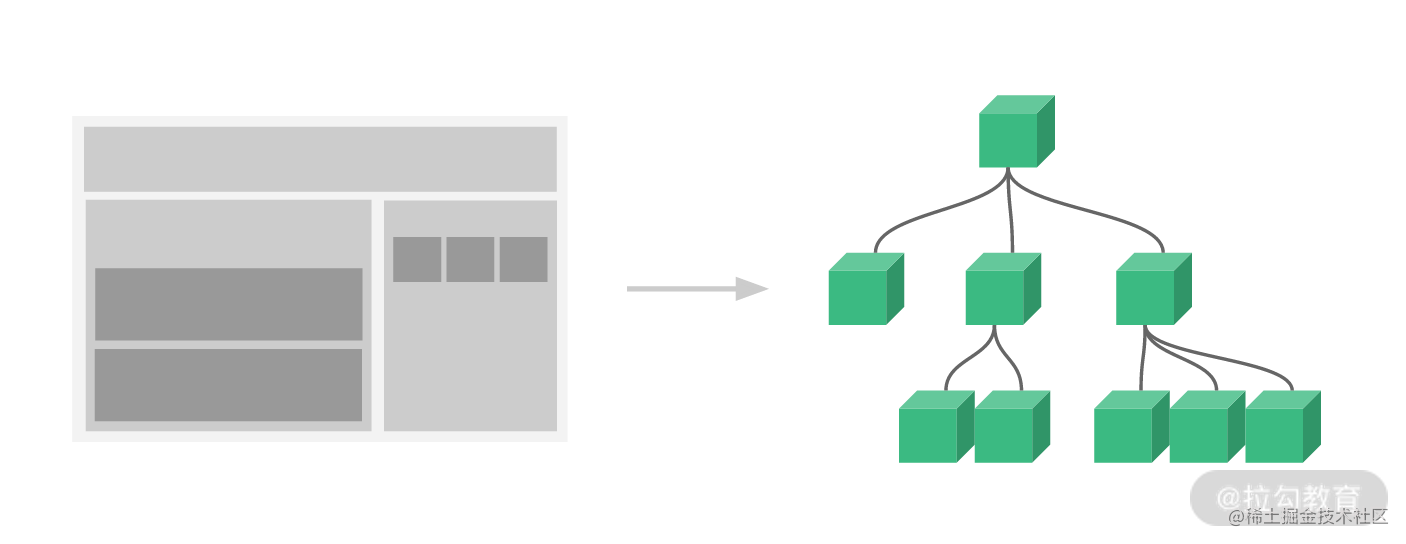
那么,组件化是如何实现的呢?
这还得从入口说起 …
// main.js文件
import { createApp } from 'vue';
import App from './App.vue';

const app = createApp(App);
app.mount('#app');
例子中可以看出,通过import { createApp } from 'vue'的方式从vue中引入了方法createApp,并将App作为参数传入其中,最后,通过app.mount('#app')的方式将app挂载到#app上去。
一、const app = createApp(App)
const createApp = ((...args) => {// 创建app方法const app = ensureRenderer().createApp(...args);// 从app中获取mount方法const { mount } = app;// 重写app.mount方法app.mount = (containerOrSelector) => {// ...};return app;
});
createApp的主要逻辑可以分为获取app和重写app.mount
1、创建app
创建app需要通过const app = ensureRenderer().createApp(...args)的方式,这里可以将流程分为两步,ensureRenderer和createApp。
(1)ensureRenderer
const rendererOptions = extend({ patchProp }, nodeOps);
// lazy create the renderer - this makes core renderer logic tree-shakable
// in case the user only imports reactivity utilities from Vue.
let renderer;
function ensureRenderer() {return (renderer ||(renderer = createRenderer(rendererOptions)));
}
function createRenderer(options) {return baseCreateRenderer(options);
}
function baseCreateRenderer(options, createHydrationFns) {// ...return {render,hydrate,createApp: createAppAPI(render, hydrate)};
}
function createAppAPI(render, hydrate) {return function createApp(rootComponent, rootProps = null) {// ...return app;};
}
这里的rendererOptions是合并而成的操作dom的一系列方法,并通过return (renderer || (renderer = createRenderer(rendererOptions)))的方式对renderer做缓存处理,如果存在直接返回,如果不存在,才进行后续的操作,这也是一种优化的策略。
baseCreateRenderer(options)的方式返回了一个包含createApp: createAppAPI(render, hydrate)的对象,其最终返回的是函数function createApp(rootComponent, rootProps = null){...}。
所以const app = ensureRenderer().createApp(...args)最终执行的就是createAppAPI内部返回的createApp函数。
(2)createApp
function createApp(rootComponent, rootProps = null) {if (!isFunction(rootComponent)) {rootComponent = Object.assign({}, rootComponent);}// ...const context = createAppContext();// ...const app = (context.app = {_uid: uid++,_component: rootComponent,_props: rootProps,_container: null,_context: context,_instance: null,version,mount() {// 与平台无关的mount方法},// 还有其他方法});return app;
}
function createAppContext() {return {app: null,config: {isNativeTag: NO,performance: false,globalProperties: {},optionMergeStrategies: {},errorHandler: undefined,warnHandler: undefined,compilerOptions: {}},mixins: [],components: {},directives: {},provides: Object.create(null),optionsCache: new WeakMap(),propsCache: new WeakMap(),emitsCache: new WeakMap()};
}
如果rootComponent不是函数,通过rootComponent = Object.assign({}, rootComponent)的方式浅拷贝rootComponent,再通过createAppContext的方式返回一个app执行的环境。最终返回一个包含_uid、_component、_props、_container、_context、_instance、version和mount等属性的app对象,这里的mount与平台无关。
2、重写app.mount
先通过const { mount } = app的方式将mount方法从app中拿出来缓存备用,然后通过app.mount = containerOrSelector) => {...}的方式对app.mount方法进行重写。
这样做的目的是,将与平台无关的mount进行缓存,然后在不同的平台中重写app.mout方法进行特定场景的处理,最终还是会执行到与平台无关的mount函数。
 // 重写的app.mount
app.mount = (containerOrSelector) => {const container = normalizeContainer(containerOrSelector);if (!container)return;const component = app._component;if (!isFunction(component) && !component.render && !component.template) {// __UNSAFE__// Reason: potential execution of JS expressions in in-DOM template.// The user must make sure the in-DOM template is trusted. If it's// rendered by the server, the template should not contain any user data.component.template = container.innerHTML;}// clear content before mountingcontainer.innerHTML = '';const proxy = mount(container, false, container instanceof SVGElement);if (container instanceof Element) {container.removeAttribute('v-cloak');container.setAttribute('data-v-app', '');}return proxy;
};
二、app.mount('#app')
当执行到入口文件的app.mount('#app')时,就会执行重写的方法app.mount。
这里先通过const container = normalizeContainer(containerOrSelector)的方式去将非 DOM 容器的字符串转换成 DOM 节点,内部使用了 DOM 操作的原生方法document.querySelector(container)。
再通过const proxy = mount(container, false, container instanceof SVGElement)的方式去调用与平台无关的mount方法,下面详细介绍mount相关的逻辑:
// 通过const { mount } = app获取到的mount
mount(rootContainer, isHydrate, isSVG) {if (!isMounted) {// #5571if ((process.env.NODE_ENV !== 'production') && rootContainer.__vue_app__) {warn(`There is already an app instance mounted on the host container.\n` +` If you want to mount another app on the same host container,` +` you need to unmount the previous app by calling \`app.unmount()\` first.`);}const vnode = createVNode(rootComponent, rootProps);// store app context on the root VNode.// this will be set on the root instance on initial mount.vnode.appContext = context;// HMR root reloadif ((process.env.NODE_ENV !== 'production')) {context.reload = () => {render(cloneVNode(vnode), rootContainer, isSVG);};}if (isHydrate && hydrate) {hydrate(vnode, rootContainer);} else {render(vnode, rootContainer, isSVG);}isMounted = true;app._container = rootContainer;rootContainer.__vue_app__ = app;if ((process.env.NODE_ENV !== 'production') || __VUE_PROD_DEVTOOLS__) {app._instance = vnode.component;devtoolsInitApp(app, version);}return getExposeProxy(vnode.component) || vnode.component.proxy;}else if ((process.env.NODE_ENV !== 'production')) {warn(`App has already been mounted.\n` +`If you want to remount the same app, move your app creation logic ` +`into a factory function and create fresh app instances for each ` +`mount - e.g. \`const createMyApp = () => createApp(App)\``);}
}
1、生成vNode
这里通过const vnode = createVNode(rootComponent, rootProps)的方式生成vnode,当前例子中会执行到以下逻辑:
// encode the vnode type information into a bitmap
const shapeFlag = isString(type)? 1 /* ShapeFlags.ELEMENT */: isSuspense(type)? 128 /* ShapeFlags.SUSPENSE */: isTeleport(type)? 64 /* ShapeFlags.TELEPORT */: isObject(type)? 4 /* ShapeFlags.STATEFUL_COMPONENT */: isFunction(type)? 2 /* ShapeFlags.FUNCTIONAL_COMPONENT */: 0;
return createBaseVNode(type, props, children, patchFlag, dynamicProps, shapeFlag, isBlockNode, true)
其中通过判断组件被编译后的type,来确定shapeFlag,当前例子中其值为4,再继续看createBaseVNode:
function createBaseVNode(type, props = null, children = null, patchFlag = 0, dynamicProps = null, shapeFlag = type === Fragment ? 0 : 1 /* ShapeFlags.ELEMENT */, isBlockNode = false, needFullChildrenNormalization = false) {const vnode = {__v_isVNode: true,__v_skip: true,type,props,key: props && normalizeKey(props),ref: props && normalizeRef(props),scopeId: currentScopeId,slotScopeIds: null,children,component: null,suspense: null,ssContent: null,ssFallback: null,dirs: null,transition: null,el: null,anchor: null,target: null,targetAnchor: null,staticCount: 0,shapeFlag,patchFlag,dynamicProps,dynamicChildren: null,appContext: null,ctx: currentRenderingInstance};// ...return vnode;
}
可以看出,当前的vnode就是一个由许多属性组成的对象,用来描述当前组件的主要信息,如同 DOM 树用来描述页面html一样。
紧接着会通过vnode.appContext = context的方式为vnode.context进行赋值。从文中刚开始可以看出,context是在createApp方法中通过context = createAppContext()的方式定义的,该方法中也为context.app进行了赋值。
生成vnode以后就会进行vnode的渲染逻辑,最终其实也是调用了 DOM 操作的原生 API,继续往下看。
2、vNode渲染
通过render(vnode, rootContainer, isSVG):
const render = (vnode, container, isSVG) => {if (vnode == null) {if (container._vnode) {unmount(container._vnode, null, null, true);}}else {patch(container._vnode || null, vnode, container, null, null, null, isSVG);}flushPreFlushCbs();flushPostFlushCbs();container._vnode = vnode;
};
当前例子中vnode存在,所以会执行到patch的逻辑,其中有主要的逻辑如下:
if (shapeFlag & 1 /* ShapeFlags.ELEMENT */) {processElement(n1, n2, container, anchor, parentComponent, parentSuspense, isSVG, slotScopeIds, optimized);
}
else if (shapeFlag & 6 /* ShapeFlags.COMPONENT */) {processComponent(n1, n2, container, anchor, parentComponent, parentSuspense, isSVG, slotScopeIds, optimized);
}
当前例子中首次渲染执行时shapeFlag为4,满足shapeFlag & 6为真值,所以会执行到processComponent:
const processComponent = (n1, n2, container, anchor, parentComponent, parentSuspense, isSVG, slotScopeIds, optimized) => {n2.slotScopeIds = slotScopeIds;if (n1 == null) {if (n2.shapeFlag & 512 /* ShapeFlags.COMPONENT_KEPT_ALIVE */) {parentComponent.ctx.activate(n2, container, anchor, isSVG, optimized);} else {mountComponent(n2, container, anchor, parentComponent, parentSuspense, isSVG, optimized);}} else {updateComponent(n1, n2, optimized);}
};
当前例子中旧的节点vnode为null,并且n2.shapeFlag & 512为0,所以会执行到mountComponent的逻辑:
const mountComponent = (initialVNode, container, anchor, parentComponent, parentSuspense, isSVG, optimized) => {const instance = (initialVNode.component = createComponentInstance(initialVNode, parentComponent, parentSuspense));if ((process.env.NODE_ENV !== 'production') && instance.type.__hmrId) {registerHMR(instance);}if ((process.env.NODE_ENV !== 'production')) {pushWarningContext(initialVNode);startMeasure(instance, `mount`);}// inject renderer internals for keepAliveif (isKeepAlive(initialVNode)) {instance.ctx.renderer = internals;}// resolve props and slots for setup context{if ((process.env.NODE_ENV !== 'production')) {startMeasure(instance, `init`);}setupComponent(instance);if ((process.env.NODE_ENV !== 'production')) {endMeasure(instance, `init`);}}// setup() is async. This component relies on async logic to be resolved// before proceedingif (instance.asyncDep) {parentSuspense && parentSuspense.registerDep(instance, setupRenderEffect);// Give it a placeholder if this is not hydration// TODO handle self-defined fallbackif (!initialVNode.el) {const placeholder = (instance.subTree = createVNode(Comment));processCommentNode(null, placeholder, container, anchor);}return;}setupRenderEffect(instance, initialVNode, container, anchor, parentSuspense, isSVG, optimized);if ((process.env.NODE_ENV !== 'production')) {popWarningContext();endMeasure(instance, `mount`);}
};
以上有两个重要的逻辑,创建instance和调用setupRenderEffect。
(1)instance
在当前逻辑中,通过const instance = (initialVNode.component = createComponentInstance(initialVNode, parentComponent, parentSuspense))的方式创建子组件实例:
function createComponentInstance(vnode, parent, suspense) {const type = vnode.type;// inherit parent app context - or - if root, adopt from root vnodeconst appContext = (parent ? parent.appContext : vnode.appContext) || emptyAppContext;const instance = {uid: uid$1++,vnode,type,parent,appContext,root: null,next: null,subTree: null,// 还有好多其他属性};if ((process.env.NODE_ENV !== 'production')) {instance.ctx = createDevRenderContext(instance);} else {instance.ctx = { _: instance };}instance.root = parent ? parent.root : instance;// ...return instance;
}
当前逻辑中通过const appContext = (parent ? parent.appContext : vnode.appContext) || emptyAppContext的方式去获取appContext,有父组件拿父组件的,无父组件拿当前vnode的,如果都找不到则使用默认的emptyAppContext。
在线上环境通过instance.ctx = { _: instance }的方式为instance定义ctx,其实就是它本身。
再通过instance.root = parent ? parent.root : instance的方式为instance定义根实例root。
(2)setupComponent
function setupComponent(instance, isSSR = false) {isInSSRComponentSetup = isSSR;const { props, children } = instance.vnode;const isStateful = isStatefulComponent(instance);initProps(instance, props, isStateful, isSSR);initSlots(instance, children);const setupResult = isStateful? setupStatefulComponent(instance, isSSR): undefined;isInSSRComponentSetup = false;return setupResult;
}
这里会处理props和slots,当前例子中不涉及,暂时不介绍。
(3)setupRenderEffect
const setupRenderEffect = (instance, initialVNode, container, anchor, parentSuspense, isSVG, optimized) => {const componentUpdateFn = () => {// 最后调用update()的时候,会执行到这里};// create reactive effect for renderingconst effect = (instance.effect = new ReactiveEffect(componentUpdateFn, () => queueJob(update), instance.scope // track it in component's effect scope));const update = (instance.update = () => effect.run());update.id = instance.uid;// allowRecurse// #1801, #2043 component render effects should allow recursive updatestoggleRecurse(instance, true);if ((process.env.NODE_ENV !== 'production')) {effect.onTrack = instance.rtc ?e => invokeArrayFns(instance.rtc, e) :void 0;effect.onTrigger = instance.rtg ?e => invokeArrayFns(instance.rtg, e) :void 0;update.ownerInstance = instance;}update();
};
通过new ReactiveEffect的方式创建ReactiveEffect实例,并赋值给instance.effect。通过const update = (instance.update = () => effect.run())的方式为instance.update赋值调用effect.run()的函数。最后,执行到update(),最终会执行componentUpdateFn。
componentUpdateFn函数中有两个重点:获取subTree和渲染subTree。
①subTree的获取
通过const subTree = (instance.subTree = renderComponentRoot(instance))的方式获取subTree。
renderComponentRoot中主要的逻辑为:
result = normalizeVNode(render.call(proxyToUse, proxyToUse, renderCache, props, setupState, data, ctx))
此时的render函数为:
function _sfc_render(_ctx, _cache, $props, $setup, $data, $options) {const _component_child = _resolveComponent("child")return (_openBlock(), _createElementBlock("div", null, [_hoisted_1,_createVNode(_component_child)]))
}
最终的执行结果为描述<h3>这个是app组件</h3>和<child></child>的vnode:
[{type: 'h3',children: "这个是app组件"}, {children: null,type: {render: function _sfc_render(_ctx, _cache) {return (_openBlock(), _createElementBlock("p", null, "这个是child组件"))}}}
]
从结果中可以看出,第一个元素是普通的h3节点。第二个元素是有render函数的组件节点。
②subTree的patch
通过patch(null, subTree, container, anchor, instance, parentSuspense, isSVG)的方式渲染subTree。
在patch函数中,shapeFlag为17,shapeFlag & 1为真值1,所以会执行到processElement(n1, n2, container, anchor, parentComponent, parentSuspense, isSVG, slotScopeIds, optimized)。
processElement中满足n1 == null,执行到mountElement(n2, container, anchor, parentComponent, parentSuspense, isSVG, slotScopeIds, optimized)。
mountElement中shapeFlag & 16为真值16。会执行到mountChildren(vnode.children, el, null, parentComponent, parentSuspense, isSVG && type !== 'foreignObject', slotScopeIds, optimized):
const mountChildren = (children, container, anchor, parentComponent, parentSuspense, isSVG, slotScopeIds, optimized, start = 0) => {for (let i = start; i < children.length; i++) {const child = (children[i] = optimized? cloneIfMounted(children[i]): normalizeVNode(children[i]));patch(null, child, container, anchor, parentComponent, parentSuspense, isSVG, slotScopeIds, optimized);}
};
这里分别先看h3的渲染:
const mountElement = (vnode, container, anchor, parentComponent, parentSuspense, isSVG, slotScopeIds,optimized) => {// 根据tag创建domel = vnode.el = hostCreateElement(vnode.type, isSVG, props && props.is, props);// 根据vnode.children为text节点赋值if (shapeFlag & 8 /* ShapeFlags.TEXT_CHILDREN */ ) {hostSetElementText(el, vnode.children);}// 将文本节点插入到父节点中hostInsert(el, container, anchor);
};
再看看child的渲染:
我们发现child是组件节点,然后会执行到patch中的processComponent(n1, n2, container, anchor, parentComponent, parentSuspense, isSVG, slotScopeIds, optimized),最后执行到mountComponent逻辑。又回到了mountComponent,递归开始。
执行到const subTree = (instance.subTree = renderComponentRoot(instance))的方式获取subTree 后,简单看最终的执行结果为描述<child></child>的vnode:
{type: 'p',children: "这个是child组件"
}
然后在子组件child的渲染过程中,会依然执行hostCreateElement、hostSetElementText和hostInsert的逻辑,最终将真实节点插入到父节点中。
执行完以后,跳出到上一级mountChildren逻辑中,将当前获取到的el通过hostInsert(el, container, anchor)的方式插入到父节点中,此时父节点中的节点为<div><h3>这个是app组件</h3><p>这个是child组件</p></div>。
页面渲染至此完成,简单总结如下:
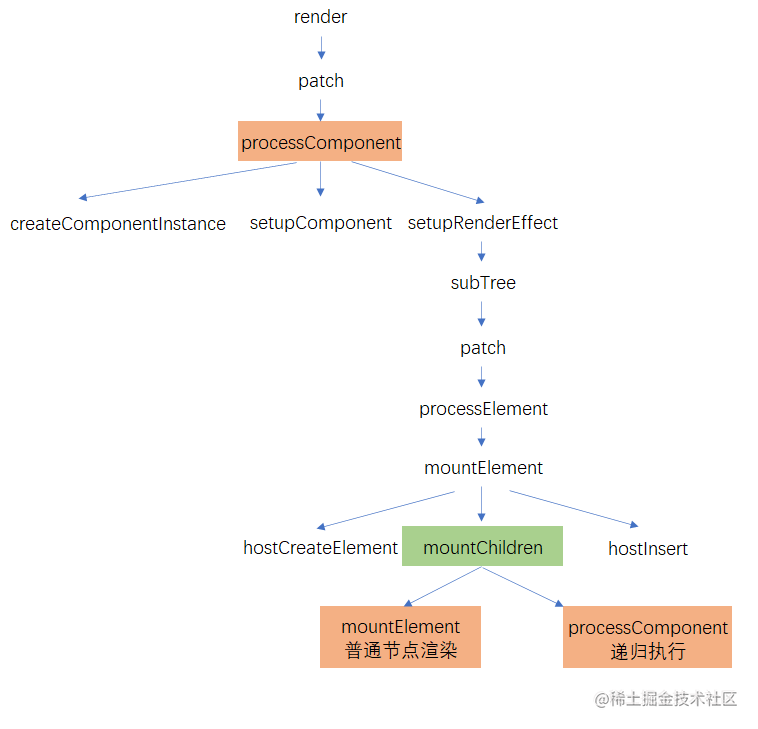
在mountElement的过程中,如果遇到mountChildren渲染过程子组件列表,普通节点会通过mountElement进行普通节点的创建和插入,组件节点会递归的执行processComponent将子组件树subTree的el插入到父节点中。这样,普通节点的el,子组件树中的el,都插入到了父节点中。依次类推,通过先子后父的方式,一层层的将节点插入到根节点中。
总结
vue组件树的渲染,是一个深度遍历的过程,从根节点开始寻找可创建真实节点的叶子节点,叶子节点完成真实节点的渲染后,再将其el交给父组件。依次类推,叶子节点将其el交给上一次中间组件,中间组件沿着树交给父级组件,最终会交给根组件。
纰漏之处在所难免,请批评指正。
最后
最近还整理一份JavaScript与ES的笔记,一共25个重要的知识点,对每个知识点都进行了讲解和分析。能帮你快速掌握JavaScript与ES的相关知识,提升工作效率。


有需要的小伙伴,可以点击下方卡片领取,无偿分享





 扫一扫
扫一扫


 632
632

 被折叠的 条评论
为什么被折叠?
被折叠的 条评论
为什么被折叠?
 到【灌水乐园】发言





