



转载自:
https://www.cnblogs.com/hwli/p/8622853.html
对于一直使用sourceinsight编辑C/C++代码的工程师们,sourceinsight是一个非常好用的编辑工具可以任意定位,跳转,回退,本人一直使用该工具做C/C++开发,sourceinsight能够满足我的大部分需求,但是有些功能没有总觉得是一个缺憾。源码链接:链接:https://pan.baidu.com/s/1DpGV75XeSpQrP1BlFbYHHg 密码:bqq6
<1>.在SourceInsight里使用"#if 0 #endif"注释,可用下面的方法添加宏插件。
- 在C:\Users\计算机名\Documents\Source Insight\Projects\Base中有个utils.em文件.打开编辑(注:最好预先备份utils.em)
- 在文档的最后添加以下代码.

 1 macro Custom_AddMacroComment()//Alt+1
 2 {    //add #if 0 #endif
 3     hwnd=GetCurrentWnd()
 4     sel=GetWndSel(hwnd)
 5     lnFirst=GetWndSelLnFirst(hwnd)
 6     lnLast=GetWndSelLnLast(hwnd)
 7     hbuf=GetCurrentBuf()
 8
 9     if (LnFirst == 0)
10     {
11         szIfStart = ""
12     }
13     else
14     {
15         szIfStart = GetBufLine(hbuf, LnFirst-1)
16     }
17
18     szIfEnd = GetBufLine(hbuf, lnLast+1)
19
20     if (szIfStart == "#if 0" && szIfEnd =="#endif")
21     {
22         DelBufLine(hbuf, lnLast+1)
23         DelBufLine(hbuf, lnFirst-1)
24         sel.lnFirst = sel.lnFirst – 1
25         sel.lnLast = sel.lnLast – 1
26     }
27     else
28     {
29         InsBufLine(hbuf, lnFirst, "#if 0")
30         InsBufLine(hbuf, lnLast+2, "#endif")
31         sel.lnFirst = sel.lnFirst + 1
32         sel.lnLast = sel.lnLast + 1
33     }
34     SetWndSel( hwnd, sel )
35 }
- 打开任意一个SI工程,点击Project->Open Project->Base,以此打开Base工程(此工程是SI的默认基础工程,如果不打开Base工程,在后面的操作中将不会显示所添加的宏),然后关闭此工程.
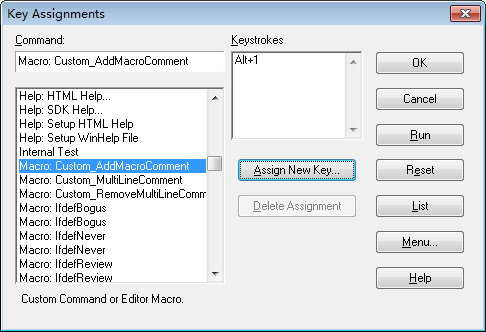
- 再打开任意一个SI工程,点击Options->Key Assignments,然后查找Custom_AddMacroComment
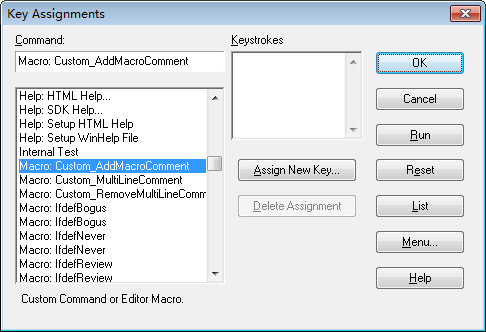
- 点击Assign New Key,此时输入键盘上想设置的快捷键(觉得Alt+X比较顺手).点击OK.
<2>.在SourceInsight里使用多行“//”注释,可用下面代码添加宏插件,方法如<1>.
 1 macro Custom_MultiLineComment()//Alt+2
 2 {   //comment multiple lines
 3     hwnd = GetCurrentWnd()
 4     selection = GetWndSel(hwnd)
 5     LnFirst = GetWndSelLnFirst(hwnd)
 6     LnLast = GetWndSelLnLast(hwnd)
 7     hbuf = GetCurrentBuf()
 8
 9     if(GetBufLine(hbuf, 0) == "//magic-number:tph85666031")
10     {
11         stop
12     }
13
14     Ln = Lnfirst
15     buf = GetBufLine(hbuf, Ln)
16     len = strlen(buf)
17
18     while(Ln <= Lnlast)
19     {
20         buf = GetBufLine(hbuf, Ln)
21         if(buf == "")
22         {
23             Ln = Ln + 1
24             continue
25            }
26
27         if(StrMid(buf, 0, 1) == "/")
28         {
29             if(StrMid(buf, 1, 2) == "/")
30             {
31                 PutBufLine(hbuf, Ln, StrMid(buf, 2, Strlen(buf)))
32             }
33         }
34
35         if(StrMid(buf,0,1) != "/")
36         {
37             PutBufLine(hbuf, Ln, Cat("//", buf))
38         }
39         Ln = Ln + 1
40     }
41
42     SetWndSel(hwnd, selection)
43 }
<3>.在SourceInsight里去除多行“//”注释,可用下面代码添加宏插件,方法如<1>.
 1 macro Custom_RemoveMultiLineComment()//Alt+3
 2 {   //Uncomment multiple lines
 3     hwnd = GetCurrentWnd()
 4     selection = GetWndSel( hwnd )
 5     lnFirst = GetWndSelLnFirst( hwnd )
 6     lnLast = GetWndSelLnLast( hwnd )
 7
 8     hbuf = GetCurrentBuf()
 9     ln = lnFirst
10     while( ln <= lnLast )
11     {
12         buf = GetBufLine( hbuf, ln )
13         len = strlen( buf )
14         if( len >= 2 )
15         {
16             start = 0
17
18             while( strmid( buf, start, start + 1 ) == CharFromAscii(32) || strmid( buf, start, start + 1 ) == CharFromAscii(9) )
19             {
20                 start = start + 1
21                 if( start >= len )
22                     break
23             }
24             if( start < len - 2 )
25             {
26                 if( strmid( buf, start, start + 2 ) == "//" )
27                 {
28                     buf2 = cat( strmid( buf, 0, start ), strmid( buf, start + 2, len ) )
29                     PutBufLine( hbuf, ln, buf2 )
30                 }
31             }
32         }
33         ln = ln + 1
34     }
35     SetWndSel( hwnd, selection )
36 }





 扫一扫
扫一扫


 8111
8111

 被折叠的 条评论
为什么被折叠?
被折叠的 条评论
为什么被折叠?
 到【灌水乐园】发言





