



WRF官网关于ncl的教程::
https://www2.mmm.ucar.edu/wrf/OnLineTutorial/Graphics/NCL/NCL_examples.php
编程语言:NCL
系统:Ubuntu 16.04.6 LTS 以及 Windows10
windows下Sublime在共享文件夹下编辑脚本,链接到run/下运行。
ln -sf /media/sf_WRF/WRFout.ncl .
1. 读取
WRF模式运行结束后会输出wrfout_d01*结果文件。利用addfile()函数打开。
可以进行批量修改文件为.nc格式,详情参考其他教程;也可以利用NCL直接进行读取。
    a = addfile("wrfout_d01_2017-06-20_00:00:00","r")
    print(a)
    printVarSummary(a)


关于文件wrfout_d01*的输出结果,大致看一眼变量和维度信息,包含wrf设定的参数信息等。
NCL: 结果文件大于2G时,需要用setfileoption()函数读。
2. 绘制
利用wrf_user_getvar()函数读取文件中的气象变量资料。
此外,简单设置绘图参数,出简图看一眼数据是否正常。
- wrf_user_getvar()函数可以将WRF Output的sigma坐标直接插值到高度层或气压层,实现垂直坐标转换,便于NCL继续处理。
  load "$NCARG_ROOT/lib/ncarg/nclscripts/csm/gsn_code.ncl"
  load "$NCARG_ROOT/lib/ncarg/nclscripts/wrf/WRFUserARW.ncl"
begin
  a = addfile("wrfout_d01_2017-06-23_00:00:00","r")
  print(a)
;## wrf_user_getvar()函数可以将WRF Output的sigma坐标直接插值到高度层
;##                  或气压层,实现垂直坐标转换,便于NCL继续处理。
  ter = wrf_user_getvar(a,"HGT",0)   ; Get terrain height for time 0

  wks = gsn_open_wks("png","test3")       ; Create a plot workstation
  opts = True                                ; Set some Basic Plot options
  opts@MainTitle = "GEOGRID FIELDS"

  res = opts                                 ; Use basic options for this field
  res@cnFillOn = True                        ; Create a color fill plot

  contour = wrf_contour(a,wks,ter,res) ; 单独contour没有画面

  pltres = True                              ; Set plot options
  mpres = True                               ; Set map options
  mpres@mpGeophysicalLineColor      = "Black"  ; Overwrite basic map settings
  mpres@mpGridLineColor             = "Black"
  mpres@mpLimbLineColor             = "Black"
  mpres@mpNationalLineColor         = "Black"
  mpres@mpPerimLineColor            = "Black"
  mpres@mpUSStateLineColor          = "Black"
  plot = wrf_map_overlays(a,wks,(/contour/),pltres,mpres)  ; Plot the data over a map background
end
输出结果图大致如下:
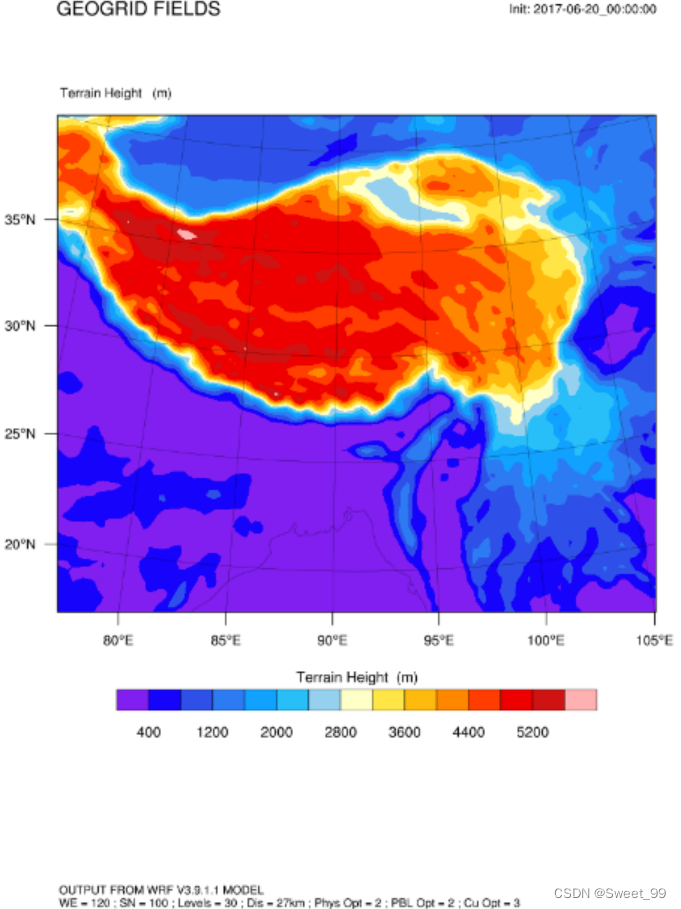
更多细化的绘图设置参考NCL官网。连续输出多个时次的图参考WRF官网对于NCL绘图的脚本实例。





 扫一扫
扫一扫


 946
946

 被折叠的 条评论
为什么被折叠?
被折叠的 条评论
为什么被折叠?
 到【灌水乐园】发言





