



 本文介绍了如何在Java项目中使用FreeMarker模板引擎配合SpringBoot发送邮件,包括依赖管理、配置文件、模板创建和发送过程。
1.什么是FreeMarker和TemplateEngine?
FreeMarker 是一款 模板引擎: 即一种基于模板和要改变的数据, 并用来生成输出文本(HTML网页,电子邮件,配置文件,源代码等)的通用工具。 它不是面向最终用户的,而是一个Java类库,是一款程序员可以嵌入他们所开发产品的组件。总结:打包html页面转换成你需要的类型(图片,PDF,电子邮件,静态页面等)
2.导入依赖
  <dependency>
            <groupId>org.freemarker</groupId>
            <artifactId>freemarker</artifactId>
            <version>2.3.28</version>
        </dependency>
        <!--  邮箱maven    -->
        <dependency>
            <groupId>org.springframework.boot</groupId>
            <artifactId>spring-boot-starter-mail</artifactId>
        </dependency>
        <!--  TemplateEngine maven    -->
        <dependency>
            <groupId>org.springframework.boot</groupId>
            <artifactId>spring-boot-starter-thymeleaf</artifactId>
        </dependency>
        <dependency>
            <groupId>org.thymeleaf</groupId>
            <artifactId>thymeleaf-spring5</artifactId>
        </dependency>
        <dependency>
            <groupId>org.thymeleaf.extras</groupId>
            <artifactId>thymeleaf-extras-java8time</artifactId>
        </dependency>
 <dependency>
	<groupId>com.sun.mail</groupId>
	<artifactId>javax.mail</artifactId>
</dependency>
//糊涂

<dependency>
    <groupId>cn.hutool</groupId>
    <artifactId>hutool-all</artifactId>
    <version>5.8.26</version>
</dependency>
3.创建文件mail.setting 推荐使用糊涂的文件配置
# 邮件服务器的SMTP地址,可选,默认为smtp.<发件人邮箱后缀>
host = smtp.qq.com
# 邮件服务器的SMTP端口,可选,默认25
port = 25
# 发件人(必须正确,否则发送失败)
from = 909411787@qq.com
# 用户名,默认为发件人邮箱前缀
user = 909411787@qq.com
# 密码(注意,某些邮箱需要为SMTP服务单独设置授权码,详情查看相关帮助)
pass =
4.application.yml设置 使用springboot的
  mail:
    host: smtp.qq.com    #邮箱服务器地址 此处为QQ邮箱的
    username: xxx@qq.com   #邮箱账号
    password: xxxxxx            #邮箱密码,此处为QQ邮箱授权码,下图有介绍
    default-encoding: utf-8    #默认编码
    from: xxx@qq.com  #邮件发件人
    properties.mail.smtp.starttls.enable: true
    properties.mail.smtp.starttls.required: true
    properties.mail.smtp.ssl.enable: true
  thymeleaf:
    prefix: classpath:/mail/  #prefix:指定模板所在的目录
    check-template-location: true  #check-tempate-location: 检查模板路径是否存在
    cache: false  #cache: 是否缓存,开发模式下设置为false,避免改了模板还要重启服务器,线上设置为true,可以提高性能。
    suffix: .html
    mode: HTML5
5.创建模板 名字xxx.html 放在资源目录里面
${} 就是形参的意思。需要传入参数
<!DOCTYPE html>
<html xmlns:th="http://www.thymeleaf.org">
<head>
    <meta charset="utf-8">
    <meta http-equiv="X-UA-Compatible" content="IE=edge">
    <meta name="description" content="email code">
    <meta name="viewport" content="width=device-width, initial-scale=1">
</head>
<!--邮箱验证码模板-->
<body>
<div style="background-color:#ECECEC; padding: 35px;">
    <table cellpadding="0" align="center"
           style="width: 800px;height: 100%; margin: 0px auto; text-align: left; position: relative; border-top-left-radius: 5px; border-top-right-radius: 5px; border-bottom-right-radius: 5px; border-bottom-left-radius: 5px; font-size: 14px; font-family:微软雅黑, 黑体; line-height: 1.5; box-shadow: rgb(153, 153, 153) 0px 0px 5px; border-collapse: collapse; background-position: initial initial; background-repeat: initial initial;background:#fff;">
        <tbody>
        <tr>
            <th valign="middle"
                style="height: 25px; line-height: 25px; padding: 15px 35px; border-bottom-width: 1px; border-bottom-style: solid; border-bottom-color: RGB(148,0,211); background-color: RGB(148,0,211); border-top-left-radius: 5px; border-top-right-radius: 5px; border-bottom-right-radius: 0px; border-bottom-left-radius: 0px;">
                <font  face="微软雅黑" size="5"  th:text="${subject}"  style="color: rgb(255, 255, 255); "></font>
            </th>
        </tr>
        <tr>
            <td style="word-break:break-all">
                <div style="padding:25px 35px 40px; background-color:#fff;opacity:0.8;">

                    <h2 style="margin: 5px 0px; ">
                        <font color="#333333" style="line-height: 20px; ">
                            <font style="line-height: 22px; " size="4">
                                尊敬的用户:</font>
                        </font>
                    </h2>
                    <!-- 中文 -->
                    <p th:text="${context}"><font color="#ff8c00"></font></p><br>

                    <p ><img  th:src="${imgasPath}" src=""/></p>
                    <!-- 英文 -->
                    <h2 style="margin: 5px 0px; ">
                        <font color="#333333" style="line-height: 20px; ">
                            <font style="line-height: 22px; " size="4">
                                Dear user:</font>
                        </font>
                    </h2>
                    <p>Hello! Thanks for using *****, your account is being authenticated by email, the
                        verification code is:<font color="#ff8c00">{0}</font>, valid for 30 minutes. Please fill in the verification code as soon as
                        possible!</p>
                    <div style="width:100%;margin:0 auto;">
                        <div style="padding:10px 10px 0;border-top:1px solid #ccc;color:#747474;margin-bottom:20px;line-height:1.3em;font-size:12px;">
                            <p>****团队</p>
                            <p>联系我们:********</p>
                            <br>
                            <p>此为系统邮件,请勿回复<br>
                                Please do not reply to this system email
                            </p>
                            <!--<p>©***</p>-->
                        </div>
                    </div>
                </div>
            </td>
        </tr>
        </tbody>
    </table>
</div>
<script>
</script>
</body>
</html>
6.随便写一个实参或者形参方法 但是 mail 必须对照你创建html的前缀!!!
不然无法识别
/*     */   public String replace_subject(String subject, String images, String content, String userName) {
/* 382 */     Context context = new Context(); //一个集合
/* 383 */     context.setVariable("subject", subject);//与模板的内容对照
/* 384 */     context.setVariable("imgasPath", images);
/* 385 */     context.setVariable("context", content);
/* 386 */     context.setVariable("userName", userName);
/*     */
/* 388 */     return this.templateEngine.process("mail", (IContext)context);
/*     */   }
6.创建一个测试方法 content 就是你的模板内容
这是hutool的方法!!!
   String type = MailUtil.send("邮箱号码", "主题", content, true, new File[] { FileUtil.file("发生附件") });
/* 351 */               System.out.println(type);
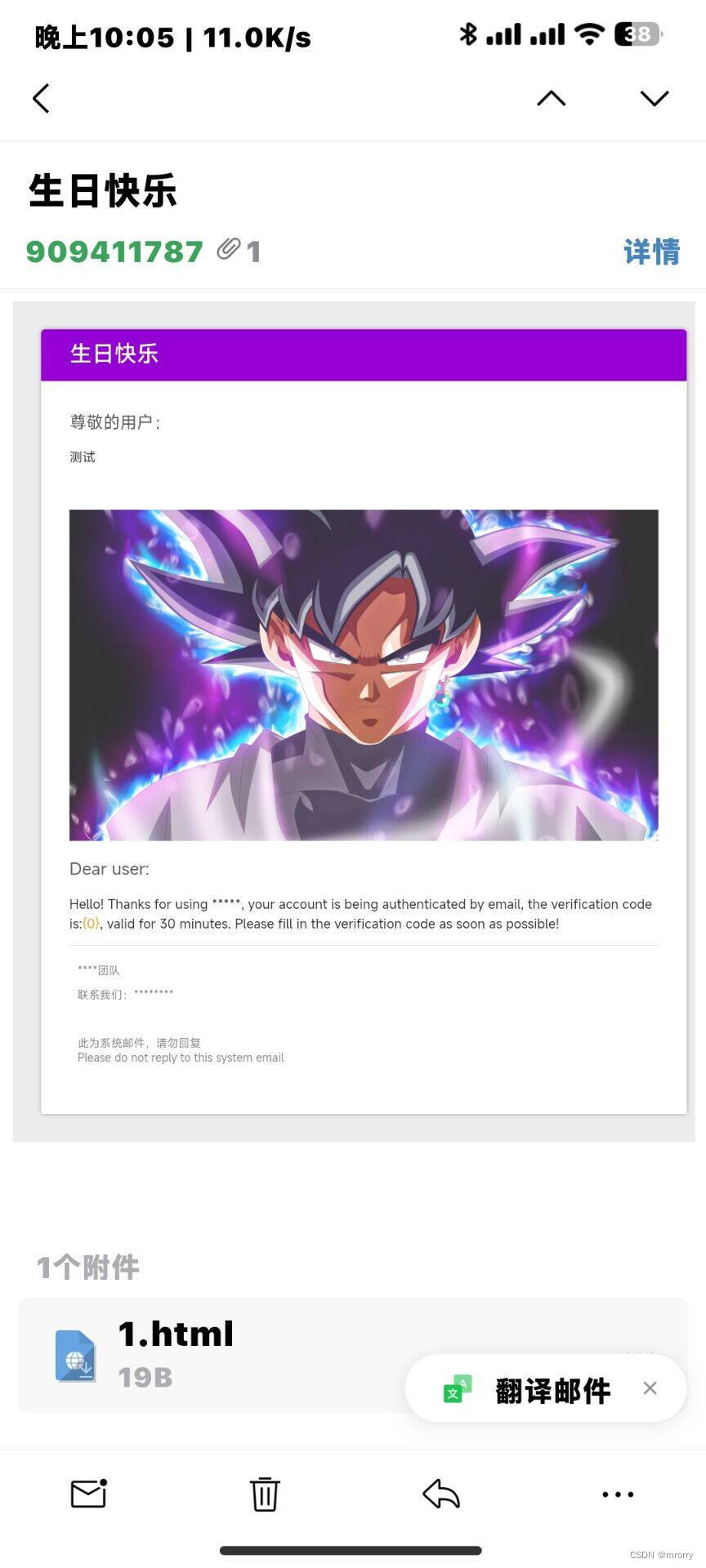
7.发生成功





 扫一扫
扫一扫


 864
864

 被折叠的 条评论
为什么被折叠?
被折叠的 条评论
为什么被折叠?
 到【灌水乐园】发言





