


1.可以拖到播放
2.可以暂停,进度调随着音乐的起伏而变化
3.使用的vue+js开发
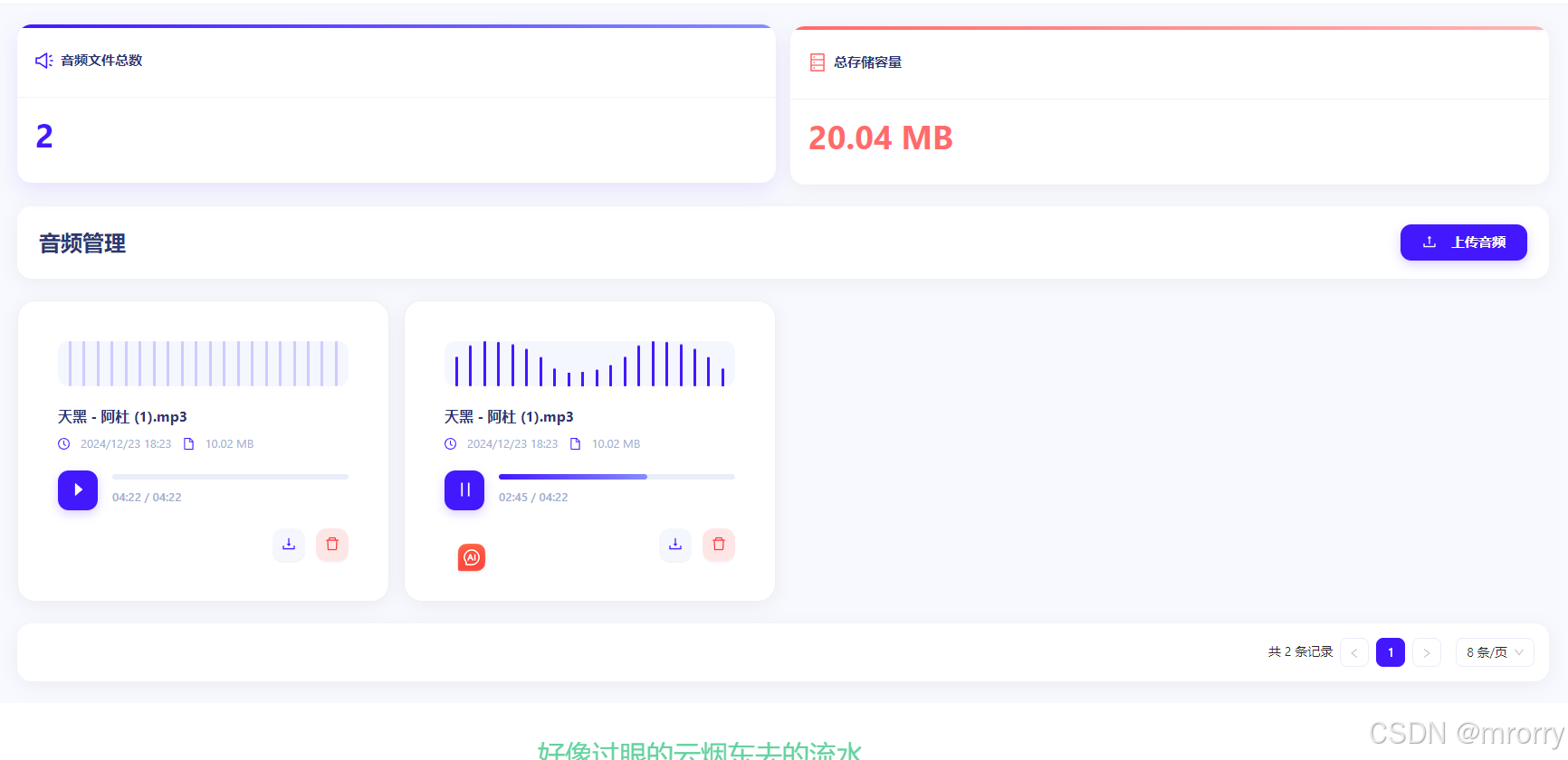
3.page接口给我改过可以使用模拟数据
{
"code": 200,
"msg": "操作成功",
"data": {
"records": [
{
"audioId": "1871139635547459581",
"createUser": "100001",
"title": null,
"artist": null,
"album": null,
"genre": null,
"filePath": "http://lingchuan-pod.oss-cn-shanghai.aliyuncs.com/天黑 - 阿杜 (1).mp3",
"fileName": "天黑 - 阿杜 (1).mp3",
"fileSize": 10508581,
"duration": 262,
"format": null,
"bitRate": null,
"sampleRate": null,
"createdTime": "2024-12-23 18:23:48",
"updatedTime": "2024-12-23 18:26:54",
"isDeleted": false
},
{
"audioId": "1871139635547459586",
"createUser": "100001",
"title": null,
"artist": null,
"album": null,
"genre": null,
"filePath": "http://lingchuan-pod.oss-cn-shanghai.aliyuncs.com/天黑 - 阿杜 (1).mp3",
"fileName": "天黑 - 阿杜 (1).mp3",
"fileSize": 10508581,
"duration": 262,
"format": null,
"bitRate": null,
"sampleRate": null,
"createdTime": "2024-12-23 18:23:48",
"updatedTime": "2024-12-23 18:23:48",
"isDeleted": false
}
],
"total": 2,
"size": 10,
"current": 1,
"orders": [],
"optimizeCountSql": true,
"searchCount": true,
"maxLimit": null,
"countId": null,
"pages": 1
}
}
代码
<template>
<div class="audio-files-container">
<!-- Statistics Cards -->
<a-row :gutter="16" class="stats-section">
<a-col :span="12">
<a-card class="stats-card files-card">
<template #title>
<sound-outlined /> 音频文件总数
</template>
<div class="stats-content">
<div class="stats-value">{{ audioStats.totalFiles }}</div>
<!-- <div class="stats-trend">
<span class="trend-label">较上月</span>
<span class="trend-value up">
<arrow-up-outlined />
12.5%
</span>
</div>
<div class="stats-chart">
<div v-for="i in 7" :key="i" class="chart-bar" :style="{ height: Math.random() * 60 + 20 + '%' }"></div>
</div> -->
</div>
</a-card>
</a-col>
<a-col :span="12">
<a-card class="stats-card storage-card">
<template #title>
<database-outlined /> 总存储容量
</template>
<div class="stats-content">
<div class="stats-value">{{ formatSize(audioStats.totalSize) }}</div>
<!-- <div class="stats-info">
<div class="storage-progress">
<div class="progress-track">
<div class="progress-fill" :style="{ width: '78%' }"></div>
</div>
<span class="progress-text">已使用 78%</span>
</div>
<div class="storage-detail">
<div class="detail-item">
<folder-outlined />
<span>可用空间</span>
<span class="value">27.5 MB</span>
</div>
<div class="detail-item">
<cloud-outlined />
<span>总容量</span>
<span class="value">150 MB</span>
</div>
</div>
</div> -->
</div>
</a-card>
</a-col>
</a-row>
<!-- Header Section -->
<div class="header">
<h2>音频管理</h2>
<a-upload
:customRequest="handleUpload"
:showUploadList="false"
accept="audio/*"
>
<a-button type="primary" class="upload-btn">
<upload-outlined /> 上传音频
</a-button>
</a-upload>
</div>
<!-- Audio Files Grid -->
<div class="audio-grid">
<a-spin :spinning="loading">
<template v-if="paginatedFiles && paginatedFiles.length">
<a-row :gutter="[16, 16]">
<a-col :xs="24" :sm="12" :md="8" :lg="6" v-for="file in paginatedFiles" :key="file.id">
<a-card class="audio-card" :hoverable="true">
<div class="audio-card-content">
<!-- Waveform Visualization -->
<div class="waveform" :class="{ 'playing': currentPlaying === file.id }">
<div class="wave-bar" v-for="n in 20" :key="n" :style="{ '--i': n }"></div>
</div>
<!-- File Info -->
<div class="file-info">
<h4>{{ file.name }}</h4>
<p>
<clock-circle-outlined /> {{ formatDateTime(file.createTime) }}
<file-outlined class="info-icon" /> {{ formatSize(file.size) }}
</p>
</div>
<!-- Audio Player -->
<div class="audio-player">
<audio
:src="file.url"
:id="'audio-' + file.id"
@timeupdate="updateProgress($event, file.id)"
@ended="handleAudioEnd(file.id)"
@loadedmetadata="handleMetadata($event, file.id)"
></audio>
<div class="player-controls">
<a-button
type="primary"
shape="circle"
class="play-btn"
@click="togglePlay(file.id)"
>
<pause-outlined v-if="currentPlaying === file.id" />
<caret-right-outlined v-else />
</a-button>
<div class="progress-wrapper">
<div
class="progress-bar"
@click="seekAudio($event, file.id)"
@mousedown="startDragging($event, file.id)"
>
<div
class="progress"
:style="{ width: progressBars[file.id] + '%' }"
>
<div class="progress-handle"></div>
</div>
</div>
<span class="time-display">{{ formatTime(getCurrentTime(file.id)) }} / {{ formatDuration(file.duration) }}</span>
</div>
</div>
</div>
<!-- Action Buttons -->
<div class="action-buttons">
<a-tooltip title="下载">
<a-button
type="primary"
ghost
shape="circle"
@click="handleDownload(file)"
>
<download-outlined />
</a-button>
</a-tooltip>
<a-tooltip title="删除">
<a-popconfirm
title="确定要删除这个音频文件吗?"
@confirm="handleDelete(file.id)"
>
<a-button type="primary" danger ghost shape="circle">
<delete-outlined />
</a-button>
</a-popconfirm>
</a-tooltip>
</div>
</div>
</a-card>
</a-col>
</a-row>
</template>
<!-- Empty State -->
<a-empty
v-else
class="empty-state"
description="暂无音频文件"
>
<template #image>
<sound-outlined class="empty-icon" />
</template>
<a-upload
:customRequest="handleUpload"
:showUploadList="false"
accept="audio/*"
>
<a-button type="primary">
<upload-outlined /> 上传音频
</a-button>
</a-upload>
</a-empty>
</a-spin>
<!-- 分页组件 -->
<div class="pagination-wrapper">
<a-pagination
v-model:current="currentPage"
:total="totalCount"
:pageSize="pageSize"
:showTotal="total => `共 ${total} 条记录`"
:showSizeChanger="true"
:pageSizeOptions="['8', '16', '24', '32']"
@change="handlePageChange"
@showSizeChange="handleSizeChange"
/>
</div>
</div>
</div>
</template>
<script>
import { defineComponent, ref, reactive, computed } from 'vue'
import {
UploadOutlined,
SoundOutlined,
DeleteOutlined,
DownloadOutlined,
CaretRightOutlined,
PauseOutlined,
DatabaseOutlined,
ClockCircleOutlined,
FileOutlined,
ArrowUpOutlined,
FolderOutlined,
CloudOutlined
} from '@ant-design/icons-vue'
import { message } from 'ant-design-vue'
import appAudioFilesApi from '@/api/biz/audiofiles/appAudioFilesApi'
export default defineComponent({
name: 'AudioFiles',
components: {
UploadOutlined,
SoundOutlined,
DeleteOutlined,
DownloadOutlined,
CaretRightOutlined,
PauseOutlined,
DatabaseOutlined,
ClockCircleOutlined,
FileOutlined,
ArrowUpOutlined,
FolderOutlined,
CloudOutlined
},
setup() {
const loading = ref(false)
const audioFiles = ref([])
const totalCount = ref(0)
const currentPlaying = ref(null)
const progressBars = reactive({})
const durations = reactive({})
const currentTimes = reactive({})
const isDragging = ref(false)
// 计算音频统计信息
const audioStats = computed(() => {
const stats = {
totalFiles: audioFiles.value.length,
totalSize: audioFiles.value.reduce((acc, file) => acc + file.size, 0),
totalDuration: audioFiles.value.reduce((acc, file) => acc + file.duration, 0),
categories: {}
}
// 统计各类别的文件数量
audioFiles.value.forEach(file => {
if (!stats.categories[file.category]) {
stats.categories[file.category] = 0
}
stats.categories[file.category]++
})
return stats
})
// 获取音频文件列表
const fetchAudioFiles = async () => {
try {
console.log('获取音频文件列表')
loading.value = true
const res = await appAudioFilesApi.page({
current: currentPage.value,
size: pageSize.value
})
console.log('API响应数据:', res)
if (res && res.records) {
const mappedFiles = res.records.map(item => ({
id: item.audioId,
name: item.fileName,
size: item.fileSize,
url: item.filePath,
createTime: item.createdTime,
duration: item.duration || 0
}))
console.log('转换后的文件数据:', mappedFiles)
audioFiles.value = mappedFiles
totalCount.value = res.total
console.log('当前文件列表:', audioFiles.value)
} else {
console.warn('API返回数据格式不正确:', res)
audioFiles.value = []
totalCount.value = 0
}
} catch (error) {
console.error('获取音频文件列表失败:', error)
message.error('获取音频文件列表失败')
audioFiles.value = []
totalCount.value = 0
} finally {
loading.value = false
}
}
// 格式化时间显示
const formatTime = (seconds) => {
if (!seconds) return '00:00'
const mins = Math.floor(seconds / 60)
const secs = Math.floor(seconds % 60)
return `${mins.toString().padStart(2, '0')}:${secs.toString().padStart(2, '0')}`
}
// 格式化持续时间(支持小时显示)
const formatDuration = (seconds) => {
if (!seconds) return '未知时长'
const hours = Math.floor(seconds / 3600)
const minutes = Math.floor((seconds % 3600) / 60)
const remainingSeconds = Math.floor(seconds % 60)
if (hours > 0) {
return `${hours}:${minutes.toString().padStart(2, '0')}:${remainingSeconds.toString().padStart(2, '0')}`
}
return `${minutes.toString().padStart(2, '0')}:${remainingSeconds.toString().padStart(2, '0')}`
}
// 格式化文件大小
const formatSize = (bytes) => {
if (bytes === 0) return '0 B'
const k = 1024
const sizes = ['B', 'KB', 'MB', 'GB']
const i = Math.floor(Math.log(bytes) / Math.log(k))
return parseFloat((bytes / Math.pow(k, i)).toFixed(2)) + ' ' + sizes[i]
}
// 格式化日期时间
const formatDateTime = (dateTimeStr) => {
const date = new Date(dateTimeStr)
return date.toLocaleString('zh-CN', {
year: 'numeric',
month: '2-digit',
day: '2-digit',
hour: '2-digit',
minute: '2-digit'
})
}
// 获取音频时长
const getDuration = (fileId) => {
return durations[fileId] || 0
}
// 获取当前播放时间
const getCurrentTime = (fileId) => {
return currentTimes[fileId] || 0
}
// 处理音频元数据加载
const handleMetadata = (event, fileId) => {
durations[fileId] = event.target.duration
}
// 更新进度条
const updateProgress = (event, fileId) => {
if (!isDragging.value) {
const { currentTime, duration } = event.target
progressBars[fileId] = (currentTime / duration) * 100
currentTimes[fileId] = currentTime
}
}
// 开始拖动进度条
const startDragging = (event, fileId) => {
isDragging.value = true
document.addEventListener('mousemove', (e) => handleDrag(e, fileId))
document.addEventListener('mouseup', stopDragging)
}
// 处理进度条拖动
const handleDrag = (event, fileId) => {
if (!isDragging.value) return
const progressBar = document.querySelector(`#audio-${fileId} + .player-controls .progress-bar`)
if (!progressBar) return
const rect = progressBar.getBoundingClientRect()
const percentage = Math.max(0, Math.min(100, ((event.clientX - rect.left) / rect.width) * 100))
progressBars[fileId] = percentage
const audio = document.getElementById(`audio-${fileId}`)
if (audio) {
audio.currentTime = (percentage / 100) * audio.duration
}
}
// 停止拖动进度条
const stopDragging = () => {
isDragging.value = false
document.removeEventListener('mousemove', handleDrag)
document.removeEventListener('mouseup', stopDragging)
}
// 点击进度条跳转
const seekAudio = (event, fileId) => {
const progressBar = event.currentTarget
const rect = progressBar.getBoundingClientRect()
const percentage = ((event.clientX - rect.left) / rect.width) * 100
const audio = document.getElementById(`audio-${fileId}`)
if (audio) {
const newTime = (percentage / 100) * audio.duration
audio.currentTime = newTime
progressBars[fileId] = percentage
}
}
// 切换播放/暂停
const togglePlay = async (fileId) => {
const audio = document.getElementById(`audio-${fileId}`)
if (!audio) return
if (currentPlaying.value === fileId) {
if (audio.paused) {
await audio.play()
} else {
audio.pause()
currentPlaying.value = null
}
} else {
// 停止当前播放的音频
if (currentPlaying.value) {
const currentAudio = document.getElementById(`audio-${currentPlaying.value}`)
if (currentAudio) {
currentAudio.pause()
currentAudio.currentTime = 0
progressBars[currentPlaying.value] = 0
}
}
currentPlaying.value = fileId
await audio.play()
}
}
// 音频播放结束
const handleAudioEnd = (fileId) => {
currentPlaying.value = null
progressBars[fileId] = 0
}
// 处理文件上传
const handleUpload = async ({ file }) => {
const formData = new FormData()
formData.append('file', file)
try {
loading.value = true
// 模拟上传
await new Promise(resolve => setTimeout(resolve, 1000))
// 模拟新增文件
const newFile = {
id: Date.now(),
name: file.name,
size: file.size,
createTime: new Date().toISOString().split('T')[0],
duration: 0,
type: 'unknown',
url: URL.createObjectURL(file),
category: 'Unknown',
lastModified: new Date().toISOString().split('T')[0]
}
audioFiles.value = [newFile, ...audioFiles.value]
message.success('上传成功')
} catch (error) {
message.error('上传失败')
} finally {
loading.value = false
}
}
// 处理文件下载
const handleDownload = (file) => {
const link = document.createElement('a')
link.href = file.url
link.download = file.name
document.body.appendChild(link)
link.click()
document.body.removeChild(link)
}
// 处理文件删除
const handleDelete = async (id) => {
try {
loading.value = true
await appAudioFilesApi.delete([{ audioId: id }])
message.success('删除成功')
await fetchAudioFiles()
} catch (error) {
message.error('删除失败')
console.error('Error deleting audio file:', error)
} finally {
loading.value = false
}
}
// 分页相关
const currentPage = ref(1)
const pageSize = ref(8)
// 计算分页后的数据
const paginatedFiles = computed(() => {
console.log('paginatedFiles computed被触发, audioFiles:', audioFiles.value)
return audioFiles.value
})
// 页码改变处理
const handlePageChange = (page) => {
currentPage.value = page
fetchAudioFiles()
}
// 每页条数改变处理
const handleSizeChange = (current, size) => {
pageSize.value = size
currentPage.value = 1
fetchAudioFiles()
}
// 初始化
const init = async () => {
await fetchAudioFiles()
console.log('初始分页')
}
init()
return {
loading,
audioFiles,
currentPlaying,
progressBars,
audioStats,
formatSize,
formatTime,
formatDuration,
getDuration,
getCurrentTime,
handleMetadata,
updateProgress,
seekAudio,
togglePlay,
handleAudioEnd,
handleUpload,
handleDownload,
handleDelete,
startDragging,
formatDateTime,
currentPage,
pageSize,
totalCount,
paginatedFiles,
handlePageChange,
handleSizeChange,
}
}
})
</script>
<style lang="less" scoped>
.audio-files-container {
padding: 24px;
font-family: -apple-system, BlinkMacSystemFont, 'Segoe UI', Roboto, 'Helvetica Neue', Arial, sans-serif;
background: #f8f9fe;
.stats-section {
margin-bottom: 24px;
.stats-card {
background: #fff;
border: none;
border-radius: 16px;
box-shadow: 0 4px 20px rgba(0, 0, 0, 0.05);
overflow: hidden;
position: relative;
height: 100%;
&.files-card::before {
content: '';
position: absolute;
top: 0;
left: 0;
right: 0;
height: 4px;
background: linear-gradient(90deg, #4318FF, #868CFF);
}
&.storage-card::before {
content: '';
position: absolute;
top: 0;
left: 0;
right: 0;
height: 4px;
background: linear-gradient(90deg, #FF6B6B, #FFB4B4);
}
&:hover {
transform: translateY(-2px);
box-shadow: 0 8px 24px rgba(67, 24, 255, 0.1);
}
:deep(.ant-card-head) {
border-bottom: 1px solid #f0f2f5;
padding: 16px 20px;
min-height: 48px;
.ant-card-head-title {
font-size: 15px;
font-weight: 600;
color: #2B3674;
display: flex;
align-items: center;
gap: 8px;
.anticon {
font-size: 20px;
}
}
}
&.files-card {
.anticon {
color: #4318FF;
}
}
&.storage-card {
.anticon {
color: #FF6B6B;
}
}
:deep(.ant-card-body) {
padding: 20px;
}
.stats-content {
position: relative;
z-index: 1;
}
.stats-value {
font-size: 36px;
font-weight: 700;
line-height: 1.2;
margin-bottom: 12px;
}
&.files-card .stats-value {
color: #4318FF;
}
&.storage-card .stats-value {
color: #FF6B6B;
}
.stats-trend {
display: flex;
align-items: center;
gap: 8px;
margin-bottom: 16px;
.trend-label {
color: #A3AED0;
font-size: 13px;
}
.trend-value {
display: flex;
align-items: center;
gap: 4px;
font-size: 13px;
font-weight: 600;
padding: 4px 8px;
border-radius: 6px;
&.up {
color: #00B69B;
background: rgba(0, 182, 155, 0.1);
}
&.down {
color: #FF6B6B;
background: rgba(255, 107, 107, 0.1);
}
.anticon {
font-size: 12px;
}
}
}
.stats-chart {
display: flex;
align-items: flex-end;
gap: 4px;
height: 40px;
margin-top: 16px;
.chart-bar {
flex: 1;
background: rgba(67, 24, 255, 0.2);
border-radius: 4px 4px 0 0;
transition: all 0.3s ease;
&:hover {
background: #4318FF;
}
}
}
.stats-info {
margin-top: 16px;
}
.storage-progress {
margin-bottom: 16px;
.progress-track {
height: 8px;
background: #F4F7FE;
border-radius: 4px;
overflow: hidden;
margin-bottom: 8px;
.progress-fill {
height: 100%;
background: linear-gradient(90deg, #FF6B6B, #FFB4B4);
border-radius: 4px;
transition: width 0.3s ease;
}
}
.progress-text {
font-size: 13px;
color: #A3AED0;
}
}
.storage-detail {
display: flex;
flex-direction: column;
gap: 12px;
.detail-item {
display: flex;
align-items: center;
gap: 8px;
color: #2B3674;
font-size: 13px;
.anticon {
font-size: 16px;
}
.value {
margin-left: auto;
font-weight: 600;
}
}
}
}
}
.header {
display: flex;
justify-content: space-between;
align-items: center;
margin-bottom: 24px;
padding: 20px 24px;
background: #fff;
border-radius: 16px;
box-shadow: 0 4px 20px rgba(0, 0, 0, 0.05);
h2 {
margin: 0;
font-size: 24px;
font-weight: 700;
color: #2B3674;
}
.upload-btn {
height: 40px;
padding: 0 24px;
font-size: 15px;
font-weight: 600;
border-radius: 12px;
background: #4318FF;
border: none;
color: #fff;
box-shadow: 0 4px 12px rgba(67, 24, 255, 0.2);
transition: all 0.3s ease;
&:hover {
transform: translateY(-2px);
background: #5425FF;
box-shadow: 0 6px 16px rgba(67, 24, 255, 0.3);
}
.anticon {
font-size: 16px;
margin-right: 8px;
}
}
}
.audio-grid {
.audio-card {
background: #fff;
border-radius: 20px;
box-shadow: 0 4px 20px rgba(0, 0, 0, 0.05);
overflow: hidden;
transition: all 0.3s cubic-bezier(0.4, 0, 0.2, 1);
&:hover {
transform: translateY(-4px);
box-shadow: 0 8px 24px rgba(67, 24, 255, 0.1);
}
.audio-card-content {
padding: 20px;
}
.waveform {
display: flex;
align-items: center;
justify-content: space-between;
height: 50px;
margin-bottom: 20px;
padding: 0 12px;
background: #F4F7FE;
border-radius: 12px;
.wave-bar {
width: 3px;
height: 100%;
background: rgba(67, 24, 255, 0.2);
border-radius: 4px;
transform-origin: bottom;
animation: none;
}
&.playing .wave-bar {
background: #4318FF;
animation: wave 1.2s ease infinite;
animation-delay: calc(var(--i) * 0.1s);
}
}
.file-info {
margin-bottom: 20px;
h4 {
margin: 0 0 8px;
font-size: 16px;
font-weight: 700;
color: #2B3674;
white-space: nowrap;
overflow: hidden;
text-overflow: ellipsis;
}
p {
margin: 0;
color: #A3AED0;
font-size: 13px;
display: flex;
align-items: center;
gap: 12px;
.anticon {
color: #4318FF;
}
}
}
.audio-player {
margin-bottom: 20px;
.player-controls {
display: flex;
align-items: center;
gap: 16px;
.play-btn {
flex-shrink: 0;
width: 44px;
height: 44px;
border-radius: 12px;
background: #4318FF;
border: none;
color: #fff;
font-size: 20px;
display: flex;
align-items: center;
justify-content: center;
transition: all 0.3s ease;
box-shadow: 0 4px 12px rgba(67, 24, 255, 0.2);
&:hover {
background: #5425FF;
transform: scale(1.05);
box-shadow: 0 6px 16px rgba(67, 24, 255, 0.3);
}
.anticon {
margin-right: -2px;
}
}
.progress-wrapper {
flex-grow: 1;
.progress-bar {
height: 6px;
background: #E9EDF7;
border-radius: 3px;
cursor: pointer;
position: relative;
margin-bottom: 8px;
.progress {
height: 100%;
background: linear-gradient(90deg, #4318FF, #868CFF);
border-radius: 3px;
position: relative;
transition: width 0.1s linear;
.progress-handle {
width: 16px;
height: 16px;
background: #fff;
border: 3px solid #4318FF;
border-radius: 50%;
position: absolute;
right: -8px;
top: 50%;
transform: translateY(-50%);
display: none;
box-shadow: 0 2px 8px rgba(67, 24, 255, 0.3);
}
}
&:hover .progress-handle {
display: block;
}
}
.time-display {
font-size: 13px;
color: #A3AED0;
font-weight: 500;
font-variant-numeric: tabular-nums;
}
}
}
}
.action-buttons {
display: flex;
justify-content: flex-end;
gap: 12px;
.ant-btn {
border-radius: 12px;
width: 36px;
height: 36px;
display: flex;
align-items: center;
justify-content: center;
transition: all 0.3s ease;
font-size: 16px;
border: none;
background: #F4F7FE;
color: #4318FF;
&:hover {
transform: scale(1.1);
background: #4318FF;
color: #fff;
box-shadow: 0 4px 12px rgba(67, 24, 255, 0.2);
}
&.ant-btn-dangerous {
background: #FFE6E6;
color: #FF3B3B;
&:hover {
background: #FF3B3B;
color: #fff;
box-shadow: 0 4px 12px rgba(255, 59, 59, 0.2);
}
}
}
}
}
}
.pagination-wrapper {
margin-top: 24px;
padding: 16px;
background: #fff;
border-radius: 16px;
box-shadow: 0 4px 20px rgba(0, 0, 0, 0.05);
display: flex;
justify-content: flex-end;
align-items: center;
:deep(.ant-pagination) {
.ant-pagination-item {
border-radius: 8px;
border: 1px solid #E9EDF7;
&:hover {
border-color: #4318FF;
a {
color: #4318FF;
}
}
&-active {
background: #4318FF;
border-color: #4318FF;
a {
color: #fff;
}
&:hover {
background: #5425FF;
a {
color: #fff;
}
}
}
}
.ant-pagination-prev,
.ant-pagination-next {
.ant-pagination-item-link {
border-radius: 8px;
border: 1px solid #E9EDF7;
&:hover {
border-color: #4318FF;
color: #4318FF;
}
}
}
.ant-select {
.ant-select-selector {
border-radius: 8px;
border: 1px solid #E9EDF7;
}
&:hover {
.ant-select-selector {
border-color: #4318FF;
}
}
}
.ant-pagination-options-quick-jumper {
input {
border-radius: 8px;
border: 1px solid #E9EDF7;
&:hover,
&:focus {
border-color: #4318FF;
}
}
}
}
}
}
@keyframes wave {
0%, 100% {
transform: scaleY(0.3);
}
50% {
transform: scaleY(1);
}
}
@media (max-width: 768px) {
.audio-files-container {
padding: 16px;
.stats-section {
margin-bottom: 16px;
}
.header {
flex-direction: column;
gap: 16px;
align-items: flex-start;
padding: 16px;
}
.audio-card {
.player-controls {
flex-direction: column;
gap: 12px;
.play-btn {
width: 40px;
height: 40px;
font-size: 18px;
}
}
}
}
}
</style>





 扫一扫
扫一扫


 1万+
1万+

 被折叠的 条评论
为什么被折叠?
被折叠的 条评论
为什么被折叠?
 到【灌水乐园】发言





