


一、对同一文件进行读写操作的注意事项
今天,使用FileReader和FileWriter实现对同一个文件进行读取内容、替换字符、再重新写入时踩到了一个坑。
先看踩坑代码:
import java.io.File;
import java.io.FileReader;
import java.io.FileWriter;
import java.io.IOException;
public class FileOperate {
public static void main(String[] args) {
String s1 = "Java";
String s2 = "World";
File file = new File("D:\\demo\\example.txt");
StringBuilder stringBuilder = new StringBuilder();
try (FileReader reader = new FileReader(file);
FileWriter writer = new FileWriter(file);) {
// 读入
char[] chars = new char[1024];
int len;
while ((len = reader.read(chars)) != -1) {
stringBuilder.append(chars, 0, len);
}
// 替换
System.out.println("替换前:" + stringBuilder);
String string = stringBuilder.toString();
String temp1 = string.replaceAll(s1, "Python");
String temp2 = temp1.replaceAll(s2, "globe");
System.out.println("替换后:" + temp2);
// 新写入
writer.write(temp2);
} catch (IOException e) {
e.printStackTrace();
}
}
}
example.txt文件内容:

运行结果:
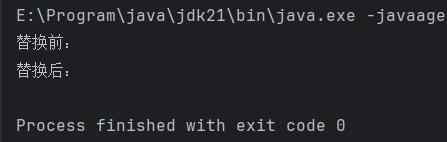
断点调试发现,程序根本没有读到字符串。
原因:FileWriter writer = new FileWriter(file)进行创建输出字符流对象时,默认是覆盖写入模式,在创建对象时就对文件进行了清空操作,而并非调用write()方法写入时才清空,因此,程序就无法正常读取到文件内原本的字符串(不仅是字符流的输出流对象如此,字节流亦是如此)。
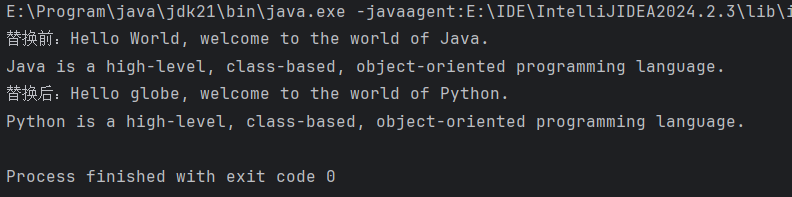
明白原因后,只需在程序读取文件内容后,再进行FileWriter对象的创建即可。(本想偷个懒,在一个try-with-resources语句中同时创建FileReader和FileWriter对象,没想到踩个坑)
修改后的代码:
import java.io.File;
import java.io.FileReader;
import java.io.FileWriter;
import java.io.IOException;
public class FileOperate {
public static void main(String[] args) {
String s1 = "Java";
String s2 = "World";
File file = new File("D:\\demo\\example.txt");
StringBuilder stringBuilder = new StringBuilder();
try (FileReader reader = new FileReader(file)) {
char[] chars = new char[1024];
int len;
while ((len = reader.read(chars)) != -1) {
stringBuilder.append(chars, 0, len);
}
} catch (IOException e) {
e.printStackTrace();
}
System.out.println("替换前:" + stringBuilder);
String string = stringBuilder.toString();
String temp1 = string.replaceAll(s1, "Python");
String temp2 = temp1.replaceAll(s2, "globe");
System.out.println("替换后:" + temp2);
try (FileWriter writer = new FileWriter(file)) {
writer.write(temp2);
} catch (IOException e) {
e.printStackTrace();
}
}
}
运行结果:





 扫一扫
扫一扫


 690
690

 被折叠的 条评论
为什么被折叠?
被折叠的 条评论
为什么被折叠?
 到【灌水乐园】发言





