


 本文深入探讨RocketMQ的消息存储机制,重点分析了同步刷盘和异步刷盘的工作原理,以及如何通过Broker配置实现不同刷盘策略,确保消息的可靠性和系统性能。
rocketmq的消息存储是先写入内存,再根据不同的刷盘策略进行刷盘,rocketmq支持两种刷盘模式:
同步刷盘:消息写入后等待刷盘成功返回
异步刷盘:消息写入内存后直接返回,由后台线程去定时刷盘
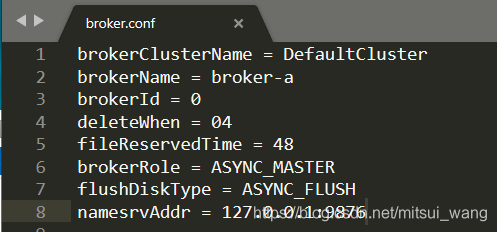
broker配置文件中设置flushDiskType字段,可选择ASYNC_FLUSH(异步刷盘)和 SYNC_FLUSH(同步刷盘)
前面"Broker-消息存储流程"中,CommitLog.putMessage方法的最后会调用CommitLog.handleDiskFlush方法进行刷盘。
    public void handleDiskFlush(AppendMessageResult result, PutMessageResult putMessageResult, MessageExt messageExt) {
        // Synchronization flush
        if (FlushDiskType.SYNC_FLUSH == this.defaultMessageStore.getMessageStoreConfig().getFlushDiskType()) {
            final GroupCommitService service = (GroupCommitService) this.flushCommitLogService;
            if (messageExt.isWaitStoreMsgOK()) {
                GroupCommitRequest request = new GroupCommitRequest(result.getWroteOffset() + result.getWroteBytes());
                service.putRequest(request);
                boolean flushOK = request.waitForFlush(this.defaultMessageStore.getMessageStoreConfig().getSyncFlushTimeout());
                if (!flushOK) {
                    log.error("do groupcommit, wait for flush failed, topic: " + messageExt.getTopic() + " tags: " + messageExt.getTags()
                        + " client address: " + messageExt.getBornHostString());
                    putMessageResult.setPutMessageStatus(PutMessageStatus.FLUSH_DISK_TIMEOUT);
                }
            } else {
                service.wakeup();
            }
        }
        // Asynchronous flush
        else {
            if (!this.defaultMessageStore.getMessageStoreConfig().isTransientStorePoolEnable()) {
                flushCommitLogService.wakeup();
            } else {
                commitLogService.wakeup();
            }
        }
    }
该方法中,首先判断当前刷盘模式是同步刷盘还是异步刷盘。
对于同步刷盘,构造一个GroupCommitRequest对象,并提交到flushCommitLogService中,线程阻塞等待刷盘完成。
对于异步刷盘,直接激活刷盘线程并返回,线程并不阻塞。
看一下GroupCommitRequest类图
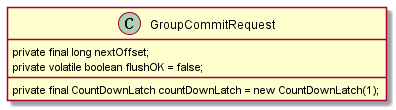
nextOffset:刷盘点偏移量
countDownLatch:刷盘控制器
flushOk:刷盘结果
public boolean waitForFlush(long timeout) {
            try {
                this.countDownLatch.await(timeout, TimeUnit.MILLISECONDS);
                return this.flushOK;
            } catch (InterruptedException e) {
                log.error("Interrupted", e);
                return false;
            }
        }
提交请求后在countDownLatch上等待,默认超时时间5s,flushCommitLogService线程处理完刷盘后,调用GroupCommitRequest.wakeupCustomer方法通知等待线程
public void wakeupCustomer(final boolean flushOK) {
            this.flushOK = flushOK;
            this.countDownLatch.countDown();
        }
看下刷盘线程处理逻辑,默认的刷盘线程是GroupCommitService
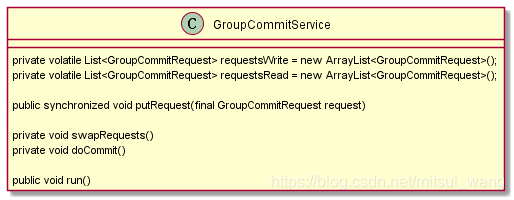
requestsWrite:写请求缓冲池
requestsRead:处理的缓冲池
主循环不断读取requestsRead处理,然后将两个缓冲池交换,处理另一个缓冲池。
private void swapRequests() {
            List<GroupCommitRequest> tmp = this.requestsWrite;
            this.requestsWrite = this.requestsRead;
            this.requestsRead = tmp;
        }
请求一直往requestsWrite缓冲池插入。
public synchronized void putRequest(final GroupCommitRequest request) {
            //将请求加入requestsWrite缓冲池
            synchronized (this.requestsWrite) {
                this.requestsWrite.add(request);
            }
            //如果线程处于等待状态将其唤醒
            if (hasNotified.compareAndSet(false, true)) {
                waitPoint.countDown(); // notify
            }
        }
线程不断循环处理刷盘请求,每次处理完其中一个缓冲池,如果另一个缓冲池没有数据会sleep10毫秒
public void run() {
            CommitLog.log.info(this.getServiceName() + " service started");

            while (!this.isStopped()) {
                try {
                    this.waitForRunning(10);
                    this.doCommit();
                } catch (Exception e) {
                    CommitLog.log.warn(this.getServiceName() + " service has exception. ", e);
                }
            }
。。。
}
刷盘逻辑在doCommit中处理,最终调用mappedFileQueue.flush进行刷盘。
        private void doCommit() {
            synchronized (this.requestsRead) {
                if (!this.requestsRead.isEmpty()) {
                    for (GroupCommitRequest req : this.requestsRead) {
                        // There may be a message in the next file, so a maximum of
                        // two times the flush
                        boolean flushOK = false;
                        for (int i = 0; i < 2 && !flushOK; i++) {
                            flushOK = CommitLog.this.mappedFileQueue.getFlushedWhere() >= req.getNextOffset();

                            if (!flushOK) {
                                CommitLog.this.mappedFileQueue.flush(0);
                            }
                        }

                        req.wakeupCustomer(flushOK);
                    }

                    long storeTimestamp = CommitLog.this.mappedFileQueue.getStoreTimestamp();
                    if (storeTimestamp > 0) {
                        CommitLog.this.defaultMessageStore.getStoreCheckpoint().setPhysicMsgTimestamp(storeTimestamp);
                    }

                    this.requestsRead.clear();
                } else {
                    // Because of individual messages is set to not sync flush, it
                    // will come to this process
                    CommitLog.this.mappedFileQueue.flush(0);
                }
            }
        }
对于异步刷盘直接激活刷盘线程
// Asynchronous flush
        else {
            if (!this.defaultMessageStore.getMessageStoreConfig().isTransientStorePoolEnable()) {
                flushCommitLogService.wakeup();
            } else {
                commitLogService.wakeup();
            }
        }





 扫一扫
扫一扫


 257
257

 被折叠的 条评论
为什么被折叠?
被折叠的 条评论
为什么被折叠?
 到【灌水乐园】发言





