



HyperLPR已经更新到了v3的版本,该版本与先前的版本一样都是用于识别中文车牌的开源图像算法项目,最新的版本的源码可从github中提取:https://github.com/szad670401/HyperLPR
一、安装扩展
python -m pip install hyperlpr3 https://pypi.tuna.tsinghua.edu.cn/simple/
二、安装完成后命令测试
**# 命令测试**
lpr3 sample -src https://image.xcar.com.cn/attachments/a/day_170125/2017012516_5cb21721d2f35a0f2984HCOTsEuQ6jwg.jpg

**# 测试结果**
----------------------------------------
2025-12-14 17:45:32.351 | INFO     | hyperlpr3.command.sample:sample:70 - 共检测到车牌: 1
2025-12-14 17:45:32.356 | SUCCESS  | hyperlpr3.command.sample:sample:73 - [绿牌新能源]沪AD07979 0.9516218900680542 [582, 1306, 992, 1431]
三、内置服务运行(方式1)
启动在线API服务
如果您有部署到云端去调用的需求,HyperLPR3中已经内置了启动WebApi服务的功能,支持一键启动,且自带SwaggerUI文档页面,相对方便友好:
1、命令启动
# 启动服务 workers为进程数量,请根据需求进行调节
lpr3 rest --port 8715 --host 0.0.0.0 --workers 1
2、运行SwaggerUI文档
启动后可打开SwaggerUI的路径:http://localhost:8715/api/v1/docs 查看和测试在线识别API服务.
http://localhost:8715/api/v1/docs
# 接口地址:localhost:8715/api/v1/rec
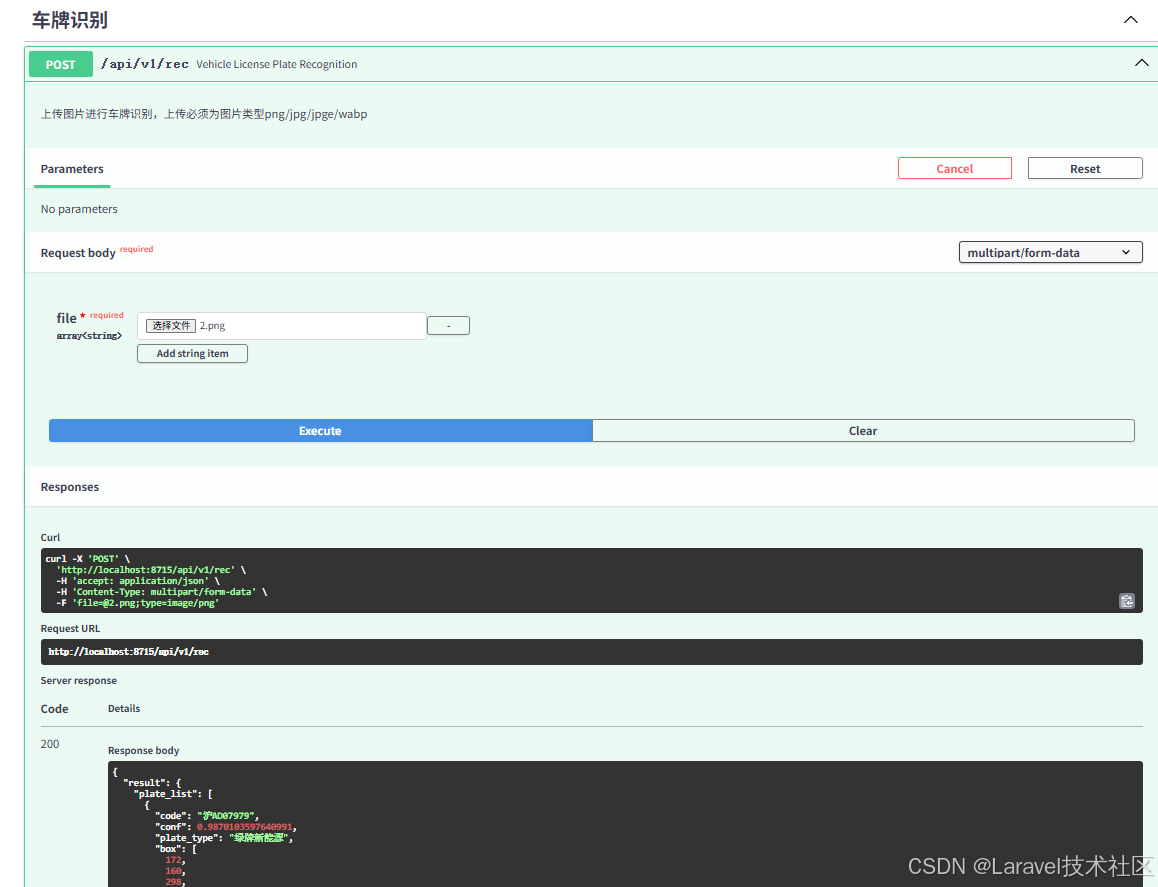
四、python代码运行(方式2)
包括视频识别和图片识别
1、完整代码
# 导入cv相关库
import cv2
import random
import warnings
import numpy as np
from PIL import ImageFont
from PIL import Image
from PIL import ImageDraw
import hyperlpr3 as lpr3


# 辅助函数
def draw_plate_on_image(img, box1, text1, font):
    x1, y1, x2, y2 = box1  # 识别框的四至范围
    # random_color = (random.randint(0, 255), random.randint(0, 255), random.randint(0, 255))
    cv2.rectangle(img, (x1, y1), (x2, y2), (0, 0, 255), 2, cv2.LINE_AA)  # 车牌外框
    # cv2.rectangle(img, (x1, y1 - 25), (x2, y1-3), (139, 139, 102), -1)  # 识别文本底色
    data = Image.fromarray(img)  # 读取图片
    draw = ImageDraw.Draw(data)  # PIL绘制图片
    draw.text((x1, y1 - 27), text1, (0, 0, 255), font=font)  # 添加识别文本
    res = np.asarray(data)  # 返回叠加识别结果的图片
    return res


# 视频识别函数
def license_recognition_video(path):
    video = cv2.VideoCapture()
    video.open(path)
    i = 0
    while True:
        i += 1
        ref, image = video.read()  # 组帧打开视频
        if ref:
            if i % 10 == 0:
                results = catcher(image)  # 执行识别算法
                for code, confidence, type_idx, box in results:
                    # [['京Q58A77', 0.9731929, 0, [150, 160, 451, 259]]]
                    text = f"{code} - {confidence:.2f}"
                    image = draw_plate_on_image(image, box, text, font=font_ch)  # 绘制识别结果
                cv2.imshow("License Plate Recognition(Directed By RSran)", image)  # 显示检测结果
                if cv2.waitKey(10) & 0xFF == ord('q'):
                    break  # 退出
        else:
            break


# 图片识别函数
def license_recognition_image(path):
    image = cv2.imread(path)  # 读取图片
    results = catcher(image)  # 执行识别算法
    print("results:",results)
    for code, confidence, type_idx, box in results:
        # [['京Q58A77', 0.9731929, 0, [150, 160, 451, 259]]]
        text = f"{code} - {confidence:.2f}"
        print(text)
        image = draw_plate_on_image(image, box, text, font=font_ch)  # 绘制识别结果
    cv2.imshow("License Plate Recognition(Directed By RSran)", image)  # 显示检测结果
    cv2.waitKey(0)


if __name__ == "__main__":
    warnings.filterwarnings("ignore", message="Mean of empty slice")  # 忽略“Mean of empty slice”的警告
    warnings.filterwarnings("ignore", message="invalid value encountered in scalar divide")
    # 忽略“invalid value encountered in scalar divide”的警告
    font_ch = ImageFont.truetype("./font/platech.ttf", 20, 0)  # 中文字体加载
    catcher = lpr3.LicensePlateCatcher(detect_level=lpr3.DETECT_LEVEL_HIGH)  # 实例化识别对象

    # 视频识别
    # file = r"Y:\2025-12-14 14-49-09.mp4"
    # license_recognition_video(file)

    # 图片识别
    license_recognition_image("./2.png")
2、运行结果:
results: [['辽BB888H', np.float32(0.9993448), 0, [103, 695, 668, 878]]]
辽BB888H - 1.00
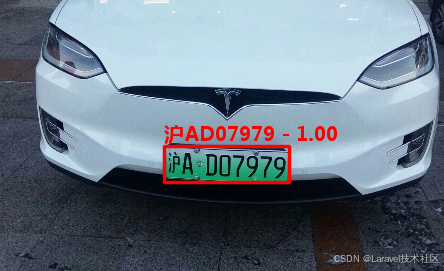
备注:图片来源于网络,侵权删。





 扫一扫
扫一扫


 2708
2708

 被折叠的 条评论
为什么被折叠?
被折叠的 条评论
为什么被折叠?
 到【灌水乐园】发言





