



 本文详细介绍了Mybatis中的一对一、一对多和多对多查询方法,包括示例代码和注解开发实践,助你理解并掌握复杂映射技术。
目录
1.Mybatis的多表查询
1.一对一查询
查询思路(附代码)
1.查询关系:一个用户有多个订单,一个订单只从属于一个用户,一对一查询的需求:查询一个订单,与此同时查询出该订单所属的用户
2.查询语句:select * from orders o,user u where o.uid=u.id;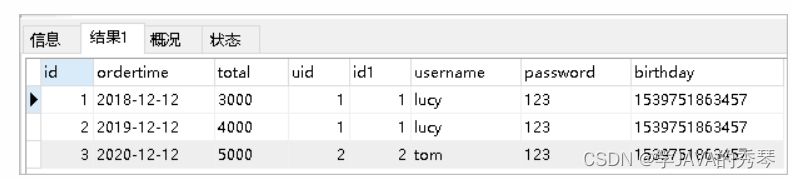
3.创建Order和User实体
public class Order {

    private int id;
    private Date ordertime;
    private double total;

    //代表当前订单从属于哪一个客户
    private User user;
}

public class User {

    private int id;
    private String username;
    private String password;
    private Date birthday;

}
4 创建OrderMapper接口
public interface OrderMapper {
    List<Order> findAll();
}
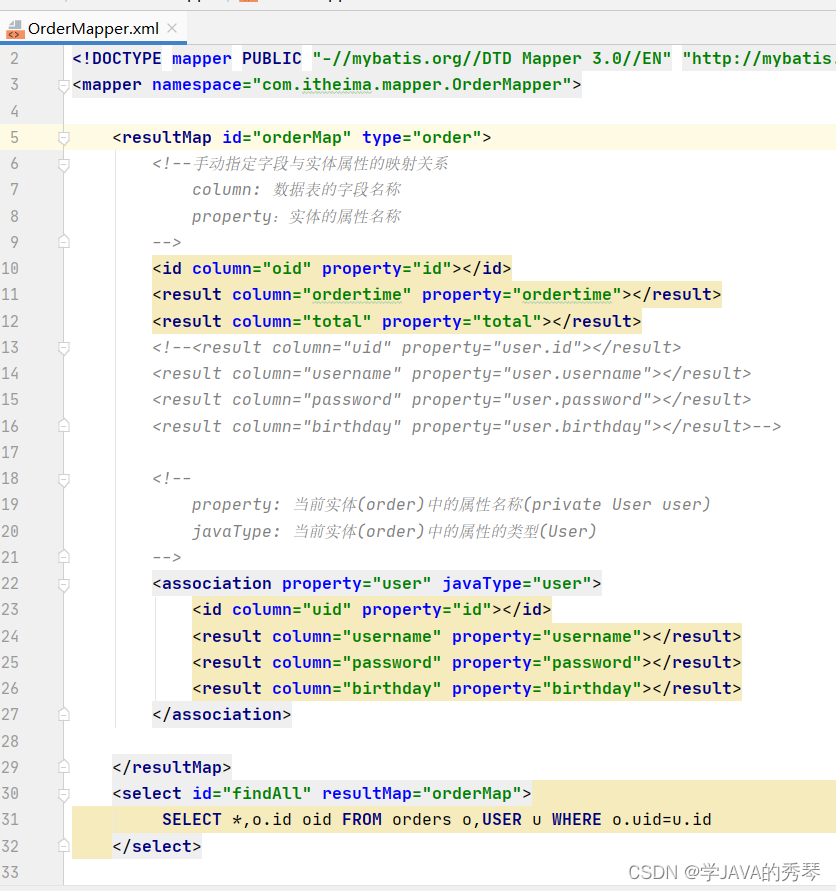
5 配置OrderMapper.xml
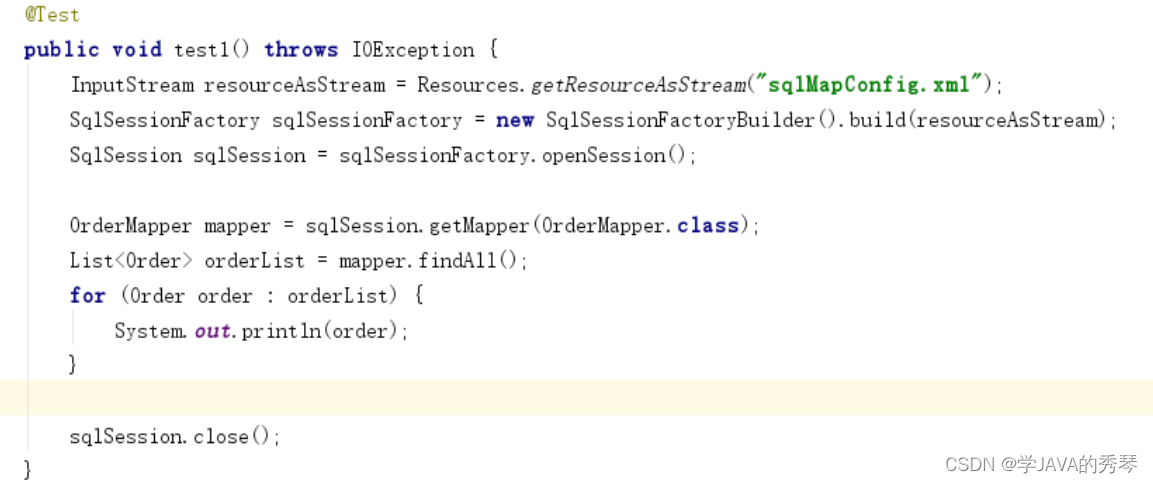
6.测试代码
2. 一对多查询
1.查询思路:
一个用户有多个订单,一个订单只从属于一个用户
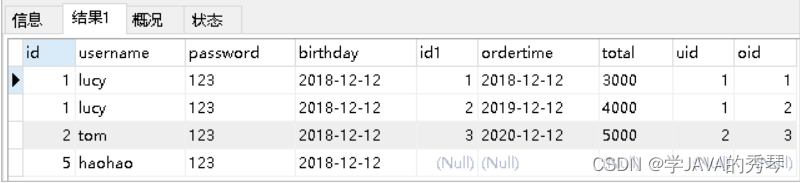
一对多查询的需求:查询一个用户,与此同时查询出该用户具有的订单
2 一对多查询的语句:select *,o.id oid from user u left join orders o on u.id=o.uid;
3 修改User实体
public class Order {

    private int id;
    private Date ordertime;
    private double total;

    //代表当前订单从属于哪一个客户
    private User user;
}

public class User {

    private int id;
    private String username;
    private String password;
    private Date birthday;
    //代表当前用户具备哪些订单
    private List<Order> orderList;
}
4 创建UserMapper接口
public interface UserMapper {
    List<User> findAll();
}
5 配置UserMapper.xml
<mapper namespace="com.itheima.mapper.UserMapper">
    <resultMap id="userMap" type="com.itheima.domain.User">
        <result column="id" property="id"></result>
        <result column="username" property="username"></result>
        <result column="password" property="password"></result>
        <result column="birthday" property="birthday"></result>
        <collection property="orderList" ofType="com.itheima.domain.Order">
            <result column="oid" property="id"></result>
            <result column="ordertime" property="ordertime"></result>
            <result column="total" property="total"></result>
        </collection>
    </resultMap>
    <select id="findAll" resultMap="userMap">
        select *,o.id oid from user u left join orders o on u.id=o.uid
    </select>
</mapper>
6 测试结果
3 多对多查询
1.多对多查询的思路:
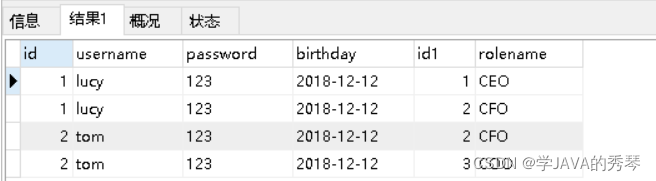
用户表和角色表的关系为,一个用户有多个角色,一个角色被多个用户使用
多对多查询的需求:查询用户同时查询出该用户的所有角色
2 多对多查询的语句:
select u.,r.,r.id rid from user u left join user_role ur on u.id=ur.user_id inner join role r on ur.role_id=r.id;
3 创建Role实体,修改User实体
public class User {
    private int id;
    private String username;
    private String password;
    private Date birthday;
    //代表当前用户具备哪些订单
    private List<Order> orderList;
    //代表当前用户具备哪些角色
    private List<Role> roleList;
}

public class Role {

    private int id;
    private String rolename;

}
4 添加UserMapper接口方法
List<User> findAllUserAndRole();5 配置UserMapper.xml
<resultMap id="userRoleMap" type="com.itheima.domain.User">
    <result column="id" property="id"></result>
    <result column="username" property="username"></result>
    <result column="password" property="password"></result>
    <result column="birthday" property="birthday"></result>
    <collection property="roleList" ofType="com.itheima.domain.Role">
        <result column="rid" property="id"></result>
        <result column="rolename" property="rolename"></result>
    </collection>
</resultMap>
<select id="findAllUserAndRole" resultMap="userRoleMap">
    select u.*,r.*,r.id rid from user u left join user_role ur on u.id=ur.user_id
    inner join role r on ur.role_id=r.id
</select>
6 测试结果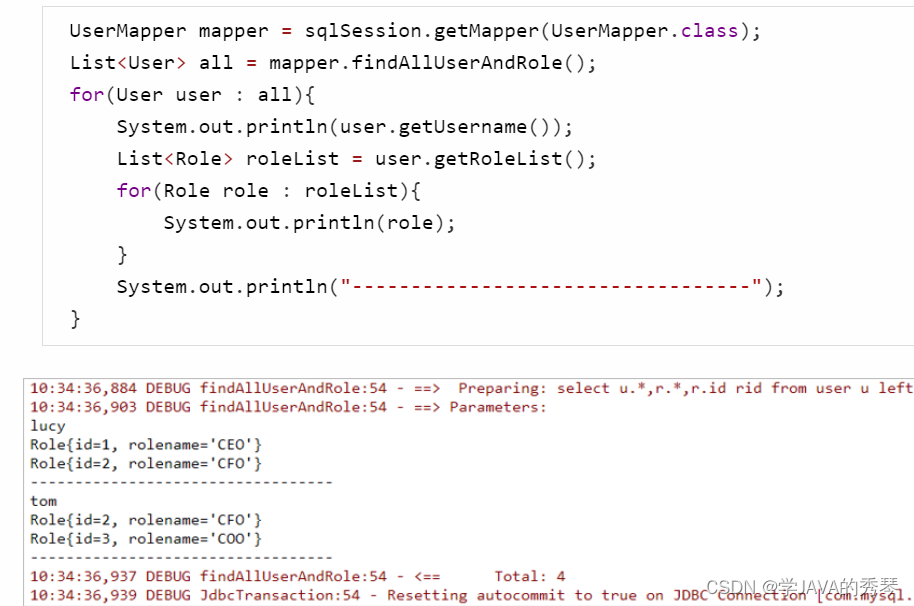
2.Mybatis的注解开发
1.常用注解
@Insert:实现新增·
@Update:实现更新
@Delete:实现删除
@Select:实现查询
@Result:实现结果集封装
@Results:可以与@Result 一起使用,封装多个结果集
@One:实现一对一结果集封装
@Many:实现一对多结果集封装2.
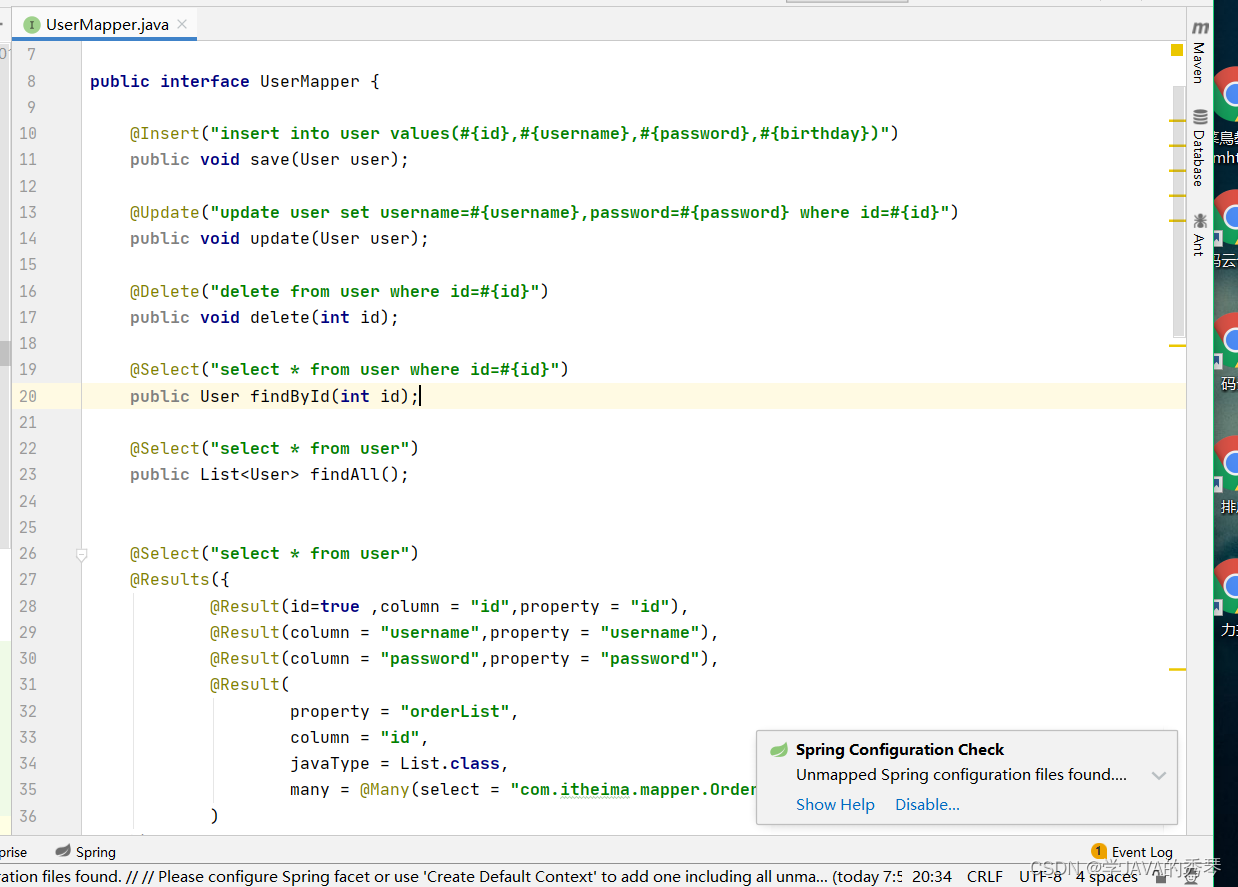

2.MyBatis的注解实现复杂映射开发

一对一查询:使用注解配置Mapper
public interface OrderMapper {
    @Select("select * from orders")
    @Results({
            @Result(id=true,property = "id",column = "id"),
            @Result(property = "ordertime",column = "ordertime"),
            @Result(property = "total",column = "total"),
            @Result(property = "user",column = "uid",
                    javaType = User.class,
                    one = @One(select = "com.itheima.mapper.UserMapper.findById"))
    })
    List<Order> findAll();
}
一对多查询:使用注解配置Mapper
public interface UserMapper {
    @Select("select * from user")
    @Results({
            @Result(id = true,property = "id",column = "id"),
            @Result(property = "username",column = "username"),
            @Result(property = "password",column = "password"),
            @Result(property = "birthday",column = "birthday"),
            @Result(property = "orderList",column = "id",
                    javaType = List.class,
                    many = @Many(select = "com.itheima.mapper.OrderMapper.findByUid"))
    })
    List<User> findAllUserAndOrder();
}

public interface OrderMapper {
    @Select("select * from orders where uid=#{uid}")
    List<Order> findByUid(int uid);

}
多对多查询:使用注解配置Mapper
public interface UserMapper {
    @Select("select * from user")
    @Results({
        @Result(id = true,property = "id",column = "id"),
        @Result(property = "username",column = "username"),
        @Result(property = "password",column = "password"),
        @Result(property = "birthday",column = "birthday"),
        @Result(property = "roleList",column = "id",
                javaType = List.class,
                many = @Many(select = "com.itheima.mapper.RoleMapper.findByUid"))
})
List<User> findAllUserAndRole();}


public interface RoleMapper {
    @Select("select * from role r,user_role ur where r.id=ur.role_id and ur.user_id=#{uid}")
    List<Role> findByUid(int uid);
}





 扫一扫
扫一扫


 2233
2233

 被折叠的 条评论
为什么被折叠?
被折叠的 条评论
为什么被折叠?
 到【灌水乐园】发言





