Shell相关

1 windows下vscode运行shell

  1. 安装git bash:http://www.git-scm.com/download/  一直next就行,个人对这个也不理解
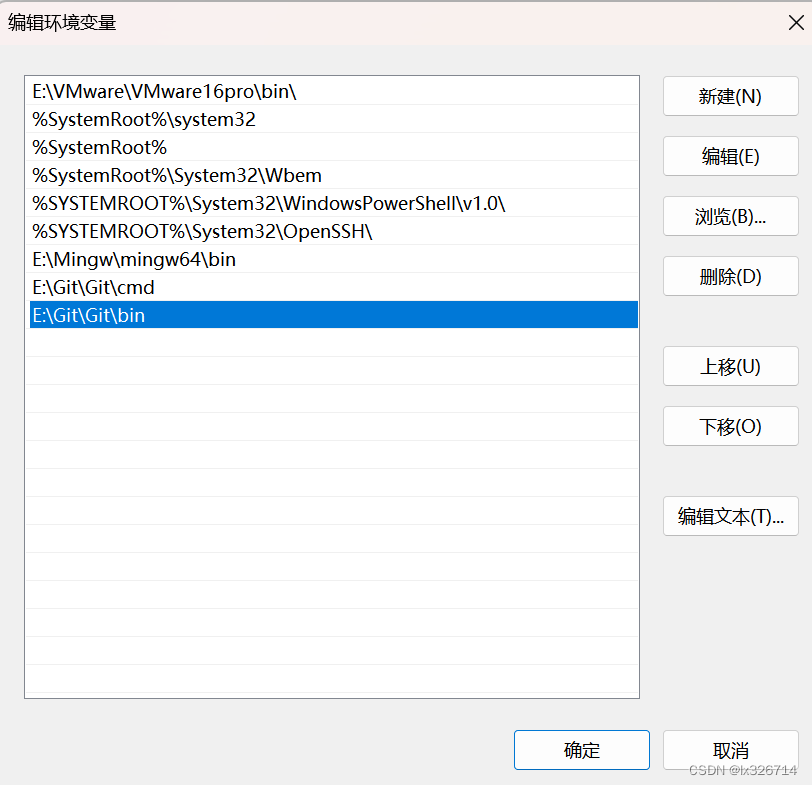
  2. 配置环境变量:找打bash.exe,我的在E:\Git\Git\bin路径,将此路径添加到环境变量中。控制面板-》系统属性-》高级-》环境变量-》系统变量-》path中放入bash.exe的路径
  3. vscode中setting 搜索“Code-runner:Run in Terminal”,打开该选项
  4. vscode中可以安装Code Runner、shell-format、ShellCheck、shellman
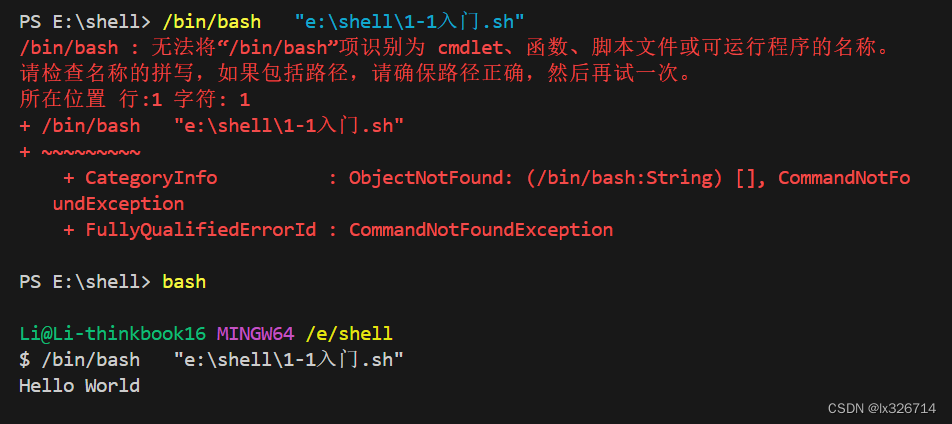
  5. 重启后,每次使用前vscode中输入bash切换环境
ACIS(Advanced Computing Interface for Simulation)是一个用于高性能计算和工程仿真的软件框架。在 ACIS 1.0.0 版本中,与 shell 相关的函数通常涉及与操作系统命令行交互、执行脚本、管理进程等操作。以下是一些常见的 shell 相关函数及其用途: ### shell 相关函数列表 #### 1. `acis_shell_execute` - **功能**: 执行指定的 shell 命令。 - **参数**: - `command`: 要执行的命令字符串。 - `output`: 用于存储命令输出的缓冲区。 - `timeout`: 命令执行的超时时间(以毫秒为单位)。 - **返回值**: 命令执行的结果状态码。 - **示例**: ```c int result = acis_shell_execute("ls -l", output_buffer, 5000); ``` #### 2. `acis_shell_spawn` - **功能**: 在后台启动一个新的进程来执行指定的 shell 命令。 - **参数**: - `command`: 要执行的命令字符串。 - `pid`: 用于存储新进程的 PID。 - **返回值**: 成功返回 0,失败返回错误码。 - **示例**: ```c pid_t pid; int result = acis_shell_spawn("my_script.sh", &pid); ``` #### 3. `acis_shell_wait` - **功能**: 等待指定的后台进程完成。 - **参数**: - `pid`: 要等待的进程 ID。 - `status`: 用于存储进程退出状态的指针。 - **返回值**: 成功返回 0,失败返回错误码。 - **示例**: ```c int status; int result = acis_shell_wait(pid, &status); ``` #### 4. `acis_shell_get_env` - **功能**: 获取指定环境变量的值。 - **参数**: - `name`: 环境变量的名称。 - `value`: 用于存储环境变量值的缓冲区。 - `size`: 缓冲区大小。 - **返回值**: 成功返回 0,失败返回错误码。 - **示例**: ```c char value[256]; int result = acis_shell_get_env("HOME", value, sizeof(value)); ``` #### 5. `acis_shell_set_env` - **功能**: 设置指定的环境变量。 - **参数**: - `name`: 环境变量的名称。 - `value`: 环境变量的值。 - `overwrite`: 是否覆盖已存在的环境变量。 - **返回值**: 成功返回 0,失败返回错误码。 - **示例**: ```c int result = acis_shell_set_env("MY_VAR", "my_value", 1); ``` #### 6. `acis_shell_chdir` - **功能**: 改变当前工作目录。 - **参数**: - `path`: 要切换到的目录路径。 - **返回值**: 成功返回 0,失败返回错误码。 - **示例**: ```c int result = acis_shell_chdir("/tmp"); ``` #### 7. `acis_shell_system` - **功能**: 执行指定的 shell 命令并等待其完成。 - **参数**: - `command`: 要执行的命令字符串。 - **返回值**: 命令执行的结果状态码。 - **示例**: ```c int result = acis_shell_system("echo 'Hello World'"); ``` #### 8. `acis_shell_pipe` - **功能**: 创建一个管道并执行命令,允许读取命令的输出。 - **参数**: - `command`: 要执行的命令字符串。 - `fp`: 用于存储打开的文件指针。 - **返回值**: 成功返回 0,失败返回错误码。 - **示例**: ```c FILE *fp; int result = acis_shell_pipe("ls -l", &fp); ``` #### 9. `acis_shell_closepipe` - **功能**: 关闭由 `acis_shell_pipe` 打开的管道。 - **参数**: - `fp`: 要关闭的文件指针。 - **返回值**: 成功返回 0,失败返回错误码。 - **示例**: ```c int result = acis_shell_closepipe(fp); ``` #### 10. `acis_shell_quote` - **功能**: 对字符串进行 shell 转义,确保安全传递给 shell 命令。 - **参数**: - `input`: 要转义的原始字符串。 - `output`: 用于存储转义后的字符串的缓冲区。 - `size`: 缓冲区大小。 - **返回值**: 成功返回 0,失败返回错误码。 - **示例**: ```c char output[256]; int result = acis_shell_quote("my file with spaces.txt", output, sizeof(output)); ``` ###
评论
成就一亿技术人!
拼手气红包6.0元
还能输入1000个字符
 
红包 添加红包
表情包 插入表情
 条评论被折叠 查看
添加红包

请填写红包祝福语或标题

红包个数最小为10个

红包金额最低5元

当前余额3.43前往充值 >
需支付:10.00
成就一亿技术人!
领取后你会自动成为博主和红包主的粉丝 规则
hope_wisdom
发出的红包
实付
使用余额支付
点击重新获取
扫码支付
钱包余额 0

抵扣说明:

1.余额是钱包充值的虚拟货币,按照1:1的比例进行支付金额的抵扣。
2.余额无法直接购买下载,可以购买VIP、付费专栏及课程。

余额充值