



我正在创建一个 winforms 应用程序,需要能够加载图像并向图像添加 2 个相交的矩形。然后我只想突出显示两者之间的交点。有没有什么库可以帮助我实现这一点?
一、
您可以在您的应用程序中使用 LEADTOOLS Imaging Pro SDK 技术。https ://www.leadtools.com/sdk/products/imaging-pro
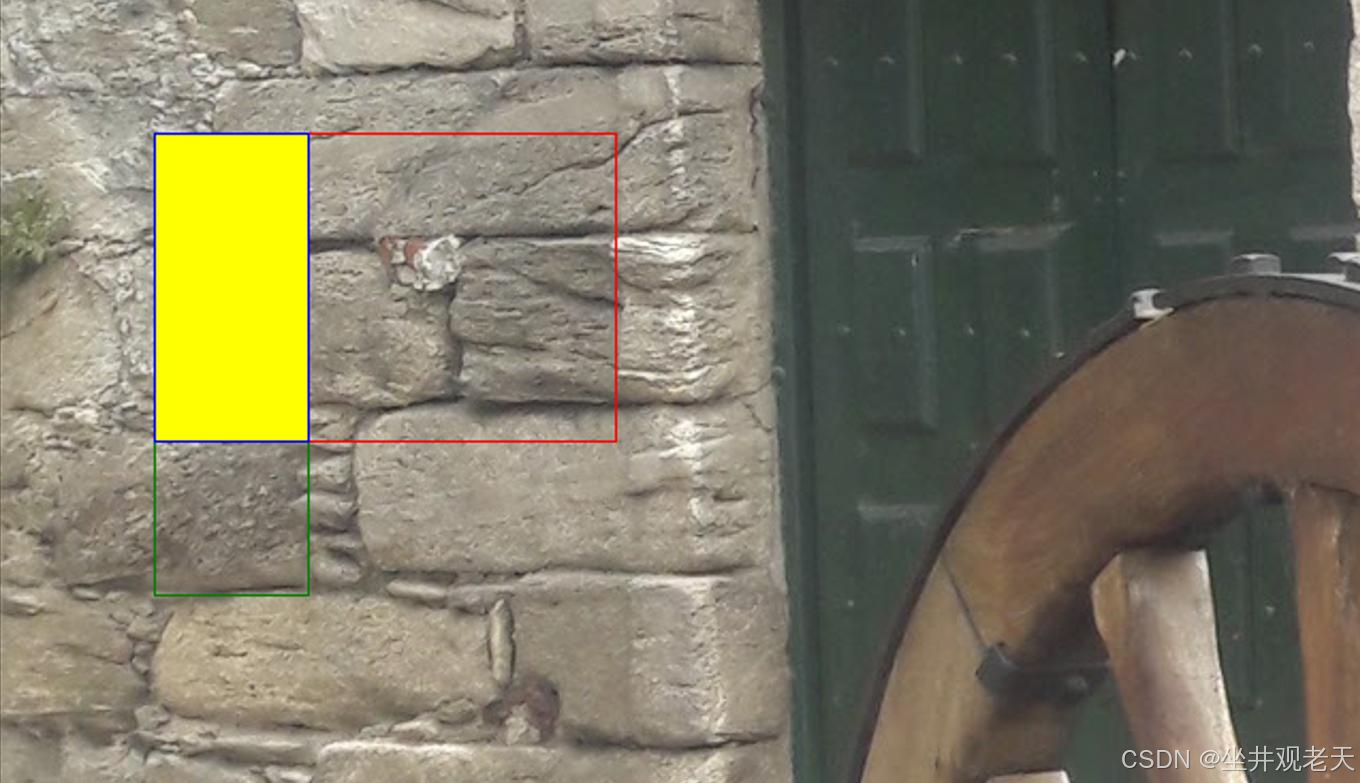
您可以使用 LeadRect 结构来查看两个矩形是否相交。可以使用 Intersect 或 IntersectsWith 方法。以下代码在加载的图像上添加两个矩形作为注释,找到相交区域,然后添加第三个矩形注释以突出显示相交区域。
// Load the image
using (RasterCodecs _codecs = new RasterCodecs())
using (RasterImage _image = _codecs.Load(@"FILE PATH TO SOURCE IMAGE"))
{
    // Create the annotation container to store the annotation objects
    AnnContainer _container = new AnnContainer();
    _container.Mapper.MapResolutions(_image.XResolution, _image.YResolution, _image.XResolution, _image.YResolution);
    _container.Size = _container.Mapper.SizeToContainerCoordinates(_image.ImageSize.ToLeadSizeD());

    // Annotation unit is 1/720 of an inch
    double inch = 720.0;

    // Add 1st rectangle as annotation
    AnnRectangleObject _1stAnnRect = new AnnRectangleObject();
    _1stAnnRect.Rect = new LeadRectD(1 * inch, 2 * inch, 1 * inch, 3 * inch);
    _1stAnnRect.Stroke = AnnStroke.Create(AnnSolidColorBrush.Create("Green"), LeadLengthD.Create(1));
    _container.Children.Add(_1stAnnRect);

    // Add 2nd rectangle as annotation
    AnnRectangleObject _2ndAnnRect = new AnnRectangleObject();
    _2ndAnnRect.Rect = new LeadRectD(1 * inch, 2 * inch, 3 * inch, 2 * inch);
    _2ndAnnRect.Stroke = AnnStroke.Create(AnnSolidColorBrush.Create("Red"), LeadLengthD.Create(1));
    _container.Children.Add(_2ndAnnRect);

    // Get the intersecting rectangle
    LeadRectD _intersectingRect = LeadRectD.IntersectRects(_1stAnnRect.Rect, _2ndAnnRect.Rect);

    // Add intersecting rectangle as annotation to the container
    AnnRectangleObject _intersectingAnnRect = new AnnRectangleObject();
    _intersectingAnnRect.Rect = _intersectingRect;
    _intersectingAnnRect.Stroke = AnnStroke.Create(AnnSolidColorBrush.Create("Blue"), LeadLengthD.Create(1));
    _intersectingAnnRect.Fill = AnnSolidColorBrush.Create("Yellow");
    _container.Children.Add(_intersectingAnnRect);

    // Optional, burn annotations to image
    AnnWinFormsRenderingEngine _renderingEngine = new AnnWinFormsRenderingEngine();
    using (var burnedImage = _renderingEngine.RenderOnImage(_container, _image))
        _codecs.Save(burnedImage, @"C:\Temp\test.jpg", RasterImageFormat.Jpeg, 0);
}
二、
您不需要第三方库来执行此操作。一些内置库可以很好地完成此操作。
过程:
- 在现有图像上绘制每个矩形
- 找到两个矩形的交点
- 绘制第三个矩形(可能填充了 alpha 混合)
绘制一个矩形:
        Rectangle ee = new Rectangle(10, 10, 30, 30);
        using (Pen pen = new Pen(Color.Red, 2)) {
            e.Graphics.DrawRectangle(pen, ee);
        }
找到两个矩形的交点:
...使用System.Drawing 中的Rectangle.Intersect方法...
返回第三个 Rectangle 结构,该结构表示另外两个 Rectangle 结构的交集。如果没有交集,则返回一个空的 Rectangle。
绘制具有透明度/alpha 的矩形:
var alpha = 128; // this is your transparency between 0-255
using (Graphics g = Graphics.FromImage(pb.Image))
{
    using(Brush brush = new SolidBrush(Color.FromArgb(alpha, red, green, blue)))
    {
        g.FillRectangle(brush , x, y, width, height);
    }
}
参考文献:
https://stackoverflow.com/a/5942223/2869344
https://stackoverflow.com/a/21630086/2869344
https://stackoverflow.com/a/7580217/2869344





 扫一扫
扫一扫


 2453
2453

 被折叠的 条评论
为什么被折叠?
被折叠的 条评论
为什么被折叠?
 到【灌水乐园】发言





