





「案例分享」BenchmarkSQL 5.0 压测 openGauss 5.0.0
openGauss小助手2023-11-17 10:17湖南
一、前言
本次BenchmarkSQL 压测openGauss仅作为学习使用压测工具测试tpcc为目的,并不代表数据库性能如本次压测所得数据。实际生产性能压测,还需结合服务器软硬件配置、数据库性能参数调优、BenchmarkSQL 配置文件参数相结合,是一个复杂的过程。
1.1 BenchmarkSQL 工具介绍
BenchmarkSQL 是一款经典的开源数据库测试工具,其内含了TPC-C测试脚本,可同时支持 Oracle、MySQL、PostGreSQL、SQL Server以及一些国产数据库的基准测试,应用其对数据库进行 TPC-C 标准测试,可模拟多种事务处理:如新订单、支付操作、订单状态查询、发货、库存状态查询等,从而获得TpmC 值。截止到2023年8月,最新的BenchmarkSQL 版本是5.0。
1.2 数据库信息介绍
本次压测所使用的openGauss数据库是一套两节点主备集群,数据库版本为5.0.0。在进行压测前假设已创建了测试数据库和用户,设置了用户权限,并为数据库配置了白名单,创建数据库、用户、设置权限及设置白名单基本操作如下。
-- 数据库服务器,omm用户操作
-- 连接数据库
[omm@opengauss-db2 ~]$ gsql -d gaussdb -p 26000
-- 创建数据库用户
gaussdb=# CREATE USER openuser WITH SYSADMIN password "Openuser@123";
-- 分配用户权限
gaussdb=# GRANT ALL PRIVILEGES TO openuser;
-- 设置白名单,运行程序从192.168.73.21 访问数据库
[omm@opengauss-db2 ~]$ gs_guc reload -N all -I all -h "host gaussdb openuser 192.168.73.21/32 sha256"
二、环境信息
2.1 服务器信息
主机名称
主机IP
配置描述
操作系统
用途描述
opengauss-db1
10.110.3.156
4C/8G
CentOS Linux release 7.9.2009 (Core)
DB服务器
opensource-db
192.168.73.21
2c/4G
CentOS Linux release 7.9.2009 (Core)
BenchmarkSQL服务器
2.2 软件信息
软件名称
版本信息
信息描述
openGauss
5.0.0
openGauss数据库版本
BenchmarkSQL
5.0
BenchmarkSQL软件版本
JDK
OpenJDK 11
JDK版本,编译ant
python
3.10.12
BenchmarkSQL压测收集OS信息脚本依赖python
ant
1.9.4
编译构建BenchmarkSQL的Java源代码
R语言
3.6.3
用于生成BenchmarkSQL压测后的png图片等信息
三、环境准备
3.1 安装软件依赖包
部署BenchmarkSQL需要系统安装一些依赖包,如果服务器可联网,可通过yum直接安装,如果无法联网,可在服务器上配置本地YUM源,通过本地YUM安装软件依赖包。
-- BenchmarkSQL 服务器,root用户操作
-- yum 安装软件依赖包
[root@opensource-db ~]# yum install gcc glibc-headers gcc-c++ gcc-gfortran readline-devel libXt-devel pcre-devel libcurl libcurl-devel \
java-11-openjdk ant ncurses ncurses-devel autoconf automake zlib zlib-devel bzip2 bzip2-devel xz-devel -y
-- 检查是否已安装
rpm -qa --queryformat "%{NAME}-%{VERSION}-%{RELEASE} (%{ARCH})\n" | grep -E "gcc|glibc-headers|gcc-c++|gcc-gfortran|readline-devel|libXt-devel|pcre-devel|libcurl libcurl-devel|java-11-openjdk|ant|ncurses|ncurses-devel|autoconf|automake|zlib|zlib-devel|bzip2|bzip2-devel|xz-devel"
3.2 创建用户
BenchmarkSQL选择部署在非root用户omm用户下。
[root@opensource-db ~]# /usr/sbin/groupadd -g 1000 dbgrp
[root@opensource-db ~]# /usr/sbin/useradd -u 1000 -g dbgrp omm
[root@opensource-db ~]# echo "omm123" | passwd --stdin omm
3.3 安装部署BenchmarkSQL
3.3.1 下载BenchmarkSQL
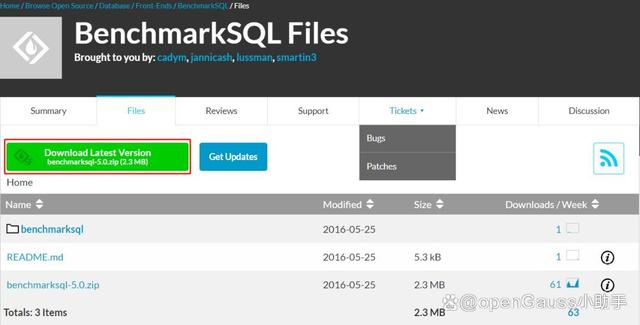
登录https://sourceforge.net/projects/benchmarksql/files/网站下载最新版BenchmarkSQL 5.0,将下载的benchmarksql-5.0.zip上传至服务器omm用户/home/omm目录下并解压。
3.3.2 解压BenchmarkSQL
-- BenchmarkSQL 服务器,omm用户操作
[root@opensource-db ~]# su - omm
[omm@opensource-db ~]$ unzip benchmarksql-5.0.zip
[omm@opensource-db ~]$ tree -f benchmarksql-5.0
benchmarksql-5.0
├── benchmarksql-5.0/build
│ ├── benchmarksql-5.0/build/ExecJDBC.class
│ ├── benchmarksql-5.0/build/jTPCC.class
│ ├── benchmarksql-5.0/build/jTPCCConfig.class
│ ├── benchmarksql-5.0/build/jTPCCConnection.class
│ ├── benchmarksql-5.0/build/jTPCCRandom.class
│ ├── benchmarksql-5.0/build/jTPCCTData$1.class
│ ├── benchmarksql-5.0/build/jTPCCTData.class
│ ├── benchmarksql-5.0/build/jTPCCTData$DeliveryBGData.class
│ ├── benchmarksql-5.0/build/jTPCCTData$DeliveryData.class
│ ├── benchmarksql-5.0/build/jTPCCTData$NewOrderData.class
│ ├── benchmarksql-5.0/build/jTPCCTData$OrderStatusData.class
│ ├── benchmarksql-5.0/build/jTPCCTData$PaymentData.class
│ ├── benchmarksql-5.0/build/jTPCCTData$StockLevelData.class
│ ├── benchmarksql-5.0/build/jTPCCTerminal.class
│ ├── benchmarksql-5.0/build/jTPCCUtil.class
│ ├── benchmarksql-5.0/build/LoadData.class
│ ├── benchmarksql-5.0/build/LoadDataWorker.class
│ ├── benchmarksql-5.0/build/OSCollector.class
│ └── benchmarksql-5.0/build/OSCollector$CollectData.class
├── benchmarksql-5.0/build.xml
├── benchmarksql-5.0/dist
│ └── benchmarksql-5.0/dist/BenchmarkSQL-5.0.jar
├── benchmarksql-5.0/doc
│ └── benchmarksql-5.0/doc/src
│ └── benchmarksql-5.0/doc/src/TimedDriver.odt
├── benchmarksql-5.0/HOW-TO-RUN.txt
├── benchmarksql-5.0/lib
│ ├── benchmarksql-5.0/lib/apache-log4j-extras-1.1.jar
│ ├── benchmarksql-5.0/lib/firebird
│ │ ├── benchmarksql-5.0/lib/firebird/connector-api-1.5.jar
│ │ └── benchmarksql-5.0/lib/firebird/jaybird-2.2.9.jar
│ ├── benchmarksql-5.0/lib/log4j-1.2.17.jar
│ ├── benchmarksql-5.0/lib/oracle
│ │ └── benchmarksql-5.0/lib/oracle/README.txt
│ └── benchmarksql-5.0/lib/postgres
│ └── benchmarksql-5.0/lib/postgres/postgresql-9.3-1102.jdbc41.jar
├── benchmarksql-5.0/README.md
├── benchmarksql-5.0/run
│ ├── benchmarksql-5.0/run/funcs.sh
│ ├── benchmarksql-5.0/run/generateGraphs.sh
│ ├── benchmarksql-5.0/run/generateReport.sh
│ ├── benchmarksql-5.0/run/log4j.properties
│ ├── benchmarksql-5.0/run/misc
│ │ ├── benchmarksql-5.0/run/misc/blk_device_iops.R
│ │ ├── benchmarksql-5.0/run/misc/blk_device_kbps.R
│ │ ├── benchmarksql-5.0/run/misc/cpu_utilization.R
│ │ ├── benchmarksql-5.0/run/misc/dirty_buffers.R
│ │ ├── benchmarksql-5.0/run/misc/latency.R
│ │ ├── benchmarksql-5.0/run/misc/net_device_iops.R
│ │ ├── benchmarksql-5.0/run/misc/net_device_kbps.R
│ │ ├── benchmarksql-5.0/run/misc/os_collector_linux.py
│ │ └── benchmarksql-5.0/run/misc/tpm_nopm.R
│ ├── benchmarksql-5.0/run/props.fb
│ ├── benchmarksql-5.0/run/props.ora
│ ├── benchmarksql-5.0/run/props.pg
│ ├── benchmarksql-5.0/run/runBenchmark.sh
│ ├── benchmarksql-5.0/run/runDatabaseBuild.sh
│ ├── benchmarksql-5.0/run/runDatabaseDestroy.sh
│ ├── benchmarksql-5.0/run/runLoader.sh
│ ├── benchmarksql-5.0/run/runSQL.sh
│ ├── benchmarksql-5.0/run/sql.common
│ │ ├── benchmarksql-5.0/run/sql.common/buildFinish.sql
│ │ ├── benchmarksql-5.0/run/sql.common/foreignKeys.sql
│ │ ├── benchmarksql-5.0/run/sql.common/indexCreates.sql
│ │ ├── benchmarksql-5.0/run/sql.common/indexDrops.sql
│ │ ├── benchmarksql-5.0/run/sql.common/tableCreates.sql
│ │ ├── benchmarksql-5.0/run/sql.common/tableDrops.sql
│ │ └── benchmarksql-5.0/run/sql.common/tableTruncates.sql
│ ├── benchmarksql-5.0/run/sql.firebird
│ │ └── benchmarksql-5.0/run/sql.firebird/extraHistID.sql
│ ├── benchmarksql-5.0/run/sql.oracle
│ │ └── benchmarksql-5.0/run/sql.oracle/extraHistID.sql
│ └── benchmarksql-5.0/run/sql.postgres
│ ├── benchmarksql-5.0/run/sql.postgres/buildFinish.sql
│ ├── benchmarksql-5.0/run/sql.postgres/extraHistID.sql
│ └── benchmarksql-5.0/run/sql.postgres/tableCopies.sql
└── benchmarksql-5.0/src
├── benchmarksql-5.0/src/client
│ ├── benchmarksql-5.0/src/client/jTPCCConfig.java
│ ├── benchmarksql-5.0/src/client/jTPCCConnection.java
│ ├── benchmarksql-5.0/src/client/jTPCC.java
│ ├── benchmarksql-5.0/src/client/jTPCCRandom.java
│ ├── benchmarksql-5.0/src/client/jTPCCTData.java
│ ├── benchmarksql-5.0/src/client/jTPCCTerminal.java
│ └── benchmarksql-5.0/src/client/jTPCCUtil.java
├── benchmarksql-5.0/src/jdbc
│ └── benchmarksql-5.0/src/jdbc/ExecJDBC.java
├── benchmarksql-5.0/src/LoadData
│ ├── benchmarksql-5.0/src/LoadData/LoadData.java
│ └── benchmarksql-5.0/src/LoadData/LoadDataWorker.java
└── benchmarksql-5.0/src/OSCollector
└── benchmarksql-5.0/src/OSCollector/OSCollector.java
19 directories, 74 files
3.3.3 编译BenchmarkSQL
-- BenchmarkSQL 服务器,omm用户操作
[omm@opensource-db benchmarksql-5.0]$ ant
Buildfile: /home/omm/benchmarksql-5.0/build.xml
init:
compile:
[javac] Compiling 11 source files to /home/omm/benchmarksql-5.0/build
dist:
[jar] Building jar: /home/omm/benchmarksql-5.0/dist/BenchmarkSQL-5.0.jar
BUILD SUCCESSFUL
Total time: 7 seconds
3.4 安装R语言
3.4.1 下载R语言软件包
登录https://mirror.bjtu.edu.cn/cran/src/base/R-3/ 网站下载最新版的R-3.6.3软件包,将下载的R语言软件包使用root用户上传至部署BenchmarkSQL服务器。

3.4.2 解压编译R语言
-- 解压R语言软件包
[root@opensource-db fio]# tar -zxvf R-3.6.3.tar.gz
-- 编译R语言软件包
[root@opensource-db fio]# cd R-3.6.3
[root@opensource-db fio]# ./configure && make && make install
-- 默认R语言安装在/usr/local/bin/R目录下
[root@opensource-db fio]# which R
/usr/local/bin/R
3.5 更新JDBC驱动
3.5.1 下载openGauss JDBC驱动
登录openGauss官网https://opengauss.org/zh/download/,选择当前操作系统对应并和openGauss 5.0.0 数据库版对应的jdbc驱动包,如下所示。
将下载的JDBC驱动包openGauss-5.0.0-JDBC.tar.gz使用ftp工具二进制上传至BenchmarkSQL服务器omm用户 /home/omm/benchmarksql-5.0/lib/postgres目录下。
3.5.2 替换postgresql驱动
解压openGauss-5.0.0-JDBC.tar.gz驱动包,并替换postgresql驱动,具体操作如下所示。
-- BenchmarkSQL 服务器,omm用户操作
[omm@opensource-db ~]$ cd /home/omm/benchmarksql-5.0/lib/postgres
[omm@opensource-db postgres]$ tar -zxvf openGauss-5.0.0-JDBC.tar.gz
[omm@opensource-db postgres]$ mkdir bak
[omm@opensource-db postgres]$ mv postgresql-9.3-1102.jdbc41.jar ./bak
3.6 配置props文件
使用BenchmarkSQL压测,需要配置压测所需的props文件,配置方法及文件内容如下
实际生产和性能压测,要根据服务器配置及对应业务调整各参数值。
-- BenchmarkSQL 服务器,omm用户操作
-- 编辑props.openGauss配置文件
[omm@opensource-db ~]$ cat > /home/omm/benchmarksql-5.0/run/props.openGauss<<EOF
db=postgres
driver=org.postgresql.Driver
conn=jdbc:postgresql://10.110.3.156:26000/tpcc?binaryTransfer=false&forcebinary=false
user=openuser
password=Openuser@123
warehouses=20
loadWorkers=6
terminals=50
runTxnsPerTerminal=0
runMins=5
limitTxnsPerMin=0
terminalWarehouseFixed=false
newOrderWeight=45
paymentWeight=43
orderStatusWeight=4
deliveryWeight=4
stockLevelWeight=4
resultDirectory=my_result_%tY-%tm-%td_%tH%tM%tS
resultDirectory=my_result_%tY-%tm-%td_%tH%tM%tS
osCollectorScript=./misc/os_collector_linux.py
osCollectorInterval=1
osCollectorSSHAddr=omm@10.110.3.155
osCollectorDevices=net_ens33 blk_sda
EOF
--- props.openGauss 文件内容及其具体含义如下
db=postgres // 指定了用于压测的目标数据库管理系统为PostgreSQL
driver=org.postgresql.Driver //设置了用于PostgreSQL的Java数据库连接(JDBC)驱动程序类
conn = xxx // 定义了连接字符串,用于连接到运行PostgreSQL数据库的主机IP、数据库和端口号,binaryTransfer=false和forcebinary=false指示在压测期间客户端与服务器之间数据传输的方式
user=openuser // 指定了将用于认证连接到数据库的用户名
password=Openuser@123 // 设置了指定用户的密码
warehouses=20 // 设置了压测中将使用的仓库数量
loadWorkers=6 // 设置了用于初始数据加载阶段的工作线程数量
terminals=50 // 设置了在性能测试期间将使用的模拟终端(用户)数量
runTxnsPerTerminal=0 // 指定了每个终端在性能测试期间要执行的事务数量
runMins=5 // 设置了性能测试的持续时间,以分钟为单位
limitTxnsPerMin=0 // 设置了性能测试期间每分钟可以执行的事务数量上限
terminalWarehouseFixed=false // 指示是否将终端分配到固定的仓库。如设置为"true",每个终端将分配到特定的仓库。如果设置为"false",终端将随机分配到仓库
newOrderWeight=45 // 设置了在压测工作负载中NewOrder事务的权重
paymentWeight=43 // 设置了在压测工作负载中Payment事务的权重
orderStatusWeight=4 // 设置了在压测工作负载中OrderStatus事务的权重
deliveryWeight=4 // 设置了在压测工作负载中Delivery事务的权重
stockLevelWeight=4 //设置了在压测工作负载中StockLevel事务的权重
resultDirectory=my_result_%tY-%tm-%td_%tH%tM%tS // 定义了存储压测结果的目录
osCollectorScript=./misc/os_collector_linux.py // 指定了用于在压测期间收集系统性能指标(CPU\内存\磁盘\网络)的操作系统收集脚本的路径
osCollectorInterval=1 // 设置了操作系统收集脚本在压测期间收集系统性能指标的间隔(以秒为单位)
osCollectorSSHAddr=omm@10.110.3.155 // 指定了操作系统收集脚本用于连接到目标机器并收集性能指标的SSH地址
osCollectorDevices=net_ens33 blk_sda // 定义了操作系统收集脚本将监视性能指标的网络和块设备
-- 注意,osCollectorDevices 后 net_xxx 要使用数据库实际网卡名称
3.7 配置互信
使用BenchmarkSQL压测,要配置BenchmarkSQL服务器到openGauss数据库omm用户的互信,配置方法如下。
-- BenchmarkSQL 服务器,omm用户操作
[omm@opensource-db ~]$ ssh-keygen -t rsa // 按回车
Generating public/private rsa key pair.
Enter file in which to save the key (/home/omm/.ssh/id_rsa): // 按回车
Created directory '/home/omm/.ssh'.
Enter passphrase (empty for no passphrase): // 按回车
Enter same passphrase again: // 按回车
Your identification has been saved in /home/omm/.ssh/id_rsa.
Your public key has been saved in /home/omm/.ssh/id_rsa.pub.
The key fingerprint is:
SHA256:s9ncyhcmAjneSnYsNgNcxWKPHkoGQyP7AqBPMDxppkk omm@opensource-db
The key's randomart image is:
+---[RSA 2048]----+
|*.+ o. |
|oEo. + . |
|O.o+ o = |
|++ = * . |
|. oo = *S |
| . . X =*..o |
| + *o.oo.. |
| . . .. |
| o. |
+----[SHA256]-----+
[omm@opensource-db ~]$ ssh-copy-id omm@10.110.3.156
/bin/ssh-copy-id: INFO: Source of key(s) to be installed: "/home/omm/.ssh/id_rsa.pub"
The authenticity of host '10.110.3.156 (10.110.3.156)' can't be established.
ECDSA key fingerprint is SHA256:EP/j7VG6/RAnl5lBNc2LLOKtyksDBUvXyvNc7hzPHx8.
ECDSA key fingerprint is MD5:f7:f7:93:08:85:63:37:65:18:92:e5:e7:36:f9:c7:6d.
Are you sure you want to continue connecting (yes/no)? yes
/bin/ssh-copy-id: INFO: attempting to log in with the new key(s), to filter out any that are already installed
/bin/ssh-copy-id: INFO: 1 key(s) remain to be installed -- if you are prompted now it is to install the new keys
omm@10.110.3.156's password:
Number of key(s) added: 1
Now try logging into the machine, with: "ssh 'omm@10.110.3.156'"
and check to make sure that only the key(s) you wanted were added.
-- 测试免密登录,如果不输入密码可以远程登录,表明免密配置成功
[omm@opensource-db ~]$ ssh omm@10.110.3.156
Last login: Thu Aug 3 09:05:03 2023
四、BenchmarkSQL压测
4.1 导入测试数据
通过执行BenchmarkSQL工具中runDatabaseBuild.sh脚本,导入测试数据。
-- BenchmarkSQL 服务器,omm用户操作
[omm@opensource-db ~]$ cd /home/omm/benchmarksql-5.0/run
[omm@opensource-db run]$ ./runDatabaseBuild.sh props.openGauss
# ------------------------------------------------------------
# Loading SQL file ./sql.common/tableCreates.sql
# ------------------------------------------------------------
Aug 03, 2023 11:14:51 AM org.postgresql.core.v3.ConnectionFactoryImpl openConnectionImpl
INFO: [e1de774d-e8df-40f8-8436-b026b3cdcbe8] Try to connect. IP: 10.110.3.156:26000
Aug 03, 2023 11:14:52 AM org.postgresql.core.v3.ConnectionFactoryImpl openConnectionImpl
INFO: [192.168.73.21:53626/10.110.3.156:26000] Connection is established. ID: e1de774d-e8df-40f8-8436-b026b3cdcbe8
Aug 03, 2023 11:14:52 AM org.postgresql.core.v3.ConnectionFactoryImpl openConnectionImpl
INFO: Connect complete. ID: e1de774d-e8df-40f8-8436-b026b3cdcbe8
create table bmsql_config (
cfg_name varchar(30) primary key,
cfg_value varchar(50)
);
create table bmsql_warehouse (
w_id integer not null,
w_ytd decimal(12,2),
w_tax decimal(4,4),
w_name varchar(10),
w_street_1 varchar(20),
w_street_2 varchar(20),
w_city varchar(20),
w_state char(2),
w_zip char(9)
);
create table bmsql_district (
d_w_id integer not null,
d_id integer not null,
d_ytd decimal(12,2),
d_tax decimal(4,4),
d_next_o_id integer,
d_name varchar(10),
d_street_1 varchar(20),
d_street_2 varchar(20),
d_city varchar(20),
d_state char(2),
d_zip char(9)
);
create table bmsql_customer (
c_w_id integer not null,
c_d_id integer not null,
c_id integer not null,
c_discount decimal(4,4),
c_credit char(2),
c_last varchar(16),
c_first varchar(16),
c_credit_lim decimal(12,2),
c_balance decimal(12,2),
c_ytd_payment decimal(12,2),
c_payment_cnt integer,
c_delivery_cnt integer,
c_street_1 varchar(20),
c_street_2 varchar(20),
c_city varchar(20),
c_state char(2),
c_zip char(9),
c_phone char(16),
c_since timestamp,
c_middle char(2),
c_data varchar(500)
);
create sequence bmsql_hist_id_seq;
create table bmsql_history (
hist_id integer,
h_c_id integer,
h_c_d_id integer,
h_c_w_id integer,
h_d_id integer,
h_w_id integer,
h_date timestamp,
h_amount decimal(6,2),
h_data varchar(24)
);
create table bmsql_new_order (
no_w_id integer not null,
no_d_id integer not null,
no_o_id integer not null
);
create table bmsql_oorder (
o_w_id integer not null,
o_d_id integer not null,
o_id integer not null,
o_c_id integer,
o_carrier_id integer,
o_ol_cnt integer,
o_all_local integer,
o_entry_d timestamp
);
create table bmsql_order_line (
ol_w_id integer not null,
ol_d_id integer not null,
ol_o_id integer not null,
ol_number integer not null,
ol_i_id integer not null,
ol_delivery_d timestamp,
ol_amount decimal(6,2),
ol_supply_w_id integer,
ol_quantity integer,
ol_dist_info char(24)
);
create table bmsql_item (
i_id integer not null,
i_name varchar(24),
i_price decimal(5,2),
i_data varchar(50),
i_im_id integer
);
create table bmsql_stock (
s_w_id integer not null,
s_i_id integer not null,
s_quantity integer,
s_ytd integer,
s_order_cnt integer,
s_remote_cnt integer,
s_data varchar(50),
s_dist_01 char(24),
s_dist_02 char(24),
s_dist_03 char(24),
s_dist_04 char(24),
s_dist_05 char(24),
s_dist_06 char(24),
s_dist_07 char(24),
s_dist_08 char(24),
s_dist_09 char(24),
s_dist_10 char(24)
);
Starting BenchmarkSQL LoadData
driver=org.postgresql.Driver
conn=jdbc:postgresql://10.110.3.156:26000/gaussdb?binaryTransfer=false&forcebinary=false
user=openuser
password=***********
warehouses=20
loadWorkers=6
fileLocation (not defined)
csvNullValue (not defined - using default 'NULL')
Aug 03, 2023 11:14:52 AM org.postgresql.core.v3.ConnectionFactoryImpl openConnectionImpl
INFO: [f92333a4-8b64-4d98-be59-e76d89125f8e] Try to connect. IP: 10.110.3.156:26000
Aug 03, 2023 11:14:52 AM org.postgresql.core.v3.ConnectionFactoryImpl openConnectionImpl
INFO: [192.168.73.21:53628/10.110.3.156:26000] Connection is established. ID: f92333a4-8b64-4d98-be59-e76d89125f8e
Aug 03, 2023 11:14:52 AM org.postgresql.core.v3.ConnectionFactoryImpl openConnectionImpl
INFO: Connect complete. ID: f92333a4-8b64-4d98-be59-e76d89125f8e
Worker 000: Loading ITEM
Aug 03, 2023 11:14:52 AM org.postgresql.core.v3.ConnectionFactoryImpl openConnectionImpl
INFO: [4f6b3c8b-f753-485d-a671-9505c00b1755] Try to connect. IP: 10.110.3.156:26000
Aug 03, 2023 11:14:53 AM org.postgresql.core.v3.ConnectionFactoryImpl openConnectionImpl
INFO: [192.168.73.21:53630/10.110.3.156:26000] Connection is established. ID: 4f6b3c8b-f753-485d-a671-9505c00b1755
Aug 03, 2023 11:14:53 AM org.postgresql.core.v3.ConnectionFactoryImpl openConnectionImpl
INFO: Connect complete. ID: 4f6b3c8b-f753-485d-a671-9505c00b1755
Worker 001: Loading Warehouse 1
Aug 03, 2023 11:14:53 AM org.postgresql.core.v3.ConnectionFactoryImpl openConnectionImpl
INFO: [c95ec3f6-c980-48d2-bf90-292028550537] Try to connect. IP: 10.110.3.156:26000
Aug 03, 2023 11:14:53 AM org.postgresql.core.v3.ConnectionFactoryImpl openConnectionImpl
INFO: [192.168.73.21:53632/10.110.3.156:26000] Connection is established. ID: c95ec3f6-c980-48d2-bf90-292028550537
Aug 03, 2023 11:14:53 AM org.postgresql.core.v3.ConnectionFactoryImpl openConnectionImpl
INFO: Connect complete. ID: c95ec3f6-c980-48d2-bf90-292028550537
Worker 002: Loading Warehouse 2
Aug 03, 2023 11:14:53 AM org.postgresql.core.v3.ConnectionFactoryImpl openConnectionImpl
INFO: [35bc44aa-0f4f-456b-a369-355104489259] Try to connect. IP: 10.110.3.156:26000
Aug 03, 2023 11:14:53 AM org.postgresql.core.v3.ConnectionFactoryImpl openConnectionImpl
INFO: [192.168.73.21:53634/10.110.3.156:26000] Connection is established. ID: 35bc44aa-0f4f-456b-a369-355104489259
Aug 03, 2023 11:14:53 AM org.postgresql.core.v3.ConnectionFactoryImpl openConnectionImpl
INFO: Connect complete. ID: 35bc44aa-0f4f-456b-a369-355104489259
Worker 003: Loading Warehouse 3
Aug 03, 2023 11:14:53 AM org.postgresql.core.v3.ConnectionFactoryImpl openConnectionImpl
INFO: [650475e1-42f5-464b-9fbf-644ab231af5c] Try to connect. IP: 10.110.3.156:26000
Aug 03, 2023 11:14:53 AM org.postgresql.core.v3.ConnectionFactoryImpl openConnectionImpl
INFO: [192.168.73.21:53636/10.110.3.156:26000] Connection is established. ID: 650475e1-42f5-464b-9fbf-644ab231af5c
Aug 03, 2023 11:14:53 AM org.postgresql.core.v3.ConnectionFactoryImpl openConnectionImpl
INFO: Connect complete. ID: 650475e1-42f5-464b-9fbf-644ab231af5c
Worker 004: Loading Warehouse 4
Aug 03, 2023 11:14:53 AM org.postgresql.core.v3.ConnectionFactoryImpl openConnectionImpl
INFO: [0d7dd192-c56d-4dcc-adf7-a3cf8f493546] Try to connect. IP: 10.110.3.156:26000
Aug 03, 2023 11:14:53 AM org.postgresql.core.v3.ConnectionFactoryImpl openConnectionImpl
INFO: [192.168.73.21:53638/10.110.3.156:26000] Connection is established. ID: 0d7dd192-c56d-4dcc-adf7-a3cf8f493546
Aug 03, 2023 11:14:53 AM org.postgresql.core.v3.ConnectionFactoryImpl openConnectionImpl
INFO: Connect complete. ID: 0d7dd192-c56d-4dcc-adf7-a3cf8f493546
Worker 005: Loading Warehouse 5
Worker 000: Loading ITEM done
Worker 000: Loading Warehouse 6
Worker 001: Loading Warehouse 1 done
Worker 001: Loading Warehouse 7
Worker 003: Loading Warehouse 3 done
Worker 003: Loading Warehouse 8
Worker 005: Loading Warehouse 5 done
Worker 005: Loading Warehouse 9
Worker 004: Loading Warehouse 4 done
Worker 004: Loading Warehouse 10
Worker 002: Loading Warehouse 2 done
Worker 002: Loading Warehouse 11
Worker 000: Loading Warehouse 6 done
Worker 000: Loading Warehouse 12
Worker 001: Loading Warehouse 7 done
Worker 001: Loading Warehouse 13
Worker 005: Loading Warehouse 9 done
Worker 005: Loading Warehouse 14
Worker 003: Loading Warehouse 8 done
Worker 003: Loading Warehouse 15
Worker 004: Loading Warehouse 10 done
Worker 004: Loading Warehouse 16
Worker 002: Loading Warehouse 11 done
Worker 002: Loading Warehouse 17
Worker 000: Loading Warehouse 12 done
Worker 000: Loading Warehouse 18
Worker 001: Loading Warehouse 13 done
Worker 001: Loading Warehouse 19
Worker 004: Loading Warehouse 16 done
Worker 004: Loading Warehouse 20
Worker 003: Loading Warehouse 15 done
Worker 005: Loading Warehouse 14 done
Worker 000: Loading Warehouse 18 done
Worker 002: Loading Warehouse 17 done
Worker 001: Loading Warehouse 19 done
Worker 004: Loading Warehouse 20 done
# ------------------------------------------------------------
# Loading SQL file ./sql.common/indexCreates.sql
# ------------------------------------------------------------
Aug 03, 2023 11:17:06 AM org.postgresql.core.v3.ConnectionFactoryImpl openConnectionImpl
INFO: [ee5aaeba-26ed-4df8-8532-169b37f1edb5] Try to connect. IP: 10.110.3.156:26000
Aug 03, 2023 11:17:06 AM org.postgresql.core.v3.ConnectionFactoryImpl openConnectionImpl
INFO: [192.168.73.21:53644/10.110.3.156:26000] Connection is established. ID: ee5aaeba-26ed-4df8-8532-169b37f1edb5
Aug 03, 2023 11:17:06 AM org.postgresql.core.v3.ConnectionFactoryImpl openConnectionImpl
INFO: Connect complete. ID: ee5aaeba-26ed-4df8-8532-169b37f1edb5
alter table bmsql_warehouse add constraint bmsql_warehouse_pkey
primary key (w_id);
alter table bmsql_district add constraint bmsql_district_pkey
primary key (d_w_id, d_id);
alter table bmsql_customer add constraint bmsql_customer_pkey
primary key (c_w_id, c_d_id, c_id);
create index bmsql_customer_idx1
on bmsql_customer (c_w_id, c_d_id, c_last, c_first);
alter table bmsql_oorder add constraint bmsql_oorder_pkey
primary key (o_w_id, o_d_id, o_id);
create unique index bmsql_oorder_idx1
on bmsql_oorder (o_w_id, o_d_id, o_carrier_id, o_id);
alter table bmsql_new_order add constraint bmsql_new_order_pkey
primary key (no_w_id, no_d_id, no_o_id);
alter table bmsql_order_line add constraint bmsql_order_line_pkey
primary key (ol_w_id, ol_d_id, ol_o_id, ol_number);
alter table bmsql_stock add constraint bmsql_stock_pkey
primary key (s_w_id, s_i_id);
alter table bmsql_item add constraint bmsql_item_pkey
primary key (i_id);
# ------------------------------------------------------------
# Loading SQL file ./sql.common/foreignKeys.sql
# ------------------------------------------------------------
Aug 03, 2023 11:17:52 AM org.postgresql.core.v3.ConnectionFactoryImpl openConnectionImpl
INFO: [4636695b-a98d-496a-8893-234a849d39e3] Try to connect. IP: 10.110.3.156:26000
Aug 03, 2023 11:17:52 AM org.postgresql.core.v3.ConnectionFactoryImpl openConnectionImpl
INFO: [192.168.73.21:53648/10.110.3.156:26000] Connection is established. ID: 4636695b-a98d-496a-8893-234a849d39e3
Aug 03, 2023 11:17:52 AM org.postgresql.core.v3.ConnectionFactoryImpl openConnectionImpl
INFO: Connect complete. ID: 4636695b-a98d-496a-8893-234a849d39e3
# ------------------------------------------------------------
# Loading SQL file ./sql.postgres/extraHistID.sql
# ------------------------------------------------------------
Aug 03, 2023 11:17:53 AM org.postgresql.core.v3.ConnectionFactoryImpl openConnectionImpl
INFO: [af9bb608-c0ec-49a3-8670-a4d41aa47974] Try to connect. IP: 10.110.3.156:26000
Aug 03, 2023 11:17:53 AM org.postgresql.core.v3.ConnectionFactoryImpl openConnectionImpl
INFO: [192.168.73.21:53650/10.110.3.156:26000] Connection is established. ID: af9bb608-c0ec-49a3-8670-a4d41aa47974
Aug 03, 2023 11:17:53 AM org.postgresql.core.v3.ConnectionFactoryImpl openConnectionImpl
INFO: Connect complete. ID: af9bb608-c0ec-49a3-8670-a4d41aa47974
-- ----
-- Extra Schema objects/definitions for history.hist_id in PostgreSQL
-- ----
-- ----
-- This is an extra column not present in the TPC-C
-- specs. It is useful for replication systems like
-- Bucardo and Slony-I, which like to have a primary
-- key on a table. It is an auto-increment or serial
-- column type. The definition below is compatible
-- with Oracle 11g, using a sequence and a trigger.
-- ----
-- Adjust the sequence above the current max(hist_id)
select setval('bmsql_hist_id_seq', (select max(hist_id) from bmsql_history));
-- Make nextval(seq) the default value of the hist_id column.
alter table bmsql_history
alter column hist_id set default nextval('bmsql_hist_id_seq');
-- Add a primary key history(hist_id)
alter table bmsql_history add primary key (hist_id);
# ------------------------------------------------------------
# Loading SQL file ./sql.postgres/buildFinish.sql
# ------------------------------------------------------------
Aug 03, 2023 11:17:56 AM org.postgresql.core.v3.ConnectionFactoryImpl openConnectionImpl
INFO: [8aa56b0b-1332-4a11-a8da-cdc17bae1072] Try to connect. IP: 10.110.3.156:26000
Aug 03, 2023 11:17:56 AM org.postgresql.core.v3.ConnectionFactoryImpl openConnectionImpl
INFO: [192.168.73.21:53652/10.110.3.156:26000] Connection is established. ID: 8aa56b0b-1332-4a11-a8da-cdc17bae1072
Aug 03, 2023 11:17:56 AM org.postgresql.core.v3.ConnectionFactoryImpl openConnectionImpl
INFO: Connect complete. ID: 8aa56b0b-1332-4a11-a8da-cdc17bae1072
-- ----
-- Extra commands to run after the tables are created, loaded,
-- indexes built and extra's created.
-- PostgreSQL version.
-- ----
vacuum analyze;
4.2 执行TPCC压测
通过执行BenchmarkSQL工具中runBenchmark.sh脚本,用来压测数据。
-- BenchmarkSQL 服务器,omm用户操作
[omm@opensource-db ~]$ cd /home/omm/benchmarksql-5.0/run
[antdb@opensource-db run]$ ./runBenchmark.sh props.openGauss
13:15:32,094 [main] INFO jTPCC : Term-00,
13:15:32,099 [main] INFO jTPCC : Term-00, +-------------------------------------------------------------+
13:15:32,099 [main] INFO jTPCC : Term-00, BenchmarkSQL v5.0
13:15:32,099 [main] INFO jTPCC : Term-00, +-------------------------------------------------------------+
13:15:32,099 [main] INFO jTPCC : Term-00, (c) 2003, Raul Barbosa
13:15:32,099 [main] INFO jTPCC : Term-00, (c) 2004-2016, Denis Lussier
13:15:32,102 [main] INFO jTPCC : Term-00, (c) 2016, Jan Wieck
13:15:32,102 [main] INFO jTPCC : Term-00, +-------------------------------------------------------------+
13:15:32,102 [main] INFO jTPCC : Term-00,
13:15:32,118 [main] INFO jTPCC : Term-00, db=postgres
13:15:32,118 [main] INFO jTPCC : Term-00, driver=org.postgresql.Driver
13:15:32,119 [main] INFO jTPCC : Term-00, conn=jdbc:postgresql://10.110.3.156:26000/gaussdb?binaryTransfer=false&forcebinary=false
13:15:32,119 [main] INFO jTPCC : Term-00, user=openuser
13:15:32,119 [main] INFO jTPCC : Term-00,
13:15:32,119 [main] INFO jTPCC : Term-00, warehouses=20
13:15:32,119 [main] INFO jTPCC : Term-00, terminals=50
13:15:32,125 [main] INFO jTPCC : Term-00, runMins=5
13:15:32,126 [main] INFO jTPCC : Term-00, limitTxnsPerMin=0
13:15:32,126 [main] INFO jTPCC : Term-00, terminalWarehouseFixed=false
13:15:32,126 [main] INFO jTPCC : Term-00,
13:15:32,126 [main] INFO jTPCC : Term-00, newOrderWeight=45
13:15:32,127 [main] INFO jTPCC : Term-00, paymentWeight=43
13:15:32,127 [main] INFO jTPCC : Term-00, orderStatusWeight=4
13:15:32,127 [main] INFO jTPCC : Term-00, deliveryWeight=4
13:15:32,127 [main] INFO jTPCC : Term-00, stockLevelWeight=4
13:15:32,127 [main] INFO jTPCC : Term-00,
13:15:32,127 [main] INFO jTPCC : Term-00, resultDirectory=my_result_%tY-%tm-%td_%tH%tM%tS
13:15:32,128 [main] INFO jTPCC : Term-00, osCollectorScript=./misc/os_collector_linux.py
13:15:32,128 [main] INFO jTPCC : Term-00,
13:15:32,176 [main] INFO jTPCC : Term-00, copied props.openGauss to my_result_2023-08-03_131532/run.properties
13:15:32,186 [main] INFO jTPCC : Term-00, created my_result_2023-08-03_131532/data/runInfo.csv for runID 20
13:15:32,186 [main] INFO jTPCC : Term-00, writing per transaction results to my_result_2023-08-03_131532/data/result.csv
13:15:32,188 [main] INFO jTPCC : Term-00, osCollectorScript=./misc/os_collector_linux.py
13:15:32,188 [main] INFO jTPCC : Term-00, osCollectorInterval=1
13:15:32,188 [main] INFO jTPCC : Term-00, osCollectorSSHAddr=omm@10.110.3.156
13:15:32,188 [main] INFO jTPCC : Term-00, osCollectorDevices=net_ens33 blk_sda
13:15:32,209 [main] INFO jTPCC : Term-00,
Aug 03, 2023 1:15:32 PM org.postgresql.core.v3.ConnectionFactoryImpl openConnectionImpl
INFO: [442d140d-5e56-4497-9dac-9154696c60ca] Try to connect. IP: 10.110.3.156:26000
Aug 03, 2023 1:15:32 PM org.postgresql.core.v3.ConnectionFactoryImpl openConnectionImpl
INFO: [192.168.73.21:53906/10.110.3.156:26000] Connection is established. ID: 442d140d-5e56-4497-9dac-9154696c60ca
......省略部分内容
Aug 03, 2023 1:15:36 PM org.postgresql.core.v3.ConnectionFactoryImpl openConnectionImpl
INFO: Connect complete. ID: a8718921-1f95-424d-8079-b5ae01ff1f44
Aug 03, 2023 1:15:36 PM org.postgresql.core.v3.ConnectionFactoryImpl openConnectionImpl
INFO: [b11af915-865f-45d7-90bc-b8d9d1cd3ddc] Try to connect. IP: 10.110.3.156:26000
Aug 03, 2023 1:15:36 PM org.postgresql.core.v3.ConnectionFactoryImpl openConnectionImpl
INFO: [192.168.73.21:54008/10.110.3.156:26000] Connection is established. ID: b11af915-865f-45d7-90bc-b8d9d1cd3ddc
Aug 03, 2023 1:15:36 PM org.postgresql.core.v3.ConnectionFactoryImpl openConnectionImpl
INFO: Connect complete. ID: b11af915-865f-45d7-90bc-b8d9d1cd3ddc
Term-00, Running Average tpmTOTAL: 45291.44 Current tpmTOTAL: 1497552 Memory Usage: 246MB / 1004MB
13:20:36,822 [Thread-27] INFO jTPCC : Term-00,
13:20:36,824 [Thread-27] INFO jTPCC : Term-00,
13:20:36,826 [Thread-27] INFO jTPCC : Term-00, Measured tpmC (NewOrders) = 20372.52
13:20:36,827 [Thread-27] INFO jTPCC : Term-00, Measured tpmTOTAL = 45251.92
13:20:36,827 [Thread-27] INFO jTPCC : Term-00, Session Start = 2023-08-03 13:15:36
13:20:36,827 [Thread-27] INFO jTPCC : Term-00, Session End = 2023-08-03 13:20:36
13:20:36,828 [Thread-27] INFO jTPCC : Term-00, Transaction Count = 226506
五、生成测试报告
5.1 生成测试报告
通过执行BenchmarkSQL工具中generateReport.sh脚本,用来生成测试报告。
-- BenchmarkSQL 服务器,omm用户操作
[omm@opensource-db ~]$ cd /home/omm/benchmarksql-5.0/run
[antdb@opensource-db run]$ ./generateReport.sh my_result_2023-08-03_131532
Generating my_result_2023-08-03_131532/tpm_nopm.png ... OK
Generating my_result_2023-08-03_131532/latency.png ... OK
Generating my_result_2023-08-03_131532/cpu_utilization.png ... OK
Generating my_result_2023-08-03_131532/dirty_buffers.png ... OK
Generating my_result_2023-08-03_131532/blk_sda_iops.png ... OK
Generating my_result_2023-08-03_131532/blk_sda_kbps.png ... OK
Generating my_result_2023-08-03_131532/net_ens33_iops.png ... OK
Generating my_result_2023-08-03_131532/net_ens33_kbps.png ... OK
Generating my_result_2023-08-03_131532/report.html ... OK
5.2 查看测试报告
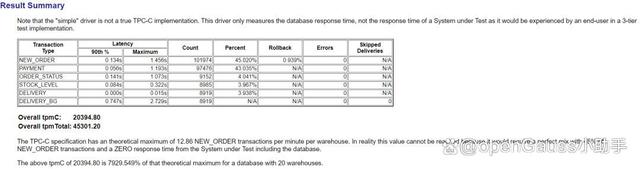
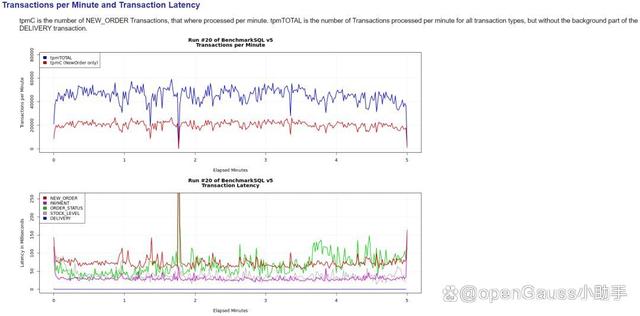
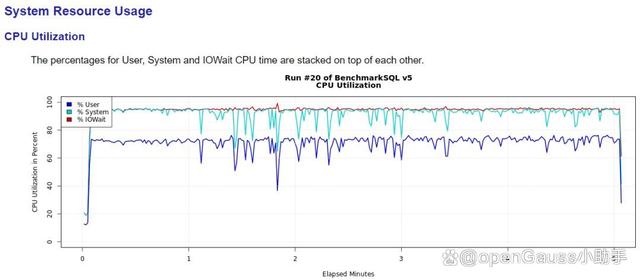
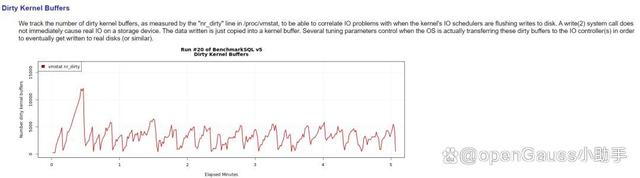
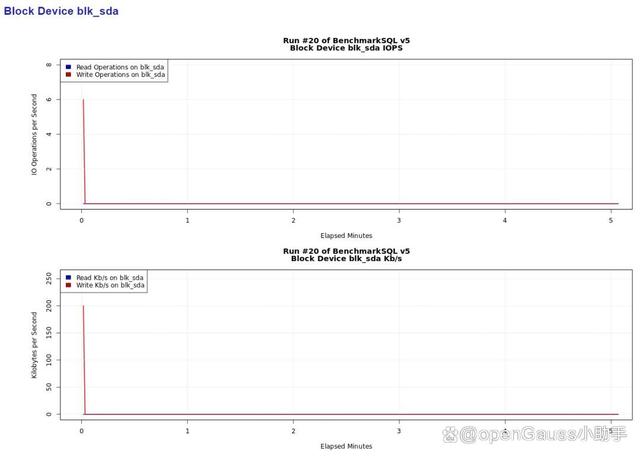
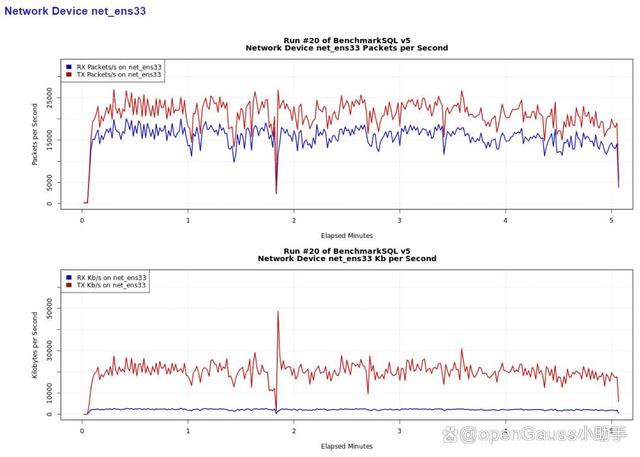
打包并下载my_result_2023-08-03_131532目录文件,里面包含了生成的测试报告,其中report.html文件已html格式生成测试报告。
报告里包含了数据库、磁盘、网卡压测等信息。
六、附录
6.1 IOError: [Errno 2] No such file or directory
如果props配置文件数据库网卡名称错误,在执行压测时会报如下错误:
Traceback (most recent call last):
File "<stdin>", line 211, in <module>
File "<stdin>", line 39, in main
File "<stdin>", line 186, in initNetDevice
IOError: [Errno 2] No such file or directory: '/sys/class/net/eth0/statistics/rx_packets'
13:41:25,933 [Thread-0] ERROR OSCollector$CollectData : OSCollector, unexpected EOF while reading from external helper process

6.2 ValueError: can’t have unbufferd text I/O
如果部署BenchmarkSQL的服务器没有部署python2,而部署了python3,会导致os_collector_linux.py采集报错,无法采集到数据库操作系统信息,因为os_collector_linux.py脚本部分内容不兼容python3,会报如下错误:
Traceback (most recent call last):
File "<stdin>", line 302, in <module>
File "<stdin>", line 65, in main
File "<stdin>", line 162, in initNetDevice
ValueError: can’t have unbufferd text I/O
17:36:26,676 [Thread-0] ERROR OSCollector$CollectData : OSCollector, unexpected EOF while reading from external helper process

以下提供了一份改写的兼容python3的os_collector_linux.py脚本
import
errno
import
math
import
os
import
sys
import
time
def main(argv):
global
deviceFDs
global
lastDeviceData
runID =
int
(argv[
])
interval =
float
(argv[
1
])
startTime = time.time()
nextDue = startTime + interval
sysInfo = [
'run'
,
'elapsed'
, ]
sysInfo += initSystemUsage()
print(
","
.join([
str
(x)
for
x
in
sysInfo]))
devices = []
deviceFDs = {}
lastDeviceData = {}
for
dev
in
argv[
2
:]:
if
dev.startswith(
'blk_'
):
devices.append(dev)
elif
dev.startswith(
'net_'
):
devices.append(dev)
else
:
raise
Exception(
"unknown device type '"
+ dev +
"'"
)
for
dev
in
devices:
if
dev.startswith(
'blk_'
):
devInfo = [
'run'
,
'elapsed'
,
'device'
, ]
devInfo += initBlockDevice(dev)
print(
","
.join([
str
(x)
for
x
in
devInfo]))
elif
dev.startswith(
'net_'
):
devInfo = [
'run'
,
'elapsed'
,
'device'
, ]
devInfo += initNetDevice(dev)
print(
","
.join([
str
(x)
for
x
in
devInfo]))
sys.stdout.flush()
try
:
while
True
:
now = time.time()
if
nextDue > now:
time.sleep(nextDue - now)
elapsed =
int
((nextDue - startTime) *
1000.0
)
sysInfo = [runID, elapsed, ]
sysInfo += getSystemUsage()
print(
","
.join([
str
(x)
for
x
in
sysInfo]))
for
dev
in
devices:
if
dev.startswith(
'blk_'
):
devInfo = [runID, elapsed, dev, ]
devInfo += getBlockUsage(dev, interval)
print(
","
.join([
str
(x)
for
x
in
devInfo]))
elif
dev.startswith(
'net_'
):
devInfo = [runID, elapsed, dev, ]
devInfo += getNetUsage(dev, interval)
print(
","
.join([
str
(x)
for
x
in
devInfo]))
nextDue += interval
sys.stdout.flush()
except
KeyboardInterrupt:
print(
""
)
return
except
IOError
as
e:
if
e.errno == errno.EPIPE:
return
else
:
raise
e
def initSystemUsage():
global
procStatFD
global
procVMStatFD
global
lastStatData
global
lastVMStatData
procStatFD =
open
(
"/proc/stat"
,
"rb"
)
for
line
in
procStatFD:
line = line.decode().split()
if
line[
] ==
"cpu"
:
lastStatData = [
int
(x)
for
x
in
line[
1
:]]
break
if
len
(lastStatData) !=
10
:
raise
Exception(
"cpu line in /proc/stat too short"
)
procVMStatFD =
open
(
"/proc/vmstat"
,
"rb"
)
lastVMStatData = {}
for
line
in
procVMStatFD:
line = line.decode().split()
if
line[
]
in
[
'nr_dirty'
, ]:
lastVMStatData[
'vm_'
+ line[
]] =
int
(line[
1
])
if
len
(lastVMStatData.keys()) !=
1
:
raise
Exception(
"not all elements found in /proc/vmstat"
)
return
[
'cpu_user'
,
'cpu_nice'
,
'cpu_system'
,
'cpu_idle'
,
'cpu_iowait'
,
'cpu_irq'
,
'cpu_softirq'
,
'cpu_steal'
,
'cpu_guest'
,
'cpu_guest_nice'
,
'vm_nr_dirty'
,
]
def getSystemUsage():
global
procStatFD
global
procVMStatFD
global
lastStatData
global
lastVMStatData
procStatFD.seek(
,
)
for
line
in
procStatFD:
line = line.decode().split()
if
line[
] !=
"cpu"
:
continue
statData = [
int
(x)
for
x
in
line[
1
:]]
deltaTotal =
float
(
sum
(statData) -
sum
(lastStatData))
if
deltaTotal ==
:
result = [
0.0
for
x
in
statData]
else
:
result = []
for
old, new
in
zip
(lastStatData, statData):
result.append(
float
(new - old) / deltaTotal)
lastStatData = statData
break
procVMStatFD.seek(
,
)
newVMStatData = {}
for
line
in
procVMStatFD:
line = line.decode().split()
if
line[
]
in
[
'nr_dirty'
, ]:
newVMStatData[
'vm_'
+ line[
]] =
int
(line[
1
])
for
key
in
[
'vm_nr_dirty'
, ]:
result.append(newVMStatData[key])
return
result
def initBlockDevice(dev):
global
deviceFDs
global
lastDeviceData
devPath = os.path.join(
"/sys/block"
, dev[
4
:],
"stat"
)
deviceFDs[dev] =
open
(devPath,
"rb"
)
line = deviceFDs[dev].readline().decode().split()
newData = []
for
idx, mult
in
[
(
,
1.0
), (
1
,
1.0
), (
2
,
0.5
),
(
4
,
1.0
), (
5
,
1.0
), (
6
,
0.5
),
]:
newData.append(
int
(line[idx]))
lastDeviceData[dev] = newData
return
[
'rdiops'
,
'rdmerges'
,
'rdkbps'
,
'wriops'
,
'wrmerges'
,
'wrkbps'
, ]
def getBlockUsage(dev, interval):
global
deviceFDs
global
lastDeviceData
deviceFDs[dev].seek(
,
)
line = deviceFDs[dev].readline().decode().split()
oldData = lastDeviceData[dev]
newData = []
result = []
ridx =
for
idx, mult
in
[
(
,
1.0
), (
1
,
1.0
), (
2
,
0.5
),
(
4
,
1.0
), (
5
,
1.0
), (
6
,
0.5
),
]:
newData.append(
int
(line[idx]))
result.append(
float
(newData[ridx] - oldData[ridx]) * mult / interval)
ridx +=
1
lastDeviceData[dev] = newData
return
result
def initNetDevice(dev):
global
deviceFDs
global
lastDeviceData
devPath = os.path.join(
"/sys/class/net"
, dev[
4
:],
"statistics"
)
deviceData = []
for
fname
in
[
'rx_packets'
,
'rx_bytes'
,
'tx_packets'
,
'tx_bytes'
, ]:
key = dev +
"."
+ fname
deviceFDs[key] =
open
(os.path.join(devPath, fname),
"rb"
)
deviceData.append(
int
(deviceFDs[key].read()))
lastDeviceData[dev] = deviceData
return
[
'rxpktsps'
,
'rxkbps'
,
'txpktsps'
,
'txkbps'
, ]
def getNetUsage(dev, interval):
global
deviceFDs
global
lastDeviceData
oldData = lastDeviceData[dev]
newData = []
for
fname
in
[
'rx_packets'
,
'rx_bytes'
,
'tx_packets'
,
'tx_bytes'
, ]:
key = dev +
"."
+ fname
deviceFDs[key].seek(
,
)
newData.append(
int
(deviceFDs[key].read()))
result = [
float
(newData[
] - oldData[
]) / interval,
float
(newData[
1
] - oldData[
1
]) / interval /
1024.0
,
float
(newData[
2
] - oldData[
2
]) / interval,
float
(newData[
3
] - oldData[
3
]) / interval /
1024.0
,
]
lastDeviceData[dev] = newData
return
result
if
__name__ ==
'__main__'
:
sys.exit(main(sys.argv[
1
:]))
6.3 ant无法编译BenchmarkSQL
有时会遇到ant无法编译BenchmarkSQL的问题,遇到如下报错:
Error: Could not find or load main class org.apache.tools.ant.launch.Launcher
Caused by: java.lang.ClassNotFoundException: org.apache.tools.ant.launch.Launcher
解决办法是,要配置环境JAVA_HOME和CLASSPATH环境变量,如下所示:
-- BenchmarkSQL服务器,omm用户操作
-- 编辑 .bash_profile文件,添加如下内容
export JAVA_HOME=/usr/java/jdk-11
export CLASSPATH=.:${JAVA_HOME}/lib:/usr/share/ant/lib/ant-launcher.jar
-- 生效 .bash_profile文件
此时就可以使用ant正常编译BenchmarkSQL了。
原文:





 扫一扫
扫一扫


 1163
1163

 被折叠的 条评论
为什么被折叠?
被折叠的 条评论
为什么被折叠?
 到【灌水乐园】发言





