




 本文详细介绍了如何解决Wireshark中出现的大量关于IP校验和卸载错误的问题。通过调整Wireshark的设置,可以避免软件在数据包到达网卡前进行处理导致的效率低下,以及由此产生的错误信息。具体操作包括进入协议设置,取消验证IPv4校验和的选项。
转自:vonnie
One note about Checksum errors
If you’re seeing a bunch of black rows with red text about IP checksum offload errors you should tell Wireshark to ignore it.
Your NIC is complaining because packet processing is being done in software by Wireshark before it ever hits the NIC. The NIC is like:
Yo, this is inefficient so I’m going to barf up a bunch of annoying errors to let the user know how I feel about this.
Let’s tell Wireshark to cool it.
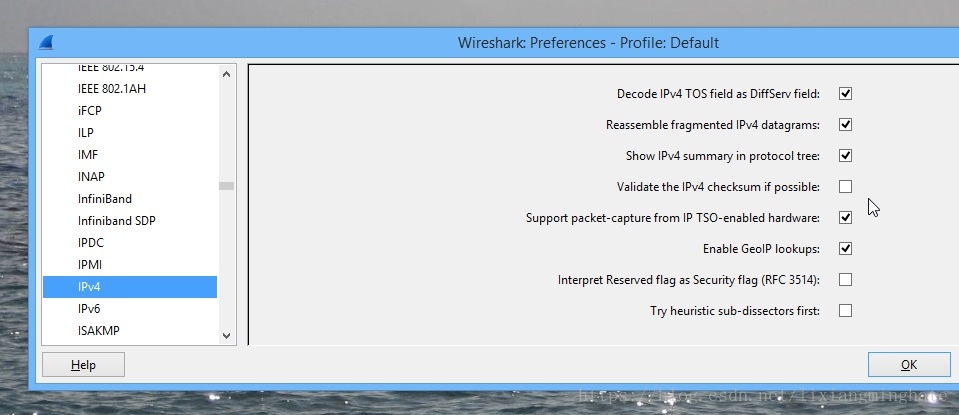
Hit up Shift + Ctrl + p, click Protocols in the left pane and scroll down to IPv4.
In the right pane, Uncheck Validate the IPv4 checksum if possible and click OK. This will tell Wireshark to calm down lol.
The Bottom Line
What can I say?
After this you should have a pretty solid understanding of Wireshark.
Let me know what you think in the comments below!





 扫一扫
扫一扫


 1007
1007

 被折叠的 条评论
为什么被折叠?
被折叠的 条评论
为什么被折叠?
 到【灌水乐园】发言





