



 本文介绍了JDBC连接数据库时可能出现的异常处理,详细讲解了JDBC工具类的封装,包括创建连接、ResultSet的使用、防止SQL注入的PreparedStatement、事务管理,并给出了具体的代码实现和测试案例,展示了如何通过工具类简化数据库操作。
相关文章
Jdbc工具类的简单例子
封装方法
- 创建连接,共用调用
- 静态代码块,只需调用一次,账号密码等配置文件获取,不需更改代码
- 关闭资源方法
配置文件:
driver=com.mysql.cj.jdbc.Driver
url = jdbc:mysql://localhost:3306/study?useSSL=false&serverTimezone=UTC&characterEncoding=utf-8
user=root
password=password
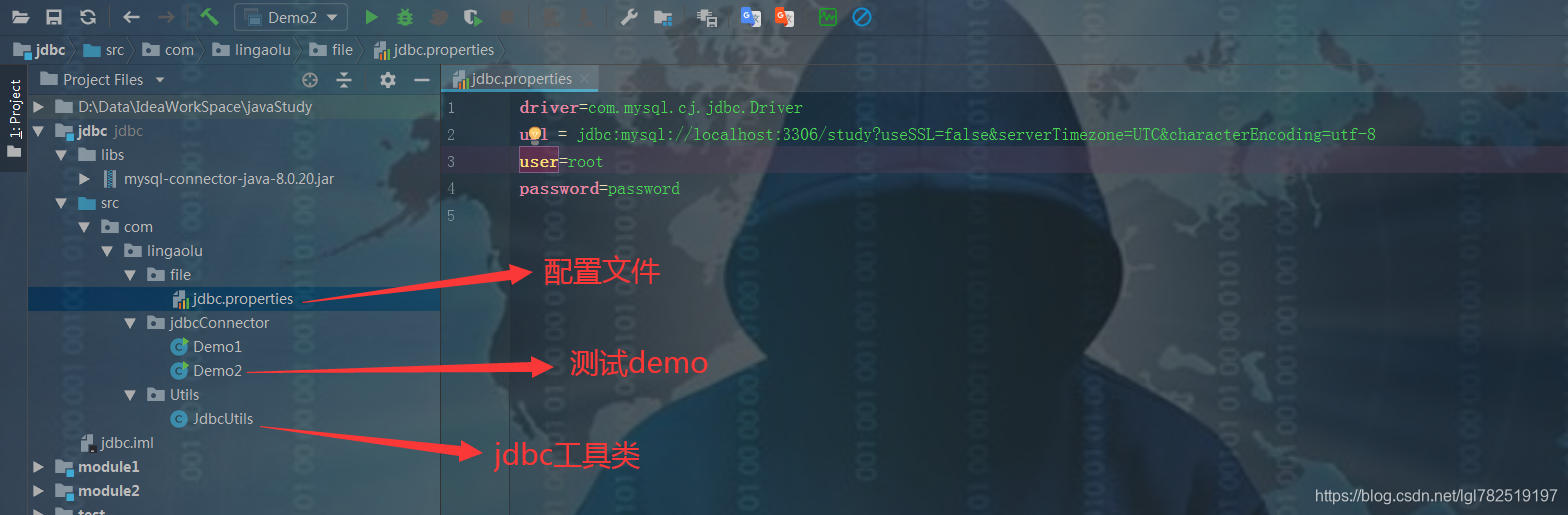
工具类代码
package com.lingaolu.Utils;

import java.io.FileReader;
import java.io.IOException;
import java.net.URL;
import java.sql.*;
import java.util.Properties;

/**
 * @author 林高禄
 * @create 2020-06-23-11:12
 */
public class JdbcUtils {
    private static String driver;
    private static String url;
    private static String userName;
    private static String pw;

    static{
        try {
            Properties p = new Properties();
            ClassLoader classLoader = JdbcUtils.class.getClassLoader();
            // 这个路径相对于src的路径来说,classLoader.getResource只能获取src下的目录
            URL resource = classLoader.getResource("com/lingaolu/file/jdbc.properties");
            String path = resource.getPath();
            p.load(new FileReader(path));
            driver = p.getProperty("driver");
            url = p.getProperty("url");
            userName = p.getProperty("user");
            pw = p.getProperty("password");
            Class.forName(driver);
        } catch (IOException e) {
            e.printStackTrace();
        } catch (ClassNotFoundException e) {
            e.printStackTrace();
        }
    }

    public static Connection createConnection() throws SQLException {
        return DriverManager.getConnection(url, userName, pw);
    }

    public static void close(Statement stmt,Connection con){
        if(null != stmt){
            try {
                stmt.close();
            } catch (SQLException e) {
                e.printStackTrace();
            }
        }
        if(null != con){
            try {
                con.close();
            } catch (SQLException e) {
                e.printStackTrace();
            }
        }
    }

    public static void close(ResultSet set,Statement s,Connection con){
        if(null != set){
            try {
                set.close();
            } catch (SQLException e) {
                e.printStackTrace();
            }
        }
        close(s,con);
    }
}
测试demo2代码
package com.lingaolu.jdbcConnector;

import com.lingaolu.Utils.JdbcUtils;

import java.sql.*;

/**
 * @author 林高禄
 * @create 2020-06-23-17:27
 */
public class Demo2 {
    public static void main(String[] args) {
        Connection con = null;
        Statement stmt = null;
        try {
            con = JdbcUtils.createConnection();
            String sql = "insert into account value(null,'林帅',20000)";
            String sql2 = "select * from account";
            stmt = con.createStatement();
            // 如果是查询的话返回true,如果是更新或插入的话就返回false
            boolean execute = stmt.execute(sql);
            boolean execute2 = stmt.execute(sql2);
            System.out.println(execute);
            System.out.println(execute2);
        } catch (SQLException e) {
            e.printStackTrace();
        }finally {
            JdbcUtils.close(stmt,con);
        }
    }
}
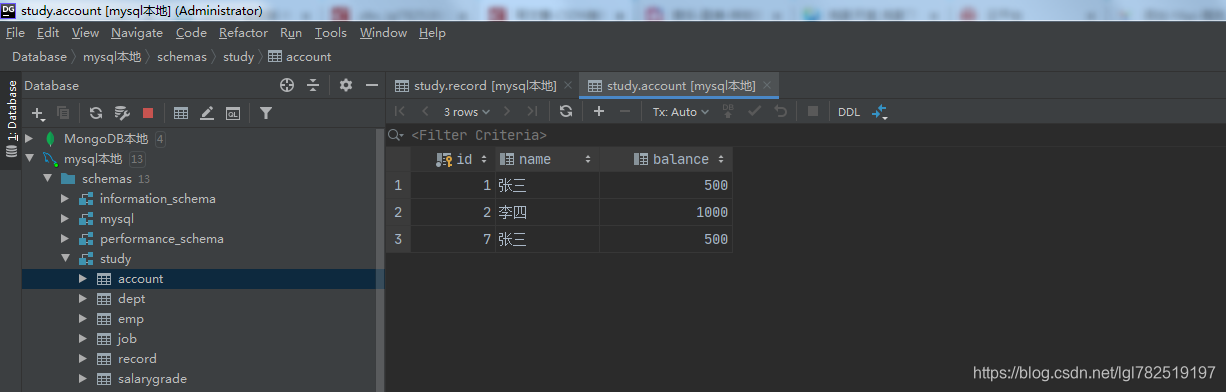
运行前数据库数据
运行输出:
false
true
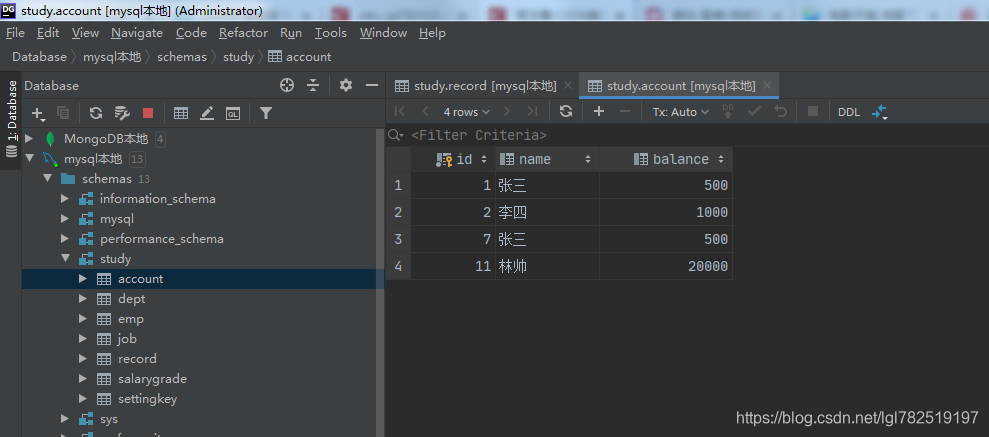
运行后数据库数据
简单的jdbc工具类就介绍到这





 扫一扫
扫一扫


 652
652

 被折叠的 条评论
为什么被折叠?
被折叠的 条评论
为什么被折叠?
 到【灌水乐园】发言





