



 本文详细介绍了在使用JDBC连接MySQL数据库时可能遇到的异常处理,包括驱动包版本不匹配、服务器时区问题、乱码问题的解决方案,并提供了相应的代码示例和配置建议。
相关文章
概念
- Java DataBase Connectivity,Java数据库连接,Java语言操作数据库
本质
- 官方(sun公司)定义的一套所有关系型数据库的规则,即接口。各个数据库厂商去实现这套接口,提供数据库驱动jar包。我们可以使用这套接口(JDBC)编程,真正执行的代码是驱动jar包中的实现类
使用Demo
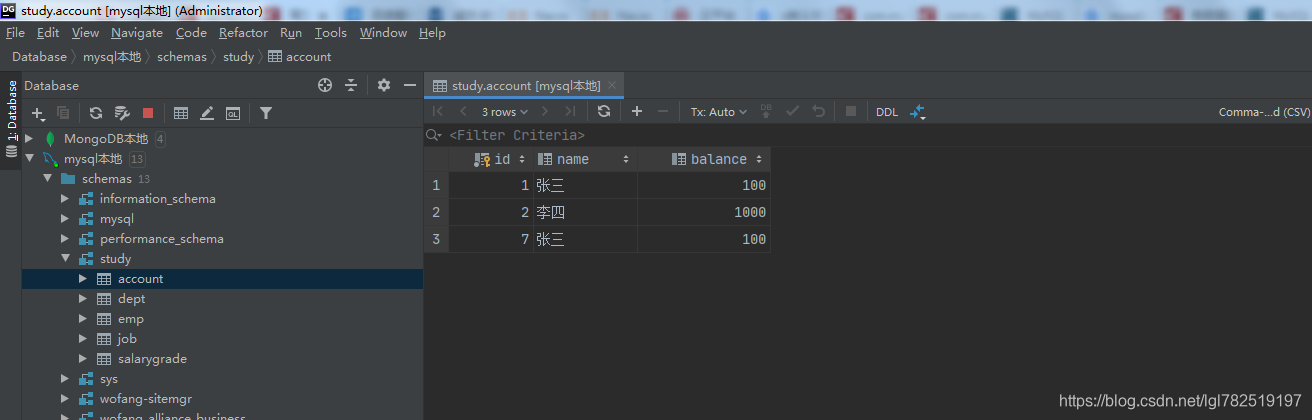
使用前的数据
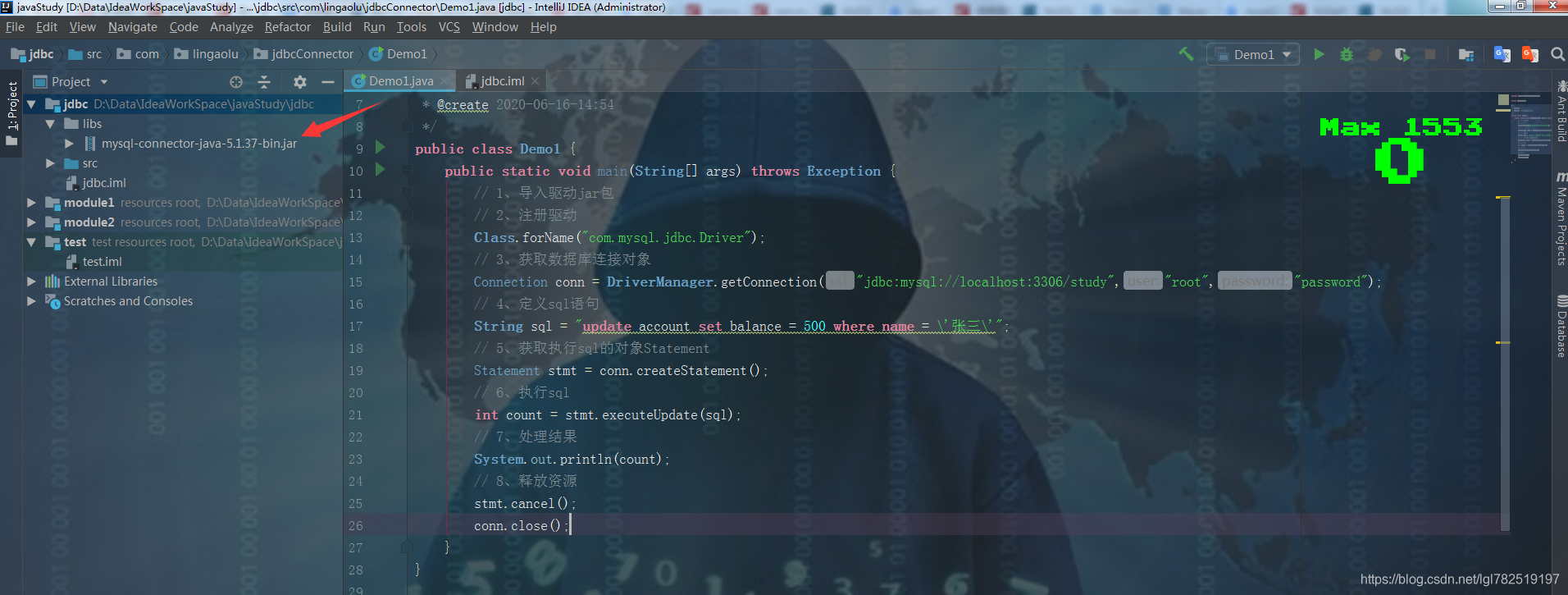
代码
package com.lingaolu.jdbcConnector;

import java.sql.*;

/**
 * @author 林高禄
 * @create 2020-06-16-17:27
 */
public class Demo1 {
    public static void main(String[] args) throws Exception{
        // 1、导入驱动jar包
        // 2、注册驱动,1.5版本之后可以省略,会自动注册
        Class.forName("com.mysql.jdbc.Driver");
        // 3、获取数据库连接对象
        Connection conn = DriverManager.getConnection("jdbc:mysql://localhost:3306/study","root","password");
        // 4、定义sql语句
        String sql = "update account set balance = 500 where name = \'张三\'";
        // 5、获取执行sql的对象Statement
        Statement stmt = conn.createStatement();
        // 6、执行sql
        //boolean bll = stmt.execute(sql);  // 可以执行任意的sql
        // ResultSet resultSet = stmt.executeQuery(sql);  // 报错,执行查询语句
        // 执行增删改
        int count = stmt.executeUpdate(sql);
        // 7、处理结果
        System.out.println(count);
        // 8、释放资源
        stmt.cancel();
        conn.close();
    }
}
运行输出:
Exception in thread "main" com.mysql.jdbc.exceptions.jdbc4.MySQLNonTransientConnectionException: Could not create connection to database server.
at sun.reflect.NativeConstructorAccessorImpl.newInstance0(Native Method)
at sun.reflect.NativeConstructorAccessorImpl.newInstance(NativeConstructorAccessorImpl.java:62)
at sun.reflect.DelegatingConstructorAccessorImpl.newInstance(DelegatingConstructorAccessorImpl.java:45)
at java.lang.reflect.Constructor.newInstance(Constructor.java:422)
at com.mysql.jdbc.Util.handleNewInstance(Util.java:404)
at com.mysql.jdbc.Util.getInstance(Util.java:387)
at com.mysql.jdbc.SQLError.createSQLException(SQLError.java:919)
at com.mysql.jdbc.SQLError.createSQLException(SQLError.java:898)
at com.mysql.jdbc.SQLError.createSQLException(SQLError.java:887)
at com.mysql.jdbc.SQLError.createSQLException(SQLError.java:862)
at com.mysql.jdbc.ConnectionImpl.connectOneTryOnly(ConnectionImpl.java:2331)
at com.mysql.jdbc.ConnectionImpl.createNewIO(ConnectionImpl.java:2084)
at com.mysql.jdbc.ConnectionImpl.<init>(ConnectionImpl.java:795)
at com.mysql.jdbc.JDBC4Connection.<init>(JDBC4Connection.java:44)
at sun.reflect.NativeConstructorAccessorImpl.newInstance0(Native Method)
at sun.reflect.NativeConstructorAccessorImpl.newInstance(NativeConstructorAccessorImpl.java:62)
at sun.reflect.DelegatingConstructorAccessorImpl.newInstance(DelegatingConstructorAccessorImpl.java:45)
at java.lang.reflect.Constructor.newInstance(Constructor.java:422)
at com.mysql.jdbc.Util.handleNewInstance(Util.java:404)
at com.mysql.jdbc.ConnectionImpl.getInstance(ConnectionImpl.java:400)
at com.mysql.jdbc.NonRegisteringDriver.connect(NonRegisteringDriver.java:327)
at java.sql.DriverManager.getConnection(DriverManager.java:664)
at java.sql.DriverManager.getConnection(DriverManager.java:247)
at com.lingaolu.jdbcConnector.Demo1.main(Demo1.java:15)
Caused by: java.lang.NullPointerException
at com.mysql.jdbc.ConnectionImpl.getServerCharset(ConnectionImpl.java:3004)
at com.mysql.jdbc.MysqlIO.sendConnectionAttributes(MysqlIO.java:1908)
at com.mysql.jdbc.MysqlIO.proceedHandshakeWithPluggableAuthentication(MysqlIO.java:1837)
at com.mysql.jdbc.MysqlIO.doHandshake(MysqlIO.java:1207)
at com.mysql.jdbc.ConnectionImpl.coreConnect(ConnectionImpl.java:2254)
at com.mysql.jdbc.ConnectionImpl.connectOneTryOnly(ConnectionImpl.java:2285)
... 13 more
异常处理
驱动包版本问题
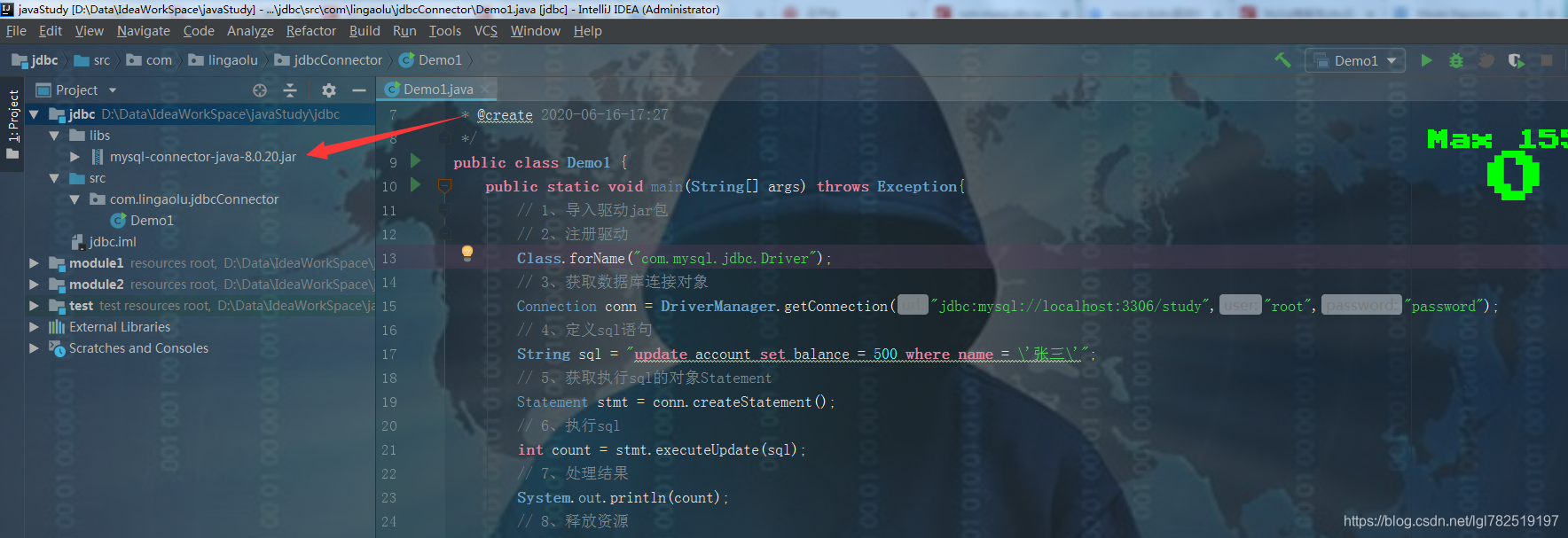
因为我的mysql是8.0版本的,而驱动包是5.1版本的,所以连接不上,所以我们要用8.0版本的驱动包
下载地址
https://mvnrepository.com/artifact/mysql/mysql-connector-java
https://blog.youkuaiyun.com/u014689794/article/details/79969352
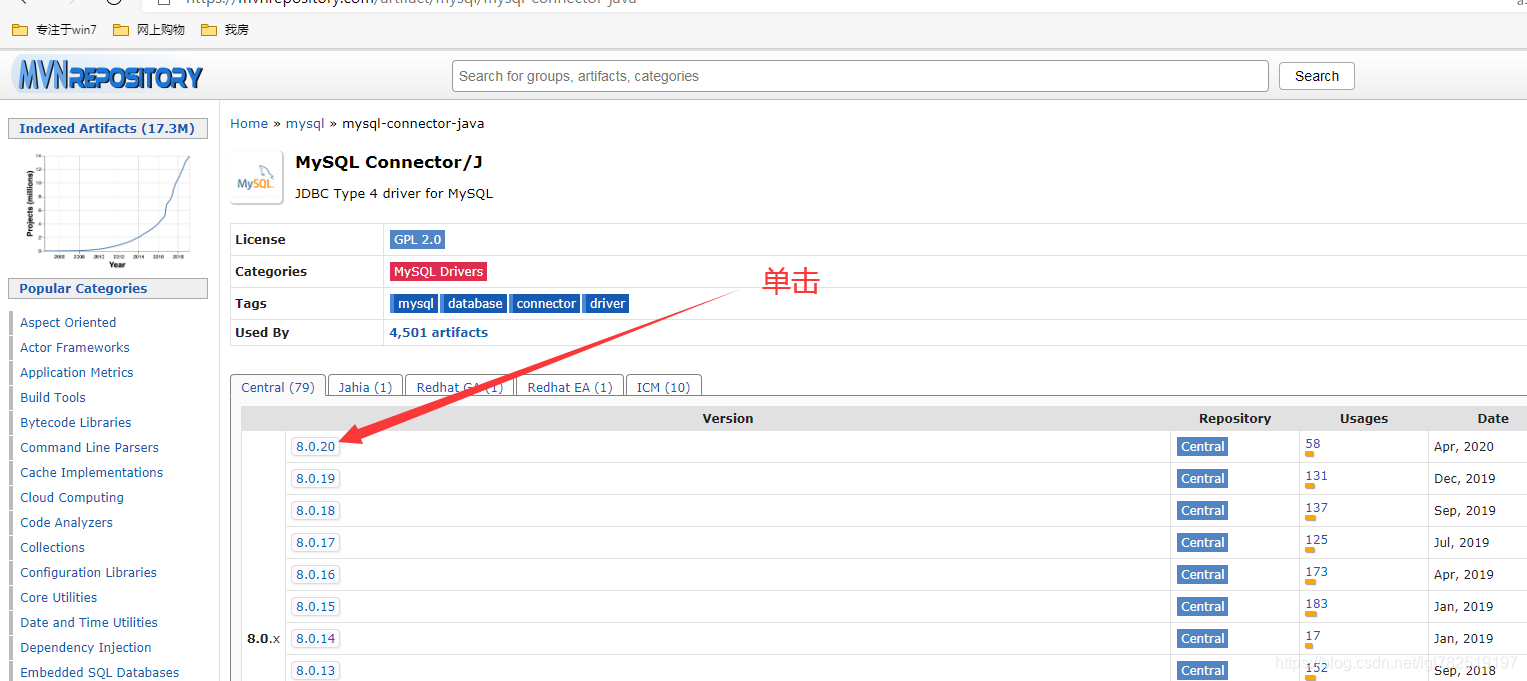
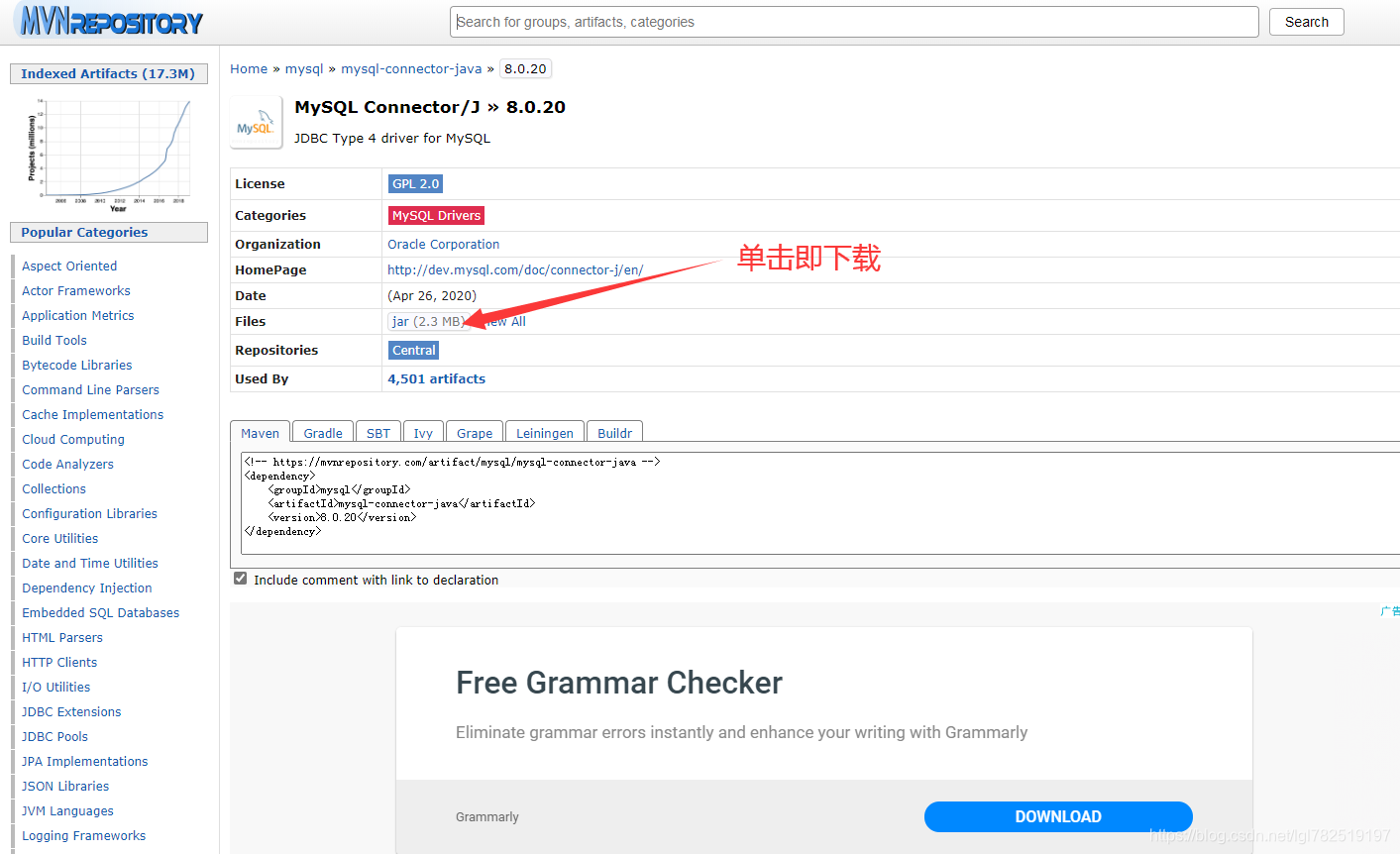
我已经下载了8.0.20版本的驱动包,放入项目
运行输出:
Loading class `com.mysql.jdbc.Driver'. This is deprecated. The new driver class is `com.mysql.cj.jdbc.Driver'. The driver is automatically registered via the SPI and manual loading of the driver class is generally unnecessary.
Exception in thread "main" java.sql.SQLException: The server time zone value '�й���ʱ��' is unrecognized or represents more than one time zone. You must configure either the server or JDBC driver (via the 'serverTimezone' configuration property) to use a more specifc time zone value if you want to utilize time zone support.
at com.mysql.cj.jdbc.exceptions.SQLError.createSQLException(SQLError.java:129)
at com.mysql.cj.jdbc.exceptions.SQLError.createSQLException(SQLError.java:97)
at com.mysql.cj.jdbc.exceptions.SQLError.createSQLException(SQLError.java:89)
at com.mysql.cj.jdbc.exceptions.SQLError.createSQLException(SQLError.java:63)
at com.mysql.cj.jdbc.exceptions.SQLError.createSQLException(SQLError.java:73)
at com.mysql.cj.jdbc.exceptions.SQLExceptionsMapping.translateException(SQLExceptionsMapping.java:76)
at com.mysql.cj.jdbc.ConnectionImpl.createNewIO(ConnectionImpl.java:836)
at com.mysql.cj.jdbc.ConnectionImpl.<init>(ConnectionImpl.java:456)
at com.mysql.cj.jdbc.ConnectionImpl.getInstance(ConnectionImpl.java:246)
at com.mysql.cj.jdbc.NonRegisteringDriver.connect(NonRegisteringDriver.java:197)
at java.sql.DriverManager.getConnection(DriverManager.java:664)
at java.sql.DriverManager.getConnection(DriverManager.java:247)
at com.lingaolu.jdbcConnector.Demo1.main(Demo1.java:15)
Caused by: com.mysql.cj.exceptions.InvalidConnectionAttributeException: The server time zone value '�й���ʱ��' is unrecognized or represents more than one time zone. You must configure either the server or JDBC driver (via the 'serverTimezone' configuration property) to use a more specifc time zone value if you want to utilize time zone support.
at sun.reflect.NativeConstructorAccessorImpl.newInstance0(Native Method)
at sun.reflect.NativeConstructorAccessorImpl.newInstance(NativeConstructorAccessorImpl.java:62)
at sun.reflect.DelegatingConstructorAccessorImpl.newInstance(DelegatingConstructorAccessorImpl.java:45)
at java.lang.reflect.Constructor.newInstance(Constructor.java:422)
at com.mysql.cj.exceptions.ExceptionFactory.createException(ExceptionFactory.java:61)
at com.mysql.cj.exceptions.ExceptionFactory.createException(ExceptionFactory.java:85)
at com.mysql.cj.util.TimeUtil.getCanonicalTimezone(TimeUtil.java:132)
at com.mysql.cj.protocol.a.NativeProtocol.configureTimezone(NativeProtocol.java:2120)
at com.mysql.cj.protocol.a.NativeProtocol.initServerSession(NativeProtocol.java:2143)
at com.mysql.cj.jdbc.ConnectionImpl.initializePropsFromServer(ConnectionImpl.java:1310)
at com.mysql.cj.jdbc.ConnectionImpl.connectOneTryOnly(ConnectionImpl.java:967)
at com.mysql.cj.jdbc.ConnectionImpl.createNewIO(ConnectionImpl.java:826)
... 6 more
新的驱动程序类
Loading class `com.mysql.jdbc.Driver'. This is deprecated. The new driver class is `com.mysql.cj.jdbc.Driver'. The driver is automatically registered via the SPI and manual loading of the driver class is generally unnecessary.
不推荐使用:加载类“ com.mysql.jdbc.Driver”。 新的驱动程序类为“ com.mysql.cj.jdbc.Driver”。 通过SPI自动注册驱动程序,通常不需要手动加载驱动程序类。
服务器时区值
Exception in thread "main" java.sql.SQLException: The server time zone value '�й���ʱ��' is unrecognized or represents more than one time zone. You must configure either the server or JDBC driver (via the 'serverTimezone' configuration property) to use a more specifc time zone value if you want to utilize time zone support.
java.sql.SQLException:服务器时区值’。无法识别或代表多个时区。 如果要利用时区支持,则必须配置服务器或JDBC驱动程序(通过“ serverTimezone”配置属性)以使用更特定的时区值。
修改驱动程序类,对于建立java程序与数据库的连接,mysql 8.0 以上版本不需要建立 SSL 连接的,需要显示关闭。同时需要在url中添加时区设置。修改后的代码
package com.lingaolu.jdbcConnector;

import java.sql.*;

/**
 * @author 林高禄
 * @create 2020-06-16-17:27
 */
public class Demo1 {
    public static void main(String[] args) throws Exception{
        // 1、导入驱动jar包
        // 2、注册驱动,1.5版本之后可以省略,会自动注册
        //Class.forName("com.mysql.cj.jdbc.Driver");
        // 3、获取数据库连接对象
        Connection conn = DriverManager.getConnection("jdbc:mysql://localhost:3306/study?useSSL=false&serverTimezone=UTC","root","password");
        // 4、定义sql语句
        String sql = "update account set balance = 500 where name = \'张三\'";
        // 5、获取执行sql的对象Statement
        Statement stmt = conn.createStatement();
        // 6、执行sql
        //boolean bll = stmt.execute(sql);  // 可以执行任意的sql
        // ResultSet resultSet = stmt.executeQuery(sql);  // 报错,执行查询语句
        // 执行增删改
        int count = stmt.executeUpdate(sql);
        // 7、处理结果
        System.out.println(count);
        // 8、释放资源
        stmt.cancel();
        conn.close();
    }
}
乱码问题
为了防止中文乱码可以在url中添加"characterEncoding=utf-8"
package com.lingaolu.jdbcConnector;

import java.sql.*;

/**
 * @author 林高禄
 * @create 2020-06-16-17:27
 */
public class Demo1 {
    public static void main(String[] args) throws Exception{
        // 1、导入驱动jar包
        // 2、注册驱动,1.5版本之后可以省略,会自动注册
        //Class.forName("com.mysql.cj.jdbc.Driver");
        // 3、获取数据库连接对象
        Connection conn = DriverManager.getConnection("jdbc:mysql://localhost:3306/study?useSSL=false&serverTimezone=UTC&characterEncoding=utf-8","root","password");
        // 4、定义sql语句
        String sql = "update account set balance = 500 where name = \'张三\'";
        // 5、获取执行sql的对象Statement
        Statement stmt = conn.createStatement();
        // 6、执行sql
        //boolean bll = stmt.execute(sql);  // 可以执行任意的sql
        // ResultSet resultSet = stmt.executeQuery(sql);  // 报错,执行查询语句
        // 执行增删改
        int count = stmt.executeUpdate(sql);
        // 7、处理结果
        System.out.println(count);
        // 8、释放资源
        stmt.cancel();
        conn.close();
    }
}
运行输出:
2
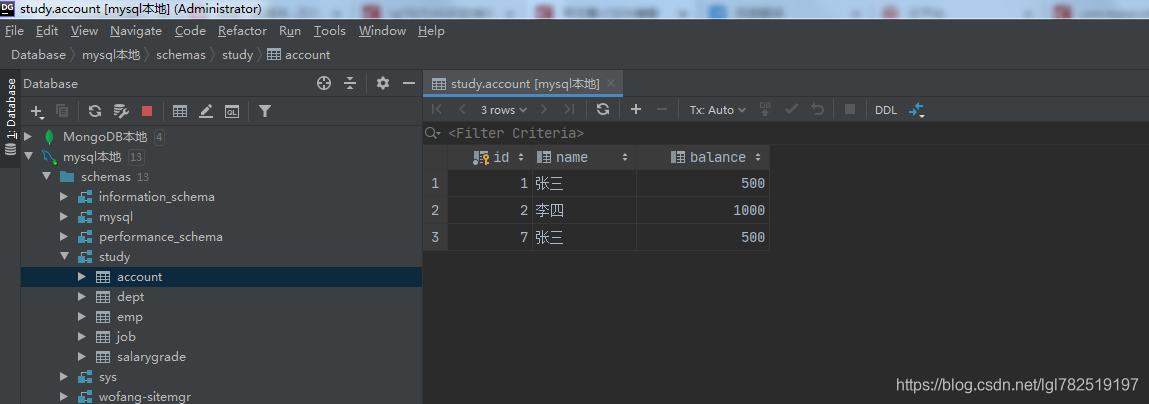
执行后的数据库,数据已修改





 扫一扫
扫一扫


 714
714

 被折叠的 条评论
为什么被折叠?
被折叠的 条评论
为什么被折叠?
 到【灌水乐园】发言





