


 本文全面介绍了Python字符串的基础知识,包括字符串的创建、访问、格式化、基本运算等内容,并提供了丰富的实例帮助理解。
python 字符串详解
大家好,我是 Lemon 。
在前不久, Lemon 将 Python 字符串相关的内容整理成一份 速查表(pdf版),有同学问有没有文字版的内容。
今天,Lemon 将该速查表对应的文字版内容跟大家分享下。
主要内容包括以下几个方面:
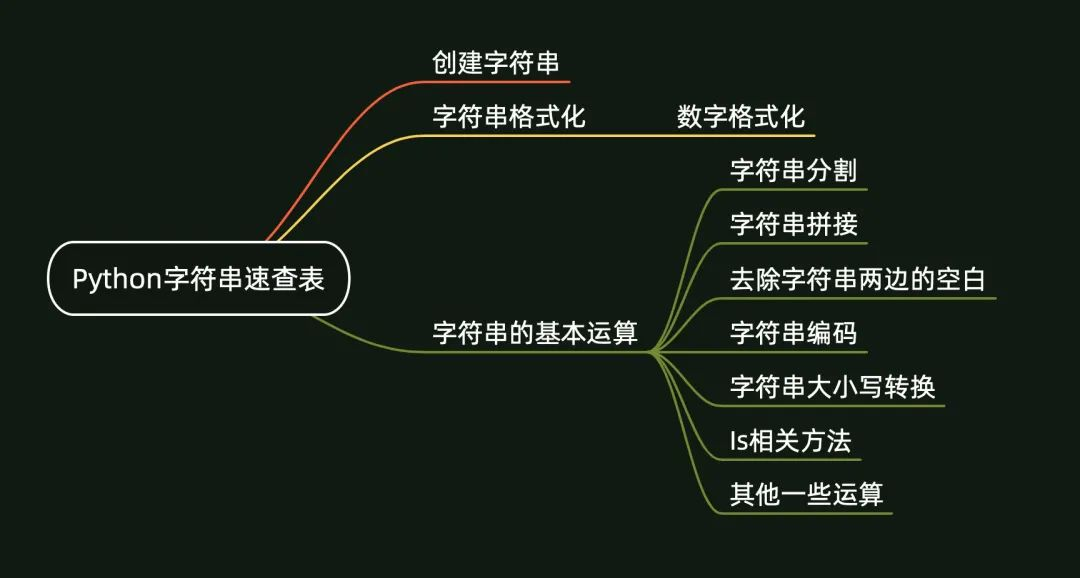
《Python字符串速查表》(V1.0版)一共 5 页,页面概览如下:
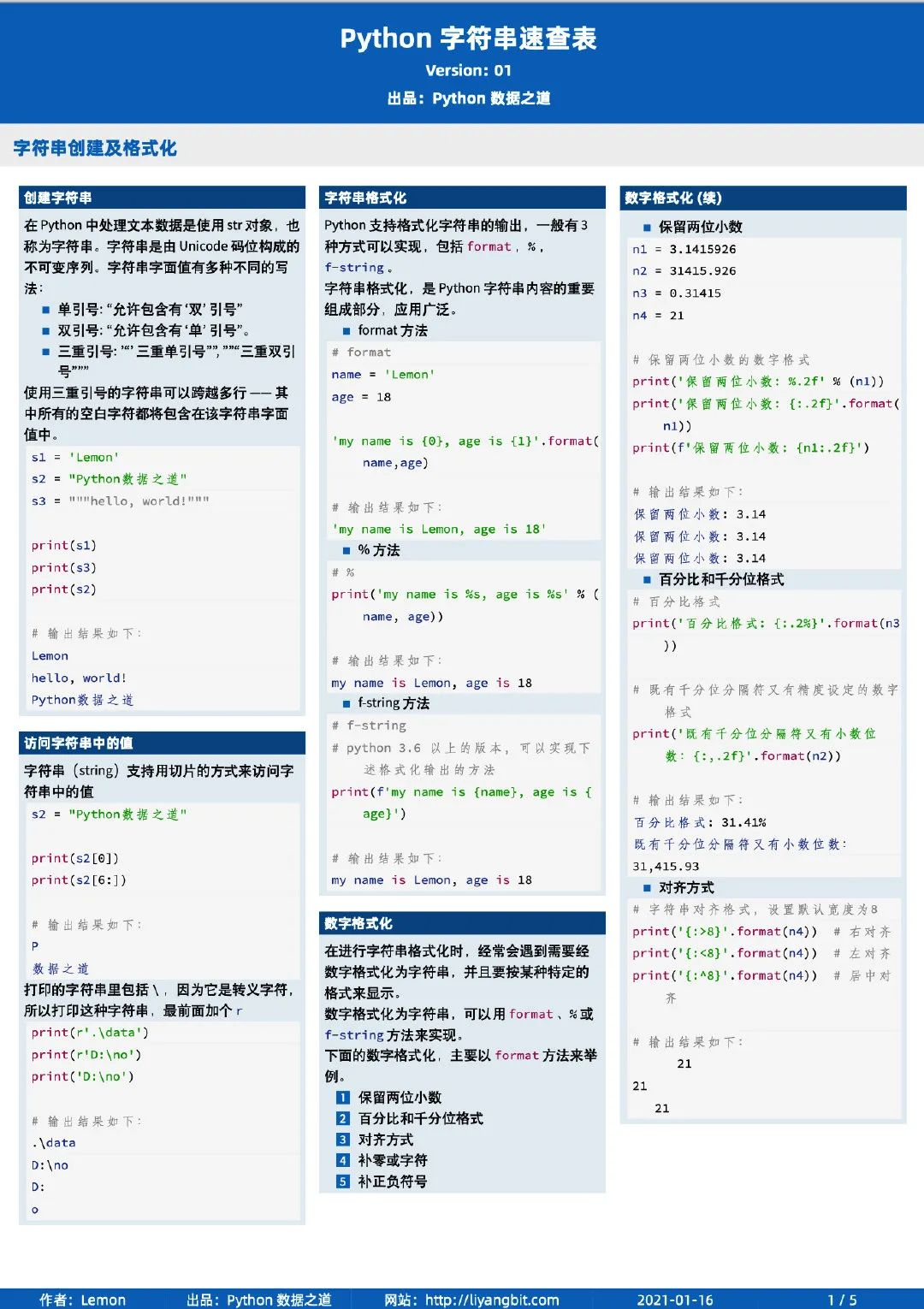
别小看 Python 字符串,它是 Python 最重要的基础之一, Lemon 在整理的过程中,发现内容也不少。
01 创建字符串
在 Python 中处理文本数据是使用 str 对象,也称为 字符串。字符串是由 Unicode 码位构成的不可变 序列。字符串字面值有多种不同的写法:
单引号: '允许包含有 "双" 引号'
双引号: "允许包含有 '单' 引号"。
三重引号: '''三重单引号''', """三重双引号"""
使用三重引号的字符串可以跨越多行 —— 其中所有的空白字符都将包含在该字符串字面值中。
s1 = 'Lemon'
s2 = "Python数据之道"
s3 = """
hello, world!

"""

print(s1)
print(s3)
print(s2)
Lemon

hello, world!


Python数据之道
请对比下三重引号
s1 = 'Lemon'
s2 = "Python数据之道"
s3 = """hello, world!"""

print(s1)
print(s3)
print(s2)
Lemon
hello, world!
Python数据之道
02 访问字符串中的值
字符串(string)支持用切片的方式来访问字符串中的值,这个功能在Python的list 中经常会用到。
关于 list 的更多内容,可以点击下面的链接前往:
s2 = "Python数据之道"

print(s2[0])
print(s2[6:])
P
数据之道
打印的字符串里包括 \ ,因为它是转义字符,所以打印这种字符串,最前面加个 r
print(r'.\data')
print(r'D:\no')
print('D:\no')
.\data
D:\no
D:
o
03 字符串格式化
Python 支持格式化字符串的输出,一般有3种方式可以实现,包括 format , % , f-string 。
字符串格式化,是 Python 字符串内容的重要组成部分,应用广泛。
# format

name = 'Lemon'
age = 18

'my name is {0}, age is {1}'.format(name,age)
'my name is Lemon, age is 18'
# %
print('my name is %s, age is %s' % (name, age))
my name is Lemon, age is 18
# f-string
# python 3.6 以上的版本,可以实现下述格式化输出的方法
print(f'my name is {name}, age is {age}')
my name is Lemon, age is 18
数字格式化
在进行字符串格式化时,经常会遇到需要经数字格式化为字符串,并且要按某种特定的格式来显示。
数字格式化为字符串,可以用 format 、% 或 f-string 方法来实现。
下面的数字格式化,主要以 format 方法来举例。
n1 = 3.1415926
n2 = 31415.926
n3 = 0.31415
n4 = 21

# 保留两位小数的数字格式
print('保留两位小数: %.2f' % (n1))
print('保留两位小数: {:.2f}'.format(n1))
print(f'保留两位小数: {n1:.2f}')
保留两位小数: 3.14
保留两位小数: 3.14
保留两位小数: 3.14
# 百分比格式
print('百分比格式: {:.2%}'.format(n3))

# 既有千分位分隔符又有精度设定的数字格式
print('既有千分位分隔符又有小数位数:{:,.2f}'.format(n2))
百分比格式: 31.41%
既有千分位分隔符又有小数位数:31,415.93
# 字符串对齐格式,设置默认宽度为8
print('{:>8}'.format(n4))  # 右对齐
print('{:<8}'.format(n4))  # 左对齐
print('{:^8}'.format(n4))  # 居中对齐
      21
21
   21
# 数字补零,或者补特定符号,比如 ‘x’
print('左边补零: {:0>4}'.format(n4))  # 左边补0,宽度为4
print('右边补x:{:x<5}'.format(n4))  # 右边补x,宽度为5
左边补零:0021
右边补x:21xxx
n1 = 3.14159
n2 = -3.14159

# 带符号保留小数点后两位

# "+"
print('正数前加正号,负数前加负:')
print('{:+.2f}'.format(n1))
print('{:+.2f}'.format(n2))

# "-"
print('正数前无符号,负数前加负号:')
print('{:-.2f}'.format(n1))
print('{:-.2f}'.format(n2))

# 空格
print('正数前加空格,负数前加负号:')
print('{: .2f}'.format(n1))
print('{: .2f}'.format(n2))
正数前加正号,负数前加负:
+3.14
-3.14
正数前无符号,负数前加负号:
3.14
-3.14
正数前加空格,负数前加负号:
 3.14
-3.14
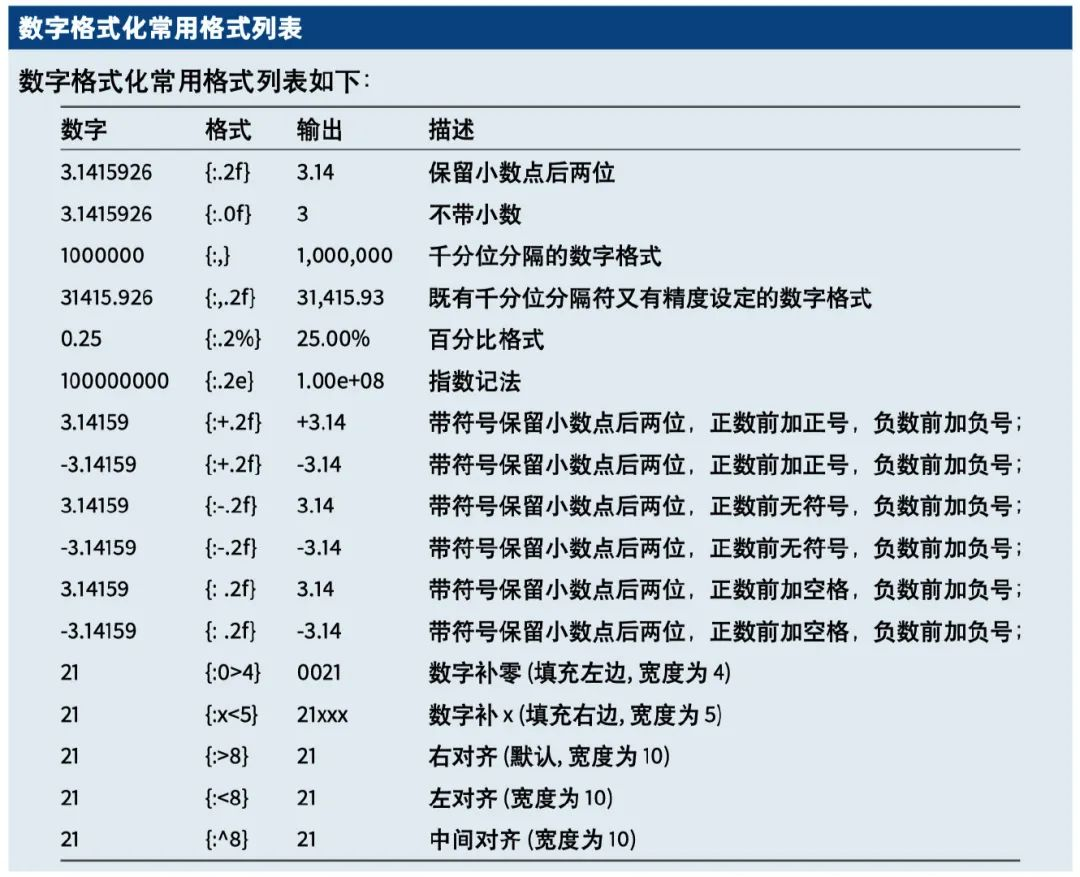
数字格式化常见的格式整理如下:
04 字符串的基本运算
拼接字符串
s1 = 'Hello, Dear friends, '
s2 = 'welcome to PyDataLab '

# 字符串拼接
print(s1 + s2)
Hello, Dear friends, welcome to PyDataLab
# 乘法
print(s2 * 2)
welcome to PyDataLab welcome to PyDataLab
字符串的大小写转换
s = 'hello, welcome to PyDataLab'

# 每个单词的首字母大写, title()
print('每个单词的首字母大写: ',s.title())

# 段落的首字母大写, capitalize()
print('段落的首字母大写: ',s.capitalize())

# lower(), 所有字母小写
print('所有字母小写: ',s.lower())

# upper(), 所有字母大写
print('所有字母大写: ',s.upper())

# 大写转小写,小写转大写
print('大写转小写,小写转大写: ',s.swapcase())
每个单词的首字母大写:Hello, Welcome To Pydatalab
段落的首字母大写:Hello, welcome to pydatalab
所有字母小写:hello, welcome to pydatalab
所有字母大写:HELLO, WELCOME TO PYDATALAB
大写转小写,小写转大写:HELLO, WELCOME TO pYdATAlAB
使用换行和制表符
# \n,表示换行
print('hello, \nwelcome to PyDataLab')
hello,
welcome to PyDataLab
# \t,表示制表符,会在字符换前保留空白
print('\thello, welcome to PyDataLab')
hello, welcome to PyDataLab
字符串分割
字符串的分割,通常有 split 和 partition 系列方法。
split 系列
split 系列方法包括 split() 、 rsplit() 、splitlines() 等。
split() 将一个字符串分隔成多个字符串组成的列表,不含分隔符; rsplit() 的功能与 split() 类似,只不过是从字符串最后面开始分割;splitlines() 按照('\n', '\r', \r\n'等)分隔,分割成列表。
s = 'hello, welcome to PyDataLab'

# 按空格分割
s.split()
['hello,', 'welcome', 'to', 'PyDataLab']
# 按某个字符分割
s.split('e')
['h', 'llo, w', 'lcom', ' to PyDataLab']
# 按某个字符分割,只分割一次
s.split('e',1)
['h', 'llo, welcome to PyDataLab']
# 按某个字符分割,只分割一次
s.rsplit('e',1)
['hello, welcom', ' to PyDataLab']
# 去掉换行符,以换行符分割成列表
print('1+2\n+3+4'.splitlines())
['1+2', '+3+4']
partition 系列
partition 系列方法包括 partition() 和 rpartition() 。
partition() 根据指定的分隔符(sep)将字符串进行分割,从字符串左边开始索引分隔符sep,索引到则停止索引,返回的是一个包含三个元素的元组(tuple),即 (head, sep, tail)。
# 遇到第一个分隔符后就停止索引
print(s.partition('e'))

# 没有遇到分隔符,返回原字符串和两个空字符串
print(s.partition('f'))
('h', 'e', 'llo, welcome to PyDataLab')
('hello, welcome to PyDataLab', '', '')
rpartition() 的功能与 partition() 类似,只不过是从字符串最后面开始分割。
# 遇到第一个分隔符后就停止索引
print(s.rpartition('e'))

# 没有遇到分隔符,返回两个空字符串和原字符串
print(s.rpartition('f'))
('hello, welcom', 'e', ' to PyDataLab')
('', '', 'hello, welcome to PyDataLab')
split 和 partition 系列方法的区别
| 方法 | 返回类型 | 是否包含分隔符 |
|---|---|---|
| split系列方法 | list(列表) | 否 |
| partition系列方法 | tuple(元组) | 是 |
去除字符串两边的空白
s = '  hello, world  '

# 去除字符串两端的空白
s.strip()
'hello, world'
# 去除字符串右侧的空白
s.rstrip()
' hello, world'
# 去除字符串左侧的空白
s.lstrip()
'hello, world '
字符串编码
编码 encode
s1 = 'Python数据之道'

# 编码 encode
s2 = s1.encode(encoding='utf-8')
s2
b'Python\xe6\x95\xb0\xe6\x8d\xae\xe4\xb9\x8b\xe9\x81\x93'
解码 decode
# 解码 decode
s2.decode(encoding='utf-8')
'Python数据之道'
is 相关方法
相关的方法有 isdigit() , isdecimal() , isnumeric()
s4 = 'Hi PyDataLab'
s5 = '2021'
s6 = "Lemon2069"

print(s4.isdigit())
print(s5.isdigit())
print(s5.isdecimal())
print(s5.isnumeric())
False
True
True
True
s7='①②③'
# isdigit()、isnumeric() 为True
# isdecimal()为False

print(s7.isdigit())
print(s7.isdecimal())
print(s7.isnumeric())
True
False
True
# isnumeric()会认为是True
s8='贰拾'

print(s8.isdigit())
print(s8.isdecimal())
print(s8.isnumeric())
False
False
True
s9 = '二十'

print(s9.isdigit())
print(s9.isdecimal())
print(s9.isnumeric())
False
False
True
| 方法 | True | False | Error |
|---|---|---|---|
| isdigit() | Unicode数字,byte数字(单字节),全角数字(双字节),罗马数字 | 汉字数字 | 无 |
| isdecimal() | Unicode数字,全角数字(双字节) | 罗马数字,汉字数字 | byte数字(单字节) |
| isnumeric() | Unicode数字,全角数字(双字节),罗马数字,汉字数字 | 无 | byte数字(单字节) |
isdigit()表示字符串内全部为数字
isalpha()表示字符串内全部为字符
isspace()表示字符串由一个或多个空格组成
isalnum()表示字符串内全部为数字和字符
s4 = 'PyDataLab'
s5 = '2021'
s6 = "Lemon2069"
s7 = ' '
s8 = 'Python数据之道'
s62 = "Lemon 2069"

print(s7.isspace())
print(s4.isalpha())
print(s8.isalpha())
print(s6.isalnum())
print(s62.isalnum())
True
True
True
True
False
.isupper() 字符串全部由大写组成 .islower() 字符串全部由小写组成 .istitle() 字符串形式为驼峰命名,单词的第一个字母大写,eg:"Hello World"
s1 = 'lemon'
s2 = 'LEMON'
s3 = 'PyDataLab'
s4 = 'Hello Lemon'

print(s1.islower())
print(s2.isupper())
print(s3.istitle())
print(s4.istitle())
True
True
False
True
还有一个 is 判断方法,isinstance(obj,type)
判断一个 object 是什么类型
type可选类型为:int,float,bool,complex,str,bytes,unicode,list,dict,set,tuple
并且 type 可以为一个元组(tuple):isinstance(obj, (str, int))
s1 = 'lemon'

print(isinstance(s1,str))
print(isinstance(s1,(str, int)))
True
True
其他一些运算
s = 'hello, world'

# 统计相同字符的个数
print(s.count('e'))

# 计算字符串的长度
print(len(s))

# 字符替换
print(s.replace('l','L'))

# 字符替换, 只替换指定位置的字符
# replace() 方法把字符串中的 old(旧字符串) 替换成 new(新字符串),如果指定第三个参数max,则替换不超过 max 次。
print(s.replace('l','L',2))
1
12
heLLo, worLd
heLLo, world
s = 'hello, world'

# 判断是否以某字符开头
s.startswith('h')
True
# 判断是否以某字符开头,区分大小写
s.startswith('H')
False
# 判断是否以某字符开头
s.startswith('a')
False
# 判断是否以某字符结尾
s.endswith('d')
True
# 判断是否以某字符结尾,区分大小写
s.endswith('a')
False
# join
# string.join(seq) ,以 string 作为分隔符,将 seq 中所有的元素合并为一个新的字符串
'/'.join(s1)
'l/e/m/o/n'
s1 = 'lemon'

# 返回字符串中最大的字符
max(s1)
'o'
# 返回字符串中最小的字符
min(s1)
'e'
文件获取
Lemon 已经整理好完整的 《Python字符串速查表》 (高清pdf版),一共 5 页,大家可以在下面的公众号回复 str 来获取。






 扫一扫
扫一扫


 1万+
1万+

 被折叠的 条评论
为什么被折叠?
被折叠的 条评论
为什么被折叠?
 到【灌水乐园】发言





