


1. allGrouping全分组,相当于广播
builder.setSpout("spout", new MySpout(), 2);
builder.setBolt("bolt", new MyBolt(), 3).allGrouping("spout").setNumTasks(2);
bolt的2个task,每个executor执行1个,所以共开启2个bolt线程,2个bolt对象
PC201312272159,7532,Thread-26-spout-executor[5 5],MySpout@1697915218,open
PC201312272159,7532,Thread-28-spout-executor[4 4],MySpout@1116487711,open
PC201312272159,7532,Thread-26-spout-executor[5 5],MySpout@1697915218,nextTuple(hello world index=0Thread-26-spout-executor[5 5])
PC201312272159,7532,Thread-26-spout-executor[5 5],MySpout@1697915218,nextTuple(hello world index=1Thread-26-spout-executor[5 5])
PC201312272159,7532,Thread-26-spout-executor[5 5],MySpout@1697915218,nextTuple(hello world index=2Thread-26-spout-executor[5 5])
PC201312272159,7532,Thread-28-spout-executor[4 4],MySpout@1116487711,nextTuple(hello world index=0Thread-28-spout-executor[4 4])
PC201312272159,7532,Thread-28-spout-executor[4 4],MySpout@1116487711,nextTuple(hello world index=1Thread-28-spout-executor[4 4])
PC201312272159,7532,Thread-28-spout-executor[4 4],MySpout@1116487711,nextTuple(hello world index=2Thread-28-spout-executor[4 4])

PC201312272159,7532,Thread-20-bolt-executor[3 3],MyBolt@471749353,prepare()
PC201312272159,7532,Thread-18-bolt-executor[2 2],MyBolt@1008687601,prepare()
PC201312272159,7532,Thread-20-bolt-executor[3 3],MyBolt@471749353,execute(hello world index=0Thread-28-spout-executor[4 4])
PC201312272159,7532,Thread-20-bolt-executor[3 3],MyBolt@471749353,execute(hello world index=1Thread-26-spout-executor[5 5])
PC201312272159,7532,Thread-20-bolt-executor[3 3],MyBolt@471749353,execute(hello world index=2Thread-26-spout-executor[5 5])
PC201312272159,7532,Thread-20-bolt-executor[3 3],MyBolt@471749353,execute(hello world index=1Thread-28-spout-executor[4 4])
PC201312272159,7532,Thread-20-bolt-executor[3 3],MyBolt@471749353,execute(hello world index=2Thread-28-spout-executor[4 4])
PC201312272159,7532,Thread-18-bolt-executor[2 2],MyBolt@1008687601,execute(hello world index=0Thread-26-spout-executor[5 5])
PC201312272159,7532,Thread-18-bolt-executor[2 2],MyBolt@1008687601,execute(hello world index=0Thread-28-spout-executor[4 4])
PC201312272159,7532,Thread-18-bolt-executor[2 2],MyBolt@1008687601,execute(hello world index=1Thread-26-spout-executor[5 5])
PC201312272159,7532,Thread-18-bolt-executor[2 2],MyBolt@1008687601,execute(hello world index=2Thread-26-spout-executor[5 5])
PC201312272159,7532,Thread-18-bolt-executor[2 2],MyBolt@1008687601,execute(hello world index=1Thread-28-spout-executor[4 4])
PC201312272159,7532,Thread-18-bolt-executor[2 2],MyBolt@1008687601,execute(hello world index=2Thread-28-spout-executor[4 4])
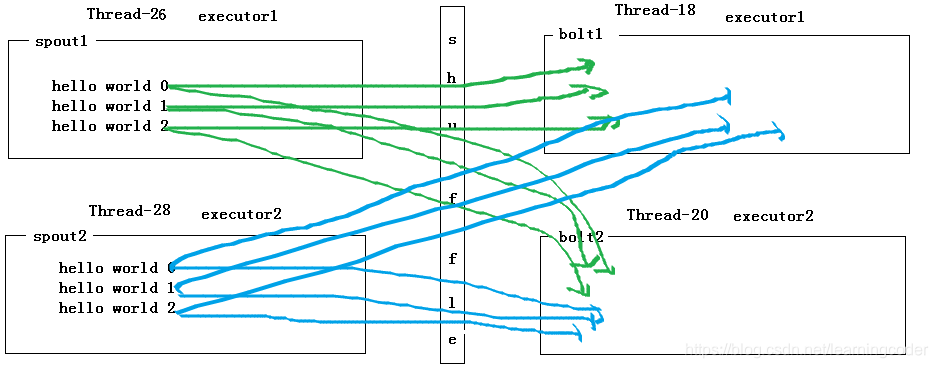
(图中间应该是allgroup)
2. shuffleGrouping 随机分组
builder.setSpout("spout", new MySpout(), 2);
builder.setBolt("bolt", new MyBolt(),2).shuffleGrouping("spout").setNumTasks(6);
PC201312272159,8172,Thread-18-spout-executor[8 8],MySpout@2007385198,open//故意设置的task多于executor, 2个executor,各运行一个task,造成另外4个task资源浪费

PC201312272159,8172,Thread-22-spout-executor[9 9],MySpout@1341389966,open

PC201312272159,8172,Thread-18-spout-executor[8 8],MySpout@2007385198,nextTuple(hello world index=0Thread-18-spout-executor[8 8])

PC201312272159,8172,Thread-18-spout-executor[8 8],MySpout@2007385198,nextTuple(hello world index=1Thread-18-spout-executor[8 8])

PC201312272159,8172,Thread-18-spout-executor[8 8],MySpout@2007385198,nextTuple(hello world index=2Thread-18-spout-executor[8 8])

PC201312272159,8172,Thread-22-spout-executor[9 9],MySpout@1341389966,nextTuple(hello world index=0Thread-22-spout-executor[9 9])

PC201312272159,8172,Thread-22-spout-executor[9 9],MySpout@1341389966,nextTuple(hello world index=1Thread-22-spout-executor[9 9])

PC201312272159,8172,Thread-22-spout-executor[9 9],MySpout@1341389966,nextTuple(hello world index=2Thread-22-spout-executor[9 9])

//6个task,就是6个bolt实例

PC201312272159,8172,Thread-26-bolt-executor[5 7],MyBolt@1183510072,prepare()

PC201312272159,8172,Thread-26-bolt-executor[5 7],MyBolt@618405619,prepare()

PC201312272159,8172,Thread-26-bolt-executor[5 7],MyBolt@1609598998,prepare()

PC201312272159,8172,Thread-28-bolt-executor[2 4],MyBolt@1060412223,prepare()

PC201312272159,8172,Thread-28-bolt-executor[2 4],MyBolt@838038185,prepare()

PC201312272159,8172,Thread-28-bolt-executor[2 4],MyBolt@902623311,prepare()

// 实际只启用来2个task

PC201312272159,8172,Thread-26-bolt-executor[5 7],MyBolt@1183510072,execute(hello world index=0Thread-18-spout-executor[8 8])

PC201312272159,8172,Thread-26-bolt-executor[5 7],MyBolt@1183510072,execute(hello world index=0Thread-22-spout-executor[9 9])

PC201312272159,8172,Thread-26-bolt-executor[5 7],MyBolt@1183510072,execute(hello world index=1Thread-18-spout-executor[8 8])

PC201312272159,8172,Thread-28-bolt-executor[2 4],MyBolt@1060412223,execute(hello world index=1Thread-22-spout-executor[9 9])

PC201312272159,8172,Thread-28-bolt-executor[2 4],MyBolt@1060412223,execute(hello world index=2Thread-18-spout-executor[8 8])

PC201312272159,8172,Thread-28-bolt-executor[2 4],MyBolt@1060412223,execute(hello world index=2Thread-22-spout-executor[9 9])
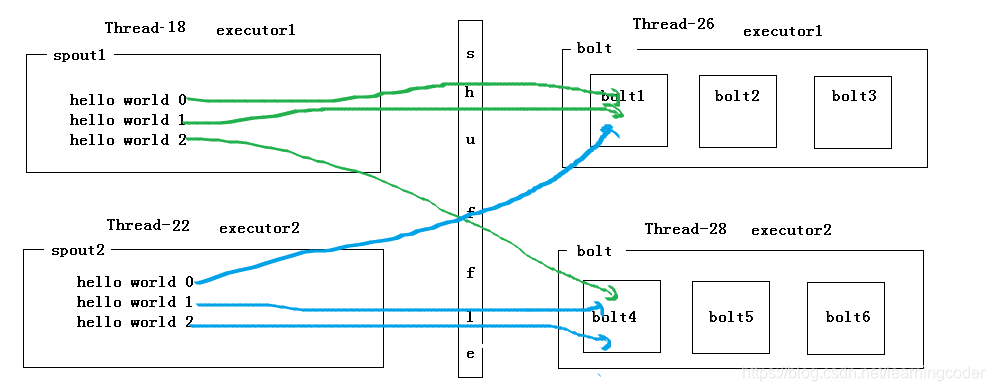
3. directGrouping 定向分组
builder.setSpout("spout", new MySpout(), 2);
builder.setBolt("bolt", new MyBolt(),2).directGrouping("spout").setNumTasks(6);

int taskid = 0;
Map<Integer, String> map = context.getTaskToComponent();
for (Map.Entry<Integer, String> entry : map.entrySet()) {
	if ("bolt".equals(entry.getValue())) {
		taskid = entry.getKey();
		break;
	}
}
collector.emitDirect(taskid, new Values(line));
//2个spout
PC201312272159,3084,Thread-22-spout-executor[9 9],MySpout@1200934567,open
PC201312272159,3084,Thread-18-spout-executor[8 8],MySpout@1808556554,open
PC201312272159,3084,Thread-18-spout-executor[8 8],MySpout@1808556554,nextTuple(hello world index=0Thread-18-spout-executor[8 8])
PC201312272159,3084,Thread-18-spout-executor[8 8],MySpout@1808556554,nextTuple(hello world index=1Thread-18-spout-executor[8 8])
PC201312272159,3084,Thread-18-spout-executor[8 8],MySpout@1808556554,nextTuple(hello world index=2Thread-18-spout-executor[8 8])
PC201312272159,3084,Thread-22-spout-executor[9 9],MySpout@1200934567,nextTuple(hello world index=0Thread-22-spout-executor[9 9])
PC201312272159,3084,Thread-22-spout-executor[9 9],MySpout@1200934567,nextTuple(hello world index=1Thread-22-spout-executor[9 9])
PC201312272159,3084,Thread-22-spout-executor[9 9],MySpout@1200934567,nextTuple(hello world index=2Thread-22-spout-executor[9 9])
//6个bolt,实际只向其中1个bolt发送数据
PC201312272159,3084,Thread-28-bolt-executor[2 4],MyBolt@1280030270,prepare()
PC201312272159,3084,Thread-26-bolt-executor[5 7],MyBolt@1528181603,prepare()
PC201312272159,3084,Thread-26-bolt-executor[5 7],MyBolt@698713305,prepare()
PC201312272159,3084,Thread-28-bolt-executor[2 4],MyBolt@1215572847,prepare()
PC201312272159,3084,Thread-28-bolt-executor[2 4],MyBolt@225885189,prepare()
PC201312272159,3084,Thread-28-bolt-executor[2 4],MyBolt@1280030270,execute(hello world index=0Thread-22-spout-executor[9 9])
PC201312272159,3084,Thread-28-bolt-executor[2 4],MyBolt@1280030270,execute(hello world index=0Thread-18-spout-executor[8 8])
PC201312272159,3084,Thread-28-bolt-executor[2 4],MyBolt@1280030270,execute(hello world index=1Thread-18-spout-executor[8 8])
PC201312272159,3084,Thread-28-bolt-executor[2 4],MyBolt@1280030270,execute(hello world index=2Thread-18-spout-executor[8 8])
PC201312272159,3084,Thread-28-bolt-executor[2 4],MyBolt@1280030270,execute(hello world index=1Thread-22-spout-executor[9 9])
PC201312272159,3084,Thread-28-bolt-executor[2 4],MyBolt@1280030270,execute(hello world index=2Thread-22-spout-executor[9 9])
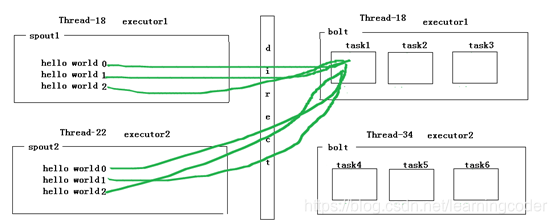
4. Global grouping:只发送到一个Bolt中去执行。发送到最小的task上去执行,就是directGrouping的特例而已

 366


 扫一扫


 被折叠的 条评论
为什么被折叠?
 到【灌水乐园】发言


