


背景
大家经常在做系统开发,或者app开发时候,开发的app想要验证在某个品牌手机上是否完美运行,或者针对某个品牌的适配的一个功能是否正常,比如开发手机公司钱包相关功能集成sdk,适配手机公司折叠屏幕场景等,或者偶尔调研某个手机品牌的功能。
这些时候情况下常规做法那就是你去买某品牌的手机,而且这个品牌可能手机机型比较多,每个机型都可能出现不一样的问题,所以这种对于开发者来说去买实体设备手机来测试确实是一个比较大的花费开销,而且各种机型都要的话也是一笔不少开销。
所以针对开发者为了测试app需要花费大量金钱买设备这种痛点问题,三星直接给我们提供了远程在线实验室设备,方便开发者们进行相关的开发测试。
三星远程实验室相关介绍
官网地址:
https://developer.samsung.com/remote-test-lab

The Remote Test Lab is a solution that enables developers to control devices remotely. Using the Remote Test Lab service, you can test your application on a real device.
The Remote Test Lab service enables developers to access Samsung mobile devices through the web and to install and test applications on the devices. This is not only the most effective and easiest way to test the compatibility of an application with Samsung mobile devices but also the best way to cut down on hardware costs for test devices. Interaction with the device is performed over the network in real time allowing you to comprehensively test your application before distributing it.
三星这个远程测试实验室服务主要是提供给开发者网页进行使用三星设备的,方便大家进行相关的app和兼容性测试,主要优点:可以减少开发者买三星设备的花费,也可以使用各种各样的三星设备。
User Privilege
用户权益
The Remote Test Lab service is available to all users of the Samsung Developers Forum [https://developer.samsung.com]. The following credit policy is applied.
20 credits are provided to each Samsung Developer user every day.
With 1 credit, users can use the Remote Test Lab service for 15 minutes.
Minimum reservation: 30 minutes (2 credits)
Maximum reservation: 10 hours a day (40 credits)
(可以看到这里每天会发放20个credits,2个credits可以用机器30分钟,完全满足日常需求)
测试机器时长其实会耗费credits,所以需要更多credits,这个发现每天可以领取免费的20个,所以基本上每天都可以完全满足日常需求:

Major Features
主要优点特性:
大概就是这个是可以任意选定设备,而且是真实设备,也可以安装和使用app,基本上都是实时反馈操作。
Reservation of a particular device
Installation and execution of applications on a real device
Screen streaming and event injection in real-time
Automated test - predefined tests on your application
Restrictions
使用限制,主要就是远程链接使用速度和网络速度有关系
Additional peripherals are not supported
Since the Remote Test Lab service is a remote access solution, it may be affected by the distance from the server, the data rate and data traffic of the network connection and the local network policy (firewall).
Sometimes, the connection with the device will be interrupted, which may seem like the connection with the device is disconnected.
使用三星远程实验室设备
第一步:
点击下面官网链接
https://developer.samsung.com/remote-test-lab
第二步:
注册登录好自己的三星开发者账号,一般有邮箱和手机既可以。

第三步:
点击开始使用,正式进入到设备选着页面
 然后根据自己需要测试的设备进行型号选择

一般选30分钟既可以:

第四步:
使用rdb进行连接三星的远程设备,只有远程链接的三星的设备,我们才可以在terminal中使用adb相关命令的执行。

注意这里连接必须要先运行rdb,rdb的下载直接点击connect按钮就会弹出提示让下载,然后terminal运行即可以,windows和linux都可以。

下载后再进行运行:
 再继续在web上点击connect,就可以通过adb devices看到对应的设备了:
test@test:~/Downloads/rdb$ adb devices
List of devices attached
localhost:54458	device
接下来就可以进行相关的adb操作,其他更多的设备相关的信息介绍使用可以点击页面如下地方:

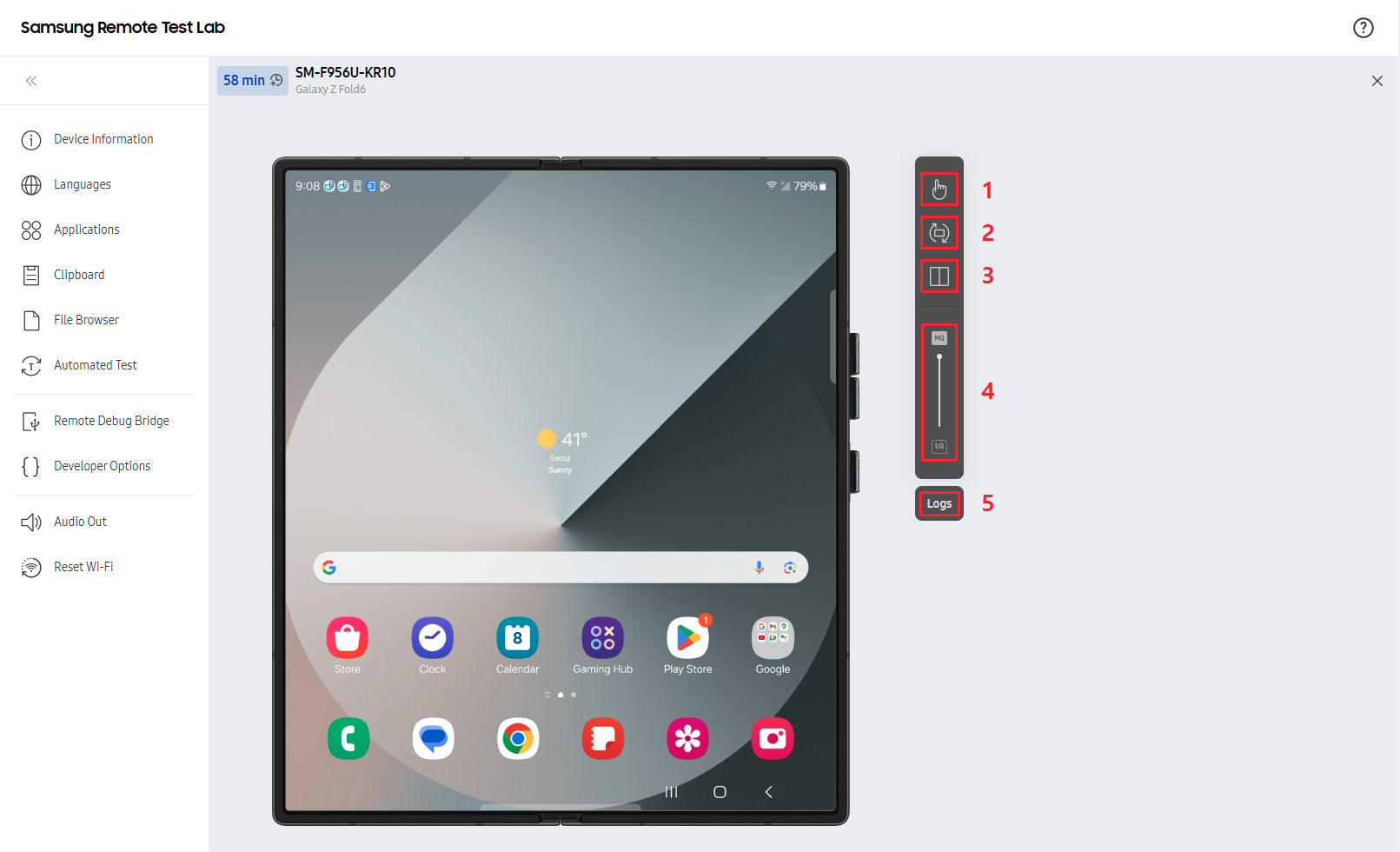
设备操作栏部分
这里主要先说说右边几个按钮

The settings bar enables you to control various elements of the device screen and input method.
1、 Input Mode switches the input mode between touch and S Pen.(输入方式手触摸还是笔触摸)
2、 Rotate changes the orientation of the device.(旋转手机)
3、 Folding switches a foldable device between folded, unfolded, and Flex Mode (partially folded).(如果设备是折叠屏的,那么就切换折叠和非折叠模式)
4、Screen Quality slider adjusts the quality of the device screen image shown in the RTL Web Client.(设备视频画面传输质量设置,一般和网络速度有关系,一般默认就可以)
5、Logs opens the device log.(打印log按钮)
更加详细的使用说明大家可以直接官网查看:
https://developer.samsung.com/remotetestlab/
这里点击“Device View”可以到设备显示部分的操作介绍


 265


 扫一扫


 被折叠的 条评论
为什么被折叠?
 到【灌水乐园】发言


