


 本文详细介绍A-Frame,一种用于构建虚拟现实应用的网页开发框架。覆盖基本数据结构、模型加载、动画处理及增强现实功能,适用于WebVR内容创作。
1. 简介
A-Frame是一个用来构建虚拟现实(VR)应用的网页开发框架。由WebVR的发起人Mozilla VR 团队所开发,是当下用来开发WebVR内容主流技术方案。
使用时,一般需要导入两个库,一个aframe.js是基本组件,一个aframe-ar.js是用来做AR的,放在script标签中,而需要显示的内容则放在a-scene中。
这里是资源清单:https://github.com/aframevr/awesome-aframe/
下面是一些常用的资源网址:
https://codepen.io/pen/tour/welcome/start 前端在线编辑器
https://www.flickr.com/search/?text=equirectangular 全景图
https://www.toptal.com/designers/subtlepatterns/ 材质
2. 基本数据结构
A-Frame基于three.js框架,并且使用了实体-组件-系统(entity-component-system)(ECS)架构。ECS架构是三维游戏中常见且理想的设计模式, 遵循组合模式要好于继承和层次结构的设计原则。下面是一些将不同组件组合成不同类型的实体的抽象示例:
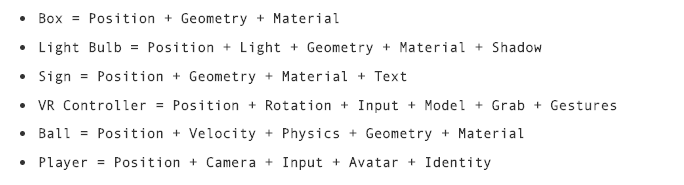
2.1 实体-组件
A-Frame拥有代表ECS每个方面的API:
- 实体(Entities) 对应的是<a-entity> 元素和原型。
- 组件(Components) 通过 <a-entity>的HTML属性来表示。底层实现上, 组件是包含模式(schema)、生命周期处理器和方法的对象。组件通过AFRAME.registerComponent (name, definition)API来注册。
- 系统(Systems) 通过 <a-scene>的HTML属性来表示。系统在定义上和组件类似,系统通过 AFRAME.registerSystem (name, definition) API来注册。
我们创建 <a-entity> 并将组件附加为其HTML属性。大多数组件具有多个属性,这些属性用类似于 HTMLElement.style CSS的语法来表示。此语法采用分号形式来隔离属性及其属性值,并使用一个分号来分隔不同的属性定义:
<a-entity ${componentName}="${propertyName1}: ${propertyValue1}; ${propertyName2:}: ${propertyValue2}">
举例如下,我们有一个 <a-entity>,添加了 geometry,material,light, and position 组件,使用了各种属性和属性值:
<a-entity geometry="primitive: sphere; radius: 1.5"
          light="type: point; color: white; intensity: 2"
          material="color: white; shader: flat; src: glow.jpg"
          position="0 0 -5"></a-entity>
2.2 原语
A-Frame提供一些简单易用的标签元素如a-box和 a-sky,这些被称之为 原语(primitives),实际上是实体-组件模式的封装,使其对于初学者容易使用,如下图:
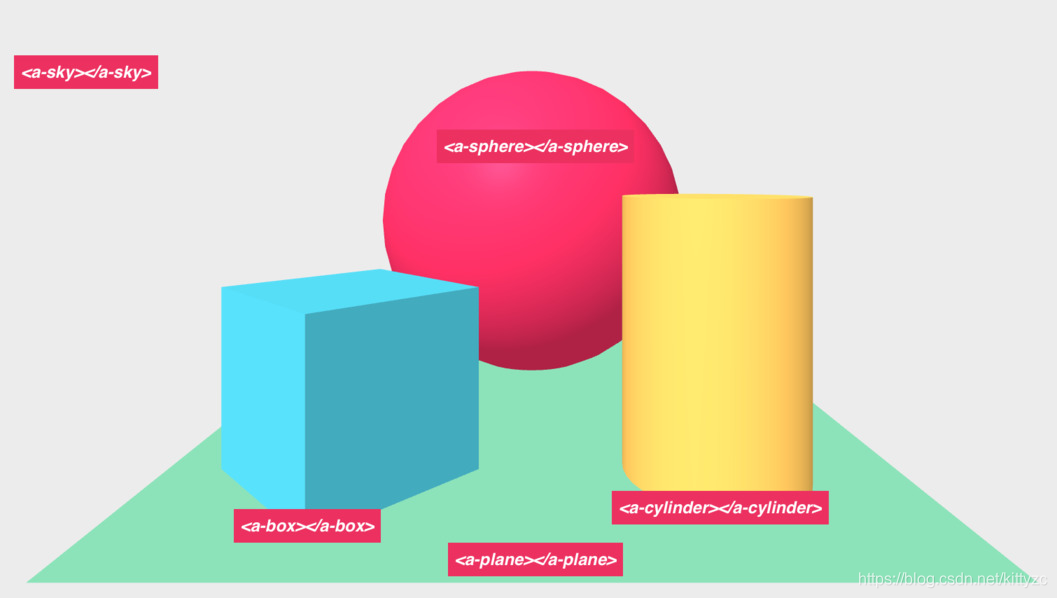
下面来测试一个物理效果和一个特殊的海洋组件,注意设置了static-body和dynamic-body两项:
<html>
  <head>
    <script src="https://aframe.io/releases/0.5.0/aframe.min.js"></script>
    <script src="https://cdn.jsdelivr.net/gh/donmccurdy/aframe-extras@v6.1.0/dist/aframe-extras.min.js"></script>
    <script src="https://unpkg.com/aframe-physics-system@1.4.0/dist/aframe-physics-system.min.js"></script>
  </head>
  <body>
    <a-scene physics>
      <a-box position="-1 4 -3" rotation="0 45 0" color="#4CC3D9" dynamic-body></a-box>
      <a-plane position="0 -0.5 -4" rotation="-90 0 0" width="4" height="4" color="#7BC8A4" static-body></a-plane>
      <a-ocean color="aqua" depth="100" width="100" static-body></a-ocean>
      <a-sky color="#ECECEC"></a-sky>
    </a-scene>
  </body>
</html>
 最低0.47元/天 解锁文章






 扫一扫
扫一扫


 1218
1218

 被折叠的 条评论
为什么被折叠?
被折叠的 条评论
为什么被折叠?
 到【灌水乐园】发言





