





 在尝试将文件上传到HDFS时遇到WARN hdfs.DFSClient: DataStreamer Exception错误。解决方案包括检查并确保dfs.namenode.name.dir和dfs.datanode.data.dir在hdfs-site.xml中的配置一致性,以及重启DataNode。如果当前目录不一致,需进行调整。另一种方法是关闭NameNode和DataNode,删除current文件夹,重新格式化NameNode,然后启动。
案例:
在准备put一个file到 hdfs的时候,遇到以下错误。
[root@hadoop01 current]# hdfs dfs -put /home/words /
19/12/05 15:49:14 WARN hdfs.DFSClient: DataStreamer Exception
org.apache.hadoop.ipc.RemoteException(java.io.IOException): File /words._COPYING_ could only be replicated to 0 nodes instead of minReplication (=1).  There are 0 datanode(s) running and no node(s) are excluded in this operation.
	at org.apache.hadoop.hdfs.server.blockmanagement.BlockManager.chooseTarget4NewBlock(BlockManager.java:1620)
	at org.apache.hadoop.hdfs.server.namenode.FSNamesystem.getNewBlockTargets(FSNamesystem.java:3135)
	at org.apache.hadoop.hdfs.server.namenode.FSNamesystem.getAdditionalBlock(FSNamesystem.java:3059)
	at org.apache.hadoop.hdfs.server.namenode.NameNodeRpcServer.addBlock(NameNodeRpcServer.java:725)
	at org.apache.hadoop.hdfs.protocolPB.ClientNamenodeProtocolServerSideTranslatorPB.addBlock(ClientNamenodeProtocolServerSideTranslatorPB.java:493)
	at org.apache.hadoop.hdfs.protocol.proto.ClientNamenodeProtocolProtos$ClientNamenodeProtocol$2.callBlockingMethod(ClientNamenodeProtocolProtos.java)
	at org.apache.hadoop.ipc.ProtobufRpcEngine$Server$ProtoBufRpcInvoker.call(ProtobufRpcEngine.java:616)
	at org.apache.hadoop.ipc.RPC$Server.call(RPC.java:982)
	at org.apache.hadoop.ipc.Server$Handler$1.run(Server.java:2217)
	at org.apache.hadoop.ipc.Server$Handler$1.run(Server.java:2213)
	at java.security.AccessController.doPrivileged(Native Method)
	at javax.security.auth.Subject.doAs(Subject.java:415)
	at org.apache.hadoop.security.UserGroupInformation.doAs(UserGroupInformation.java:1762)
	at org.apache.hadoop.ipc.Server$Handler.run(Server.java:2211)

	at org.apache.hadoop.ipc.Client.call(Client.java:1476)
	at org.apache.hadoop.ipc.Client.call(Client.java:1413)
	at org.apache.hadoop.ipc.ProtobufRpcEngine$Invoker.invoke(ProtobufRpcEngine.java:229)
	at com.sun.proxy.$Proxy16.addBlock(Unknown Source)
	at org.apache.hadoop.hdfs.protocolPB.ClientNamenodeProtocolTranslatorPB.addBlock(ClientNamenodeProtocolTranslatorPB.java:418)
	at sun.reflect.NativeMethodAccessorImpl.invoke0(Native Method)
	at sun.reflect.NativeMethodAccessorImpl.invoke(NativeMethodAccessorImpl.java:57)
	at sun.reflect.DelegatingMethodAccessorImpl.invoke(DelegatingMethodAccessorImpl.java:43)
	at java.lang.reflect.Method.invoke(Method.java:606)
	at org.apache.hadoop.io.retry.RetryInvocationHandler.invokeMethod(RetryInvocationHandler.java:191)
	at org.apache.hadoop.io.retry.RetryInvocationHandler.invoke(RetryInvocationHandler.java:102)
	at com.sun.proxy.$Proxy17.addBlock(Unknown Source)
	at org.apache.hadoop.hdfs.DFSOutputStream$DataStreamer.locateFollowingBlock(DFSOutputStream.java:1603)
	at org.apache.hadoop.hdfs.DFSOutputStream$DataStreamer.nextBlockOutputStream(DFSOutputStream.java:1388)
	at org.apache.hadoop.hdfs.DFSOutputStream$DataStreamer.run(DFSOutputStream.java:554)
put: File /words._COPYING_ could only be replicated to 0 nodes instead of minReplication (=1).  There are 0 datanode(s) running and no node(s) are excluded in this operation.
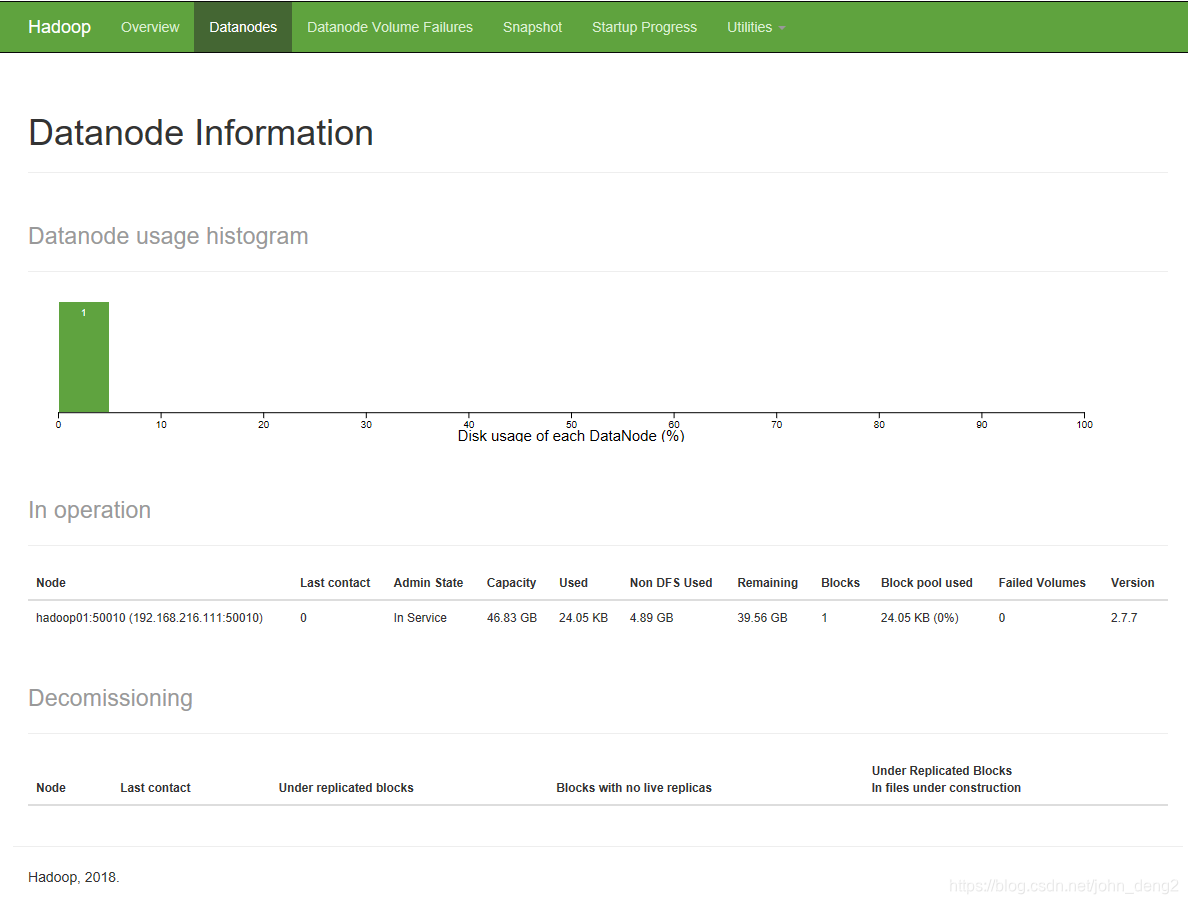
经过查询,发现DataNode是存在的,但查了Datanode Information发现没有DataNode在运行。所以做了以下操作:
- 到hdfs-site.xml文件中,找到dfs.namenode.name.dir和dfs.datanode.data.dir节点配置值
- 然后查看它们在current/VERSION里面的clusterID是否一致,不一致需要修改。
- 把DataNode kill了然后重启启动
[root@hadoop01 current]# jps
4825 QuorumPeerMain
17470 NameNode
17960 DFSZKFailoverController
14852 ResourceManager
17772 JournalNode
18527 Jps
14959 NodeManager
17577 DataNode
[root@hadoop01 current]# kill -9 17577
上传成功了。
[root@hadoop01 bin]# start-dfs.sh start
Usage: start-dfs.sh [-upgrade|-rollback] [other options such as -clusterId]
[root@hadoop01 bin]# start-dfs.sh
Starting namenodes on [hadoop01 hadoop02]
hadoop02: starting namenode, logging to /usr/local/hadoop-2.7.7/logs/hadoop-root-namenode-hadoop02.out
hadoop01: namenode running as process 17470. Stop it first.
hadoop01: starting datanode, logging to /usr/local/hadoop-2.7.7/logs/hadoop-root-datanode-hadoop01.out
hadoop02: datanode running as process 14470. Stop it first.
hadoop03: datanode running as process 9498. Stop it first.
Starting journal nodes [hadoop01 hadoop02 hadoop03]
hadoop02: journalnode running as process 14629. Stop it first.
hadoop03: journalnode running as process 9592. Stop it first.
hadoop01: journalnode running as process 17772. Stop it first.
Starting ZK Failover Controllers on NN hosts [hadoop01 hadoop02]
hadoop02: zkfc running as process 14757. Stop it first.
hadoop01: zkfc running as process 17960. Stop it first.
[root@hadoop01 bin]# jps
4825 QuorumPeerMain
17470 NameNode
17960 DFSZKFailoverController
14852 ResourceManager
17772 JournalNode
19144 Jps
18853 DataNode
14959 NodeManager
[root@hadoop01 bin]# hdfs dfs -put /home/words /
Datanode Information 也可以看到对于的Datanode存活了。
解决方法2:
- 把namenode和datanode先关闭。
- 删除hdfs-site xml dfs.namenode.name.dir和dfs.datanode.data.dir目录下的current文件 “rm -rf current”
- 然后格式化 hdfs namenode -format
- 格式化后重启启动namenode. hadoop-daemon.sh start namenode






 扫一扫
扫一扫


 2287
2287

 被折叠的 条评论
为什么被折叠?
被折叠的 条评论
为什么被折叠?
 到【灌水乐园】发言





