



 本文详细介绍使用BingImageSearchAPI快速建立图片数据集的方法,包括获取API密钥、编写Python脚本下载图片及筛选过程。
朋友们,如需转载请标明出处:http://blog.youkuaiyun.com/jiangjunshow
1. 快速建立图片数据集,我们将使用 Bing Image Search API 建立自己的图片数据集。
首先进入 Bing Image Search API 网站:点击链接
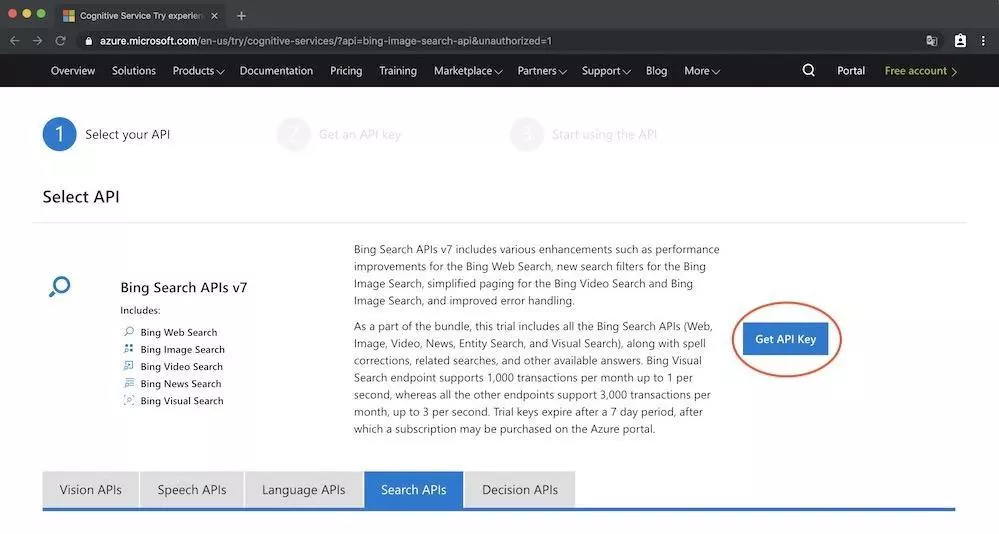
点击“Get API Key”按钮

选择7天试用,点击“Get start”按钮
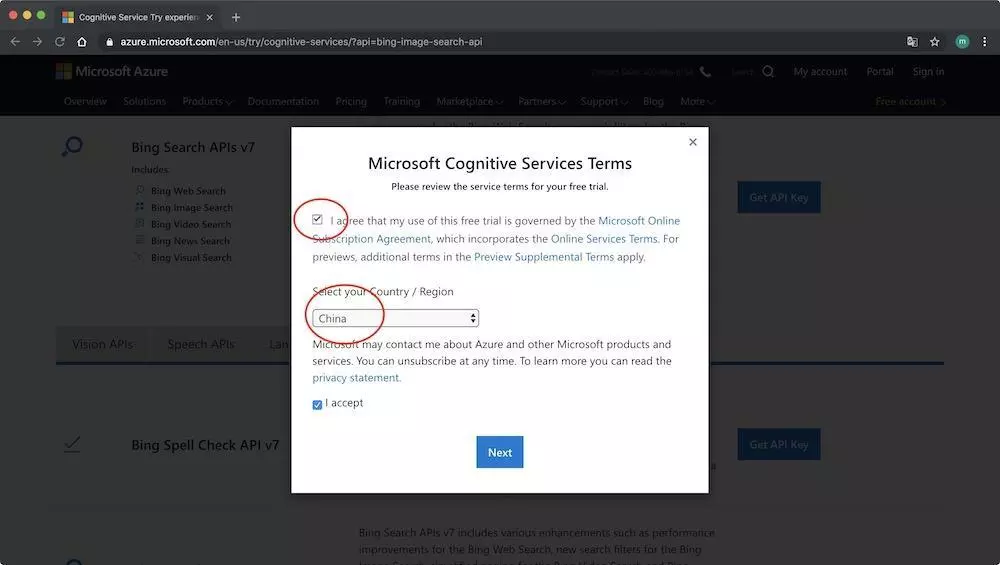
同意微软服务条款和勾选地区,点击“Next”按钮
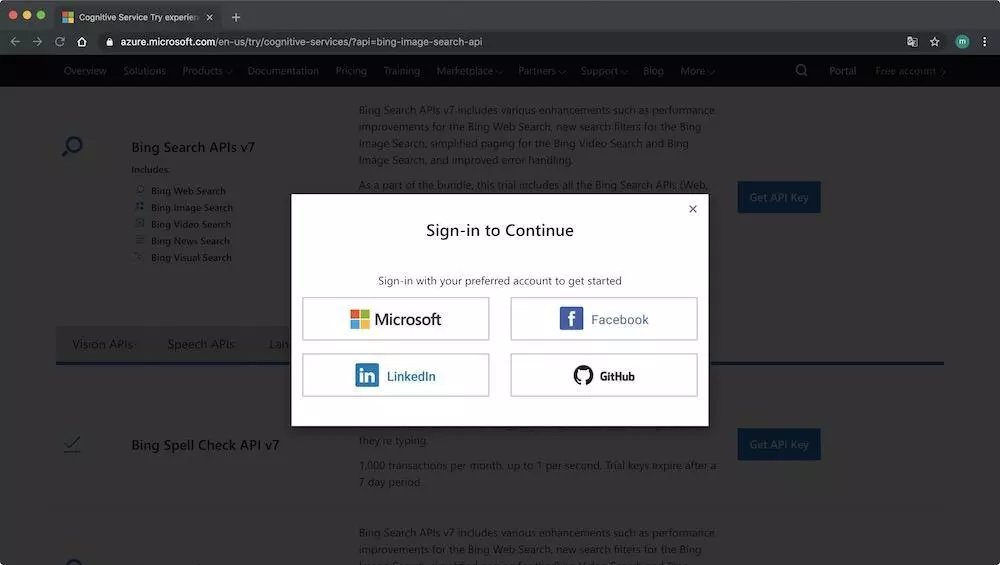
可以使用你的 Microsoft, Facebook, LinkedIn, 或 GitHub 账号登陆,我使用我的 GitHub 账号登陆。
注册完成,进入Your APIs 页面。如下图所示:
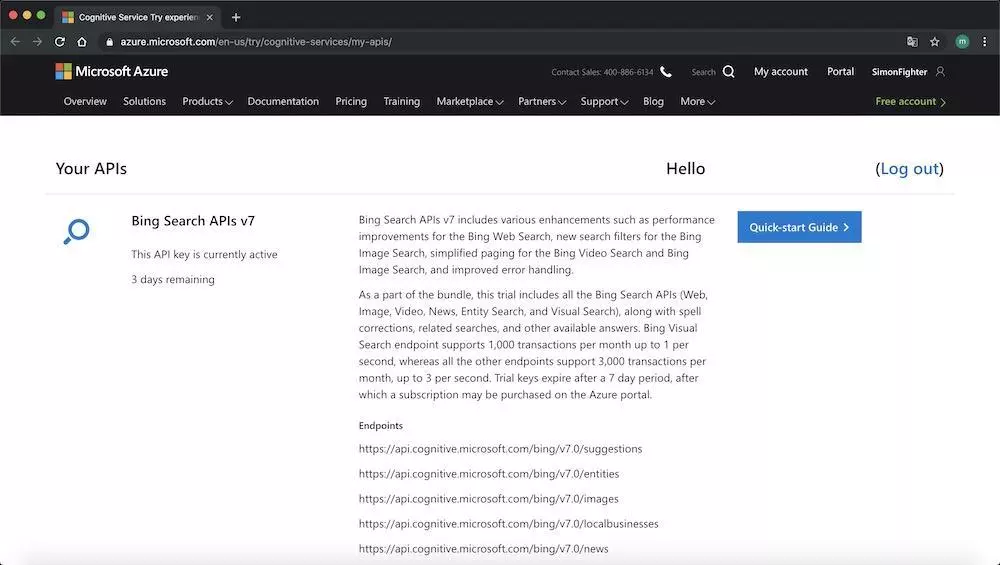
向下拖动,可以查看可以使用的API列表和API Keys,注意红框部分,将在后面部分使用到。
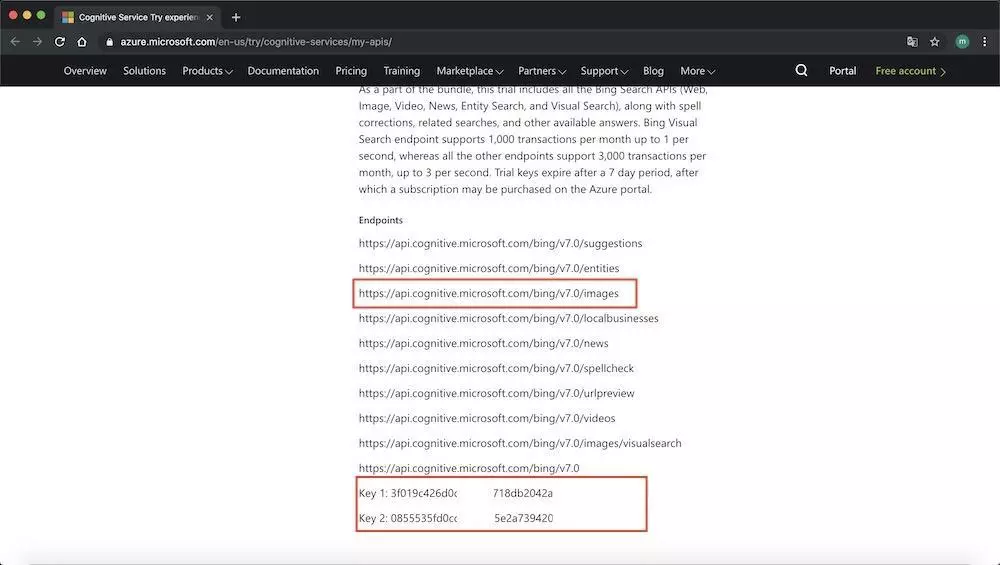
至此,你已经有一个Bing Image Search API账号,并可以使用 Bing Image Search API 了。你可以访问:
- Quickstart: Search for images using the Bing Image Search REST API and Python
- How to page through results from the Bing Web Search API
了解更多关于 Bing Image Search API 如何使用的信息。下面将介绍编写Python脚本,使用 Bing Image Search API 下载图片。
2. 编写Python脚本下载图片
首先安装 requests 包,在终端执行命令
$ pip install requests
复制代码
新建一个文件,命名为 search_bing_api.py,插入以下代码
# import the necessary packages
from requests import exceptions
import argparse
import requests
import os
import cv2

# construct the argument parser and parse the arguments
ap = argparse.ArgumentParser()
ap.add_argument("-q", "--query", required=True,
	help="search query to search Bing Image API for")
args = vars(ap.parse_args())

query = args["query"]
output = "/Users/simon/AI/dataset/" + query

# set your Microsoft Cognitive Services API key along with (1) the
# maximum number of results for a given search and (2) the group size
# for results (maximum of 50 per request)
API_KEY = "YOUR Bing Image Search API Key"
MAX_RESULTS = 250
GROUP_SIZE = 50

# set the endpoint API URL
URL = "https://api.cognitive.microsoft.com/bing/v7.0/images/search"

# when attempting to download images from the web both the Python
# programming language and the requests library have a number of
# exceptions that can be thrown so let's build a list of them now
# so we can filter on them
EXCEPTIONS = set([IOError, FileNotFoundError,exceptions.RequestException, exceptions.HTTPError,exceptions.ConnectionError, exceptions.Timeout])


# store the search term in a convenience variable then set the
# headers and search parameters
term = query
headers = {"Ocp-Apim-Subscription-Key" : API_KEY}
params = {"q": term, "offset": 0, "count": GROUP_SIZE}

# make the search
print("[INFO] searching Bing API for '{}'".format(term))
search = requests.get(URL, headers=headers, params=params)
search.raise_for_status()

# grab the results from the search, including the total number of
# estimated results returned by the Bing API
results = search.json()
estNumResults = min(results["totalEstimatedMatches"], MAX_RESULTS)
print("[INFO] {} total results for '{}'".format(estNumResults,term))

# initialize the total number of images downloaded thus far
total = 0

# loop over the estimated number of results in `GROUP_SIZE` groups
for offset in range(0, estNumResults, GROUP_SIZE):
	# update the search parameters using the current offset, then
	# make the request to fetch the results
	print("[INFO] making request for group {}-{} of {}...".format(
		offset, offset + GROUP_SIZE, estNumResults))
	params["offset"] = offset
	search = requests.get(URL, headers=headers, params=params)
	search.raise_for_status()
	results = search.json()
	print("[INFO] saving images for group {}-{} of {}...".format(
		offset, offset + GROUP_SIZE, estNumResults))

# loop over the results
	for v in results["value"]:
		# try to download the image
		try:
			# make a request to download the image
			print("[INFO] fetching: {}".format(v["contentUrl"]))
			r = requests.get(v["contentUrl"], timeout=30)

			# build the path to the output image
			ext = v["contentUrl"][v["contentUrl"].rfind("."):]
			p = os.path.sep.join([output, "{}{}".format(str(total).zfill(8), ext)])

			# write the image to disk
			f = open(p, "wb")
			f.write(r.content)
			f.close()
			image = cv2.imread(p)

			# if the image is `None` then we could not properly load the
			# image from disk (so it should be ignored)
			if image is None:
				print("[INFO] deleting: {}".format(p))
				os.remove(p)
				continue

		# catch any errors that would not unable us to download the
		# image
		except Exception as e:
			# check to see if our exception is in our list of
			# exceptions to check for
			if type(e) in EXCEPTIONS:
				print("[INFO] skipping: {}".format(v["contentUrl"]))
				continue

		# update the counter
		total += 1
复制代码
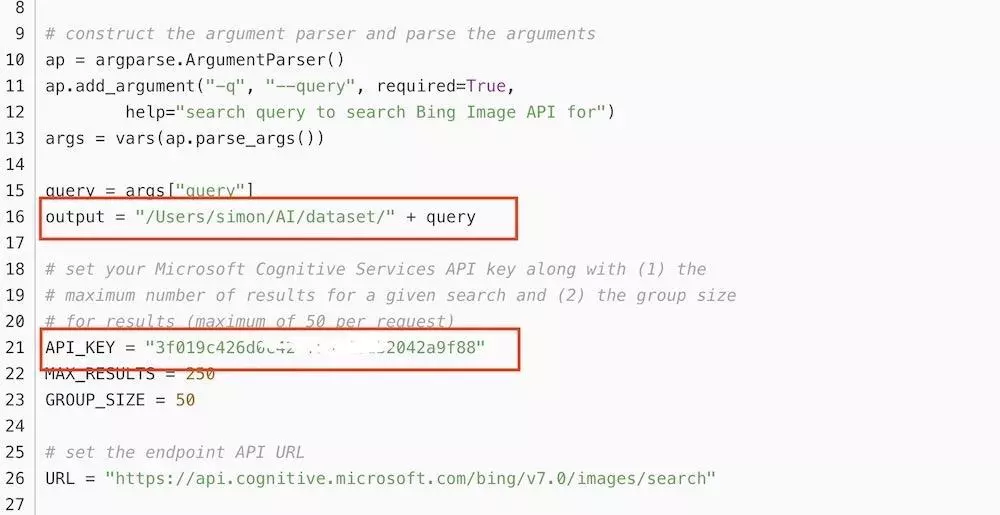
以上为所有的Python下载图片代码,注意以下红框部分替换为自己的文件目录和自己的 Bing Image Search API Key。
3. 运行下载脚本,下载图片
创建图片存储主目录,在终端执行命令
$ mkdir dataset
复制代码
创建当前下载内容的存储目录,在终端执行命令
$ mkdir dataset/pikachu
复制代码
终端执行命令如下命令,开始下载图片
$ python search_bing_api.py --query "pikachu"
复制代码
[INFO] searching Bing API for 'pikachu'
[INFO] 250 total results for 'pikachu'
[INFO] making request for group 0-50 of 250...
[INFO] saving images for group 0-50 of 250...
[INFO] fetching: http://images5.fanpop.com/image/photos/29200000/PIKACHU-pikachu-29274386-861-927.jpg
[INFO] skipping: http://images5.fanpop.com/image/photos/29200000/PIKACHU-pikachu-29274386-861-927.jpg
[INFO] fetching: http://images6.fanpop.com/image/photos/33000000/pikachu-pikachu-33005706-895-1000.png
[INFO] skipping: http://images6.fanpop.com/image/photos/33000000/pikachu-pikachu-33005706-895-1000.png
[INFO] fetching: http://images5.fanpop.com/image/photos/31600000/Pikachu-with-pokeball-pikachu-31615402-2560-2245.jpg
复制代码按照相同的方法下载其他图片:charmander,squirtle,bulbasaur,mewtwo
下载 charmander
$ mkdir dataset/charmander
复制代码
$ python search_bing_api.py --query "charmander"
复制代码下载 squirtle
$ mkdir dataset/squirtle
复制代码
$ python search_bing_api.py --query "squirtle"
复制代码下载 bulbasaur
$ mkdir dataset/bulbasaur
复制代码
$ python search_bing_api.py --query "bulbasaur"
复制代码下载 mewtwo
$ mkdir dataset/mewtwo
复制代码
$ python search_bing_api.py --query "mewtwo"
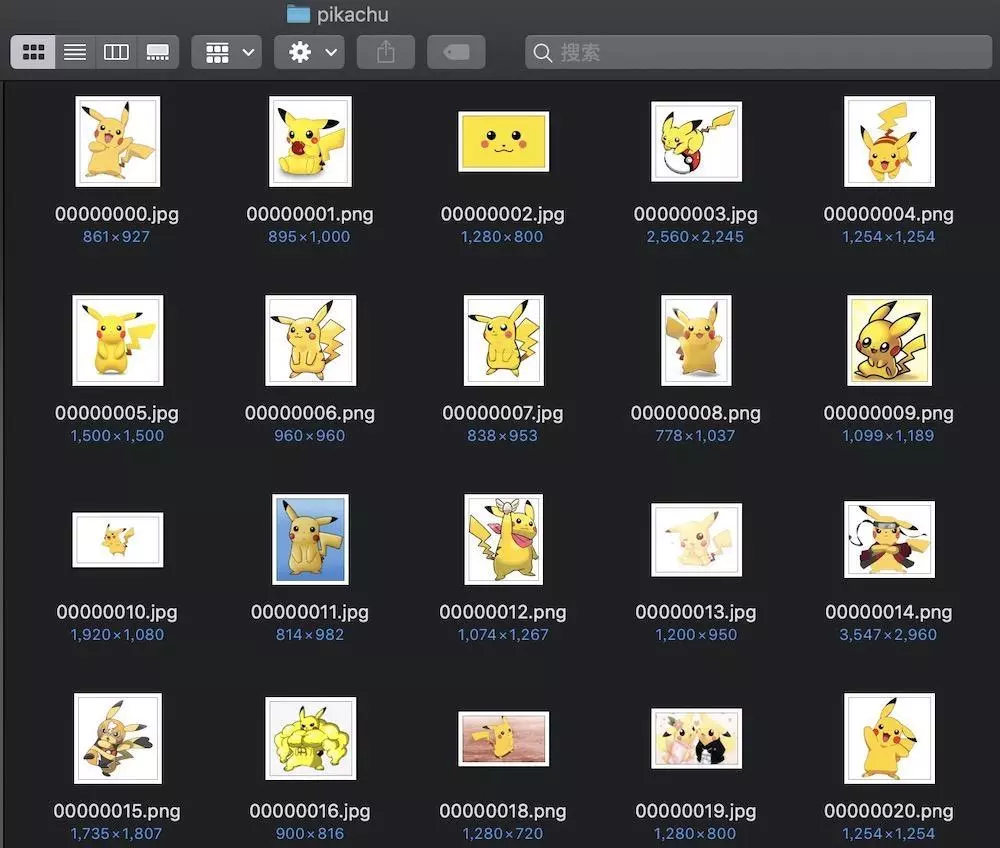
复制代码下载的图片如下图所示
下载全部完成大约需要30多分钟时间,最终五个文件夹下的图片内容如下
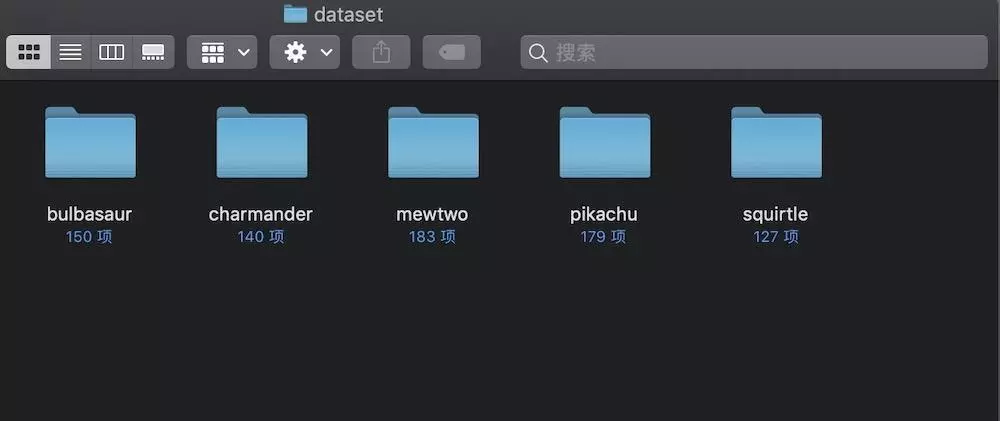
为了更好的训练模型,我们应该进行图片筛选,将不合适的图片删除掉。比如在某一个分类文件夹下,将不属于这个分类的图片删除掉,将包含了其他分类的图片删除等。筛选方法为,打开文件夹,浏览图片,手工进行筛选。






 扫一扫
扫一扫


 8406
8406

 被折叠的 条评论
为什么被折叠?
被折叠的 条评论
为什么被折叠?
 到【灌水乐园】发言





