



W3C在CSS3的工作草案中把选择器独立出来成为一个模块。实际上,选择器是CSS知识中的重要部分之一,也是CSS的根基。利用CSS选择器能不改动HTML结构,通过添加不同的CSS规则得到不同样式的网页。
CSS3选择器分类:
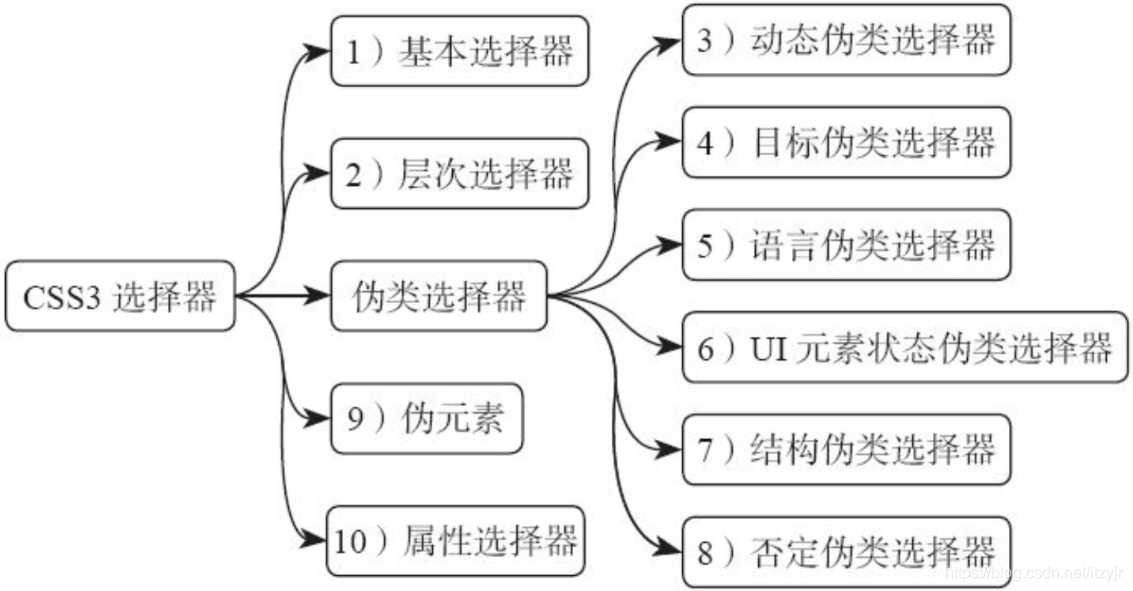
➊基本选择器
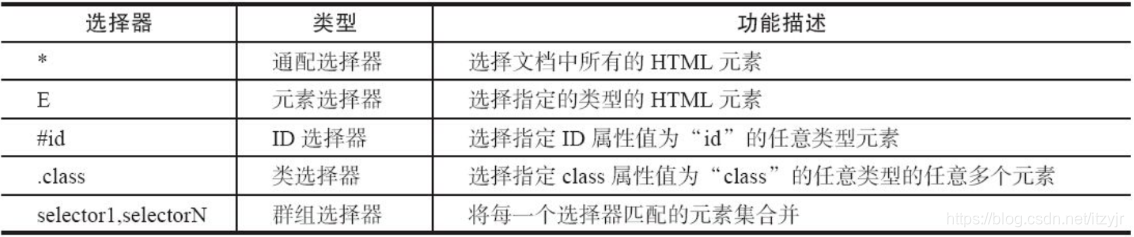
通过基本选择器可以确定HTML树形结构中大多数的DOM元素节点。详细说明如下表:
<!DOCTYPE HTML>
<html lang="en-US">
<head>
    <meta charset="UTF-8">
    <title>使用CSS3基本选择器</title>
    <style type="text/css">
        *{margin: 0;padding:0;}
        .clearfix:after,.clearfix:before{display:table;content:""}
        .clearfix:after{clear:both;overflow:hidden}
        .demo { width: 250px; border: 1px solid #ccc; padding: 10px;margin: 20px auto}
        li {list-style:none outside none; float: left; height: 20px; line-height: 20px; width: 20px;
            border-radius: 10px; text-align: center; background: #f36; color: green; margin-right: 5px; }
        .demo *{background: orange}
        ul {background:grey}
        #first{background:lime;color:#000}
        #last {background:#000;color:lime}
        .item {background: green;color: #fff;font-weight:bold}
        .item.important {background:red;}
    </style>
</head>
<body>
<ul class="clearfix demo">
    <li class="first" id="first">1</li>
    <li class="active">2</li>
    <li class="important item">3</li>
    <li class="important">4</li>
    <li class="item">5</li>
    <li>6</li>
    <li>7</li>
    <li>8</li>
    <li>9</li>
    <li class="last" id="last">10</li>
</ul>
</body>
</html>

➀通配选择器
(*)用来选择所有元素,当然也可以选择某个元素下的所有元素。如:
*{margin:0;padding:0}
所有元素的margin和padding都设置为0。通过CSS3选择器中的通配选择器来改变列表中所有子项的背景色为orange:
.demo *{background: orange}

➁元素选择器
元素选择器(E)是CSS选择器中最常见、最基本的选择器。文档的元素包括html、body、p、iv等,如示例中ul、li也属于HTML元素。接下来通过ul元素选择器改变整个列表的背景色。
ul {background:grey}
 此时列表ul的背景色变成灰色了。
➂ID选择器
在使用ID选择器(#id)之前,需要在HTML文档中给对应的元素设置id属性并设置其值,才能找到对应的元素。ID选择器具有唯一性,在一个页面中不会同时出现id相同的属性值。在CSS样式中使用id选择器时,需要在id属性值的前面加上“#”号。在示例中,列表的第一项和最后一项分别定义了id为“first”和“last”。使用这两个id值来改变列表项中第一个和最后一个列表项的背景色和前景色。
#first {background:lime;color:#000}
#last {background:#000;color:lime}

➃类选择器
类选择器(.class)是以独立于文档元素的方式来指定元素样式。使用方法与ID选择器极其相似,首先在HTML给需要的元素定义class属性,并为其设置属性值。其与ID选择器有一个很大不同之处。“类选择器在一个页面中可以有多个相同的类名,而ID选择器其ID值在整个页面中是唯一的一个”。
.item {background:green;color:#fff;font-weight:bold}

类选择器还有一种使用方法,就是多类选择器。通过两个或两个以上类选择器合并,来定义有别于一个类名的元素效果。
.item.important {background:red;}
 (列表3同时具有important和item类名,列表4只有important类名,列表5只有item类名)
➄群组选择器
群组选择器(selector1,selectorN)是将具有相同样式的元素分组在一起,每个元素之间用逗号(,)隔开,例如“selector,selector2,...selectorN”。这个逗号告诉浏览器,规则中包含多个不同的选择器。省去逗号就成了后代选择器了,“selector1 selectorN”表示选择器selectorN所有元素为selector1的后代元素。
.clearfix:after,.clearfix:before{display:table;content:""}
以上代码即表明选择器.clearfix:after和.clearfix:before都具有{display:table;content:""}样式。
➋层次选择器
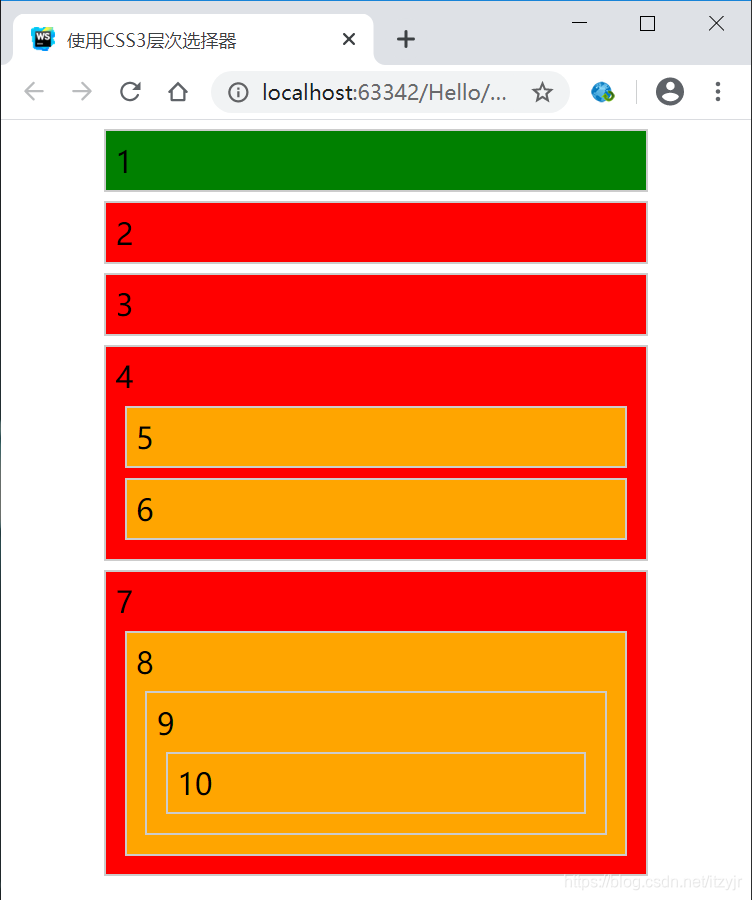
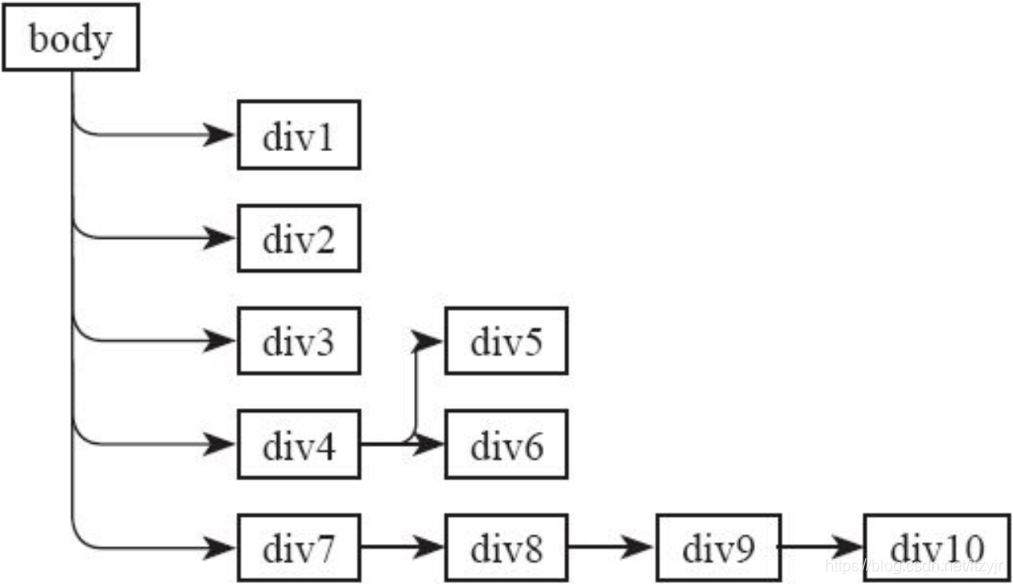
层次选择器通过HTML的DOM元素间的层次关系获取元素,其主要的层次关系包括后代、父子、相邻兄弟和通用兄弟几种关系,通过其中某类关系可以方便快捷地选定需要的元素。
层次选择器语法如下表:

<!DOCTYPE HTML>
<html lang="en-US">
<head>
    <meta charset="UTF-8">
    <title>使用CSS3层次选择器</title>
    <style type="text/css">
        *{margin: 0;padding:0;}
        body {width: 300px;margin: 0 auto;}
        div{margin:5px;padding:5px;border: 1px solid #ccc;}
        div div {background: orange;}
        body > div {background: green;}
        .active + div {background: lime;}
        .active ~ div {background: red;}
    </style>
</head>
<body>
<div class="active">1</div><!-- 为了说明相邻兄弟选择器,在此处添加一个类名active -->
<div>2</div>
<div>3</div>
<div>4
    <div>5</div>
    <div>6</div>
</div>
<div>7
    <div>8
        <div>9
            <div>10</div>
        </div>
    </div>
</div>
</body>
</html>
body的树形结构草图如下:
➀后代选择器
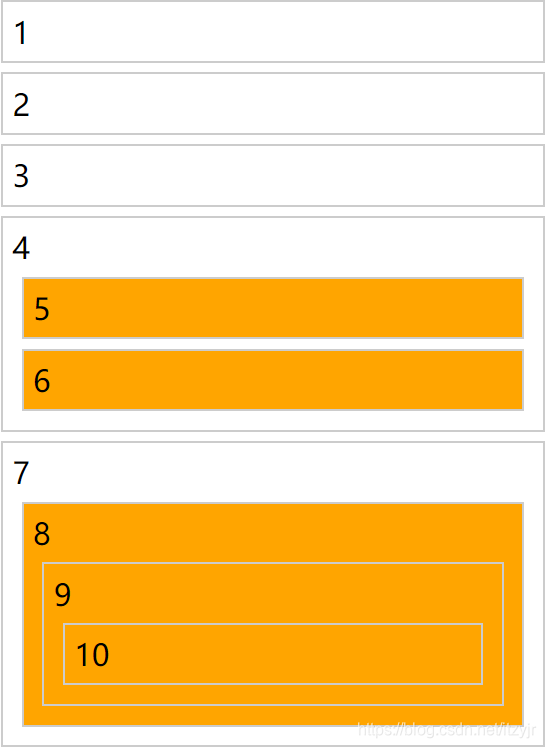
后代选择器(E F)也称为包含选择器,作用就是可以选择某元素的后代元素。例如“E F”,E为祖先元素,F为后代元素,表达的意思是选择E元素的所有后代F元素。这里的F元素不管是E元素的子元素、孙辈元素或者更深层次的关系,都将被选中。
*{margin:0;padding:0;}
body {width:300px;margin:0 auto;}
div {margin:5px;padding:5px;border:1px solid #ccc;}
div div {background:orange;}
➁子选择器
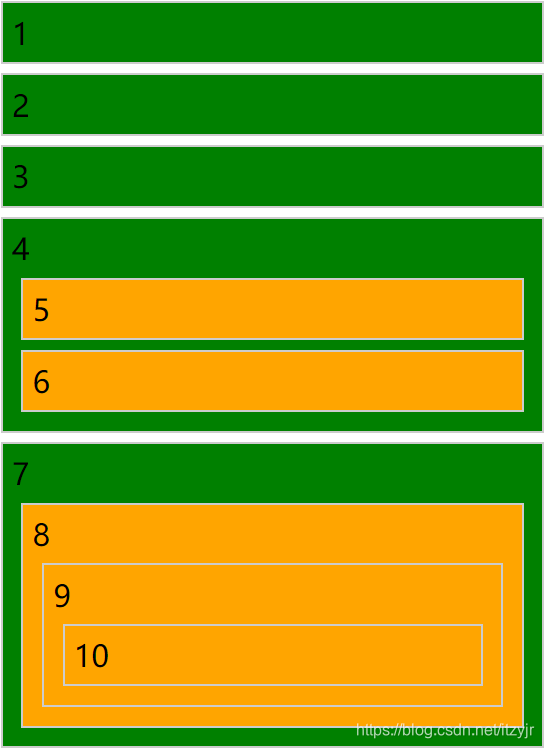
子选择器(E>F)只能选择某元素的子元素。这与后代选择器(E F)不一样,E>F中F仅仅是E的子元素而已。
body > div {background:green;}
➂相邻兄弟选择器
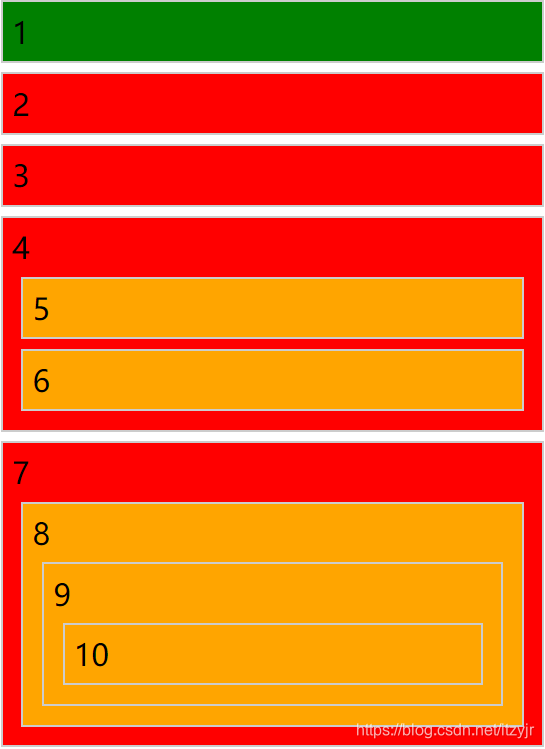
相邻兄弟选择器(E+F)可以选择紧接在另一个元素后的元素,它们具有一个相同的父元素。即,E和F是同辈元素,F元素在E元素后面并且相邻。
.active + div {background:lime;}

➃通用兄弟选择器
通用兄弟选择器(E~F)是CSS3新增加的,用于选择某元素后面的所有兄弟元素。即,E和F元素都是同辈元素,并且F元素在E元素之后,E~F将选中E元素后面的所有F元素。
.active ~ div {background: red;}
伪类选择器:
E:pseudo-class {property:value}
其中,E为HTML中的元素;pseudo-class是CSS的伪类选择器名称;property是CSS的属性;value为CSS属性值。
伪类选择器(简称:伪类)通过冒号来定义,它定义了元素的状态,如点击按下,点击完成等,通过伪类可以为元素的状态修改样式。
伪类的功能和一般的DOM中的元素样式相似,但和一般的DOM中的元素样式不一样,它并不改变任何DOM内容。只是插入了一些修饰类的元素,这些元素对于用户来说是可见的,但是对于DOM来说不可见。伪类的效果可以通过添加一个实际的类来达到。
➌动态伪类选择器
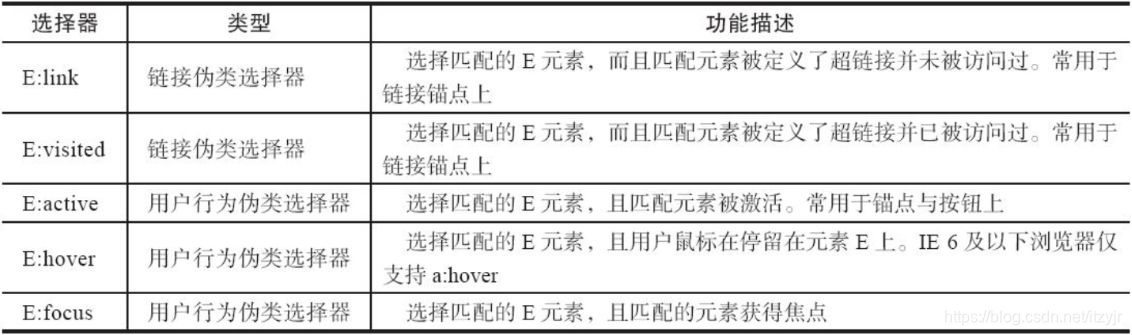
动态伪类并不存在于HTML中,只有当用户和网站交互的时候才能体现出来。动态伪类包含两种,第一种是在链接中常看到的锚点伪类,另一种为用户行为伪类。
动态伪类选择器语法如下表:
<!DOCTYPE HTML>
<html lang="en-US">
<head>
    <meta charset="UTF-8">
    <title>使用动态伪类选择器美化按钮</title>
    <style type="text/css">
        .download-info {
            text-align: center;
        }
        /*默认状态下的按钮效果*/
        .btn {
            background-color: #0074cc;
            *background-color: #0055cc;
            background-image: -ms-linear-gradient(top, #0088cc, #0055cc);
            background-image: -webkit-gradient(linear, 0 0, 0 100%, from(#0088cc), to(#0055cc));
            background-image: -webkit-linear-gradient(top, #0088cc, #0055cc);
            background-image: -o-linear-gradient(top, #0088cc, #0055cc);
            background-image: -moz-linear-gradient(top, #0088cc, #0055cc);
            background-image: linear-gradient(top, #0088cc, #0055cc);
            background-repeat: repeat-x;
            display: inline-block;
            *display: inline;
            border: 1px solid #cccccc;
            *border: 0;
            border-color: #ccc;
            border-color: rgba(0, 0, 0, 0.1) rgba(0, 0, 0, 0.1) rgba(0, 0, 0, 0.25);
            border-radius: 6px;
            color: #ffffff;
            cursor: pointer;
            font-size: 20px;
            font-weight: normal;
            filter: progid:dximagetransform.microsoft.gradient(startColorstr='#0088cc', endColorstr='#0055cc', GradientType=0);
            filter: progid:dximagetransform.microsoft.gradient(enabled=false);
            line-height: normal;
            padding: 14px 24px;
            text-align: center;
            text-shadow: 0 -1px 0 rgba(0, 0, 0, 0.25);
            text-decoration: none;
            vertical-align: middle;
            *zoom: 1;
        }
        /*悬浮状态下按钮效果*/
        .btn:hover {
            background-position: 0 -15px;
            background-color: #0055cc;
            *background-color: #004ab3;
            color: #ffffff;
            text-decoration: none;
            text-shadow: 0 -1px 0 rgba(0, 0, 0, 0.25);
            -webkit-transition: background-position 0.1s linear;
            -moz-transition: background-position 0.1s linear;
            -ms-transition: background-position 0.1s linear;
            -o-transition: background-position 0.1s linear;
            transition: background-position 0.1s linear;
        }
        /*点击时按钮效果*/
        .btn:active {
            background-color: #0055cc;
            *background-color: #004ab3;
            background-color: #004099 \9;
            background-image: none;
            outline: 0;
            box-shadow: inset 0 2px 4px rgba(0, 0, 0, 0.15), 0 1px 2px rgba(0, 0, 0, 0.05);
            color: rgba(255, 255, 255, 0.75);
        }
        /*获得焦点按钮效果*/
        .btn:focus {
            outline: thin dotted #333;
            outline: 5px auto -webkit-focus-ring-color;
            outline-offset: -2px;
        }
    </style>
</head>
<body>
<div class="download-info">
    <a href="#" class="btn">View project on GitHub</a>
</div>
</body>
</html>
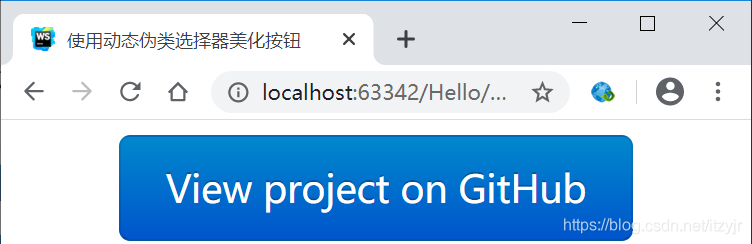 (默认状态)
 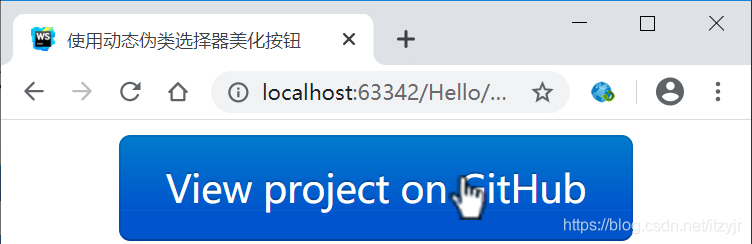 (悬浮状态)
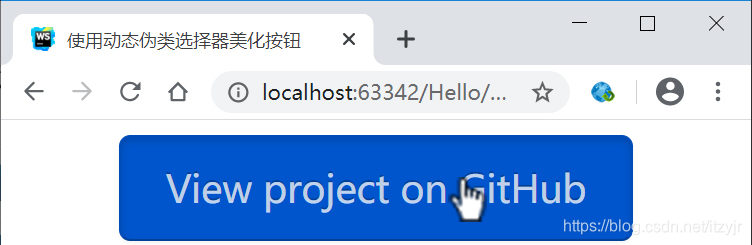 (点击状态)
➍目标伪类选择器
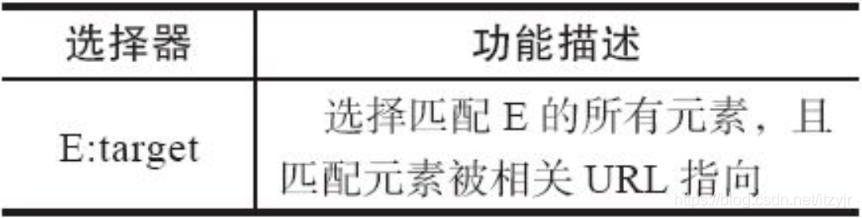
目标伪类选择器“:target”是众多实用的CSS3特性中的一个,用来匹配文档的URI中某个标志符的目标元素。具体来说,URI中的标志符通常会包含一个井号(#),后面带有一个标志符名称,例如“#contact”,“:target” 就是用来匹配元素id=“contact”的元素的。在Web页面中,一些URL拥有片段标识符,它由一个井号(#)后跟一个锚点或元素ID组合而成,可以链接到页面的某个特定元素。“:target”伪类选择器选取链接的目标元素,然后供定义样式。即,点击<a href="#myid">XYZ</a>后:target给id="myid"的元素定义样式。
目标伪类选择器语法如下表:
<!DOCTYPE HTML>
<html lang="en-US">
<head>
<meta charset="UTF-8">
<title>垂直手风琴</title>
<style type="text/css">
.accordionMenu {
background: #fff;
color:#424242;
font: 12px Arial, Verdana, sans-serif;
margin:0 auto;
padding: 10px;
width: 500px;
}
.accordionMenu h2 {
margin:5px 0;
padding:0;
position: relative;
}
.accordionMenu h2:before {
border: 5px solid #fff;
border-color: #fff transparent transparent;
content:"";
height: 0;
position:absolute;
right: 10px;
top: 15px;
width: 0;
}
.accordionMenu h2 a {
background: #8f8f8f;
background: -moz-linear-gradient( top, #cecece, #8f8f8f);
background: -webkit-gradient(linear, left top, left bottom, from(#cecece), to(#8f8f8f));
background: -webkit-linear-gradient( top, #cecece, #8f8f8f);
background: -o-linear-gradient( top, #cecece, #8f8f8f);
background: linear-gradient( top, #cecece, #8f8f8f);
border-radius: 5px;
color:#424242;
display: block;
font-size: 13px;
font-weight: normal;
margin:0;
padding:10px 10px;
text-shadow: 2px 2px 2px #aeaeae;
text-decoration:none;
}
.accordionMenu :target h2 a,
.accordionMenu h2 a:focus,
.accordionMenu h2 a:hover,
.accordionMenu h2 a:active {
background: #2288dd;
background: -moz-linear-gradient( top, #6bb2ff, #2288dd);
background: -webkit-gradient(linear, left top, left bottom, from(#6bb2ff), to(#2288dd));
background: -webkit-linear-gradient( top, #6bb2ff, #2288dd);
background: -o-linear-gradient( top, #6bb2ff, #2288dd);
background: linear-gradient( top, #6bb2ff, #2288dd);
color:#FFF;
}
.accordionMenu p {
margin:0;
height: 0;
overflow: hidden;
padding:0 10px;
-moz-transition: height 0.5s ease-in;
-webkit-transition: height 0.5s ease-in;
-o-transition: height 0.5s ease-in;
transition: height 0.5s ease-in;
}
.accordionMenu :target p {
height:100px;
overflow: auto;
}
.accordionMenu :target h2:before {
border-color: transparent transparent transparent #fff;
}
</style>
</head>
<body>
<div class="accordionMenu">
<div class="menuSection" id="brand">
<h2><a href="#brand">Brand</a></h2>
<p>Lorem ipsum dolor sit amet, consectetur adipisicing elit, sed do eiusmod tempor incididunt ut labore et dolore magna aliqua. Ut enim ad minim veniam, quis nostrud exercitation ullamco laboris nisi ut aliquip ex ea commodo consequat. Duis aute irure dolor in reprehenderit in voluptate velit esse cillum dolore eu fugiat nulla pariatur. Excepteur sint occaecat cupidatat non proident, sunt in culpa qui officia deserunt mollit anim id est laborum.Lorem ipsum dolor sit amet, consectetur adipisicing elit, sed do eiusmod tempor incididunt ut labore et dolore magna aliqua. Ut enim ad minim veniam, quis nostrud exercitation ullamco laboris nisi ut aliquip ex ea commodo consequat. Duis aute irure dolor in reprehenderit in voluptate velit esse cillum dolore eu fugiat nulla pariatur. Excepteur sint occaecat cupidatat non proident, sunt in culpa qui officia deserunt mollit anim id est laborum.</p>
</div>
<div class="menuSection" id="promotion">
<h2><a href="#promotion">Promotion</a></h2>
<p>Lorem ipsum dolor sit amet, consectetur adipisicing elit, sed do eiusmod tempor incididunt ut labore et dolore magna aliqua. Ut enim ad minim veniam, quis nostrud exercitation ullamco laboris nisi ut aliquip ex ea commodo consequat. Duis aute irure dolor in reprehenderit in voluptate velit esse cillum dolore eu fugiat nulla pariatur. Excepteur sint occaecat cupidatat non proident, sunt in culpa qui officia deserunt mollit anim id est laborum.</p>
</div>
<div class="menuSection" id="event">
<h2><a href="#event">Event</a></h2>
<p>Lorem ipsum dolor sit amet, consectetur adipisicing elit, sed do eiusmod tempor incididunt ut labore et dolore magna aliqua. Ut enim ad minim veniam, quis nostrud exercitation ullamco laboris nisi ut aliquip ex ea commodo consequat. Duis aute irure dolor in reprehenderit in voluptate velit esse cillum dolore eu fugiat nulla pariatur. Excepteur sint occaecat cupidatat non proident, sunt in culpa qui officia deserunt mollit anim id est laborum.</p>
</div>
</div>
</body>
</html>

效果如上,页面中有三个区块,默认状态只显示三个区块的标题,点击其中一个标题时,其对应的内容就会显示;点击另一个标题时,对应区块内容将显示,而前一块内容将隐藏。
下面简化流程,只指出重要节点数据,这样更清晰:
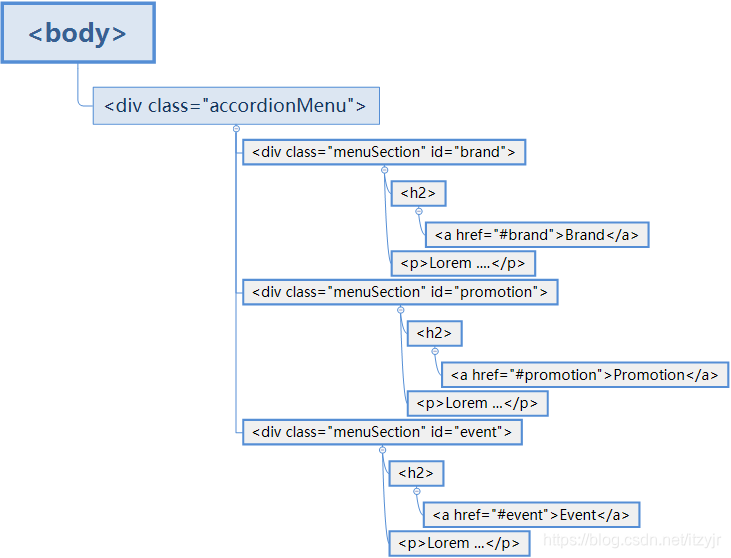
.accordionMenu {}
.accordionMeun h2 {}
.accordionMeun h2:before {}
.accordionMeun h2 a {}
.accordionMeun :target h2 a, .accordionMeun h2 a:focus, .accordionMeun h2 a:hover, .accordionMeun h2 a:active {}
.accordionMeun p {}
.accordionMeun :target p {}
.accordionMeun :target h2:before{}
看个简单的例子,更直观理解target选择器:
<!DOCTYPE html>
<html>
<head>
    <style>
        p:target { /*此处去掉前面的p效果一样,即对所有能产生target的标签元素产生效果*/
            border: 2px solid #D4D4D4;
            background-color: #e5eecc;
        }
    </style>
</head>
<body>
<h1>这是标题</h1>
<p><a href="#news1">跳转至内容 1</a></p>
<p><a href="#news2">跳转至内容 2</a></p>
<p>请点击上面的链接,:target 选择器会突出显示当前活动的 HTML 锚。</p>
<p id="news1"><b>内容 1...</b></p>
<p id="news2"><b>内容 2...</b></p>
<p><b>注释:</b> Internet Explorer 8 以及更早的版本不支持 :target 选择器。</p>
</body>
</html>
URL 带有后面跟有锚名称 #,指向文档内某个具体的元素。这个被链接的元素就是目标元素(target element)。
:target 选择器可用于选取当前活动的目标元素。

“target”应用场景:高亮显示区块、从相互层叠的盒容器或图片中突出显示其中一项、tabs效果、幻灯片效果、灯箱效果、相册效果。其中几项效果用JavaScript制作效果会更好,因为纯CSS版本可能存在潜在的易用性和可用性问题。
➎语言伪类选择器
使用语言伪类选择器来匹配使用语言的元素是非常有用的,特别是用于多语言版本的网站,其作用更是明显。可以使用他来根据不同语言版本设置页面的字体风格。
语言伪类选择器是根据元素的语言编码匹配元素。这种语言信息必须包含在文档中,或者与文档关联,不能从CSS指定。为文档指定语言,有两种方法可以表示。如果使用HTML5,直接可以设置文档的语言。如:
<!DOCTYPE HTML>
<html lang="en-US">
另一种方法就是手工在文档中指定lang属性,并设置对应的语言值,如:
<body lang="fr">
语言伪类选择器允许为不同的语言定义特殊的规则,这在多语言版本的网站用起来是特别的方便。
E:lang表示选择匹配E的所有元素,且匹配元素指定了lang属性,而且其值为language。
<!DOCTYPE HTML>
<html lang="en">
<head>
    <meta charset="UTF-8">
    <title>语言伪类选择器运用</title>
    <style type="text/css">
        :lang(en) {
            quotes:'"' '"';
        }
        :lang(en) q {background: red;}
        :lang(fr) {
            quotes:'?' '?';
        }
        :lang(fr) q {background: green;}
    </style>
</head>
<body>
<p>WWF's goal is to:
    <q cite="http://www.wwf.org">
        build a future where people live in harmony with nature
    </q> we hope they succeed.</p>
</body>
</html>

改<html lang="fr">则:

➏UI元素状态伪类选择器
UI元素状态伪类选择器也是CSS3选择器模块组中的一部分,主要用于form表单元素上,以提高网页的人机交互、操作逻辑以及页面的整体美观,使表单页更具个性与品位,而且使用户操作页面表单更便利和简单。
UI元素的状态一般包括:启用、禁用、选中、未选中、获得焦点、失去焦点、锁定和待机等。
UI元素状态伪类选择器语法如下表:

<!DOCTYPE HTML>
<html lang="en-US">
<head>
<meta charset="UTF-8">
<title>UI元素状态伪类选择器使用</title>
<style type="text/css">
form {
margin: 0 0 18px;
}
fieldset {
padding: 0;
margin: 0;
border: 0;
}
legend {
display: block;
width: 100%;
padding: 0;
margin-bottom: 27px;
font-size: 19.5px;
line-height: 36px;
color: #333333;
border: 0;
border-bottom: 1px solid #e5e5e5;
}
legend small {
font-size: 13.5px;
color: #999999;
}
label,
input,
button,
select,
textarea {
font-size: 13px;
font-weight: normal;
line-height: 18px;
}
input,
button,
select,
textarea {
font-family: "Helvetica Neue", Helvetica, Arial, sans-serif;
}
label {
display: block;
margin-bottom: 5px;
}
select,
textarea,
input[type="text"],
input[type="password"],
input[type="datetime"],
input[type="datetime-local"],
input[type="date"],
input[type="month"],
input[type="time"],
input[type="week"],
input[type="number"],
input[type="email"],
input[type="url"],
input[type="search"],
input[type="tel"],
input[type="color"],
.uneditable-input {
display: inline-block;
height: 18px;
padding: 4px;
margin-bottom: 9px;
font-size: 13px;
line-height: 18px;
color: #555555;
}
input,
textarea {
width: 210px;
}
textarea {
height: auto;
}
textarea,
input[type="text"],
input[type="password"],
input[type="datetime"],
input[type="datetime-local"],
input[type="date"],
input[type="month"],
input[type="time"],
input[type="week"],
input[type="number"],
input[type="email"],
input[type="url"],
input[type="search"],
input[type="tel"],
input[type="color"],
.uneditable-input {
background-color: #ffffff;
border: 1px solid #cccccc;
border-radius: 3px;
box-shadow: inset 0 1px 1px rgba(0, 0, 0, 0.075);
-webkit-transition: border linear 0.2s, box-shadow linear 0.2s;
-moz-transition: border linear 0.2s, box-shadow linear 0.2s;
-ms-transition: border linear 0.2s, box-shadow linear 0.2s;
-o-transition: border linear 0.2s, box-shadow linear 0.2s;
transition: border linear 0.2s, box-shadow linear 0.2s;
}
/*表单元素获得焦点效果*/
textarea:focus,
input[type="text"]:focus,
input[type="password"]:focus,
input[type="datetime"]:focus,
input[type="datetime-local"]:focus,
input[type="date"]:focus,
input[type="month"]:focus,
input[type="time"]:focus,
input[type="week"]:focus,
input[type="number"]:focus,
input[type="email"]:focus,
input[type="url"]:focus,
input[type="search"]:focus,
input[type="tel"]:focus,
input[type="color"]:focus,
.uneditable-input:focus {
border-color: rgba(82, 168, 236, 0.8);
outline: 0;
outline: thin dotted \9;
box-shadow: inset 0 1px 1px rgba(0, 0, 0, 0.075), 0 0 8px rgba(82, 168, 236, 0.6);
}
input[type="radio"],
input[type="checkbox"] {
margin: 3px 0;
*margin-top: 0;
line-height: normal;
cursor: pointer;
}
input[type="submit"],
input[type="reset"],
input[type="button"],
input[type="radio"],
input[type="checkbox"] {
width: auto;
}
select,
input[type="file"] {
height: 28px;
*margin-top: 4px;
line-height: 28px;
}
select {
width: 220px;
border: 1px solid #bbb;
}
select[multiple],
select[size] {
height: auto;
}
/*表单中下拉选择框、文件控件、单选按钮、复选按钮得到焦点时效果*/
select:focus,
input[type="file"]:focus,
input[type="radio"]:focus,
input[type="checkbox"]:focus {
outline: thin dotted #333;
outline: 5px auto -webkit-focus-ring-color;
outline-offset: -2px;
}
.radio,
.checkbox {
min-height: 18px;
padding-left: 18px;
}
.radio input[type="radio"],
.checkbox input[type="checkbox"] {
float: left;
margin-left: -18px;
}
.controls > .radio:first-child,
.controls > .checkbox:first-child {
padding-top: 5px;
}
.radio.inline,
.checkbox.inline {
display: inline-block;
padding-top: 5px;
margin-bottom: 0;
vertical-align: middle;
}
.radio.inline + .radio.inline,
.checkbox.inline + .checkbox.inline {
margin-left: 10px;
}
input,
textarea,
.uneditable-input {
margin-left: 0;
}
/*禁用的input、select、textarea表单元素效果*/
input[disabled],/*等效于input:disabled*/
select[disabled],/*等效于select:disabled*/
textarea[disabled],/*等效于textarea:disabled*/
input[readonly],
select[readonly],
textarea[readonly] {
cursor: not-allowed;
background-color: #eeeeee;
border-color: #ddd;
}
/*禁用的单选按钮和复选按钮效果*/
input[type="radio"][disabled],/*等效于input[type="radio"]:disabled*/
input[type="checkbox"][disabled],/*等效于input[type="checkbox"]:disabled*/
input[type="radio"][readonly],
input[type="checkbox"][readonly] {
background-color: transparent;
}
.control-group.warning > label,
.control-group.warning .help-block,
.control-group.warning .help-inline {
color: #c09853;
}
/*表单警告状态下效果*/
.control-group.warning .checkbox,
.control-group.warning .radio,
.control-group.warning input,
.control-group.warning select,
.control-group.warning textarea {
color: #c09853;
border-color: #c09853;
}
/*表单警告状态下并获得焦点下效果*/
.control-group.warning .checkbox:focus,
.control-group.warning .radio:focus,
.control-group.warning input:focus,
.control-group.warning select:focus,
.control-group.warning textarea:focus {
border-color: #a47e3c;
box-shadow: 0 0 6px #dbc59e;
}
.control-group.error > label,
.control-group.error .help-block,
.control-group.error .help-inline {
color: #b94a48;
}
/*表单错误状态下效果*/
.control-group.error .checkbox,
.control-group.error .radio,
.control-group.error input,
.control-group.error select,
.control-group.error textarea {
color: #b94a48;
border-color: #b94a48;
}
/*表单错误状态并获取焦点时效果*/
.control-group.error .checkbox:focus,
.control-group.error .radio:focus,
.control-group.error input:focus,
.control-group.error select:focus,
.control-group.error textarea:focus {
border-color: #953b39;
box-shadow: 0 0 6px #d59392;
}
.control-group.success > label,
.control-group.success .help-block,
.control-group.success .help-inline {
color: #468847;
}
/*表单成功状态下效果*/
.control-group.success .checkbox,
.control-group.success .radio,
.control-group.success input,
.control-group.success select,
.control-group.success textarea {
color: #468847;
border-color: #468847;
}
/*表单成功状态于并获得焦点下效果*/
.control-group.success .checkbox:focus,
.control-group.success .radio:focus,
.control-group.success input:focus,
.control-group.success select:focus,
.control-group.success textarea:focus {
border-color: #356635;
box-shadow: 0 0 6px #7aba7b;
}
input:focus:required:invalid,
textarea:focus:required:invalid,
select:focus:required:invalid {
color: #b94a48;
border-color: #ee5f5b;
}
input:focus:required:invalid:focus,
textarea:focus:required:invalid:focus,
select:focus:required:invalid:focus {
border-color: #e9322d;
box-shadow: 0 0 6px #f8b9b7;
}
.form-actions {
padding: 17px 20px 18px;
margin-top: 18px;
margin-bottom: 18px;
background-color: #f5f5f5;
border-top: 1px solid #e5e5e5;
*zoom: 1;
}
.form-actions:before,
.form-actions:after {
display: table;
content: "";
}
.form-actions:after {
clear: both;
}
.uneditable-input {
overflow: hidden;
white-space: nowrap;
cursor: not-allowed;
background-color: #ffffff;
border-color: #eee;
box-shadow: inset 0 1px 2px rgba(0, 0, 0, 0.025);
}
:-moz-placeholder {
color: #999999;
}
:-ms-input-placeholder {
color: #999999;
}
::-webkit-input-placeholder {
color: #999999;
}
.help-block,
.help-inline {
color: #555555;
}
.help-block {
display: block;
margin-bottom: 9px;
}
.help-inline {
display: inline-block;
*display: inline;
padding-left: 5px;
vertical-align: middle;
*zoom: 1;
}
.form-horizontal input,
.form-horizontal textarea,
.form-horizontal select,
.form-horizontal .help-inline {
display: inline-block;
*display: inline;
margin-bottom: 0;
*zoom: 1;
}
.form-horizontal .hide {
display: none;
}
.control-group {
margin-bottom: 9px;
}
legend + .control-group {
margin-top: 18px;
-webkit-margin-top-collapse: separate;
}
.form-horizontal .control-group {
margin-bottom: 18px;
*zoom: 1;
}
.form-horizontal .control-group:before,
.form-horizontal .control-group:after {
display: table;
content: "";
}
.form-horizontal .control-group:after {
clear: both;
}
.form-horizontal .control-label {
float: left;
width: 140px;
padding-top: 5px;
text-align: right;
}
.form-horizontal .controls {
*display: inline-block;
*padding-left: 20px;
margin-left: 160px;
*margin-left: 0;
}
.form-horizontal .controls:first-child {
*padding-left: 160px;
}
.form-horizontal .help-block {
margin-top: 9px;
margin-bottom: 0;
}
.form-horizontal .form-actions {
padding-left: 160px;
}
.btn {
display: inline-block;
*display: inline;
padding: 4px 10px 4px;
margin-bottom: 0;
*margin-left: .3em;
font-size: 13px;
line-height: 18px;
*line-height: 20px;
color: #333333;
text-align: center;
text-shadow: 0 1px 1px rgba(255, 255, 255, 0.75);
vertical-align: middle;
cursor: pointer;
background-color: #f5f5f5;
*background-color: #e6e6e6;
background-image: -ms-linear-gradient(top, #ffffff, #e6e6e6);
background-image: -webkit-gradient(linear, 0 0, 0 100%, from(#ffffff), to(#e6e6e6));
background-image: -webkit-linear-gradient(top, #ffffff, #e6e6e6);
background-image: -o-linear-gradient(top, #ffffff, #e6e6e6);
background-image: linear-gradient(top, #ffffff, #e6e6e6);
background-image: -moz-linear-gradient(top, #ffffff, #e6e6e6);
background-repeat: repeat-x;
border: 1px solid #cccccc;
*border: 0;
border-color: rgba(0, 0, 0, 0.1) rgba(0, 0, 0, 0.1) rgba(0, 0, 0, 0.25);
border-color: #e6e6e6 #e6e6e6 #bfbfbf;
border-bottom-color: #b3b3b3;
border-radius: 4px;
filter: progid:dximagetransform.microsoft.gradient(startColorstr='#ffffff', endColorstr='#e6e6e6', GradientType=0);
filter: progid:dximagetransform.microsoft.gradient(enabled=false);
*zoom: 1;
box-shadow: inset 0 1px 0 rgba(255, 255, 255, 0.2), 0 1px 2px rgba(0, 0, 0, 0.05);
}
.btn:hover,
.btn:active,
.btn.active,
.btn.disabled,/*按钮禁用下效果,等效于.btn:disabled*/
.btn[disabled] {
background-color: #e6e6e6;
*background-color: #d9d9d9;
}
.btn:active,
.btn.active {
background-color: #cccccc \9;
}
.btn:first-child {
*margin-left: 0;
}
.btn:hover {
color: #333333;
text-decoration: none;
background-color: #e6e6e6;
*background-color: #d9d9d9;
background-position: 0 -15px;
-webkit-transition: background-position 0.1s linear;
-moz-transition: background-position 0.1s linear;
-ms-transition: background-position 0.1s linear;
-o-transition: background-position 0.1s linear;
transition: background-position 0.1s linear;
}
.btn:focus {
outline: thin dotted #333;
outline: 5px auto -webkit-focus-ring-color;
outline-offset: -2px;
}
.btn.active,
.btn:active {
background-color: #e6e6e6;
background-color: #d9d9d9 \9;
background-image: none;
outline: 0;
box-shadow: inset 0 2px 4px rgba(0, 0, 0, 0.15), 0 1px 2px rgba(0, 0, 0, 0.05);
}
/*表单按钮禁用状态下效果*/
.btn.disabled,/*等效于.btn:disabled*/
.btn[disabled] {
cursor: default;
background-color: #e6e6e6;
background-image: none;
opacity: 0.65;
filter: alpha(opacity=65);
box-shadow: none;
}
.btn-primary,
.btn-primary:hover {
color: #ffffff;
text-shadow: 0 -1px 0 rgba(0, 0, 0, 0.25);
}
.btn-primary.active {
color: rgba(255, 255, 255, 0.75);
}
.btn {
border-color: #ccc;
border-color: rgba(0, 0, 0, 0.1) rgba(0, 0, 0, 0.1) rgba(0, 0, 0, 0.25);
}
.btn-primary {
background-color: #0074cc;
*background-color: #0055cc;
background-image: -ms-linear-gradient(top, #0088cc, #0055cc);
background-image: -webkit-gradient(linear, 0 0, 0 100%, from(#0088cc), to(#0055cc));
background-image: -webkit-linear-gradient(top, #0088cc, #0055cc);
background-image: -o-linear-gradient(top, #0088cc, #0055cc);
background-image: -moz-linear-gradient(top, #0088cc, #0055cc);
background-image: linear-gradient(top, #0088cc, #0055cc);
background-repeat: repeat-x;
border-color: #0055cc #0055cc #003580;
border-color: rgba(0, 0, 0, 0.1) rgba(0, 0, 0, 0.1) rgba(0, 0, 0, 0.25);
filter: progid:dximagetransform.microsoft.gradient(startColorstr='#0088cc', endColorstr='#0055cc', GradientType=0);
filter: progid:dximagetransform.microsoft.gradient(enabled=false);
}
.btn-primary:hover,
.btn-primary:active,
.btn-primary.active,
.btn-primary.disabled,
.btn-primary[disabled] {
background-color: #0055cc;
*background-color: #004ab3;
}
.btn-primary:active,
.btn-primary.active {
background-color: #004099 \9;
}
button.btn,
input[type="submit"].btn {
*padding-top: 2px;
*padding-bottom: 2px;
}
button.btn::-moz-focus-inner,
input[type="submit"].btn::-moz-focus-inner {
padding: 0;
border: 0;
}
</style>
</head>
<body>
<form class="form-horizontal">
<fieldset>
<div class="control-group">
<label class="control-label" for="focusedInput">Focused input</label>
<div class="controls">
<input class="input-xlarge focused" id="focusedInput" type="text" value="This is focused…">
</div>
</div>
<div class="control-group">
<label class="control-label">Uneditable input</label>
<div class="controls">
<span class="input-xlarge uneditable-input">Some value here</span>
</div>
</div>
<div class="control-group">
<label class="control-label" for="disabledInput">Disabled input</label>
<div class="controls">
<input class="input-xlarge disabled" id="disabledInput" type="text" placeholder="Disabled input here…" disabled="">
</div>
</div>
<div class="control-group">
<label class="control-label" for="optionsCheckbox2">Disabled checkbox</label>
<div class="controls">
<label class="checkbox">
<input type="checkbox" id="optionsCheckbox2" value="option1" disabled="">
This is a disabled checkbox
</label>
</div>
</div>
<div class="control-group warning">
<label class="control-label" for="inputWarning">Input with warning</label>
<div class="controls">
<input type="text" id="inputWarning">
<span class="help-inline">Something may have gone wrong</span>
</div>
</div>
<div class="control-group error">
<label class="control-label" for="inputError">Input with error</label>
<div class="controls">
<input type="text" id="inputError">
<span class="help-inline">Please correct the error</span>
</div>
</div>
<div class="control-group success">
<label class="control-label" for="inputSuccess">Input with success</label>
<div class="controls">
<input type="text" id="inputSuccess">
<span class="help-inline">Woohoo!</span>
</div>
</div>
<div class="control-group success">
<label class="control-label" for="selectError">Select with success</label>
<div class="controls">
<select id="selectError">
<option>1</option>
<option>2</option>
<option>3</option>
<option>4</option>
<option>5</option>
</select>
<span class="help-inline">Woohoo!</span>
</div>
</div>
<div class="form-actions">
<button type="submit" class="btn btn-primary">Save changes</button>
<button class="btn" disabled="disabled">Cancel</button>
</div>
</fieldset>
</form>
</body>
</html>

➐结构伪类选择器
伪类可以将一段并不存在的HTML当作独立元素来定位,或是找到无法使用其他简单选择器就能定位到的切实存在的元素。因此CSS3给伪类选择器引入一种“结构伪类选择器”。这种选择器可以根据元素在文档树中的某些特性(如相对位置)定位到它们。也就是说,通过文档结构的相互关系来匹配特定元素,从而减少HTML文档对ID类名的定义,帮助你保持代码干净和整洁。
<!DOCTYPE HTML>
<html lang="en-US">
<head>
	<meta charset="UTF-8">
	<title>HTML DOM树型结构图</title>
</head>
<body>
	<div>
		<ul>
			<li>one</li>
			<li>two</li>
			<li>three</li>
		</ul>
		<div>abc</div>
		<p>para</p>
		<div>def</div>
		<p>para</p>
		<b>ghi</b>
	</div>
</body>
</html>
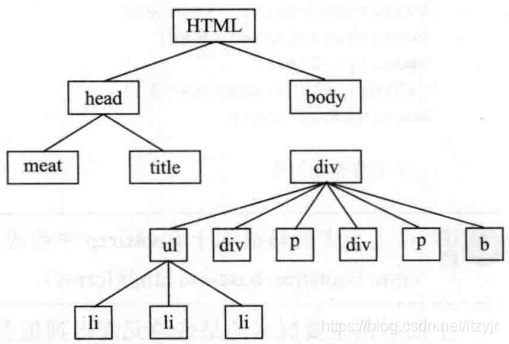
结构伪类选择器使用语法如下表:

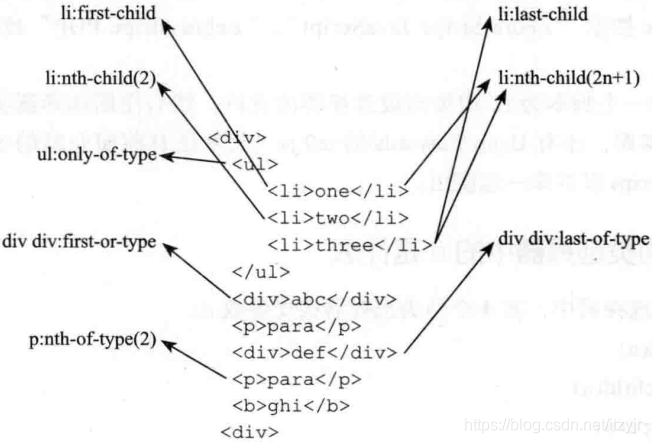
将结构伪类选择器中的参数按常用的情况划分为七种情形。
1.参数n为具体的数值这个数值可以是任何大于0的正整数,例如“:nth-child(3)”将选择一个系列中的第3个元素。
2.参数n为表达式“n*length”选择n的倍数,其中n从0开始计算,而length为大于0的整数。当length为整数1时,将选择整个系列中的所有元素,直到元素耗尽无法选择为止。因为length在实际运用中常为大于1的正数,表达式才具有实际意义,例如“:nth-child(2n)”。
3.参数n为表达式“n+length”选择大于或等于length的元素,例如“:nth-child(n+3)”。
4.参数n为表达式“-n+length”选择小于或等于length的元素,例如“:nth-child(-n+3)”。
5.参数n为表达式“n*length+b”其中b是您想设置的偏移值,其表示隔length个元素选中第n*length+b个元素,例如“:nth-child(2n+1)”。
6.参数n为关键词“odd”选择系列中的奇数(1、3、5、7)元素,其效果等同于“:nth-child(2n-1)”和“:nth-child(2n+1)”。
7.参数n为关键词“even”选择系列中的偶数(2、4、6、8)元素,其效果等同于“:nth-child(2n)”。
用CSS3的结构伪类选择器“:nth-child(n)”代替类名,跟踪元素系列的序号变化并自动匹配将会更为准确、高效,而且维护非常方便。
<!DOCTYPE HTML>
<html lang="en-US">
<head>
    <meta charset="UTF-8">
    <title>CSS3结构伪选择器的使用</title>
    <style type="text/css">
        *{
            margin: 0;
            padding: 0;
        }
        ul {
            margin: 50px auto;
            width: 400px;
            list-style: none outside none;
        }
        li {
            display:inline-block;
            margin: 5px;
            padding: 5px;
            width:50px;
            height: 50px;
            font: bold 30px/50px arial;
            background: #000;
            color: #fff;
            border-radius: 50px;
            text-align: center;
        }
        /*
        ul>li:first-child {
            background-color: green;
        }
        ul>li:last-child {
            background-color: blue;
        }
        ul>li:nth-child(3){
            background-color: yellow;
        }
        ul>li:nth-child(n){
            background-color: orange;
        }
        ul>li:nth-child(2n){
            background-color: blue;
        }
        ul>li:nth-child(2n+1){
            background-color: blue;
        }

        ul>li:nth-child(-n+5){
            background-color: blue;
        }

        ul>li:nth-child(4n+1){
            background-color: blue;
        }
        */
        ul>li:nth-last-child(even){
            background-color: green;
        }

    </style>
</head>
<body>
<ul>
    <li>1</li>
    <li>2</li>
    <li>3</li>
    <li>4</li>
    <li>5</li>
    <li>6</li>
    <li>7</li>
    <li>8</li>
    <li>9</li>
    <li>10</li>
    <li>11</li>
    <li>12</li>
    <li>13</li>
    <li>14</li>
    <li>15</li>
    <li>16</li>
    <li>17</li>
    <li>18</li>
    <li>19</li>
    <li>20</li>
</ul>
</body>
</html>
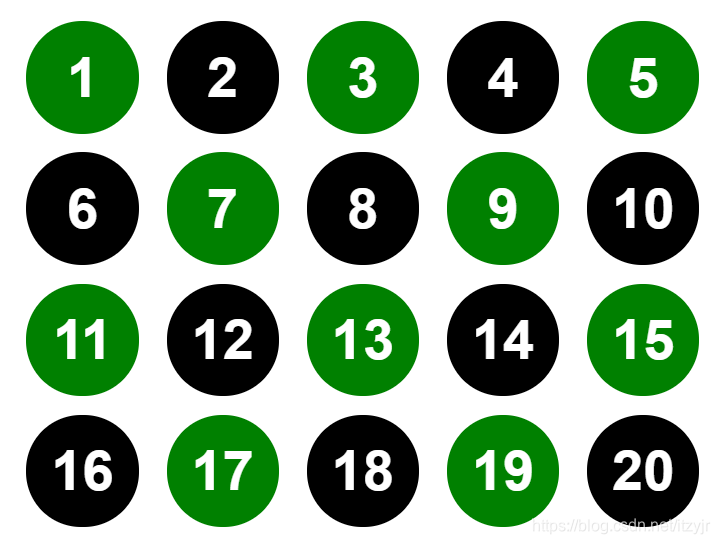 (注:“:nth-child(n)”代替的是HTML元素的类名)
例如博客侧边栏的标题“h2”顶部都有一个“margin”,用来区分标题和它们前面区块的内容,但是第一标题“h2”不需要顶部“margin”值,就可以使用下面的代码:
.aside > h2 {
    margin-top: 15px;
}
.aside > h2:first-child {
    margin-top: 0;
}
上面看到的是使用“:first-child”来移除标题顶部的间距,当然也可以用来移除元素底部的间距。
在实际Web项目中,“:last-child”的用处也非常广泛。例如在一个导航条中每个导航项都有一个右边框效果,但最后一个不想要这个右边框,此时就可以使用“:last-child”:
#nav > li {
    /* ... */
    border-right: 1px solid #ccc;
}
#nav > li:last-child {
    border-right: none;
}
另一个较常见的就是在博客制作中,假设“post”中最后一段不需要底部“margin”值,代码如下:
.post > p:last-child {
    margin-bottom: 0;
}
结构伪类选择器中的n是什么?
:nth-child(n),参数n是一个简单的表达式,取值从0开始计算,到什么时候不知道,如果在实际应用中直接这样使用,将会选中父元素中的所有子元素。注:“:nth-child(n)”中的参数只能是n,不可以使用其他字母代替,不然没有任何效果。
其中的n还可以是表达式,如2n、2n+1、n+5、-n+5、4n+1。
“:nth-child(odd)”选择的是奇数项,而“nth-last-child(odd)”选择的却是偶数项,这很好理解,因为奇数/偶数不是看内容而是看在哪个位置。
其他的:nth-of-type(n)、nth-last-of-type(n)、first-of-type、last-of-type、only-child、only-of-type都类似,好理解。
nth-of-type(n):
<!DOCTYPE HTML>
<html lang="en-US">
<head>
    <meta charset="UTF-8">
    <title></title>
    <style type="text/css">
        ul {
            list-style: none outside none;
            padding: 10px;
            background: green;
            width: 400px;
        }
        li {margin-bottom: 10px;border: 1px solid orange;}
        div {margin-bottom: 10px;border: 1px solid blue;}
        /*
        ul>li:nth-child(5) {background-color: yellow;}

        ul> li:nth-child(2n){background-color: #fff}
        */
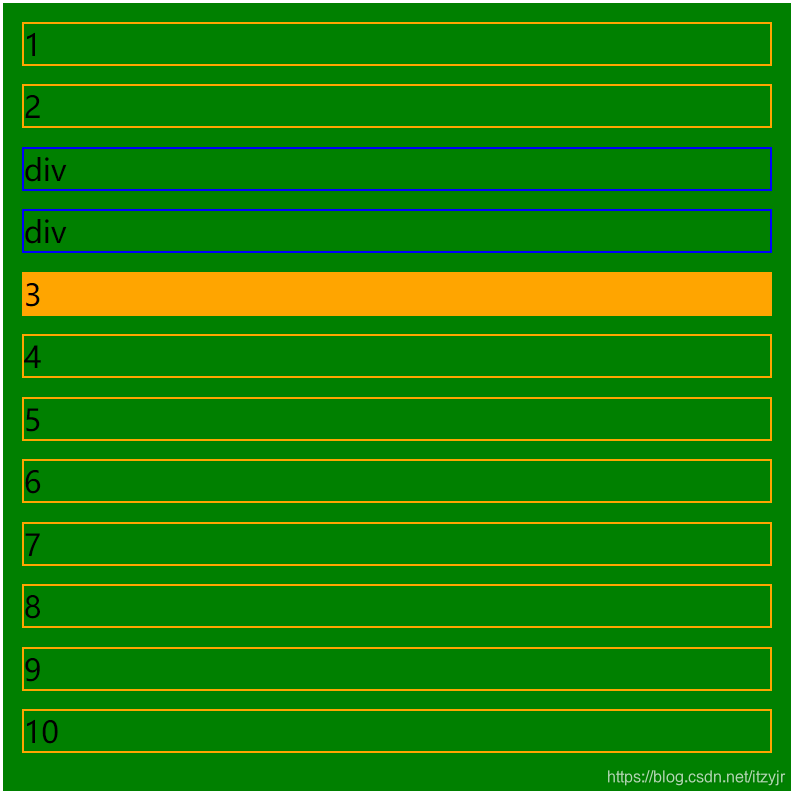
        ul>li:nth-of-type(3){background-color:orange;}
    </style>
</head>
<body>
<ul>
    <li>1</li>
    <li>2</li>
    <div>div</div>
    <div>div</div>
    <li>3</li>
    <li>4</li>
    <li>5</li>
    <li>6</li>
    <li>7</li>
    <li>8</li>
    <li>9</li>
    <li>10</li>
</ul>
</body>
</html>
<!DOCTYPE HTML>
<html lang="en-US">
<head>
	<meta charset="UTF-8">
	<title>nth-of-type选择器的使用</title>
	<style type="text/css">
		.article {
			width: 500px;
			margin: 20px auto;
		}
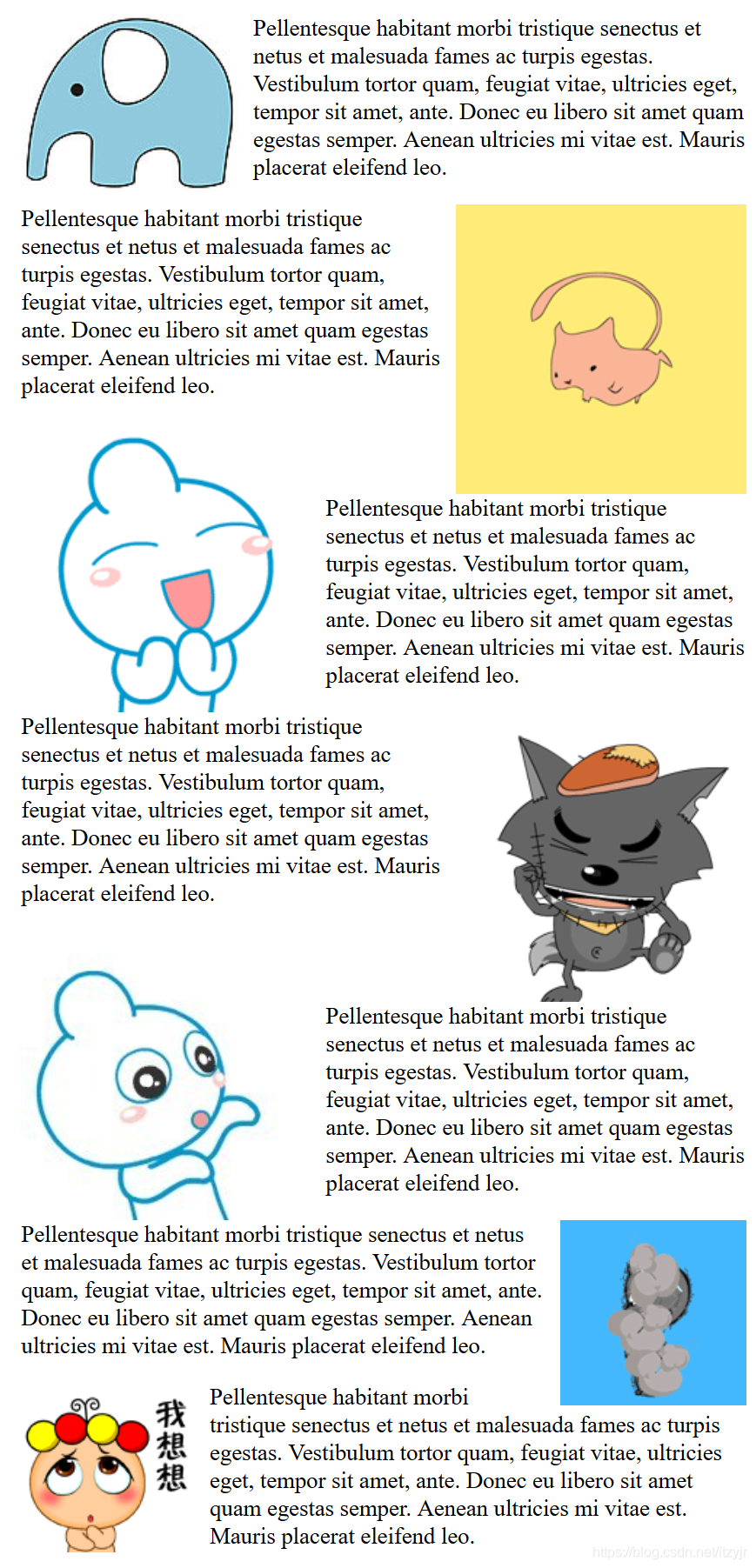
		.article img:nth-of-type(odd){
			float: left;
			margin-right: 10px;
		}

		.article img:nth-of-type(even){
			float: right;
			margin-left: 10px;
		}
	</style>
</head>
<body>
	<div class="article">
		<img src="http://img.ujian.cc/nice/35.jpg" alt="" />
		<p>Pellentesque habitant morbi tristique senectus et netus et malesuada fames ac turpis egestas. Vestibulum tortor quam, feugiat vitae, ultricies eget, tempor sit amet, ante. Donec eu libero sit amet quam egestas semper. Aenean ultricies mi vitae est. Mauris placerat eleifend leo.</p>
		<img src="http://img.ujian.cc/nice/36.jpg" alt="" />
		<p>Pellentesque habitant morbi tristique senectus et netus et malesuada fames ac turpis egestas. Vestibulum tortor quam, feugiat vitae, ultricies eget, tempor sit amet, ante. Donec eu libero sit amet quam egestas semper. Aenean ultricies mi vitae est. Mauris placerat eleifend leo.</p>
		<img src="http://img.ujian.cc/nice/38.jpg" alt="" />
		<p>Pellentesque habitant morbi tristique senectus et netus et malesuada fames ac turpis egestas. Vestibulum tortor quam, feugiat vitae, ultricies eget, tempor sit amet, ante. Donec eu libero sit amet quam egestas semper. Aenean ultricies mi vitae est. Mauris placerat eleifend leo.</p>
		<img src="http://img.ujian.cc/nice/31.jpg" alt="" />
		<p>Pellentesque habitant morbi tristique senectus et netus et malesuada fames ac turpis egestas. Vestibulum tortor quam, feugiat vitae, ultricies eget, tempor sit amet, ante. Donec eu libero sit amet quam egestas semper. Aenean ultricies mi vitae est. Mauris placerat eleifend leo.</p>
		<img src="http://img.ujian.cc/nice/32.jpg" alt="" />
		<p>Pellentesque habitant morbi tristique senectus et netus et malesuada fames ac turpis egestas. Vestibulum tortor quam, feugiat vitae, ultricies eget, tempor sit amet, ante. Donec eu libero sit amet quam egestas semper. Aenean ultricies mi vitae est. Mauris placerat eleifend leo.</p>
		<img src="http://img.ujian.cc/nice/33.jpg" alt="" />
		<p>Pellentesque habitant morbi tristique senectus et netus et malesuada fames ac turpis egestas. Vestibulum tortor quam, feugiat vitae, ultricies eget, tempor sit amet, ante. Donec eu libero sit amet quam egestas semper. Aenean ultricies mi vitae est. Mauris placerat eleifend leo.</p>
		<img src="http://img.ujian.cc/nice/34.jpg" alt="" />
		<p>Pellentesque habitant morbi tristique senectus et netus et malesuada fames ac turpis egestas. Vestibulum tortor quam, feugiat vitae, ultricies eget, tempor sit amet, ante. Donec eu libero sit amet quam egestas semper. Aenean ultricies mi vitae est. Mauris placerat eleifend leo.</p>

	</div>
</body>
</html>
only-child:
<!DOCTYPE HTML>
<html lang="en-US">
<head>
	<meta charset="UTF-8">
	<title>:only-child的使用</title>
	<style type="text/css">
		.post {
			width: 300px;
			margin: 20px auto;
			padding: 5px;
			border: 1px solid #ccc;
		}
		p {
			background: green;
			color: #fff;
			border: 1px solid orange;
			padding: 5px;
		}
		.post>p:only-child{
			border-width: 2px;
			background-color: #000;
		}
	</style>
</head>
<body>
	<div class="post">
		<p>我是第一个段落</p>
		<p>我是第二个段落</p>
	</div>
	<div class="post">
		<p>我就一个段落</p>
	</div>
</body>
</html>
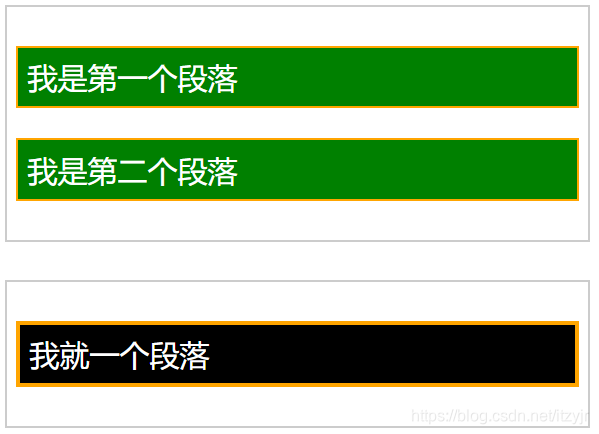 (只包含一个child的只有最后一个<div>)
这里最后看一下“:empty”的使用:
“:empty”用来选择没有任何内容的元素,这里“没有任何内容”指的是一点内容都没有,哪怕一个空格。这个选择器用来处理动态输出内容方面非常方便。例如想高亮提示用户搜索出来的结果为空时,就可以这样使用:
#result:empty{background-color:#fcc;}
实战体验:CSS3美化表格
<!DOCTYPE HTML>
<html lang="en-US">
<head>
<meta charset="UTF-8">
<title>CSS3美化表格</title>
<style type="text/css">
*{margin: 0;padding: 0;}
body {
padding: 40px 100px;
}
.demo {
width: 600px;
margin: 40px auto;
font-family: 'trebuchet MS', 'Lucida sans', Arial;
font-size: 14px;
color: #444;
}
/*表格的默认设置*/
table {
*border-collapse: collapse; /* IE7 and lower */
border-spacing: 0;
width: 100%;
}
/*========制作圆角表格========*/
.bordered {
border: solid #ccc 1px;/*给表格添加边框*/
border-radius: 6px;/*设置表格圆角*/
box-shadow: 0 1px 1px #ccc;/*表格阴影设置*/
}
.bordered tr {
-o-transition: all 0.1s ease-in-out;
-webkit-transition: all 0.1s ease-in-out;
-moz-transition: all 0.1s ease-in-out;
-ms-transition: all 0.1s ease-in-out;
transition: all 0.1s ease-in-out;
}
.bordered .highlight,
.bordered tr:hover {
background: #fbf8e9;/*表格行的悬浮状态效果*/
}
.bordered td,
.bordered th {
border-left: 1px solid #ccc;
border-top: 1px solid #ccc;
padding: 10px;
text-align: left;
}
.bordered th {
/*表格表头添加渐变背景色*/
background-color: #dce9f9;
background-image: -webkit-gradient(linear, left top, left bottom, from(#ebf3fc), to(#dce9f9));
background-image: -webkit-linear-gradient(top, #ebf3fc, #dce9f9);
background-image: -moz-linear-gradient(top, #ebf3fc, #dce9f9);
background-image: -ms-linear-gradient(top, #ebf3fc, #dce9f9);
background-image: -o-linear-gradient(top, #ebf3fc, #dce9f9);
background-image: linear-gradient(top, #ebf3fc, #dce9f9);
filter: progid:DXImageTransform.Microsoft.gradient(GradientType=0, startColorstr=#ebf3fc, endColorstr=#dce9f9);
-ms-filter: "progid:DXImageTransform.Microsoft.gradient (GradientType=0, startColorstr=#ebf3fc, endColorstr=#dce9f9)";
box-shadow: 0 1px 0 rgba(255,255,255,.8) inset;/*表格表头设置内阴影*/
border-top: none;
text-shadow: 0 1px 0 rgba(255,255,255,.5);/*表格表头设置文字阴影*/
}
/*使用:first-child去除表格每行的第一个单元格的左边框*/
.bordered td:first-child,
.bordered th:first-child {
border-left: none;
}
/*使用:first-child设置表格表头第一个单元格仅左上角为圆角*/
.bordered th:first-child {
border-radius: 6px 0 0 0;
}
/*使用:last-child设置表格表头最后一个单元格仅右上角为圆角*/
.bordered th:last-child {
border-radius: 0 6px 0 0;
}
/*使用:first-child和:last-child设置表格最后一行的第一个单元格左下角为圆角*/
.bordered tr:last-child td:first-child {
border-radius: 0 0 0 6px;
}
/*使用:last-child设置表格最后一行的最后一个单元格右上角为圆角*/
.bordered tr:last-child td:last-child {
border-radius: 0 0 6px 0;
}
/*=======制作Zebra表格(斑马线表格)效果==========*/
.zebra td,
.zebra th {
padding: 10px;
border-bottom: 1px solid #f2f2f2;
}
/*使用:nth-child(even)给表格的奇数行添加背景和阴影效果*/
.zebra .alternate,
.zebra tbody tr:nth-child(even) {
background: #f5f5f5;
box-shadow: 0 1px 0 rgba(255,255,255,.8) inset;
}
.zebra th {
text-align: left;
text-shadow: 0 1px 0 rgba(255,255,255,.5);
border-bottom: 1px solid #ccc;
background-color: #eee;
background-image: -webkit-gradient(linear, left top, left bottom, from(#f5f5f5), to(#eee));
background-image: -webkit-linear-gradient(top, #f5f5f5, #eee);
background-image: -moz-linear-gradient(top, #f5f5f5, #eee);
background-image: -ms-linear-gradient(top, #f5f5f5, #eee);
background-image: -o-linear-gradient(top, #f5f5f5, #eee);
background-image: linear-gradient(top, #f5f5f5, #eee);
filter: progid:DXImageTransform.Microsoft.gradient(GradientType=0, startColorstr=#f5f5f5, endColorstr=#eeeeee);
-ms-filter: "progid:DXImageTransform.Microsoft.gradient (GradientType=0, startColorstr=#f5f5f5, endColorstr=#eeeeee)";
}
/*使用 :first-child设置表格表头第一个单元格左上角为圆角*/
.zebra th:first-child {
border-radius: 6px 0 0 0;
}
/*使用 :last-child设置表格表头最后一个单元格右上角为圆角*/
.zebra th:last-child {
border-radius: 0 6px 0 0;
}
.zebra tfoot td {
border-bottom: 0;
border-top: 1px solid #fff;
background-color: #f1f1f1;
}
/*使用 :first-child设置表格脚部第一个单元格左下角为圆角*/
.zebra tfoot td:first-child {
border-radius: 0 0 0 6px;
}
/*使用 :last-child设置表格脚部最后一个单元格右下角为圆角*/
.zebra tfoot td:last-child {
border-radius: 0 0 6px 0;
}
</style>
</head>
<body>
<div class="demo">
<table class="bordered">
<thead>
<tr>
<th>#</th>
<th>IMDB Top 10 Movies</th>
<th>Year</th>
</tr>
</thead>
<tbody>
<tr>
<td>1</td>
<td>The Shawshank Redemption</td>
<td>1994</td>
</tr>
<tr>
<td>2</td>
<td>The Godfather</td>
<td>1972</td>
</tr>
<tr>
<td>3</td>
<td>The Godfather: Part II</td>
<td>1974</td>
</tr>
<tr>
<td>4</td>
<td>The Good, the Bad and the Ugly</td>
<td>1966</td>
</tr>
</tbody>
</table>
<p style="height: 50px"></p>
<table class="zebra">
<thead>
<tr>
<th>#</th>
<th>IMDB Top 10 Movies</th>
<th>Year</th>
</tr>
</thead>
<tbody>
<tr>
<td>1</td>
<td>The Shawshank Redemption</td>
<td>1994</td>
</tr>
<tr>
<td>2</td>
<td>The Godfather</td>
<td>1972</td>
</tr>
<tr>
<td>3</td>
<td>The Godfather: Part II</td>
<td>1974</td>
</tr>
<tr>
<td>4</td>
<td>The Good, the Bad and the Ugly</td>
<td>1966</td>
</tr>
</tbody>
<tfoot>
<tr>
<td> </td>
<td></td>
<td></td>
</tr>
</tfoot>
</table>
</div>
</body>
</html>

➑否定伪类选择器
否定伪类选择器“:not()”非常有用,可以起到过滤内容的作用:

<!DOCTYPE HTML>
<html lang="en-US">
<head>
<meta charset="UTF-8">
<title>CSS Filter Effects In Action</title>
<style type="text/css">
*{
margin: 0;
padding: 0;
}
ul {
width: 690px;
margin: 20px auto;
letter-spacing: -4px;
word-spacing: -4px;
font-size: 0;
}
li {
font-size: 16px;
letter-spacing: normal;
word-spacing: normal;
display:inline-block;
*display: inline;
zoom:1;
list-style: none outside none;
margin: 5px;
}
img {
width: 128px;
height: 128px;
}
.gallery li:nth-child(2){
-webkit-filter:grayscale(1);
}
.gallery li:nth-child(3){
-webkit-filter:sepia(1);
}
.gallery li:nth-child(4){
-webkit-filter:saturate(0.5);
}
.gallery li:nth-child(5){
-webkit-filter:hue-rotate(90deg);
}
.gallery li:nth-child(6){
-webkit-filter:invert(1);
}
.gallery li:nth-child(7){
-webkit-filter:opacity(0.2);
}
.gallery li:nth-child(8){
-webkit-filter:blur(3px);
}
.gallery li:nth-child(9){
-webkit-filter:drop-shadow(5px 5px 5px #ccc);
}
.gallery li:nth-child(10){
-webkit-filter: saturate(6) hue-rotate(361deg) brightness(.09);
}
.gallery:hover li:not(:hover){
-webkit-filter: blur(2px) grayscale(1);
opacity: .7;
}
</style>
</head>
<body>
<ul class="gallery">
<li>
<img alt="" src="https://cdn.duitang.com/uploads/item/201206/11/20120611091007_EnVL3.jpeg" />
</li>
<li>
<img alt="" src="https://cdn.duitang.com/uploads/item/201206/11/20120611091007_EnVL3.jpeg" />
</li>
<li>
<img alt="" src="https://cdn.duitang.com/uploads/item/201206/11/20120611091007_EnVL3.jpeg" />
</li>
<li>
<img alt="" src="https://cdn.duitang.com/uploads/item/201206/11/20120611091007_EnVL3.jpeg" />
</li>
<li>
<img alt="" src="https://cdn.duitang.com/uploads/item/201206/11/20120611091007_EnVL3.jpeg" />
</li>
<li>
<img alt="" src="https://cdn.duitang.com/uploads/item/201206/11/20120611091007_EnVL3.jpeg" />
</li>
<li>
<img alt="" src="https://cdn.duitang.com/uploads/item/201206/11/20120611091007_EnVL3.jpeg" />
</li>
<li>
<img alt="" src="https://cdn.duitang.com/uploads/item/201206/11/20120611091007_EnVL3.jpeg" />
</li>
<li>
<img alt="" src="https://cdn.duitang.com/uploads/item/201206/11/20120611091007_EnVL3.jpeg" />
</li>
<li>
<img alt="" src="https://cdn.duitang.com/uploads/item/201206/11/20120611091007_EnVL3.jpeg" />
</li>
</ul>
</body>
</html>

“:not()”过滤掉了除悬浮状态“(:hover)”的图片,其他都变成黑白模糊透明度70%的效果。所以鼠标不停留在任何图片上时,正常显示10张图片,一旦鼠标悬浮在任何一张图片上,那就除了悬浮的图片,其他都变成“:not()”设置的效果。
伪元素:
除了伪类,CSS3还支持访问伪元素。伪元素可用于定位文档中包含的文本,但无法在文档树中定位。伪类一般反映无法在CSS中轻松或可靠地检测到的某个元素属性或状态;另一方面,伪元素表示DOM外部的某种文档结构。
伪元素以双冒号开头,是为了区分于伪类。
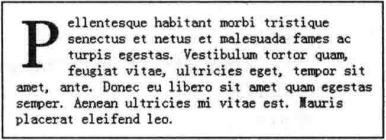
➀“::first-letter”用来选择文本块的第一个字母,除非在同一行中包含一些其他元素。它通常用于给文本元素添加排版细节,例如下沉字母或首字母:
p:first-child::first-letter {
    float: left;
    color: #903;
    padding: 4px 8px 0 3px;
    font:75px/60px Georgia;
}
➁“::first-line”也是常用于文本排版,只不过它是用于匹配元素的第一行文本。“::first-line”将匹配block、inline-block、table-caption、table-cell等级别元素的第一行:
p:last-child::first-line {
    font: italic 16px/18px Geogia;
    color: #903;
}
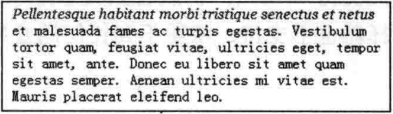
➂“::before”、“::after”,它们不是指存在于标记中的内容,而是可以插入额外内容的位置。尽管生成的内容不会成为DOM的一部分,但它同样可以设置样式。
要为伪元素生成内容,还需要配合content属性。例如,假设在页面上所有外部链接之后的括号中附加它们所指向的URL,无须硬编码到标记中,可以结合使用一个属性选择器和“::after”伪元素。
a[href^=http]::after {
    content:"(" attr(href) ")";
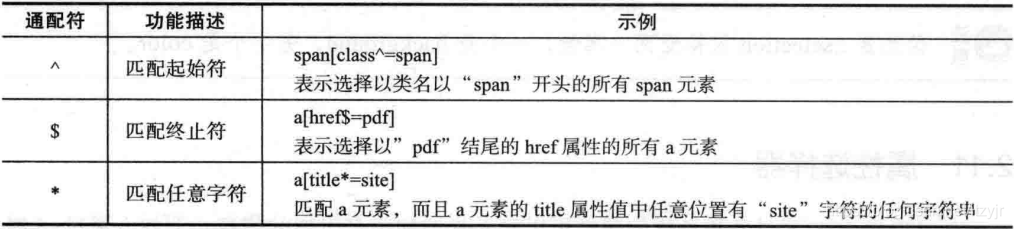
[attribute^=value],a[src^="https"]:选择其src属性值以"https"开头的每个<a>元素。

[attribute*=value],a[src*="abc"]:选择其src属性中包含"abc"子串的每个<a>元素。
➃“selection”是用来匹配突出显示的文本。浏览器默认情况下,选择网站文本是深蓝色背景、白字字体。浏览器兼容方面:WebKit内核浏览器支持,IE9+支持、Opera9.5+支持、Firefox需要加上私有属性“-moz”。

/* Webkit,Opera9.5+,IE9+ */
::selection {
    background: red;
    color: white;
}
/* Mozilla Firefox */
::-moz-selection {
    background: red;
    color: white;
}
➒属性选择器
在HTML中,通过各种各样的属性可以给元素增加很多附加的信息。
CSS3中常见的通配符:
CSS3属性选择器列表:

<!DOCTYPE HTML>
<html lang="en-US">
<head>
    <meta charset="UTF-8">
    <title>CSS3属性选择器的使用</title>
    <style type="text/css">
        .demo {
            width: 300px;
            border: 1px solid #ccc;
            padding: 10px;
            overflow: hidden;
            margin: 20px auto;
        }

        .demo a {
            float: left;
            display: block;
            height: 50px;
            width: 50px;
            border-radius: 10px;
            text-align: center;
            background: #aac;
            color: blue;
            font: bold 20px/50px Arial;
            margin-right: 5px;
            text-decoration: none;
            margin: 5px;
        }
→→→
a[id]{background-color:yellow;}
a[id][title]{background-color: red;}
a[id=first]{background-color:red;}
a[class="links"]{background-color:yellow;}
a[lang|=zh]{background-color: yellow;}
a[title~=website]{background-color:yellow;}
a[class*=links]{background-color:yellow;}
a[href^=http]{background-color:yellow;}
←←←
        a[href$=png]{background-color:yellow;}
    </style>
</head>
<body>
<div class="demo">
    <a href="http://www.w3cplus.com" target="_blank" class="links item first" id="first" title="w3cplus">1</a>
    <a href="" class="links active item" title="test website" target="_blank" lang="zh">2</a>
    <a href="sites/file/test.html" class="links item" title="this is a link" lang="zh-cn">3</a>
    <a href="sites/file/test.png" class="links item" target="_balnk" lang="zh-tw">4</a>
    <a href="sites/file/image.jpg" class="links item" title="zh-cn">5</a>
    <a href="mailto:w3cplus@hotmail" class="links item" title="website link" lang="zh">6</a>
    <a href="/a.pdf" class="links item" title="open the website" lang="cn">7</a>
    <a href="/abc.pdf" class="links item" title="close the website" lang="en-zh">8</a>
    <a href="abcdef.doc" class="links item" title="http://www.sina.com">9</a>
    <a href="abd.doc" class="linksitem last" id="last">10</a>
</div>
</body>
</html>
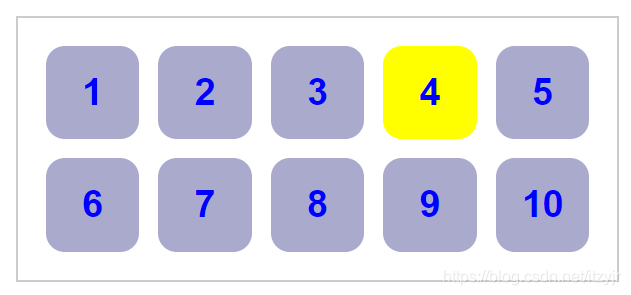
在CSS3属性选择器中,E[attr*=val]和E[attr~=val]是很容易混淆的
<style type="text/css">
.demo{
	width: 300px;
	border:1px solid #ccc;
	padding: 10px;
	overflow: hidden;
	margin: 20 auto;
}
.demo a {
	float: left;
	display: inline-block;height: 50px;
	line-height: 50px;
	width: 50px;
	border-radius: 10px;
	text-align: center;
	background: #aac;
	color: blue;
	font: bold 20/50px arial;
	margin-right:5px;
	text-decoration: none;
	margin: 5px;
}
</style>
<div class="demo">
	<a class="links item" title="website link">1</a>
	<a class="links item" title="open the website">2</a>
	<a class="links item" title="close the website">3</a>
	<a class="linksitem last" title="websiteitem link">4</a>
</div>
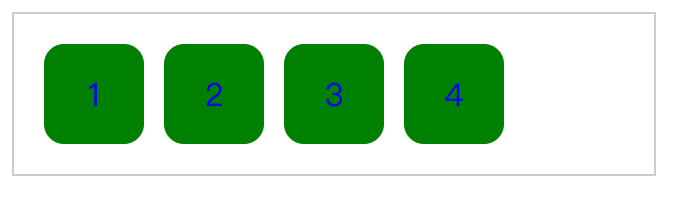
使用E[attr*=val],即:a[class*=links]{background: green;},此时,我们是给所有class不管是“links”,还是“linksitem”,标签a1、a2、a3、a4背景都变成绿色了,如图:
然后,我们来使用E[attr~=val]吧!!即:a[title ~=website]{background: yellow;},我们来观察:
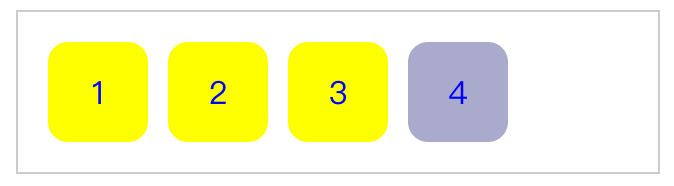
发现有木有前三个标签都变成黄色,只有最后一个没有变黄,我们上去看一下第四个标签的title代码:title="websiteitem link",原来第4个的title是websiteitem。
最后看一个创建个性化链接样式的实例:
<!DOCTYPE HTML>
<html lang="en-US">
<head>
    <meta charset="UTF-8">
    <title>创建个性化链接样式</title>
    <style type="text/css">
        a {
            font-size: 16px;
            text-decoration: none;
            padding-right: 20px;
            display: inline-block;
            margin-bottom: 5px;
            background: url(a.png) no-repeat 100% -327px;
        }
        /*匹配所有外部链接*/
        a[href^="http://"]{
            background-position: 100% -409px;/* 水平位置 垂直位置 */
        }
        /*匹配首页*/
        a[href="home"]{
            background-position: 100% -382px;
        }
        /*匹配.doc文档*/
        a[href$="doc"]{
            background-position: 100% 0;
        }
        /*匹配.ppt文档*/
        a[href$="ppt"]{
            background-position:100% -50px;
        }
        /*匹配.xls文档*/
        a[href$="xls"]{
            background-position:100% -75px;
        }
        /*匹配.html文档*/
        a[href$="html"]{
            background-position:100% -100px;
        }
        /*匹配.pdf文档*/
        a[href$="pdf"]{
            background-position:100% -125px;
        }
        /*匹配.jpg,.gif,.png图片*/
        a[href$="jpg"],
        a[href$="gif"],
        a[href$="png"]{
            background-position:100% -172px;
        }
        /*匹配.swf文档*/
        a[href$="swf"]{
            background-position:100% -193px;
        }
        /*匹配.zip,.rar压缩文档*/
        a[href$="zip"],
        a[href$="rar"]{
            background-position:100% -217px;
        }
        /*匹配.mp3文档*/
        a[href$="mp3"]{
            background-position:100% -245px;
        }
        /*匹配.exe安装文件*/
        a[href$="exe"]{
            background-position:100% -273px;
        }
        /*匹配.txt文本文档*/
        a[href$="txt"]{
            background-position:100% -298px;
        }
        /*匹配邮箱地址*/
        a[href^="mailto"]{
            background-position:100% -350px;
        }
    </style>
</head>
<body>
<ul>
    <li><a href="http://www.w3cplus.com">w3cplus.com</a></li>
    <li><a href="home">home</a></li>
    <li><a href="a.doc">Word文档</a></li>
    <li><a href="b.ppt">Powerpoint文档</a></li>
    <li><a href="c.xls">Excel文档</a></li>
    <li><a href="d.html">HTML文档</a></li>
    <li><a href="e.pdf">PDF文档</a></li>
    <li><a href="f.jpg">JPG图片文档</a></li>
    <li><a href="f.gif">GIF图片文档</a></li>
    <li><a href="f.png">PNG图片文档</a></li>
    <li><a href="g.swf">Flash文档</a></li>
    <li><a href="h.zip">ZIP压缩文档</a></li>
    <li><a href="h.rar">RAR压缩文档</a></li>
    <li><a href="j.mp3">MP3文档</a></li>
    <li><a href="h.exe">EXE安装文件</a></li>
    <li><a href="a.txt">TXT文本文档</a></li>
    <li><a href="mailto:w3cplus@hotmial.com">w3cplus@hotmail.com</a></li>
    <li><a href="#">本地链接</a></li>
</ul>
</body>
</html>
资源文件a.png:  运行效果:
运行效果: 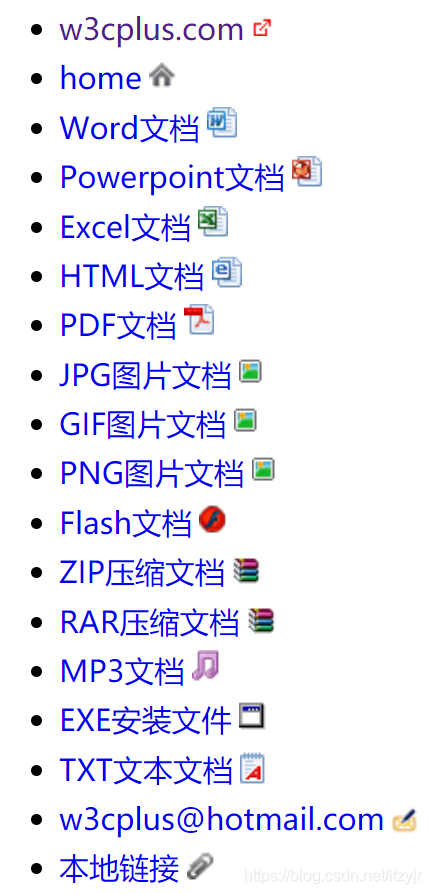





 扫一扫
扫一扫


 290
290

 被折叠的 条评论
为什么被折叠?
被折叠的 条评论
为什么被折叠?
 到【灌水乐园】发言





