Cracking Cached Domain/Active Directory Passwords on Windows XP/2000/2003

深入大模型-52-Harness综述之(二)四大子系统 一个Harness都由四个子系统拼成,Agentic Loop是主干,四个子系统是Tool系统、Memory & Context、Guardrails,再加上一个把它们优雅组织起来的Skill系统。 阅读详情
By default Windows 2000, XP and 2003 systems in a domain or Active Directory tree cache the passwords and credentials of previously logged in users. This is done so that the users can still login again if the Domain Controller or ADS tree can not be reached either because of Controller failure or network problems. These cached passwords are stored as hashes in the local systems registry at the values HKEY_LOCAL_MACHINE/SECURITY/CACHE/NL$1 through NL$10. Unless the ACL is changed these values require SYSTEM level privileges to access (you can set it so an admin account can read them but you would still want to use a tool to parse out the data). Arnaud Pilon has created a tool called CacheDump for extracting these password hashes out of the registry. He and his team have also come up with patches for the password cracking tool “John the Ripper” that allow you to use John to crack these stored credential hashes. More on the technical details can be found at http://www.cr0.net:8040/misc/cachedump.html for those who are so inclined. Fortunately from a security standpoint the way Microsoft hashes cached passwords is much more secure than the way they store local passwords in the SAM file. Since each cached hash has its own salt (a set of more or less random bits figured into the hash algorithm to help foil pre-computed attacks) cached passwords hashes take much longer to crack than LM (LAN Manager) hashes which don't salt the same way, are case insensitive and are split into seven character chunks.

        This tutorial will cover the basics of collecting the cached password hashes and setting up a Debian based Linux system with a patched version of “John the Ripper” to audit these hashes for weak passwords. With a little modification to these basic instructions you should be able to get the patched version of John to work on just about any *nix system or under the Cygwin environment for Windows.

        First download and extract cachedump.exe from http://www.cr0.net:8040/misc/cachedump-1.0.zip to the Windows box you want to get the cached password hashes from. Once you have extracted the executable make sure you are logged in as an admin user, then drop out to a command prompt and use the following command to pipe the hashes into a file:

Windows Command:
cachedump >mydump.txt


        If you look in the mydump.txt file it should contain data that looks something like the following:

Mydump.txt Contents:

jdoe:ac45d39d1029a02938b9302918c9210
admin:23acb302913da1293840329a12931ac
tjanes:2394820194832ac239104928130ab32

--------'

   If you have a lot of time and a fast computer you can try the incremental (brute force) mode and see if it gives you better results:

Linux Command:
./john -i:all -format:mscash mydump.txt


        Incremental mode is limited to only eight characters unless you change the source before you compile it, but at more than eight characters you will likely be waiting a very long time for John to finish.

        In most cases cached passwords should not be much of a problem since they can take a long time to crack if you have good password policies in place. For those who are still paranoid and have a very reliable connection to their domain controller, they can follow these steps to disable the caching of passwords and credentials:

1. Set the registry value HKLM/SOFTWARE/Microsoft/Windows NT/CurrentVersion/Winlogon/ CachedLogonsCount to 0.
2. Reboot

        I hope that this tutorial has been useful. Happy password auditing!

Further research:

CacheDump Homepage:
http://www.cr0.net:8040/misc/cachedump.html

John the Ripper Homepage:
http://www.openwall.com//john/

John the Ripper Documentation:
http://cvsweb.openwall.com/cgi/cvsweb.cgi/Owl/packages/john/john/doc/

NewOrder’s Wordlists and Tools:
http://neworder.box.sk/codebox.links.php?&key=passdict

NeuTron's tutorial on making a password cracking cluster. His information may help you if you have a lot of computers you can spare cycles on while doing your password audit:
http://www.antionline.com/showthread.php?s=&threadid=262750

A little addition from Puzzlepants, with some formatting by me:

          Sorry to bring up this thread again but several people mentioned the fact that Cain does not recognize CacheDump's format nor does it allow importing of hashes. After a little work I managed to get around that and had Cain cracking hashes that I had dumped using CacheDump. Here's a tutorial I wrote on how to do it:


Crack CacheDump Hashes Using Cain
by
P
uzzlepants


          This is a follow-up to Irongeek's tutorial on Cracking Cached Domain/Active Directory Passwords on Windows XP/2000/2003. In version 2.68, Cain added support for MS-Cache hashes but unfortunately it only supports cracking hashes retrieved from the local machine.

          This is really a big limitation because, as I've found, usually you want to go get a lot of hashes from different machines and compile them into a big list and crack them all at once. If this is not the case, it is usually not convenient to crack the hashes on the machine that they were retrieved from because it may be a machine at your office or school. You may have sufficient privaleges to install and use Cain but in most cases it's probably not the best idea.

          Cain is much easier to use than John the Ripper for cracking just about anything. In this case, both Cain and John the Ripper support cracking MS-Cache hashes but John has the distinct advantage of being able to crack hashes from a list rather than restricting only to hashes retrieved from the local machine. In fact, as John is only meant to crack hashes, it cannot even retrieve any hashes at all but that's beside the point.

          Cain also has a nice, pretty GUI and runs on Windows, therefore making it much easier for most people to use compared to John (command line only, can't run on Windows without the help of Cygwin). As I said before, Cain only supports cracking hashes retrieved from the local machine but most of the time this isn't convenient or safe. However, there is a way to get Cain to crack MS-Cache hashes from any machine that you'd like.

          CacheDump is a tool mentioned in Irongeek's tutorial that can retrieve cached hashes from a machine. It requires administrative privaleges to retrieve the hashes so you'll have to be logged in under an adminstrative account for it to work. Irongeek spells it out in his tutorial so I won't go through how to use it here. Once you have used it and have your text file with the hashes, take that to the computer you'd like to crack the hashes on using Cain.

          There are two things holding Cain back from cracking hashes obtained from external machines. The first is that Cain does not support importing a hash list to be cracked. To get around this you need to first be sure that Cain is closed. If Cain isn't closed, you won't be able to save any changes to the file you will need to change (see the next paragraph). Next, go into the Cain directory, which by default is C:/Program Files/Cain

          In this directory, you should find a file called CACHE.LST among many others. All the LST files you see are temporary files that Cain uses to store cracked and uncracked hashes between sessions. That way Cain doesn't have to start cracking everything all over when you start up the program again and you don't have to import the hashes again as well. CACHE.LST is, you guessed it, where Cain stores the MS-Cache hashes. Go ahead and open this file up in Notepad or your favorite text editor. If there is anything in the file to begin with you can do what you would like with it. Leaving it or deleting it won't affect anything at all.

          The second problem Cain has is that it does not understand the format that CacheDump uses. Fortunately, the formats that Cain and CacheDump use are very similar and don't require much effort to convert. Here is the format that Cain uses:

                              domain;username;password;hash;

          Here is the format that cachedump uses:

                              username:hash:domain

          There may be some extra information at the end of a cachedump entry but as far as I can tell that doesn't affect anything in terms of the hash or the final password. At first I thought it may be used somehow in the salt but I've found in my testing so far that this is not true.

          Going back to Cain's format, you can see that it's pretty simple. At first, obviously, "password" will be completely blank. An actual line from CACHE.LST would look something like this:

                              acme;roadrunner;;6C7773E383661CC9FD9980FB7AFA8A5D;


          The same hash dumped by cachedump would look like this:

                              roadrunner:6C7773E383661CC9FD9980FB7AFA8A5D:acme

          As you can see, the formats are very similar and easy to convert between. The only problem is that this becomes a little intensive if you have a lot of hashes. You wouldn't want to convert a lot of hashes by hand obviously, so I hacked together a quick PHP script that converts between the two formats. The script really only does a little bit of string parsing and reconstructing and is rather simple overall. It would also be really easy to get the same result from just about any other programming language if you wanted to create one yourself.

          There are 2 PHP pages involved though they could easily be combined into one. I named them cache.php and cache2.php creatively enough. Here is the source for cache.php where the user can upload a file with cachedump hashes:

<html>
<head>
<title>File Uploader</title>
</head>
<body>
<b>Convert cachedump output for Cain</b><br><br>
<form enctype="multipart/form-data" action="cache2.php" method="POST">
<input type="hidden" name="MAX_FILE_SIZE" value="102400" />
Choose a file to upload: <input name="uploadedfile" type="file" /><br>
<input type="submit" value="Upload File" />
</form>
</body>
</html>


          This particular script sets the limit for uploads to 100 KB (102,400 bytes) but you can change that easily if you would like. The other part of the script, cache2.php, is where the real magic happens. It takes the uploaded file and puts the text into an array where each line of text (each username, hash, domain combination) corresponds to one entry in the array. A loop then processes each entry in the array and outputs the Cain-formatted text. Here is the source for that page:

<html>
<head>
<title>Cache</title>
</head>
<body>
<?
// Where the file is going to be placed
$target_path = "uploads/";

/* Add the original filename to our target path. Result is "uploads/filename.extension" */
$target_path = $target_path . basename( $_FILES['uploadedfile']['name']);

// This is how we will get the temporary file...
$_FILES['uploadedfile']['tmp_name'];

$target_path = "uploads/";

$target_path = $target_path . basename( $_FILES['uploadedfile']['name']);

/* Check to see if the file was successfully uploaded or not */
if(move_uploaded_file($_FILES['uploadedfile']['tmp
_name'], $target_path)) {
echo "The file ". basename( $_FILES['uploadedfile']['name']). " has been uploaded<br><br>" .
"Here is your output:<br><br>";

/* Open the uploaded file */
$arrContents = file($target_path);

/* For every line in the uploaded file, perform the following */
foreach($arrContents as $v) {
$arr = explode(":", $v);
echo $arr[2] . ";" . $arr[0] . ";;" . $arr[1] . ";<br>";
}

/* Delete the uploaded file */
unlink($target_path);
}
else {
echo "There was an error uploading the file, <a href=/"cache.php/">please try again</a>!";
}
?>
</body>
</html>

          As you can see, both files are pretty simple. To run these on your server you will have to have write permissions in whatever directory you send the uploaded file to (set in the variable $target_path). Obviously you will have to have PHP installed on your server as well. Other than that, this script doesn't require anything else.

          If you're too lazy to run this script on your own server or you don't have a server to run this script on, I have a server up and running with this script on it for anybody to use. Before I give the link I must say a few things. First of all, this server is running on a residential cable connection and therefore cannot handle a lot of traffic. So please don't flood my poor little server or I will have to take the script down. Secondly, if you have a server to run this script on, please do. My poor little server can only handle so much.

          Without further ado, you can now freely convert cachedump output to Cain input here.

          The rest of this tutorial should be pretty self-explainatory but I am going to go ahead and tell you what you need to do next. If you listened to my directions earlier, I told you to open up CACHE.LST in Notepad or your favorite text editor. Since I never told you to close it, you should still have it open. Copy and paste your converted cachedump output into that window and save it. Then you can open up Cain, go to the cracker tab, and you should see all of your beautiful hashes ready to be cracked once you click on MS-Cache hashes.

          Now you should be ready to crack to your heart's delight but I feel I should give you a warning before you do. Compared to John the Ripper, Cain is slow. When I say slow, I mean really slow. When I ran a specially compiled version of John for Windows, it consistently ran at more than 400,000 combinations per second (c/s) on a 1.8 GHz Intel Celeron with 768 MB of RAM during a dictionary attack. Using the same dictionary and the same number of hashes, Cain ran at (and is still running at) around 3,000 combinations per second. As you can see, Cain runs a ton slower than John. The only advantage to Cain, besides the GUI and ability to run natively on Windows, is that it (I think) supports more hybrid options (taking words from a dictionary list and changing them around slightly) compared to John.

          In my experiences with John, it seems to get faster as time goes on. I recall running John on a 1 GHz AMD laptop with 256 MB of RAM. I booted up Whax and didn't even bother loading up a window manager (ie fluxbox or KDE). I ran a bruteforce attack on some cached hashes and the attack started at about 350,000 combinations per second. After about a week straight, the number had climbed to 450,000. So there, John is way faster.

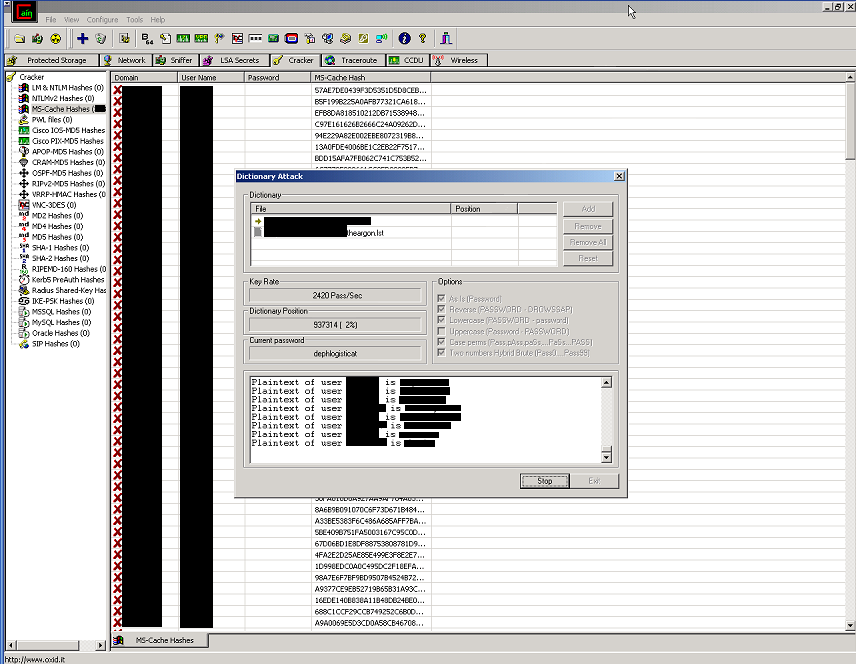
          It's about time to wrap this tutorial up. A few things before I let you go though. Firstly, I have a nice screenshot of Cain cracking a ton of MS-Cache hashes for me. Secondly, if anybody has any problems doing anything I mentioned in the tutorial, you can email me at the following address:

puzzlepants(at)gmail.com

LightTools宏 vs Python API:光学仿真自动化方案选型指南 本文深入对比了LightTools光学仿真自动化中VBA宏与Python API两种方案。VBA宏内嵌易用,适合固定流程批处理;Python API生态强大,尤其在参数优化算法集成方面优势显著,便于构建复杂工作流。文章结合案例,为不同场景下的技术选型提供清晰指南。 阅读详情

相关推荐

从零构建物联网数据中台:MQTT协议、Node.js服务、MongoDB与InfluxDB双存储及React可视化实战

本文详细介绍了从零构建物联网数据中台的完整实战方案。通过采用MQTT协议作为设备通信标准,结合Node.js搭建高并发数据处理服务,并创新性地使用MongoDB与InfluxDB双存储架构分别管理设备元数据与海量时序数据,最后利用React构建了实时数据可视化控制台。该架构有效解决了物联网项目中数据异构、查询性能低下等核心痛点,为构建高效、可扩展的物联网平台提供了清晰路径。

weixin_28432777的博客 292

循环嵌套(多层 for 循环)

表:order(订单表,order_id, user_id)、user(用户表,user_id, user_name)✅ 优化:先查所有订单,拿到所有 user_id 批量 in 查询,内存 join。✅ 优化:先把优惠券转 HashMap,单层循环查找(hash 查找 O (1))SQL 只有 2 次,O (1) 数据库查询,内存遍历 O (n)。需求:查询所有订单列表,同时带出每个订单对应的用户名称。需求:订单列表、优惠券列表,把订单匹配对应的优惠券名称。复杂度:O (M+N),非常快。

weixin_43732943的博客 215

飞常准小程序接口逆向分析:如何破解航班查询的签名机制

本文深度解析了飞常准小程序航班查询接口的安全机制,重点剖析了其基于MD5和参数排序的签名算法。通过逆向分析核心代码,详细阐述了签名生成流程,并提供了Python实现的签名生成器与调试技巧,为开发者理解与模拟此类接口调用提供了实战指南。

zz67890的博客 534

Python+Agent入门笔记(六):记忆和状态,从“一次性问答”到“能用助手”

滑动窗口的缺点很明显:被扔掉的信息就真没了。如果用户第一轮说“我不吃辣”,隔了二十轮让他推荐餐厅,模型已经忘了。定期把旧的对话压缩成一段总结,作为一条特殊的消息插进去。"""把除 system 和最近 keep_recent 条以外的消息,压缩成一条摘要。返回新的 messages 列表。"""# 把旧消息拼成纯文本,让模型总结content = f"[工具结果]把除 system 和最近 keep_recent 条以外的消息,压缩成一条摘要。返回新的 messages 列表。

qq_41241612的博客 108

logisim计组实验八 乘法器

原理:点这里 有问题欢迎留言哦~ 文章目录五位阵列乘法器电路图时间延迟分析六位补码阵列乘法器五位无符号乘法流水线原理图电路图原码一位乘法器原理图电路图补码一位乘法器 五位阵列乘法器 电路图 此处注意:全加器FA的cout端是进位端而非输出端 使用硬件控制比循环累加的速度快得多。 但是存在串行进位链 改进版: 时间延迟分析 T是计算相加数的一级门延迟 3n–>2n 性能差别在1.5倍 ...

treblez's blog 2万+

SAP-ML章<<<<第二节:物料账报错处理ABAP编程错误:RAISE_EXCEPTION>>>>

#SAP-ML章<<<<第一节:物料账报错处理ABAP编程错误:RAISE_EXCEPTION>>>> 1.物料账报错提示: ABAP编程错误:RAISE_EXCEPTION ABAP程序:SAPLFCML4H_RUN_PRICES应用组件CO-PC-ACT 2. 物料账报错背景: CKMLCP运行结算时 3. 解决方案: 通过DEBUG查看错误的地方 OKTZ:分析原因为:可能打包或者配置传输时弄错 ...

SAP.David.Gao的博客 1858

【数据结构-5】单链表的实现

单链表,具体来说是单向的、不带头的、不循环的链表。链表由一个一个节点组成,每个节点分为数据域和指针域,数据域存放数据,指针域存放下一节点的地址。这样,就可以根据指针域中的地址找到下一个节点,节点就串起来了构成了单链表。

a bit 215

台积电技术研发实力

台积电技术研发实力 台积电在半导体行业的地位毋庸置疑。他们究竟有多强大,大部分读者了解得可能非常片面。从最新公布的2019年财报里,看看台积电的真正实力。 一、台积电在市场上的地位 根据公司财报,台积公司在先进制程技术、特殊制程技术,以及先进封装技术的发展上持续领先全球集成电路制造服务领域,2019年的市场占有率为52%。台积公司总体营收以地区划分(主要依据客户营运总部所在地),来自北美市场的营收占台积公司总体营收的60%、日本与中国大陆以外的亚太市场占9%、中国大陆市场占20%、欧洲、中东及非洲市场占6

吴建明wujianming_110117 1902

本地chatbot4--引入LangGraph

上一节实现了chatbot的连续调用工具的功能,但目前流程还是提示词→模型→解析→调用工具(可选)→输出线性的一条路走到底(LangChain)只适合简单线性任务(问答、摘要、简单RAG)agent的本质是:“模型决定调工具→执行→结果喂回模型→再决定……直到完成”。举例:读日志 → 解析 ─失败→ 重试(≤3次) ─→ 退出│成功↓算统计 → 对比历史 → 生成报告 → [人工审核卡点] → 发送。

weixin_45859446的博客 103

如何使用 Ansys OptiSlang 同时运行多个参数化设计研究

了解如何通过使用 OptiSLang 同时运行多个参数化设计研究来提高工作效率。

jkh920184196的博客 2392

X86/64架构中的总线 和 ARM架构中总线的理解

内部总线 /CPU总线/FSB前端总线:类似ARM架构中的AHB总线北桥? 直接和CPU连接,这条总线主要由CPU使用,用来与高速缓存、主存和北桥(或MCH)之间传送信息。 外部总线:类似ARM架构中的APB总线(外围总线)南桥?例如PCI总线、USB总线等 通过北桥与CPU连接(南桥?),是CPU与内存RAM、ROM和输入/输出设备接口之间进行通讯的通路 内存总线:内存与北桥间的总线称为内存总线 ...

a746742897的博客 1067

C# 数据结构和特殊类型

.NET Core(现称.NET)提供丰富数据结构,优化性能与开发效率。日常开发首选List<T>和Dictionary<TKey,TValue>;高性能场景推荐Span<T>与Memory<T>减少内存分配;并发环境使用ConcurrentDictionary等线程安全集合;避免非泛型集合如ArrayList。

cccloveforever的博客 746

YOLOv11改进策略【卷积层】| ICCV-2023 引入Dynamic Snake Convolution动态蛇形卷积,改进C3k2

基于拓扑几何约束的动态蛇卷积用于管状结构分割DSConv(Dynamic Snake Convolution,动态蛇形卷积)模块的设计主要是为了更好地处理管状结构的分割任务,解决传统卷积在处理细管状结构时的不足。

Limiiiing的博客 1629

C++ 入门笔记(十七):list 入门 —— 为什么 list 不能 sort?

第17课:用大白话讲清 list 的双向链表结构、哨兵头、push_back 四步、迭代器封装、merge 与 splice 的区别,以及 vector 排序为什么常比 list 快。

wo_jack的博客 251

Outlook Express 6 (OE6) for Win7/Win8/Win10

英文版 Outlook Express6.0, 兼容Win7/Win10/WinXP,解压就可用。

TMS_WebGMaps_1.9.8.0_Full_Source

TMS_WebGMaps_1.9.8.0_Full_Source 全源码 delphi cbuilder

list

的底层是双向链表结构,双向链表中每个元素存储在互不相关的独立节点中,在节点中通过指针指向其前一个元素和后一个元素。,因此反向迭代器的实现可以借助正向迭代器,即:反向迭代器内部可以包含一个正向迭代器,对正向迭代器的接口进行包装即可。是可以在常数范围内在任意位置进行插入和删除的序列式容器,并且该容器可以前后双向迭代。迭代到该位置,在这段位置上迭代需要线性的时间开销;最大的缺陷是不支持任意位置的随机访问,比如:要访问。还需要一些额外的空间,以保存每个节点的相关联信息。个元素,必须从已知的位置。

xie0510_的博客 293

怀旧版电脑GBC模拟器

再现原版GBC掌机的界面,电脑运行连游戏界面都一样大小,很怀旧,很真实,(英文版)强烈推荐,很小的文件,很难才找到的。

3.链表相关知识点

链表

2501_93884468的博客 436

IDEA的使用指南

IDEA基于java的使用手册,可以最快速的上手,在使用中不断的丰富自己的使用技巧.

上万数据的批量插入

当数据达到上万上十万的时候,如何批量插入

junxunfs的博客 46

软件商店常见问题标准处理流程

从底层软件源来看,/etc/apt/sources.list配置错误、源地址失效、公网与内网离线源混用、ARM64与x86_64架构源串用,以及DNS解析异常、系统代理配置错误,都会导致商店无法获取应用数据;打开该应用,确认可正常运行;软件商店作为系统内置的图形化软件分发与安装入口(UKUI桌面配套组件,底层依赖APT软件源),承担着应用软件的浏览、搜索、下载、安装、升级与卸载等核心功能,是终端软件部署与管理的关键通道。覆盖软件商店启动、页面加载、应用下载、安装、卸载、搜索、自身更新等全部业务场景。

qq_39496637的博客 307

【AI 开发从入门到进阶 · 10】收官篇:LoRA 微调、模型评估、推理加速与生产部署全链路

本文系统梳理了大模型微调与生产落地的全流程,从决策是否微调、优选LoRA技术方案,到代码实现、效果评估、推理加速与FastAPI服务封装,最终构建可迭代的生产级AI系统。强调“逐级升级”原则,倡导以数据闭环驱动优化,避免技术冲动。全系列贯穿工程化思维,提供可复用模板与实战建议,助力开发者从模型训练迈向稳定可用的AI服务部署。

信息安全领域优质创作者|操作系统领域专家 126

ARIA规范

ARIA用来补充原生HTML缺失的语义,原则:优先原生标签,ARIA仅做补充。 ARIA角色role:定义组件身份,分为地标角色、构件角色、文档角色;构件角色用于自定义弹窗、tab、下拉菜单等复杂组件; ARIA状态与属性:以aria-开头,描述组件实时状态;常用:aria-label、aria-labelledby、aria-describedby、aria-hidden、aria-expanded、aria-selected、aria-modal、aria-live; 常用场景:图标按钮用aria-l

2401_83227843的博客 471

LangGraph(03):状态归约、并行更新与消息管理

并行节点写入报错?历史消息无法清理?本文拆解 LangGraph 状态归约与消息增删改机制,带你精确控制复杂工作流状态。

专注于 Agent 工程、AI 产品、Harness Engineering、LLM 算法等方向,OpenMathModel、Nivik 等开源项目作者 142

LangGraph 的分离思想总结

LangGraph 的分离思想,本质上是对"高内聚、低耦合"这一经典工程原则在 LLM 应用领域的落地。它通过状态与逻辑分离、节点职责分离、控制流与执行分离、计算与持久化分离、编排与实现分离五个层面,把一个难以维护的"大黑盒"拆解成一组可组合、可测试、可观测的部件。理解这套分离思想,比记住 API 更重要——因为当你面对新的智能体场景时,真正指导你做出合理拆分的,正是这些分离原则。

张晨光老师的播客 413

Java基础:泛型、类型擦除与 PECS 原则

泛型允许类、接口和方法使用类型参数,把许多类型检查提前到编译期,减少显式类型转换,提高代码复用性。例如。

cjpabc的博客 464

To-Do List 的「修改」功能与 CSS 定位

买牛奶</td><td index="1">写作业</td><td index="2">跑步

2401_89953644的博客 315

大模型记忆管理:消息是如何存储的

本文介绍了多轮对话中消息的存储方式,重点讲解了基于InMemoryChatMessageHistory的内存存储实现及会话隔离机制。通过为每个会话分配唯一ID,确保消息独立存储。同时展示了如何结合ChatPromptTemplate与消息历史实现上下文感知的对话,并提供了基于文件持久化的FileChatMessageHistory方案,支持消息长期保存与跨会话管理。

2301_80002260的博客 201

【C++初阶】list使用及相关实现,思路顺滑流畅!

list使用及相关实现

Severus_black的博客 226
上一篇: The Research of the MS05039 Buffer Overflow Exploit Worm
下一篇: 对Windows内核空间操作的一些说明
iiprogram
博客等级 码龄25年 1068粉丝 1515原创
评论 1
成就一亿技术人!
拼手气红包6.0元
还能输入1000个字符
 
 条评论被折叠 查看
添加红包

请填写红包祝福语或标题

个

红包个数最小为10个

元

红包金额最低5元

当前余额3.43元 前往充值 >
需支付:10.00元
成就一亿技术人!
领取后你会自动成为博主和红包主的粉丝 规则
hope_wisdom
发出的红包
实付元
使用余额支付
点击重新获取
扫码支付
钱包余额 0

抵扣说明:

1.余额是钱包充值的虚拟货币,按照1:1的比例进行支付金额的抵扣。
2.余额无法直接购买下载,可以购买VIP、付费专栏及课程。

余额充值