


 本文介绍了在CentOS7环境下,如何安装PostgreSQL并添加PostGIS扩展,包括安装gcc、GEOS、Proj、GDAL、json-c、libxml2、protobuf、protobuf-c、cgal、sfcgal等依赖,并提供了详细步骤,解决编译过程中可能出现的问题。
postgres / pgsql 安装postgis
今年的项目 是二开 别人用的是pgsql 起初接触真的是心里一万个不情愿 但是接触之后发现 每一个数据库都有他的优点 比如本次我们要安装的扩展 话不多说 开始搞(本人环境是L+A +psql + php7.2)
本文认为已安装PostgreSQL,安装步骤如 Centos7安装PostgreSQL,最好按照先把pg安装好,否则,在postgis,pgrouting安装时,指定pg的安装目录,直接抄路径应该不对,读者要指向自己的安装位置等。
注意,作者将Pg直接安装到了postgres用户下如下图:
本文将PostGIS及其外围用于三维的SFCGAL,用于网络分析的PgRouting安装都顺带上,安装步骤最好按照作者的说明安装,以免产生不可预测问题,毕竟坑我都趟过了。。。
一 安装gcc
[root@VM_0_4_centos ~]# yum install gcc
[root@VM_0_4_centos ~]# yum install gcc-c++
二 编译GEOS
[root@VM_0_4_centos ~]# cd /opt
[root@VM_0_4_centos opt]# wget https://download.osgeo.org/geos/geos-3.7.0.tar.bz2
[root@VM_0_4_centos opt]# tar -jxvf geos-3.7.0.tar.bz2
[root@VM_0_4_centos opt]# cd geos-3.7.0
[root@VM_0_4_centos geos-3.7.0]# ./configure --prefix=/usr/local/geos-3.7.0
[root@VM_0_4_centos geos-3.7.0]# make
[root@VM_0_4_centos geos-3.7.0]# make install
如果有以下问题:
问题1:
g++: command not found
于是直接yum先装上再说:
yum install gcc-c++
问题2:
error:#error “C
报错截图.png
an not compile without isnan function or macro”
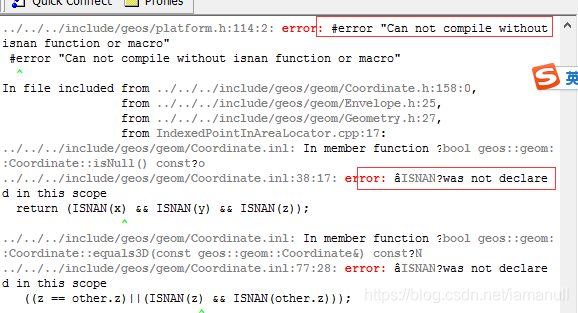
解决方法:
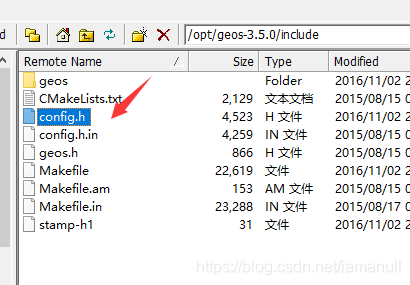
在geos解压的文件中,找到/include/config.h,编辑该文件,取消#undef HAVE_ISNAN的注释,保存退出,然后重新编译geos即可。
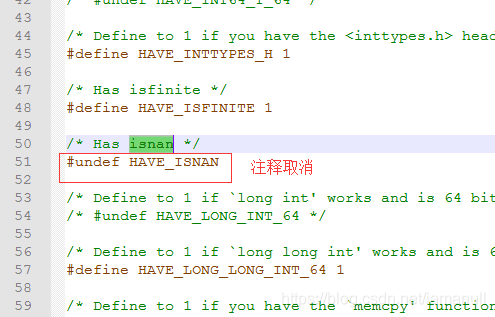
config.h文件目录位置
取消对HAVE_ISNAN的注释
三 编译Proj
[root@VM_0_4_centos opt]# wget http://download.osgeo.org/proj/proj-5.2.0.tar.gz
[root@VM_0_4_centos opt]# tar -zxvf proj-5.2.0.tar.gz
[root@VM_0_4_centos opt]# cd proj-5.2.0
[root@VM_0_4_centos proj-5.2.0]# ./configure --prefix=/usr/local/proj-5.2.0
[root@VM_0_4_centos proj-5.2.0]# make
[root@VM_0_4_centos proj-5.2.0]# make install
四 编译GDAL
[root@VM_0_4_centos opt]# wget https://download.osgeo.org/gdal/2.3.2/gdal-2.3.2.tar.gz
[root@VM_0_4_centos opt]# tar -zxvf gdal-2.3.2.tar.gz
[root@VM_0_4_centos opt]# cd gdal-2.3.2
#编译时间比较久
[root@VM_0_4_centos gdal-2.3.2]# ./configure --prefix=/usr/local/gdal-2.3.2 --with-pg=/home/postgres/bin/pg_config
[root@VM_0_4_centos gdal-2.3.2]# make
[root@VM_0_4_centos gdal-2.3.2]# make install
五 编译json-c
[root@VM_0_4_centos opt]# wget https://github.com/json-c/json-c/archive/json-c-0.13.1-20180305.tar.gz
[root@VM_0_4_centos opt]# tar -zxvf json-c-0.13.1-20180305.tar.gz
[root@VM_0_4_centos opt]# cd json-c-0.13.1-20180305
[root@VM_0_4_centos json-c-0.13.1-20180305]# ./configure --prefix=/usr/local/json-c-0.13.1
[root@VM_0_4_centos json-c-0.13.1-20180305]# make
[root@VM_0_4_centos json-c-0.13.1-20180305]# make install
六 编译libxml2
[root@VM_0_4_centos opt]# wget https://github.com/GNOME/libxml2/archive/v2.9.7.tar.gz
[root@VM_0_4_centos opt]# tar -zxvf libxml2-sources-2.9.7.tar.gz
[root@VM_0_4_centos opt]# cd libxml2-2.9
 最低0.47元/天 解锁文章






 扫一扫
扫一扫


 809
809

 被折叠的 条评论
为什么被折叠?
被折叠的 条评论
为什么被折叠?
 到【灌水乐园】发言





