


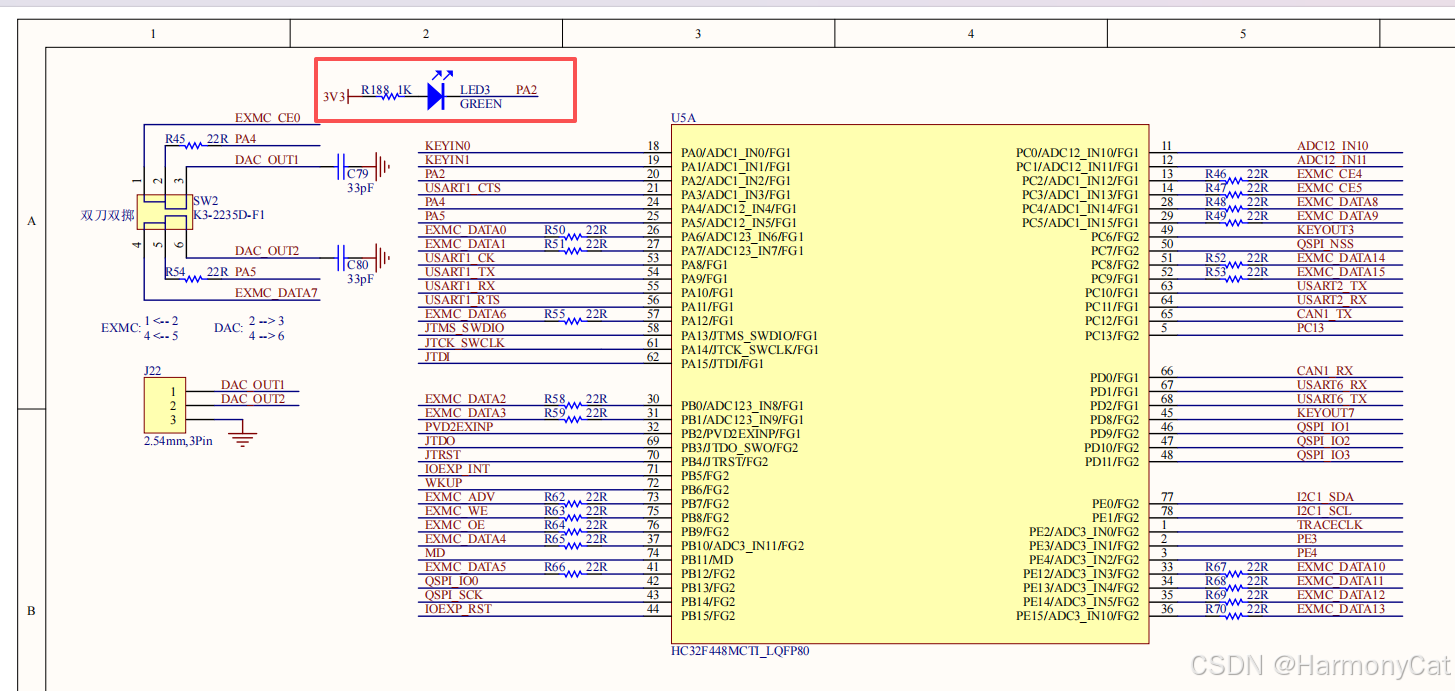
查看官方开发板原理图
PA2接了一个LED
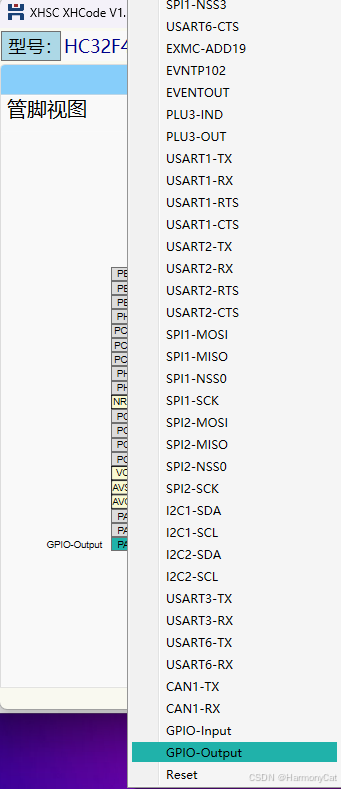
XHCode配置GPIO
选择PA2,点击GPIO OUT
代码解析
GPIO配置
在生成的main.c文件里面
//Port Config
static void App_PortCfg(void)
{
    /* GPIO initialize */
    stc_gpio_init_t stcGpioInit;
    /* PA2 set to GPIO-Output */
    (void)GPIO_StructInit(&stcGpioInit);
    stcGpioInit.u16PinDir = PIN_DIR_OUT;// 输出模式
    stcGpioInit.u16PinAttr = PIN_ATTR_DIGITAL;// 数字模式
    stcGpioInit.u16PinOutputType = PIN_OUT_TYPE_CMOS;// 推挽输出
	stcGpioInit.u16PinState = PIN_STAT_SET;// 默认高电平
    (void)GPIO_Init(GPIO_PORT_A, GPIO_PIN_02, &stcGpioInit);

}
u16PinDir = PIN_DIR_OUT:输出模式
u16PinAttr = PIN_ATTR_DIGITAL:数字模式
u16PinOutputType = PIN_OUT_TYPE_CMOS:推挽输出
u16PinState = PIN_STAT_SET:默认高电平
GPIO输出配置
u16PinDir
| 序号 | 代码 | 说明 |
|---|---|---|
| 1 | PIN_DIR_OUT | 输出 |
| 2 | PIN_DIR_IN | 输入 |
u16PinAttr
| 序号 | 代码 | 说明 |
|---|---|---|
| 1 | PIN_ATTR_DIGITAL | 数字模式 |
| 2 | PIN_ATTR_ANALOG | 模拟量模式 |
u16PinOutputType
| 序号 | 代码 | 说明 |
|---|---|---|
| 1 | PIN_OUT_TYPE_CMOS | 推挽输出 |
| 2 | PIN_OUT_TYPE_NMOS | 开漏输出 |
u16PinState
| 序号 | 代码 | 说明 |
|---|---|---|
| 1 | PIN_STAT_SET | 默认高电平 |
| 2 | PIN_STAT_RST | 默认低电平 |
主函数逻辑
int32_t main(void)
{
    /* Register write unprotected for some required peripherals. */
    LL_PERIPH_WE(LL_PERIPH_ALL);
    //Clock Config
    App_ClkCfg();
    //Port Config
    App_PortCfg();
    /* Register write protected for some required peripherals. */
    LL_PERIPH_WP(LL_PERIPH_ALL);

    for (;;) {
        	// 设置高电平
			GPIO_SetPins(GPIO_PORT_A, GPIO_PIN_02);
        	// 延时1000毫秒
			DDL_DelayMS(1000);
        	// 设置低电平
			GPIO_ResetPins(GPIO_PORT_A, GPIO_PIN_02);
        	// 延时1000毫秒
			DDL_DelayMS(1000);
    }
}





 扫一扫
扫一扫


 5370
5370

 被折叠的 条评论
为什么被折叠?
被折叠的 条评论
为什么被折叠?
 到【灌水乐园】发言





