



前言
一、实现功能
- 界面
- 用户权限功能实现
- 根据权限控制控件展示
- 基于反射实现 功能控件事件响应
二、小计步骤
1.界面
根据功能修改界面:
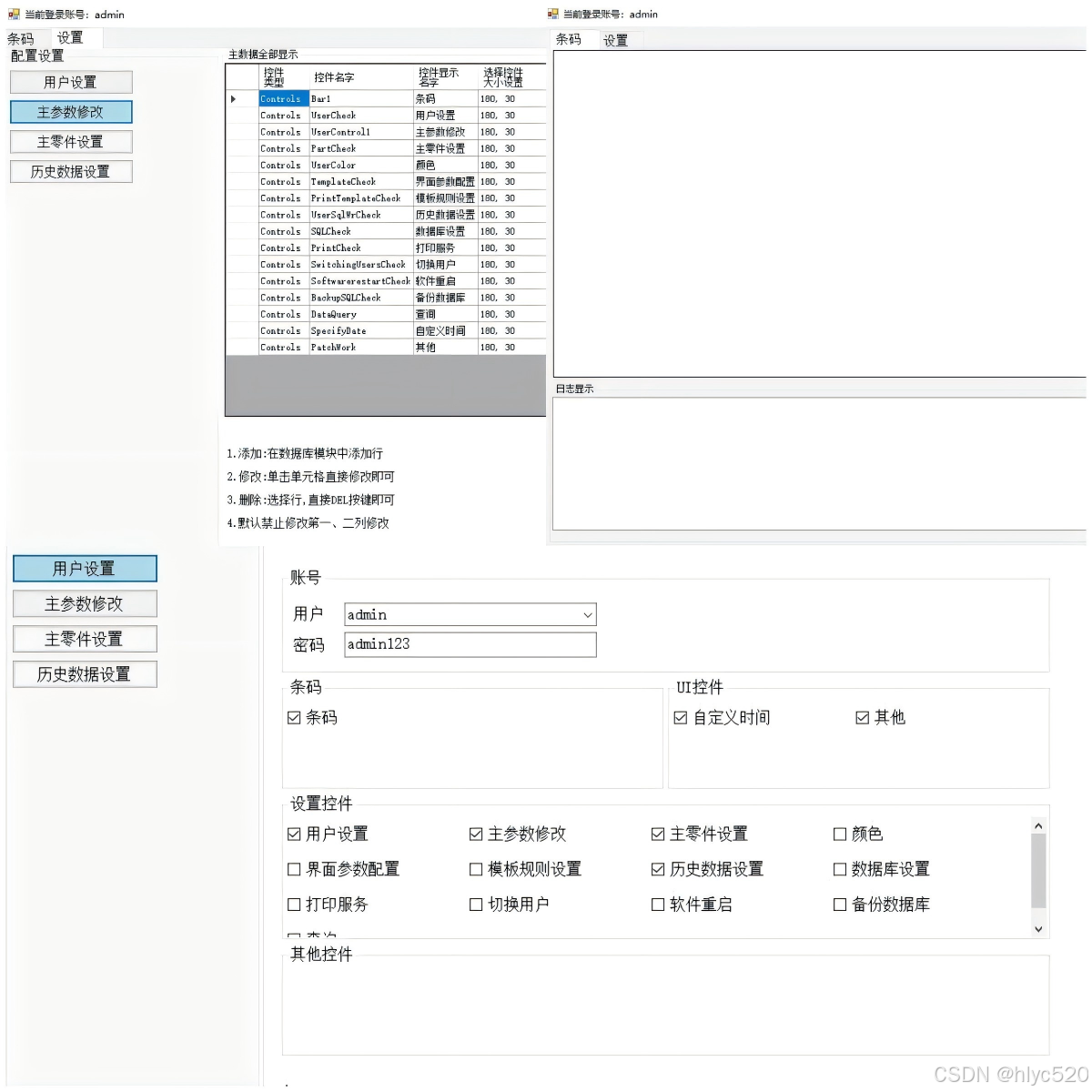
2.用户权限功能实现
1.实现用户增加
        /// <summary>
        /// 添加用户
        /// </summary>
        /// <param name="sender"></param>
        /// <param name="e"></param>
        private void Adduserbutto_Click(object sender, EventArgs e)
        {

            DataRow[] dr = Userall.Select("Loginname='" + UsercomboBox1.Text + "'");
            if (dr.Length > 0)
            {
                label3.Text = UsercomboBox1.Text + "用户存在";
                return;
            }
            if (textBox2.Text.Length < 1)
            {
                label3.Text = "密码不能为空";
                return;
            }
            if (myList.Count < 1)
            {
                label3.Text = "权限不能为空";
                return;
            }
            string joinedString = string.Join(",", myList);
            string num = SQLexecution.Addloginuser(UsercomboBox1.Text, DESEncrypt.Encrypt(textBox2.Text), DESEncrypt.Encrypt(joinedString));
            if (num == "1")
            {
                Userall = SQLexecution.selectLoginuser();
                userlead(Userall.Rows.Count - 1);//加载用户
                label3.Text = UsercomboBox1.Text + "用户添加成功" + DateTime.Now.ToString();
            }
            else
            {
                label3.Text = UsercomboBox1.Text + "用户添加失败" + DateTime.Now.ToString();
            }
        }
2.权限修改
  if (Barprint.userClass.Name != "admin" && UsercomboBox1.Text == "admin")
  {
      label3.Text = "不能修改admin权限";
      //  MessageBox.Show("admin");
  }
  else
  {
      //修改权限
      string num = SQLexecution.Updateloginuser(Convert.ToInt32(UsercomboBox1.SelectedValue), DESEncrypt.Encrypt(textBox2.Text), DESEncrypt.Encrypt(joinedString));
      if (num == "1")
      {
          Userall = SQLexecution.selectLoginuser();
          userlead(UsercomboBox1.SelectedIndex);//加载用户
                                                //   userlead();//加载用户
          label3.Text = UsercomboBox1.Text + "修改成功" + DateTime.Now.ToString();
          //重新再加载权限
          if (UsercomboBox1.Text.Equals(Barprint.userClass.Name))
          {
              Barprint.userClass.tryCounter = DESEncrypt.Encrypt(joinedString);
              Publicuse.Authority(DESEncrypt.Encrypt(joinedString));
              //    Barprint.userClass.tryCounter = DESEncrypt.Encrypt(typesof);
              //     Publicuse.Authority(DESEncrypt.Encrypt(typesof));
          }
      }
      else
      {
          label3.Text = "修改失败" + DateTime.Now.ToString();
      }
  }
3.控件增删
/// <summary>
///  动态flowLayoutPanel2 根据权限添加或者删除按钮
/// </summary>
/// <param name="tryCounter"></param>
public static void DynamicLoadingBan(List<string> myList)
{
    //把权限排序
    List<ControlConfig> foundConfig = ControlLoader.ControlsALL.FindAll(config => (config.Grouptype == 2 & config.Type == "Controls"));
    if (foundConfig.Count > 0)
    {
        foreach (ControlConfig config in foundConfig)
        {
            if (myList.Contains(config.Name))
            {
                Button button = DynamicLoad.FindControlByNameAndType<Button>(Barprint.Barprint_Form.flowLayoutPanel2, config.Name);
                if (button == null)
                {
                    Button control = new Button();
                    control.Name = config.Name;
                    control.Text = config.Text;
                    control.Size = config.Buttensize;
                    //给控件添加方法
                    control.Click += Control_Click;
                    Barprint.Barprint_Form.flowLayoutPanel2.Controls.Add(control);
                }
            }
            else
            {
                Button button = DynamicLoad.FindControlByNameAndType<Button>(Barprint.Barprint_Form.flowLayoutPanel2, config.Name);
                if (button != null)
                {
                    Barprint.Barprint_Form.flowLayoutPanel2.Controls.Remove(button);
                }
            }
        }
    }
    ///控件排序
    List<string> order = new List<string> { };
    foreach (ControlConfig item in ControlLoader.ControlsALL)
    {
        order.Add(item.Name);
    }
    FlowReorderControls(Barprint.Barprint_Form.flowLayoutPanel2, order);
}
data = pd.read_csv(
    'https://labfile.oss.aliyuncs.com/courses/1283/adult.data.csv')
print(data.head())
3.根据权限控制控件展示
 /// <summary>
 /// 动态添加打印界面
 /// </summary>
 /// <param name="tryCounter"></param>
 public static void DynamicLoadingTab(List<string> myList)
 {

     //动态添加删除TAB控件  grouptype == 0
     List<ControlConfig> foundConfig = ControlLoader.ControlsALL.FindAll(config => config.Grouptype == 0);
     if (foundConfig.Count > 0)
     {
         foreach (ControlConfig config in foundConfig)
         {
             if (myList.Contains(config.Name))
             {
                 //权限存在添加tab按钮
                 TabPage tabPage = DynamicLoad.FindControlByNameAndType<TabPage>(Barprint.Barprint_Form.tabControl1, config.Name);
                 if (tabPage == null)
                 {
                     Publicuse.Addtable(config);
                 }
                 //权限存在 添加配套的 功能模块
             }
             else
             {
                 TabPage tabPage = DynamicLoad.FindControlByNameAndType<TabPage>(Barprint.Barprint_Form.tabControl1, config.Name);
                 //权限不存在  移除
                 if (tabPage != null)
                 {
                     Barprint.Barprint_Form.tabControl1.Controls.Remove(tabPage);
                 }
             }
         }
     }
 }
4. 基于反射实现 功能控件事件响应
判断点击按钮名 反射 调用对应的方法 实现功能
 /// <summary>
 /// 按钮点击事件调用
 /// </summary>
 /// <param name="sender"></param>
 /// <param name="e"></param>
 public static void Control_Click(object sender, EventArgs e)
 {
     // string methodName = "Method2";
     //  object[] methodParameters = new object[] { "Hello, Reflection!" };
     Button clickedButton = sender as Button;

     // 检查是否有其他按钮已被选中
     if (currentlySelectedButton != null && currentlySelectedButton != clickedButton)
     {
         // 如果有,则还原其颜色
         currentlySelectedButton.BackColor = SystemColors.Control; // 或其他默认颜色
     }

     // 设置当前点击的按钮为选中状态,并改变其颜色
     //   clickedButton.BackColor = Color.Coral; // 选中颜色  Color.FromArgb(255, 173, 216, 230)
     clickedButton.BackColor = Color.FromArgb(255, 173, 216, 230);
     currentlySelectedButton = clickedButton; // 更新当前选中的按钮

     //调用按钮方法
     //  Button button = sender as Button;
     if (clickedButton != null)
     {
         //根据按钮名字  反射调用方法
         ControlMethod.InvokeMethod(myObj, clickedButton.Name);
     }
 }
反射类
   internal class ControlMethod
   {
       /// <summary>
       /// 用户设置方法调用
       /// </summary>
       public void UserCheck()
       {
           Barprint.Barprint_Form.splitContainer1.Panel2.Controls.Clear();
           UserCheck userForm = new UserCheck();
           //     userForm.TopLevel = false;
           Barprint.Barprint_Form.splitContainer1.Panel2.Controls.Add(userForm);
           userForm.Dock = DockStyle.Fill;
           userForm.Show();
       }


       /// <summary>
       /// 主要参数配置
       /// </summary>
       public void UserControl1()
       {
           Barprint.Barprint_Form.splitContainer1.Panel2.Controls.Clear();
           UserControl1 MajorParameterscheck = new UserControl1();
           //   userForm.TopLevel = false;
           Barprint.Barprint_Form.splitContainer1.Panel2.Controls.Add(MajorParameterscheck);
           MajorParameterscheck.Dock = DockStyle.Fill;
           MajorParameterscheck.Show();
       }
       /// <summary>
       /// 反射方法
       /// </summary>
       /// <param name="obj">类名</param>
       /// <param name="methodName">方法名</param>
       public static void InvokeMethod(object obj, string methodName)
       {
           Type type = obj.GetType();
           MethodInfo methodInfo = type.GetMethod(methodName);
       //    MessageBox.Show(methodName);
           if (methodInfo != null)
           {
               methodInfo.Invoke(obj, null);
           }
           else
           {
               MessageBox.Show("出错啦");
               // Console.WriteLine("Method not found: " + methodName);
           }
       }
}
总结
以上就是今天要讲的内容,本文仅仅简单介绍了实现用户权限控制,包含用户增删改、权限控制、界面控件根据权限增减。





 扫一扫
扫一扫


 8900
8900

 被折叠的 条评论
为什么被折叠?
被折叠的 条评论
为什么被折叠?
 到【灌水乐园】发言





