


前言
一、实现功能
- 界面
- 主数据类
- JSON数据存储
- 控件双缓冲
- 数据修改、删除
- 自定义提示框
二、小计步骤
1.界面
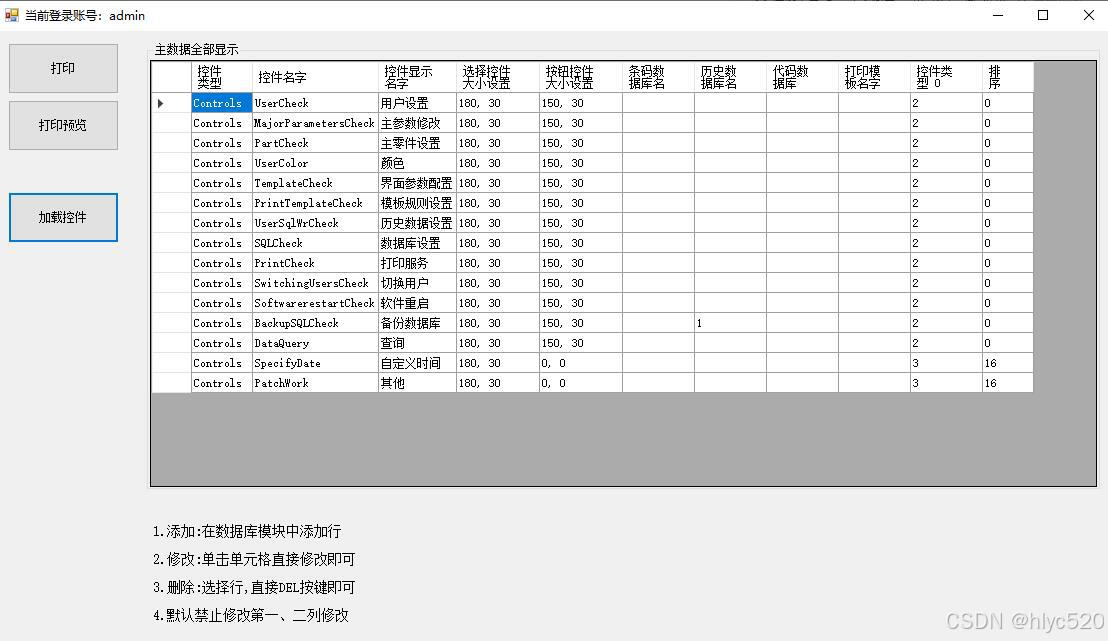
2、主数据类
代码如下:
public class ControlConfig
{


    /// <summary>
    /// 控件类型
    /// </summary>
    public string Type {

    get; set; }
    /// <summary>
    /// 控件名字
    /// </summary>
    public string Name {

    get; set; }
    /// <summary>
    /// 界面显示文字
    /// </summary>
    public string Text {

    get; set; }
    ///// <summary>
    ///// 界面位置
    ///// </summary>
    //public Point Location { get; set; }
    /// <summary>
    /// 选择按钮大小
    /// </summary>
    public Size Checksize {

    get; set; }
    /// <summary>
    /// 按钮大小
    /// </summary>
    public Size Buttensize {

    get; set; }

    /// <summary>
    /// 条码数据库
    /// </summary>
    public string SQLName {

    get; set; }
    /// <summary>
    /// 历史记录数据库
    /// </summary>
    public string HistorySQLName {

    get; set; }
    /// <summary>
    /// 颜色数据库
    /// </summary>
    public string ColorSQLName {

    get; set; }
    /// <summary>
    /// 打印模板
    /// </summary>
    public string PrintTem {

    get; set; }
    /// <summary>
    /// 控件分组类别
    /// </summary>
    public int Grouptype {

    get; set; }
    /// <summary>
    /// 控件排序
    /// </summary>
    public int ControlsSorting {

    get; set; }
}
实例类 加载默认配置:
public static class ControlLoader
{
/// 实例类 所有控件
public static List<ControlConfig> ControlsALL = new List<ControlConfig>
{
};
/// <summary>
/// 默认添加控件
/// </summary>
public static void Addconfiguration()
{
//0类控件---打印条码
//2类控件-----界面按钮
ControlsALL.Add(new ControlConfig {
Type = "Controls", Name = "UserCheck", Text = "用户设置", Checksize = new Size(180, 30), Buttensize = new Size(150, 30), Grouptype = 2 });
ControlsALL.Add(new ControlConfig {
Type = "Controls", Name = "MajorParametersCheck", Text = "主参数修改", Checksize = new Size(180, 30), Buttensize = new Size(150, 30), Grouptype = 2 });
ControlsALL.Add(new ControlConfig {
Type = "Controls", Name = "PartCheck", Text = "主零件设置", Checksize = new Size(180, 30), Buttensize = new Size(150, 30), Grouptype = 2 });
ControlsALL.Add(new ControlConfig {
Type = "Controls", Name = "UserColor", Text = "颜色", Checksize = new Size(180, 30), Buttensize =  最低0.47元/天 解锁文章






 扫一扫
扫一扫


 2461
2461

 被折叠的 条评论
为什么被折叠?
被折叠的 条评论
为什么被折叠?
 到【灌水乐园】发言





