



 本文详细介绍NumPy库中数组的创建、操作与处理方法,包括数组的生成、索引、切片、转置、数学运算及文件输入输出等功能。同时探讨了数组在数据处理、随机数生成和线性代数计算等方面的应用。
创建ndarray
创建数组最简单的办法是使用array函数。
import numpy as np
data1 = [6,7.5,8,0,1]
arr1 = np.array(data1)
#注意括号
data2 = [[1,2,3,4],[5,6,7,8]]
arr2 = np.array(data2)
arr2
array([[1, 2, 3, 4],
       [5, 6, 7, 8]])
#行维数
arr2.ndim
2
#几行几列
arr2.shape
(2, 4)
#查看数据类型
arr2.dtype
dtype('int32')
#zeros和ones创建指定长度或形状的全0或全1数组。传入表示形状的元组
np.zeros(10)
np.zeros((3,6))
array([[0., 0., 0., 0., 0., 0.],
       [0., 0., 0., 0., 0., 0.],
       [0., 0., 0., 0., 0., 0.]])
#返回的是未初始化的垃圾值
np.empty((2,3,2))
array([[[8.89644494e-312, 2.47032823e-322],
        [0.00000000e+000, 0.00000000e+000],
        [6.89813978e-307, 4.47032019e-038]],

       [[5.20843316e-090, 1.49053355e+161],
        [6.54510863e-043, 1.22254152e+161],
        [3.99910963e+252, 6.12292895e-062]]])
#注意arange和range的区别
np.arange(15)
array([ 0, 1, 2, 3, 4, 5, 6, 7, 8, 9, 10, 11, 12, 13, 14])

<matplotlib.image.AxesImage at 0x1a348c86920>
ndarray的数据类型
<matplotlib.image.AxesImage at 0x1b51be8d6f0>
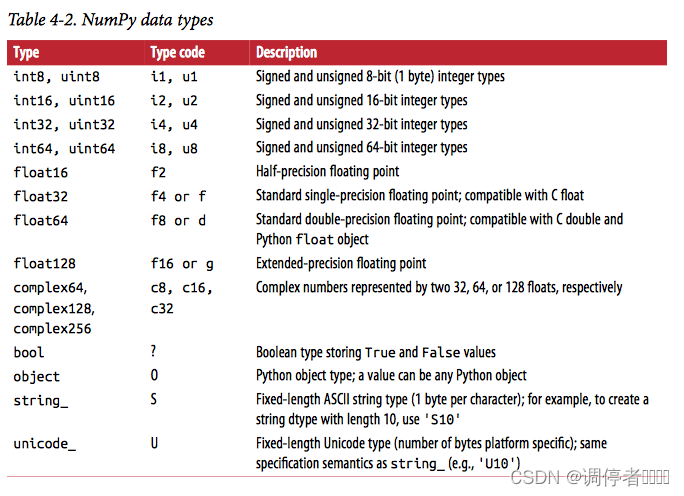
#转换数据类型
float_arr2 = arr2.astype(np.float64)
float_arr2.dtype
dtype('float64')
数组和标量之间的运算&基本的索引和切片
不同大小的数组之间的运算叫做广播。
arr = np.array([[1.,2.,3.],[4.,5.,6.]])
#对应元素相乘
arr * arr
arr ** 0.5
array([[1.        , 1.41421356, 1.73205081],
       [2.        , 2.23606798, 2.44948974]])
#对高维数组的索引(可理解为第二行)
arr[1]
array([4., 5., 6.])
#选取单个元素(第二行第一个)
arr[1][0]
arr[1,0]
4.0
#2*2*3数组
arr3d = np.array([[[1,2,3],[4,5,6]],[[7,8,9],[10,11,12]]])
arr3d[0]
#标量值和数组都可以被赋值给arr3d[0]
#这是一个赋值操作
old_values = arr3d[0].copy()
arr3d[0] = 42
arr3d[0]
array([[42, 42, 42],
       [42, 42, 42]])
#进一步切片索引
arr3d[:1,:1]
array([[[42, 42, 42]]])
#布尔型索引
names = np.array(['Bob','Joe','Will','Bob','Will','Joe','Joe'])
data = np.random.randn(7,4)
names == 'Bob'
#取的是第1行和第4行的
data[names == 'Bob']
#进一步,取第三列到最后
data[names =='Bob',2:]
array([[-0.21097286, -0.67031436],
       [-0.69220345,  0.39277619]])
names != 'Bob'
#取除了第1和第4行的其他行。-改为~
data[~(names == 'Bob')]
#或的使用
mask = (names == 'Bob')|(names == 'Will')
data[mask]
#将data中所有负值都设置为0
data[data < 0] = 0
#非'Joe'的行全设置为7
data[names != 'Joe'] = 7
花式索引跟切片不一样,它将数据复制到新数组中。
#花式索引
#创建一个8*4的数组。注意np.empty(2)和np.empty((2,3))的区别
arr = np.empty((8,4))
for i in range(8):
    arr[i] = i
arr[[0,4,3,6]]
#-1表示最后一行
arr[[-4,-5,-2,-6]]
array([[4., 4., 4., 4.],
       [3., 3., 3., 3.],
       [6., 6., 6., 6.],
       [2., 2., 2., 2.]])
#有关reshape,将列表[0,1,2,...,31]重组为8*4的数组
arr = np.arange(32).reshape((8,4))
#选取了第2行第1个,第6行第4个,第8行第2个,第3行第3个
#(1,0),(5,3),(7,1),(2,2)
arr[[1,5,7,2],[0,3,1,2]]
array([ 4, 23, 29, 10])
#选的不对,用格式矩形区域的。
#选取第2、6、8、3行以及其第1、4、2、3列的元素。
arr[[1,5,7,2]][:,[0,3,1,2]]
array([[ 4,  7,  5,  6],
       [20, 23, 21, 22],
       [28, 31, 29, 30],
       [ 8, 11,  9, 10]])
数组转置和轴对换
转置是重塑的一种特殊形式,返回的是源数据的视图。(不会进行任何复制操作)
#转置操作
arr.T
#矩阵乘法。用np.dot计算矩阵内积:两个矩阵A、B对应分量乘积之和,结果为一个标量。<A,B>=tr(A^T*B)
np.dot(arr.T,arr)
array([[2240, 2352, 2464, 2576],
       [2352, 2472, 2592, 2712],
       [2464, 2592, 2720, 2848],
       [2576, 2712, 2848, 2984]])
https://blog.youkuaiyun.com/u012762410/article/details/78912667#:~:text=%E7%9C%8B%20Python%20%E4%BB%A3%E7%A0%81%E6%97%B6%EF%BC%8C%E7%A2%B0%E8%A7%81%20numpy.%20transpose%20%E5%87%BD%E6%95%B0%E7%94%A8%E4%BA%8E%E9%AB%98%E7%BB%B4%E6%95%B0%E7%BB%84%E6%97%B6%E4%B8%8D%E6%98%8E%E7%99%BD%E5%8E%9F%E7%90%86%EF%BC%8C%E9%80%9A%E8%BF%87%E4%B8%80%E7%95%AA%E7%94%BB%E5%9B%BE%E5%88%86%E6%9E%90%E5%92%8C%E4%BB%A3%E7%A0%81%E9%AA%8C%E8%AF%81%EF%BC%8C%E5%8F%91%E7%8E%B0%20transpose%20%E7%94%A8%E6%B3%95%E5%8F%AF%E4%BB%A5%E6%B8%85%E6%99%B0%E5%9C%B0%E4%BB%8B%E7%BB%8D%E7%BB%99%E5%A4%A7%E5%AE%B6%E3%80%82,%28%20%5B%20%5B0%2C%201%5D%2C%20%20%5B2%2C%203%5D%5D%29%20
关于transpose详细易懂解释,太棒了。
#高维数组的转置操作,用到transpose。对于二维的(0,1)不改变;三维的(0,1,2)不改变
arr = np.arange(16).reshape((2,2,4))
arr.transpose((0,2,1))
#这两个结果一样,即轴1和轴2对换
arr.swapaxes(1,2)
array([[[ 0,  4],
        [ 1,  5],
        [ 2,  6],
        [ 3,  7]],

       [[ 8, 12],
        [ 9, 13],
        [10, 14],
        [11, 15]]])
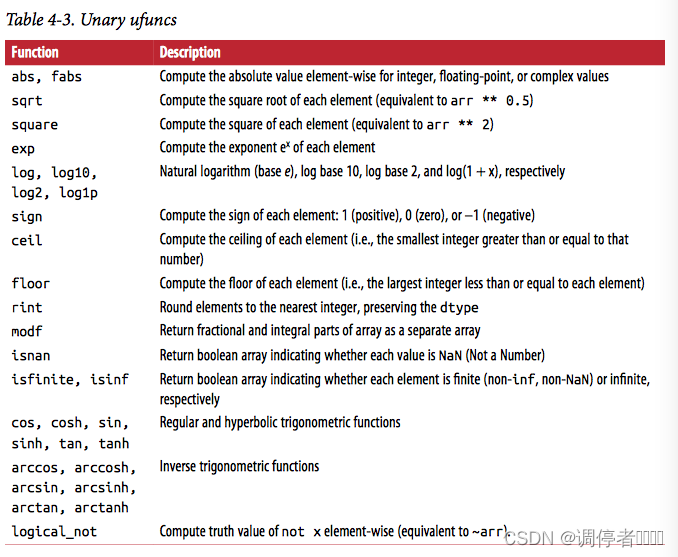
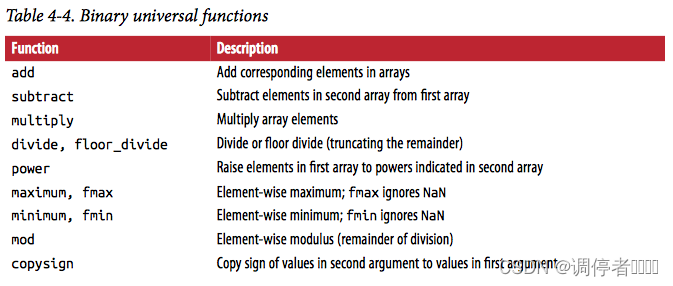
通用函数:快速的元素级数组函数
ufunc:是一种对ndarray中的数据执行【元素级】运算的函数。简单函数(接受一个或多个标量值,并产生一个或多个标量值)的矢量化包装器
arr = np.arange(10)
#对每个元素开根号
np.sqrt(arr)
#e^n
np.exp(arr)
array([1.00000000e+00, 2.71828183e+00, 7.38905610e+00, 2.00855369e+01,
       5.45981500e+01, 1.48413159e+02, 4.03428793e+02, 1.09663316e+03,
       2.98095799e+03, 8.10308393e+03])
#确定元素级最大值
x = np.random.randn(8)
y = np.random.randn(8)
np.maximum(x,y)
array([-0.89704954,  1.1959505 ,  0.51735225, -0.11959856,  0.28081407,
        0.47962544,  1.02347795,  0.44554042])
#返回浮点数数组的小数和整数部分
arr = np.random.randn(7)*5
np.modf(arr)
(array([ 0.75884592, -0.48466277, -0.92102254,  0.02762768, -0.15850239,
        -0.45304326,  0.74997901]),
 array([ 6., -6., -8.,  0., -2., -2.,  2.]))

<matplotlib.image.AxesImage at 0x1e2e9eb5810>
<matplotlib.image.AxesImage at 0x1e2e9fbf220>
利用数组进行数据处理
用数组表达式代替循环的做法称为矢量化
https://blog.youkuaiyun.com/lllxxq141592654/article/details/81532855
超详细的numpy.meshgrid()
https://blog.youkuaiyun.com/qq_21763381/article/details/100169288
超详细的imshow
#生成1000个间隔相等的点
points = np.arange(-5,5,0.01)
#xs是每一行都一样,ys是每一列都一样
xs,ys = np.meshgrid(points,points)
import matplotlib.pyplot as plt
z = np.sqrt(xs**2 + ys**2)
#画热图:通过色差、亮度来展示数据的差异。返回线性灰度色图
plt.imshow(z,cmap=plt.cm.gray)
plt.colorbar()
plt.title("Image plot of $\sqrt{x^2+y^2}$ for a grid of values")
Text(0.5, 1.0, 'Image plot of $\\sqrt{x^2+y^2}$ for a grid of values')
[外链图片转存失败,源站可能有防盗链机制,建议将图片保存下来直接上传(img-itRt9iiJ-1640171193918)(output_36_1.png)]
将条件逻辑表述为数组运算
np.where的第二个和第三个参数不必是数组,都可以是标量值。如果是数组,则数组大小可以不相等
xarr = np.array([1.1,1.2,1.3,1.4,1.5])
yarr = np.array([2.1,2.2,2.3,2.4,2.5])
cond = np.array([True,False,True,True,False])
#逻辑表述
result = [(x if c else y)
         for x,y,c in zip(xarr,yarr,cond)]
#使用np.where
result = np.where(cond,xarr,yarr)
result
array([1.1, 2.2, 1.3, 1.4, 2.5])
#看看list把zip对象强制转换成列表
list(zip(xarr,yarr,cond))
[(1.1, 2.1, True),
 (1.2, 2.2, False),
 (1.3, 2.3, True),
 (1.4, 2.4, True),
 (1.5, 2.5, False)]
#进一步理解where
arr = randn(4,4)
#正值替换为2 ,负值替换为-2
np.where(arr>0,2,-2)
#只将正值设置为2
np.where(arr>0,2,arr)
#更复杂的操作
#逻辑表达
result = []
for i in range(n):
    if cond1[i] and cond2[i]:
        result.append(0)
    elif cond1[i]:
        result.append(1)
    elif cond2[i]:
        result.append(2)
    else:
        result.append(3)
#等价形式
np.where(cond1 & cond2,0,np.where(cond1,1,np.where(cond2,2,3)))
#另一个等价形式(计算过程中,T为1,F为0)。如果1和2都满足,则1*(1-1)+2*0+3*0=0
result = 1*(cond1-cond2)+2*(cond2& -cond1)+3* -(cond1|cond2)
array([1.1, 2.2, 1.3, 1.4, 2.5])
数学和统计方法
arr = np.random.randn(5,4)
#求均值
arr.mean()
#求和
arr.sum()
#按列来,按0轴
arr.mean(axis=0)
#按行来,按1轴
arr.sum(1)
array([-2.22574668, -2.8560409 , 1.50749268, -0.78813517, 3.22950658])
arr = np.array([[0,1,2],[3,4,5],[6,7,8]])
#按0轴累加(列)
arr.cumsum(0)
#按1轴累积(行)
arr.cumprod(1)
array([[  0,   0,   0],
       [  3,  12,  60],
       [  6,  42, 336]], dtype=int32)
<matplotlib.image.AxesImage at 0x203bcc1cdf0>

# 用于布尔型数组的方法
any()和all()也能用于非布尔型数组,所有非0元素将会被当作True
```python
#sum用来对布尔型数组中的True值计数
arr = np.random.randn(100)
#正值的数量
(arr > 0).sum()
#any用于测试数组中是否存在一个或多个True
bools = np.array([False,False,True,False])
bools.any()
#all检查数组中所有值是否都为True
bools.all()
False
排序
arr = randn(8)
arr.sort()
#多维数组可以在任何一个轴向上进行排序
arr = randn(5,3)
#按1轴排(行)
arr.sort(1)
#计算5%分位数的值
large_arr = randn(1000)
large_arr.sort()
large_arr[int(0.05*len(large_arr))]
-1.674305287002164
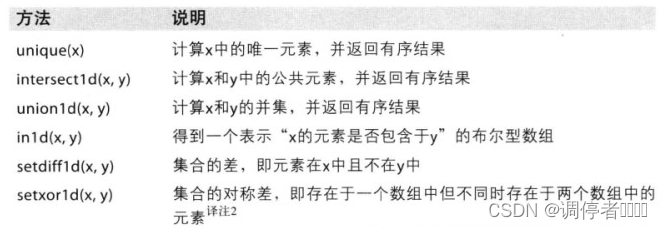
唯一化以及其他的集合逻辑
names = np.array(['Bob','Joe','Will','Bob','Will','Joe','Joe'])
#找出数组中的唯一值并返回已排序的结果
np.unique(names)
#等价形式。set() 函数创建一个无序不重复元素集
sorted(set(names))
ints = np.array([3,3,3,2,2,1,1,4,4])
np.unique(ints)
array([1, 2, 3, 4])
values = np.array([6,0,0,3,2,5,6])
#用于测试一个数组中的值在另一个数组中的成员资格
np.in1d(values,[2,3,6])
array([ True, False, False,  True,  True, False,  True])
<matplotlib.image.AxesImage at 0x203bcc808b0>
用于数组的文件输入输出
arr = np.arange(10)
#保存,原始二进制格式
np.save('some_array',arr)
#载入
np.load('some_array.npy')
#将多个数组保存到一个压缩文件中
np.savez('array_archive',a=arr,b=arr)
arch = np.load('array_archive.npz')
arch['b']
array([0, 1, 2, 3, 4, 5, 6, 7, 8, 9])
#读取txt数据,载入数组并以逗号为分隔符
!type array_ex.txt
arr = np.loadtxt('array_ex.txt',delimiter=',')
arr
0.580052,0.186730,1.040717,1.134411
0.194163,-0.636917,-0.938659,0.124094
-0.126410,0.268607,-0.695724,0.047428
-1.484413,0.004176,-0.744203,0.005487
2.302869,0.200131,1.670238,-1.881090
-0.193230,1.047233,0.482803,0.960334


array([[ 0.580052,  0.18673 ,  1.040717,  1.134411],
       [ 0.194163, -0.636917, -0.938659,  0.124094],
       [-0.12641 ,  0.268607, -0.695724,  0.047428],
       [-1.484413,  0.004176, -0.744203,  0.005487],
       [ 2.302869,  0.200131,  1.670238, -1.88109 ],
       [-0.19323 ,  1.047233,  0.482803,  0.960334]])
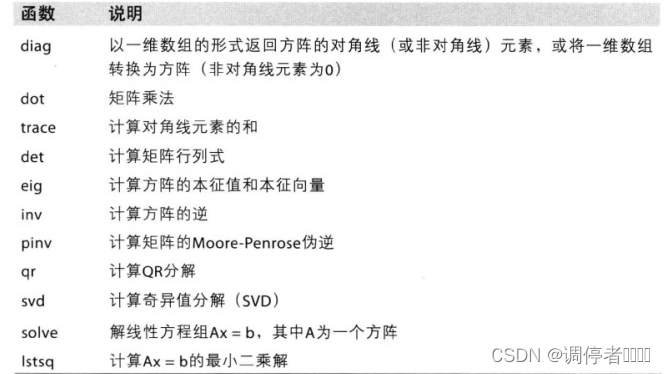
线性代数
#矩阵乘法
x = np.array([[1.,2.,3.],[4.,5.,6.]])
y = np.array([[6.,23.],[-1,7],[8,9]])
np.dot(x,y)
#一个二维数组跟一个大小合适的一维驻足的矩阵点积运算之后将得到一个一维数组
np.dot(x,np.ones(3))
array([ 6., 15.])
from numpy.linalg import inv,qr
X = randn(5,5)
#计算矩阵内积:两个矩阵A、B对应分量乘积之和,结果为一个标量。tr(X.TX)
mat = X.T.dot(X)
#计算方阵的逆
inv(mat)
#方阵乘以方阵的逆
mat.dot(inv(mat))
#计算QR分解。Q是标准正交矩阵,R是一个上三角矩阵
q,r = qr(mat)
r
array([[-7.751336  , -3.94956293,  0.9909685 ,  3.06957169,  2.39061918],
       [ 0.        , -1.46216891,  1.86777125,  2.81148394, -0.65738544],
       [ 0.        ,  0.        , -0.32306642,  1.73121535, -0.60498647],
       [ 0.        ,  0.        ,  0.        , -0.33617398, -0.11225159],
       [ 0.        ,  0.        ,  0.        ,  0.        ,  0.44843108]])


<matplotlib.image.AxesImage at 0x203bcc9a980>
随机数生成
#生成标准正态分布的样本数组
samples = np.random.normal(size=(4,4))
samples
array([[-0.24806082,  0.10413203, -1.71711032,  0.08087162],
       [-0.17604082,  0.42601616,  1.20264628, -2.04970398],
       [ 0.42111036, -0.28714347, -0.51712391, -0.2494489 ],
       [ 1.24831278, -0.10598678, -1.39223655, -1.6749262 ]])
#产生大量标准正态分布样本值
from random import normalvariate
N = 1000000
%timeit samples = [normalvariate(0,1) for _ in range(N)]
814 ms ± 21.2 ms per loop (mean ± std. dev. of 7 runs, 1 loop each)
%timeit np.random.normal(size=N)
31.1 ms ± 697 µs per loop (mean ± std. dev. of 7 runs, 10 loops each)


<matplotlib.image.AxesImage at 0x203bccc9f30>

范例:随机漫步
#以纯Python的方式实现1000步的随机漫步
import random
position = 0
walk = [position]
steps = 1000
for i in range(steps):
    #random.randint(0,1)只会生成一个0或1的整数。randint(0,3)则生成0或1或2
    #如果生成1,step是1;如果生成0,则step是-1
    step = 1 if random.randint(0,1) else -1
    position += step
    walk.append(position)
plot(walk)
plt.title("Random walk with +1/-1 steps")
Text(0.5, 1.0, 'Random walk with +1/-1 steps')
[外链图片转存失败,源站可能有防盗链机制,建议将图片保存下来直接上传(img-9f3i1zdw-1640171193924)(output_66_1.png)]
nsteps = 1000
#生成0或1整数,重复1000次
draws = np.random.randint(0,2,size=nsteps)
#大于0,即1 则为1;否则是0,则为-1
steps = np.where(draws > 0,1,-1)
#计算累计和
walk =steps.cumsum()
walk.min()
walk.max()
#首次穿越时间,即随机漫步过程中第一次到达某个特定值的时间
#得到一个距离大于等于10的布尔型数组
np.abs(walk) >= 10
#得到以上布尔型数组第一个最大值的索引(True就是最大值)
(np.abs(walk) >= 10).argmax()
#这个函数不是很高效,因为它会对数组进行完全扫描
125
一次模拟多个随机漫步
#一次性计算5000个随机漫步过程的累计和
nwalks = 5000
nsteps = 1000
draws = np.random.randint(0,2,size=(nwalks,nsteps))
steps = np.where(draws > 0,1,-1)
walks = steps.cumsum(1)
walks.max()
walks.min()
hits30 = (np.abs(walks) >= 30).any(1)
#计算5000次内有多少次到达|30|
hits30.sum()
#walks[hits30]只会选取为True的行
crossing_times = (np.abs(walks[hits30]) >= 30).argmax(1)
crossing_times.mean()
504.3277711561383
#尝试用其他分布方式得到漫步数据。
steps = np.random.normal(loc=0,scale=0.25,size=(nwalks,nsteps))





 扫一扫
扫一扫


 8万+
8万+

 被折叠的 条评论
为什么被折叠?
被折叠的 条评论
为什么被折叠?
 到【灌水乐园】发言





