


 ORC是一种针对Hadoop优化的列式存储文件格式,旨在提高Hive的存储效率和读取速度。它支持Hive的所有数据类型,包括复杂类型,并通过条带和内部索引实现高效查询。Hive通过添加STOREDASORC将表存储为ORC格式,利用tableproperties控制其行为。
一. 什么是orc
官网:https://orc.apache.org/docs/
1.ORC files目标为了提高hive的存储效率,以及减少文件大小。
Back in January 2013, we created ORC files as part of the initiative to massively speed up Apache Hive and improve the storage efficiency of data stored in Apache Hadoop. The focus was on enabling high speed processing and reducing file sizes.
2.ORC是一种为Hadoop工作负载设计的自描述type感知式(ing) 的列格式存储文件。
ORC is a self-describing type-aware columnar file format designed for Hadoop workloads. It is optimized for large streaming reads, but with integrated support for finding required rows quickly. Storing data in a columnar format lets the reader read, decompress, and process only the values that are required for the current query.
3.提高大型流数据的读效率
在写入文件时ORC这边会构建一个内部索引。
其中当谓词下推使用这些索引来确定需要为特定查询读取文件中的哪些stripes,而行索引可以将搜索范围缩小到10,000行的特定集合。
Because ORC files are type-aware, the writer chooses the most appropriate encoding for the type and builds an internal index as the file is written.
Predicate pushdown uses those indexes to determine which stripes in a file need to be read for a particular query and the row indexes can narrow the search to a particular set of 10,000 rows.
4.ORC支持Hive中的完整类型集,包括复杂类型:结构、列表、映射和联合。
ORC supports the complete set of types in Hive, including the complex types: structs, lists, maps, and unions.
5. stripes的概念
ORC文件被划分为条,默认情况下大约为64MB。文件中的条彼此独立,形成分布式工作的自然单元。
在每个条带中,列之间是分开的,因此writer只能读取所需的列。
ORC files are divided in to stripes that are roughly 64MB by default. The stripes in a file are independent of each other and form the natural unit of distributed work. Within each stripe, the columns are separated from each other so the reader can read just the columns that are required.
二. hive集成orc
if the table is ORC. Using show create table, you get this:
ORC is well integrated into Hive, so storing your istari table as ORC is done by adding “STORED AS ORC”.
CREATE TABLE istari (
  name STRING,
  color STRING
) STORED AS ORC;
具体的实现类
STORED AS INPUTFORMAT
  ‘org.apache.hadoop.hive.ql.io.orc.OrcInputFormat’
OUTPUTFORMAT
  ‘org.apache.hadoop.hive.ql.io.orc.OrcOutputFormat’
To modify a table so that new partitions of the istari table are stored as ORC files:
ALTER TABLE istari SET FILEFORMAT ORC;
三. hive表属性
Tables stored as ORC files use table properties to control their behavior. By using table properties, the table owner ensures that all clients store data with the same options.
所有的客户端在储存数据时都会有按照相同的属性操作。
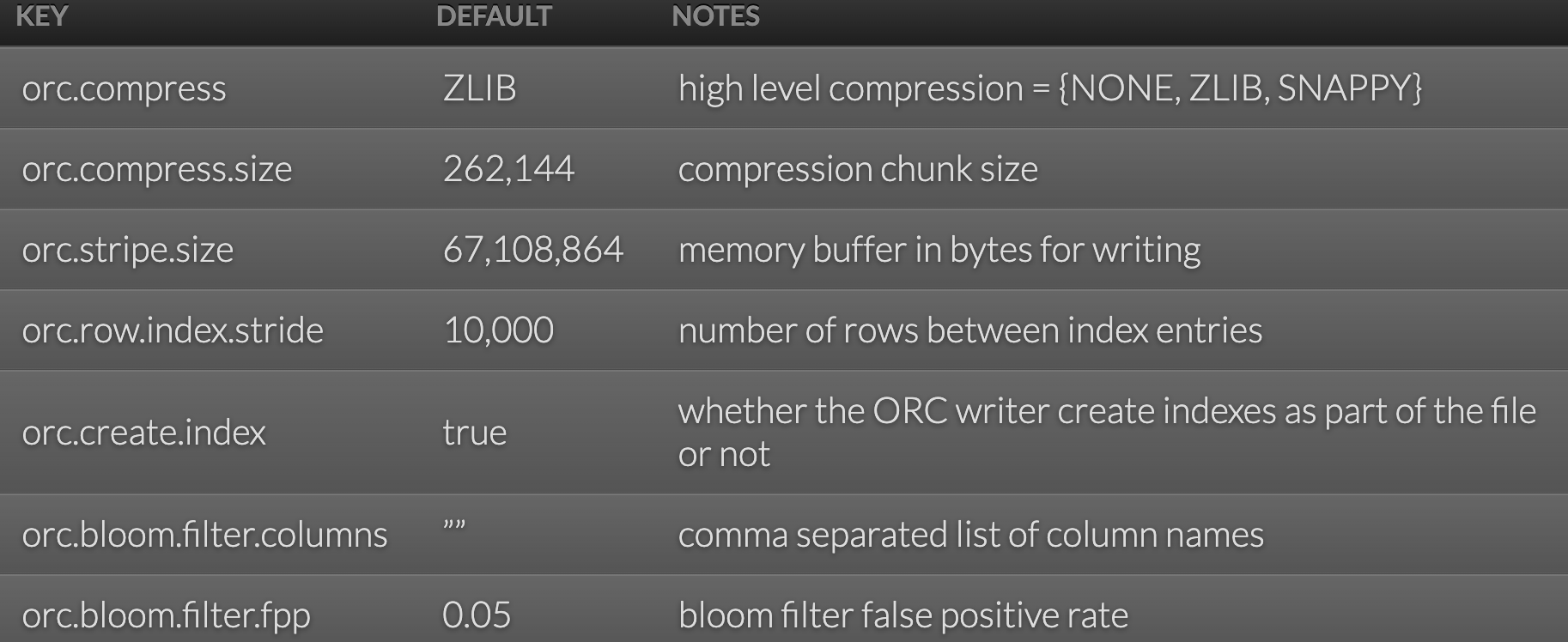
官网:hive-config
表中添加参数:
CREATE TABLE istari (
  name STRING,
  color STRING
) STORED AS ORC TBLPROPERTIES ("orc.compress"="NONE");






 扫一扫
扫一扫


 2221
2221

 被折叠的 条评论
为什么被折叠?
被折叠的 条评论
为什么被折叠?
 到【灌水乐园】发言





