


若必须使用 32 位程序,通过 C:\Windows\SysNative才能访问真实的 64 位 System32 目录(如 L"C:\Windows\SysNative\nvidia-smi.exe"),并且需确保该路径下存在文件。
下面的代码是通过命令行查看英伟达驱动对应的cuda版本号的C++程序
#include <windows.h>
#include <iostream>
#include <string>
#include <vector>

// Call nvidia-smi executable and return its output
std::string CallNvidiaSmi() {
    // Command path (using full path to avoid environment variable issues)
    // const std::wstring command = L"C:\\Users\\tengyanbo\\software\\jre\\bin\\java.exe";
    const std::wstring command = L"C:\\Windows\\System32\\nvidia-smi.exe";

    // Create pipes for capturing output
    HANDLE hReadPipe, hWritePipe;
    SECURITY_ATTRIBUTES saAttr;
    saAttr.nLength = sizeof(SECURITY_ATTRIBUTES);
    saAttr.bInheritHandle = TRUE;  // Child process can inherit handles
    saAttr.lpSecurityDescriptor = NULL;

    // Create anonymous pipe
    if (!CreatePipe(&hReadPipe, &hWritePipe, &saAttr, 0)) {
        return "Failed to create pipe. Error: " + std::to_string(GetLastError());
    }

    // Prevent read pipe from being inherited
    if (!SetHandleInformation(hReadPipe, HANDLE_FLAG_INHERIT, 0)) {
        CloseHandle(hReadPipe);
        CloseHandle(hWritePipe);
        return "Failed to set handle information. Error: " + std::to_string(GetLastError());
    }

    // Configure process startup information
    STARTUPINFOW si = { 0 };
    si.cb = sizeof(STARTUPINFOW);
    si.hStdOutput = hWritePipe;  // Redirect standard output to pipe
    si.hStdError = hWritePipe;   // Redirect standard error to pipe
    si.dwFlags |= STARTF_USESTDHANDLES;

    // Process information structure
    PROCESS_INFORMATION pi = { 0 };

    // Create process to execute nvidia-smi
    if (!CreateProcessW(
        command.c_str(),  // Application path
        NULL,             // Command line arguments (add here if needed)
        NULL,             // Process security attributes
        NULL,             // Thread security attributes
        TRUE,             // Inherit handles
        0,                // Creation flags
        NULL,             // Environment variables
        NULL,             // Current directory
        &si,              // Startup information
        &pi               // Process information
    )) {
        CloseHandle(hReadPipe);
        CloseHandle(hWritePipe);
        return "Failed to create process. Error: " + std::to_string(GetLastError());
    }

    // Close write pipe (not needed in parent process)
    CloseHandle(hWritePipe);

    // Read output from pipe
    std::string output;
    const DWORD bufferSize = 4096;
    std::vector<char> buffer(bufferSize);
    DWORD bytesRead;

    while (ReadFile(hReadPipe, buffer.data(), bufferSize - 1, &bytesRead, NULL) && bytesRead > 0) {
        buffer[bytesRead] = '\0';  // Add string terminator
        output += buffer.data();
    }

    // Wait for process to finish and get exit code
    WaitForSingleObject(pi.hProcess, INFINITE);
    DWORD exitCode;
    GetExitCodeProcess(pi.hProcess, &exitCode);

    // Clean up resources
    CloseHandle(hReadPipe);
    CloseHandle(pi.hProcess);
    CloseHandle(pi.hThread);

    if (exitCode != 0) {
        return "nvidia-smi exited with code: " + std::to_string(exitCode) + "\nOutput: " + output;
    }

    return output;
}

// Extract CUDA version from nvidia-smi output
std::string ExtractCudaVersion(const std::string& output) {
    std::cout << output << std::endl;
    const std::string marker = "CUDA Version:";
    size_t pos = output.find(marker);
    if (pos == std::string::npos) {
        return "CUDA Version not found";
    }

    // Extract version number (skip marker and whitespace)
    pos += marker.length();
    while (pos < output.length() && (output[pos] == ' ' || output[pos] == '\t')) {
        pos++;
    }

    // Read version until newline or end of string
    size_t end = output.find('\n', pos);
    if (end == std::string::npos) {
        end = output.length();
    }

    return output.substr(pos, end - pos);
}

int main() {
    // Call nvidia-smi executable
    std::string output = CallNvidiaSmi();
    if (output.empty()) {
        std::cout << "No output from nvidia-smi" << std::endl;
        return 1;
    }

    // Extract and print CUDA version
    std::string cudaVersion = ExtractCudaVersion(output);
    std::cout << "Detected CUDA Version: " << cudaVersion << std::endl;

    return 0;
}
关键代码 const std::wstring command = L"C:\Windows\System32\nvidia-smi.exe",当编译为32位程序的时候,创建进程就失败了
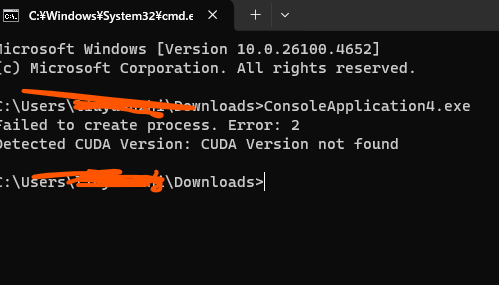
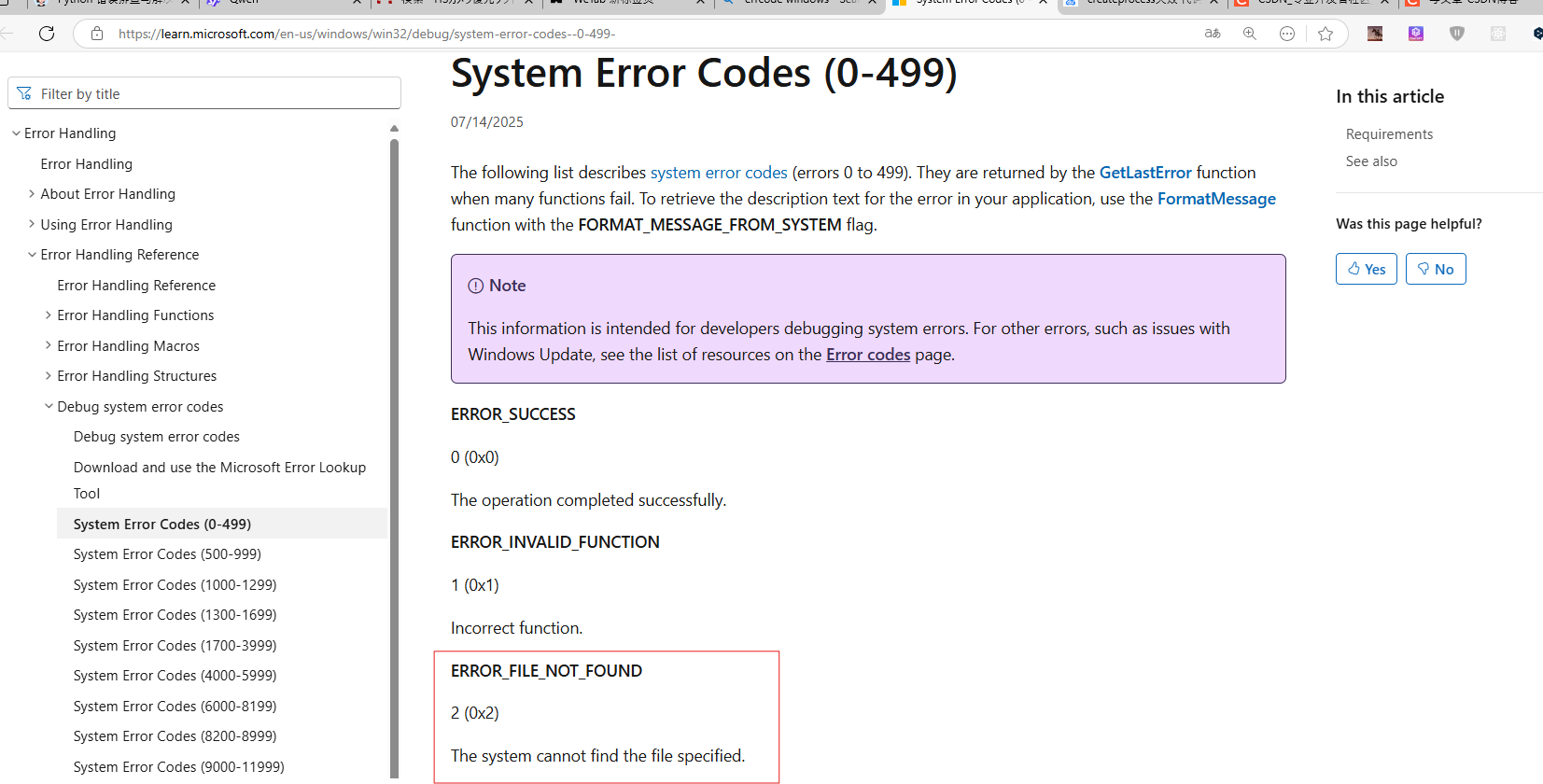
根据微软官网,返回2 应该是文件找不到
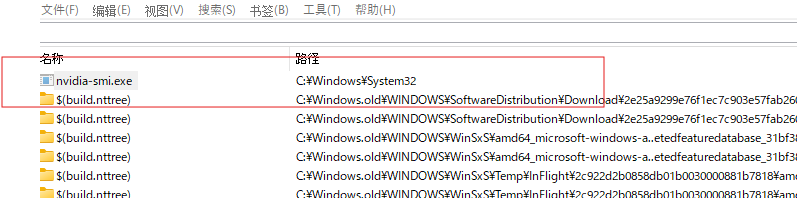
但文件明明是存在的呀! 这个东西简直就是个天坑,后来通过AI的一顿分析和自己的尝试,才知道: 若程序编译为 32 位,在 64 位 Windows 中,C:\Windows\System32 会被重定向到 C:\Windows\SysWOW64(32 位系统目录)。
于是我尝试将上面的出程序编译为64位的时候,确实好用了,上面的说法基本是正确的了。
若必须使用 32 位程序,通过 C:\Windows\SysNative才能访问真实的 64 位 System32 目录(如 L"C:\Windows\SysNative\nvidia-smi.exe"),并且需确保该路径下存在文件。
这个程序是本来想使用NSIS打包(打包之后的安装包是32位程序)的时候通过执行nvidia-smi来获取相应cuda版本号,一直不好用,然后通过C++程序才验证出来这个问题,真实一个天坑,一度怀疑NSIS出现了什么bug,的写C++扩展。知道原因后,也不用再写c++扩展了,直接调用就行了,然后对输出的字符串进行处理即可。
    nsExec::ExecToStack '"C:\Windows\SysNative\nvidia-smi.exe'
    Pop $returnCode    ; Pop return code (0 = success)
    Pop $cmdOutput     ; Pop standard output
    Pop $errorMsg      ; Pop standard error
    DetailPrint '$cmdOutput'
更多内容,欢迎关注我的微信公众号: 半夏之夜的无情剑客





 扫一扫
扫一扫


 1548
1548

 被折叠的 条评论
为什么被折叠?
被折叠的 条评论
为什么被折叠?
 到【灌水乐园】发言





