





 博主为消息订阅做技术储备,下载安装Mosquitto 2.0.14并配置用户、权限和端口协议。启动服务后,新建html访问WebSocket连接失败,但命令行发布订阅正常。经查找资料,发现2.0.12及以上版本配置websocket需添加socket_domain指定ipv4或ipv6,修改后问题解决。
最近要做消息订阅,做一点技术储备,在Download | Eclipse Mosquitto下载目前最新版2.0.14,如图:

安装后配置用户(pwfile.example)、 权限(aclfile.example)以及端口协议:
listener 1883 0.0.0.0
protocol mqtt
listener 1884 0.0.0.0
protocol websockets
启动服务

新建html访问总是提示:
Error during WebSocket handshake: net::ERR_CONNECTION_RESET
mqttws31.js:979 WebSocket connection to 'ws://ip:1884/mqtt' failed: Error during WebSocket handshake: net::ERR_CONNECTION_RESET
尝试很多方法终究还是不能解决,但是使用命令行发布订阅是可以的:
发布:

订阅:
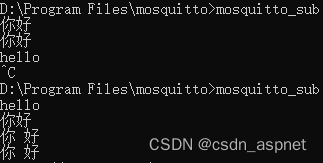
接着查找资料,终于在Anonymous setting for websockets is being ignored · Issue #2459 · eclipse/mosquitto · GitHub
找到答案,修改配置如下:
listener 1884 0.0.0.0
protocol websockets
socket_domain ipv4
listener 1884 ::
socket_domain ipv6
protocol websockets
原因:2.0.12及以上版本,配置websocket时,必须添加socket_domain配置项,来指定是 ipv4 还是 ipv6
终于解决了此问题,html也可以链接订阅消息了:







 扫一扫
扫一扫


 3807
3807

 被折叠的 条评论
为什么被折叠?
被折叠的 条评论
为什么被折叠?
 到【灌水乐园】发言





