



以下两个案例实现一个效果
20241106_145054
一、有Command属性控件绑定事件
1.xaml中创建视图
 <TextBox x:Name="a" />
 <TextBox x:Name="b" />
 <TextBox x:Name="c" />
 <Button
     Width="100"
     Height="30"
     Command="{Binding Command3}"
     Content="传递多个参数">
     <Button.CommandParameter>
         <MultiBinding Converter="{StaticResource objectToArryConverter}">
             <Binding ElementName="a" Path="Text" />
             <Binding ElementName="b" Path="Text" />
             <Binding ElementName="c" Path="Text" />
         </MultiBinding>
     </Button.CommandParameter>
</Button>2.创建ViewModel视图模型
public class MainWindowViewModel : ObservableObject
{
    public RelayCommand<object[]> Command3
    {
        get
        {
            return new RelayCommand<object[]>((arr) =>
            {
				MessageBox.Show(arr[0].ToString());
                MessageBox.Show(arr[1].ToString());
                MessageBox.Show(arr[2].ToString());
            });
        }
    }
}
3.在xaml中引用视图模型
<Window
    xmlns:vm="clr-namespace:wpf转换器.ViewModel"
    d:DataContext="{d:DesignInstance Type=vm:MainWindowViewModel}">

 <Window.DataContext>
     <vm:MainWindowViewModel />
 </Window.DataContext>
4.创建一个 Converter文件夹存放转换器,并在其中创建一个object类型转为数组类型的转换器
 public class ObjectToArryConverter : IMultiValueConverter
 {
     public object Convert(object[] values, Type targetType, object parameter, CultureInfo culture)
     {
         return  values.ToArray();
     }

     public object[] ConvertBack(object value, Type[] targetTypes, object parameter, CultureInfo culture)
     {
         throw new NotImplementedException();
     }
 }
5.在xaml中引用转换器
<Window
   xmlns:i="http://schemas.microsoft.com/xaml/behaviors">

 <Window.Resources>
     <c:ObjectToArryConverter x:Key="objectToArryConverter" />
</Window.Resources>二、没有Command属性控件绑定事件
1.安装:程序包
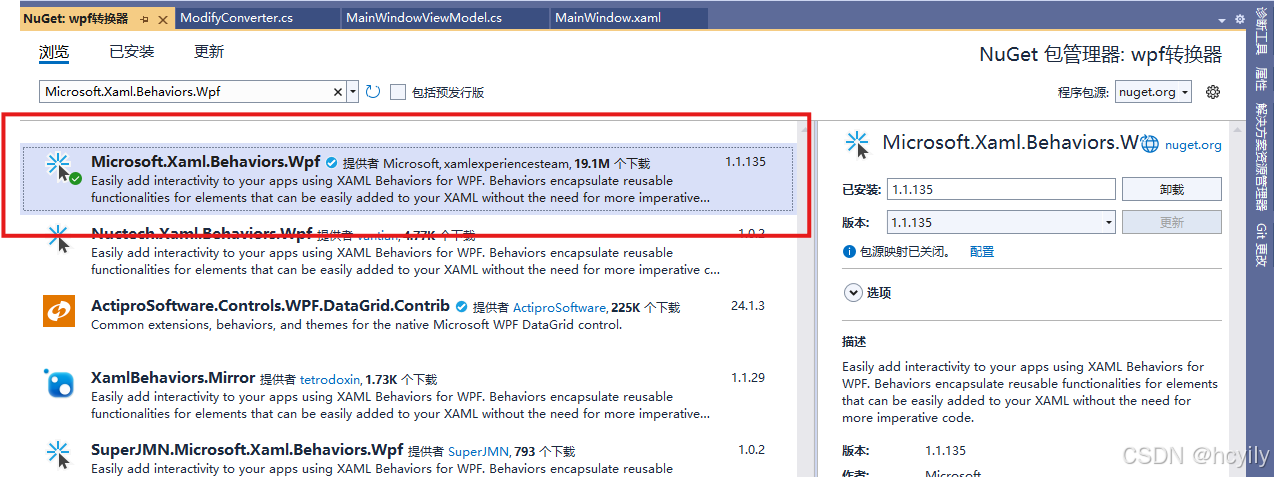
2.创建转换器
 public class ObjectToArryConverter : IMultiValueConverter
 {
     public object Convert(object[] values, Type targetType, object parameter, CultureInfo culture)
     {
         return  values.ToArray();
     }

     public object[] ConvertBack(object value, Type[] targetTypes, object parameter, CultureInfo culture)
     {
         throw new NotImplementedException();
     }
 }
3.xaml中引入转换器:
<Window
    xmlns:i="http://schemas.microsoft.com/xaml/behaviors">

 <Window.Resources>
     <c:ObjectToArryConverter x:Key="objectToArryConverter" />
 </Window.Resources>
4.xaml中创建视图
<TextBox x:Name="a" />
<TextBox x:Name="b" />
<TextBox x:Name="c" />
<TextBlock
    Width="100"
    Height="30"
    Text="传递多个参数">
    <i:Interaction.Triggers>
        <i:EventTrigger EventName="MouseLeftButtonUp">
            <i:InvokeCommandAction Command="{Binding Command3}">
                <i:InvokeCommandAction.CommandParameter>
                    <MultiBinding Converter="{StaticResource objectToArryConverter}">
                        <Binding ElementName="a" Path="Text" />
                        <Binding ElementName="b" Path="Text" />
                        <Binding ElementName="c" Path="Text" />
                    </MultiBinding>
                </i:InvokeCommandAction.CommandParameter>
            </i:InvokeCommandAction>
        </i:EventTrigger>
    </i:Interaction.Triggers>
</TextBlock>5.创建ViewModel视图模型
public class MainWindowViewModel : ObservableObject
{
    public RelayCommand<object[]> Command3
    {
        get
        {
            return new RelayCommand<object[]>((arr) =>
            {
				MessageBox.Show(arr[0].ToString());
                MessageBox.Show(arr[1].ToString());
                MessageBox.Show(arr[2].ToString());
            });
        }
    }
}
6.在xaml中引用视图模型
<Window
    xmlns:vm="clr-namespace:wpf转换器.ViewModel"
    d:DataContext="{d:DesignInstance Type=vm:MainWindowViewModel}">

 <Window.DataContext>
     <vm:MainWindowViewModel />
 </Window.DataContext>





 扫一扫
扫一扫


 1506
1506

 被折叠的 条评论
为什么被折叠?
被折叠的 条评论
为什么被折叠?
 到【灌水乐园】发言





