 鸿蒙自定义弹窗实战



如果你也对鸿蒙开发感兴趣,加入“Harmony自习室”吧!扫描下面名片,关注公众号。

1、概述
自定义弹窗(CustomDialog)可用于广告、中奖、警告、软件更新等与用户交互响应操作。开发者可以通过CustomDialogController类显示自定义弹窗。
2、创建自定义弹窗
-
使用@CustomDialog装饰器装饰自定义弹窗。
-
@CustomDialog装饰器用于装饰自定义弹框,此装饰器内进行自定义内容(也就是弹框内容
@CustomDialogstruct CustomDialogExample {controller: CustomDialogControllerbuild() {Column() {Text('我是内容').fontSize(20).margin({ top: 10, bottom: 10 })}}}
3. 创建构造器,与装饰器呼应相连。
dialogController: CustomDialogController = new CustomDialogController({builder: CustomDialogExample({}),})
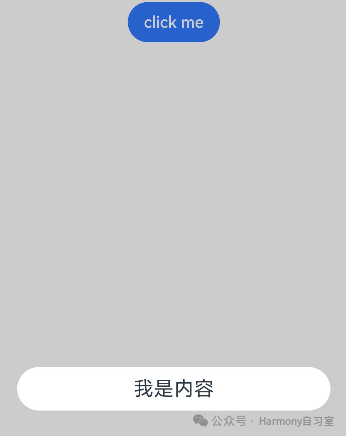
4. 点击与onClick事件绑定的组件使弹窗弹出
Flex({justifyContent:FlexAlign.Center}){Button('click me').onClick(() => {this.dialogController.open()})}.width('100%')
3、弹窗的交互
弹窗可用于数据交互,完成用户一系列响应操作。
-
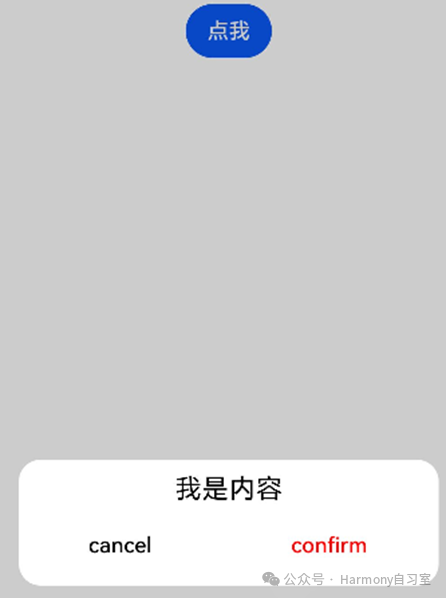
在@CustomDialog装饰器内添加按钮操作,同时添加数据函数的创建。
@CustomDialogstruct CustomDialogExample {controller: CustomDialogControllercancel: () => voidconfirm: () => voidbuild() {Column() {Text('我是内容').fontSize(20).margin({ top: 10, bottom: 10 })Flex({ justifyContent: FlexAlign.SpaceAround }) {Button('cancel').onClick(() => {this.controller.close()this.cancel()}).backgroundColor(0xffffff).fontColor(Color.Black)Button('confirm').onClick(() => {this.controller.close()this.confirm()}).backgroundColor(0xffffff).fontColor(Color.Red)}.margin({ bottom: 10 })}}}
2. 页面内需要在构造器内进行接收,同时创建相应的函数操作。
dialogController: CustomDialogController = new CustomDialogController({builder: CustomDialogExample({cancel: this.onCancel,confirm: this.onAccept,}),alignment: DialogAlignment.Default, // 可设置dialog的对齐方式,设定显示在底部或中间等,默认为底部显示})onCancel() {console.info('Callback when the first button is clicked')}onAccept() {console.info('Callback when the second button is clicked')}
4、一个完整的Demo
// xxx.ets@CustomDialogstruct CustomDialogExample {controller: CustomDialogControllercancel: () => voidconfirm: () => voidbuild() {Column() {Text('我是内容').fontSize(20).margin({ top: 10, bottom: 10 })Flex({ justifyContent: FlexAlign.SpaceAround }) {Button('cancel').onClick(() => {this.controller.close()this.cancel()}).backgroundColor(0xffffff).fontColor(Color.Black)Button('confirm').onClick(() => {this.controller.close()this.confirm()}).backgroundColor(0xffffff).fontColor(Color.Red)}.margin({ bottom: 10 })}}}@Entry@Componentstruct DialogExample {dialogController: CustomDialogController = new CustomDialogController({builder: CustomDialogExample({cancel: this.onCancel,confirm: this.onAccept,}),alignment: DialogAlignment.Default, // 可设置dialog的对齐方式,设定显示在底部或中间等,默认为底部显示})onCancel() {console.info('Callback when the first button is clicked')}onAccept() {console.info('Callback when the second button is clicked')}build() {Flex({ justifyContent: FlexAlign.Center }) {Button('click me').onClick(() => {this.dialogController.open()})}.width('100%')}}






 扫一扫
扫一扫


 576
576

 被折叠的 条评论
为什么被折叠?
被折叠的 条评论
为什么被折叠?
 到【灌水乐园】发言





