



目录
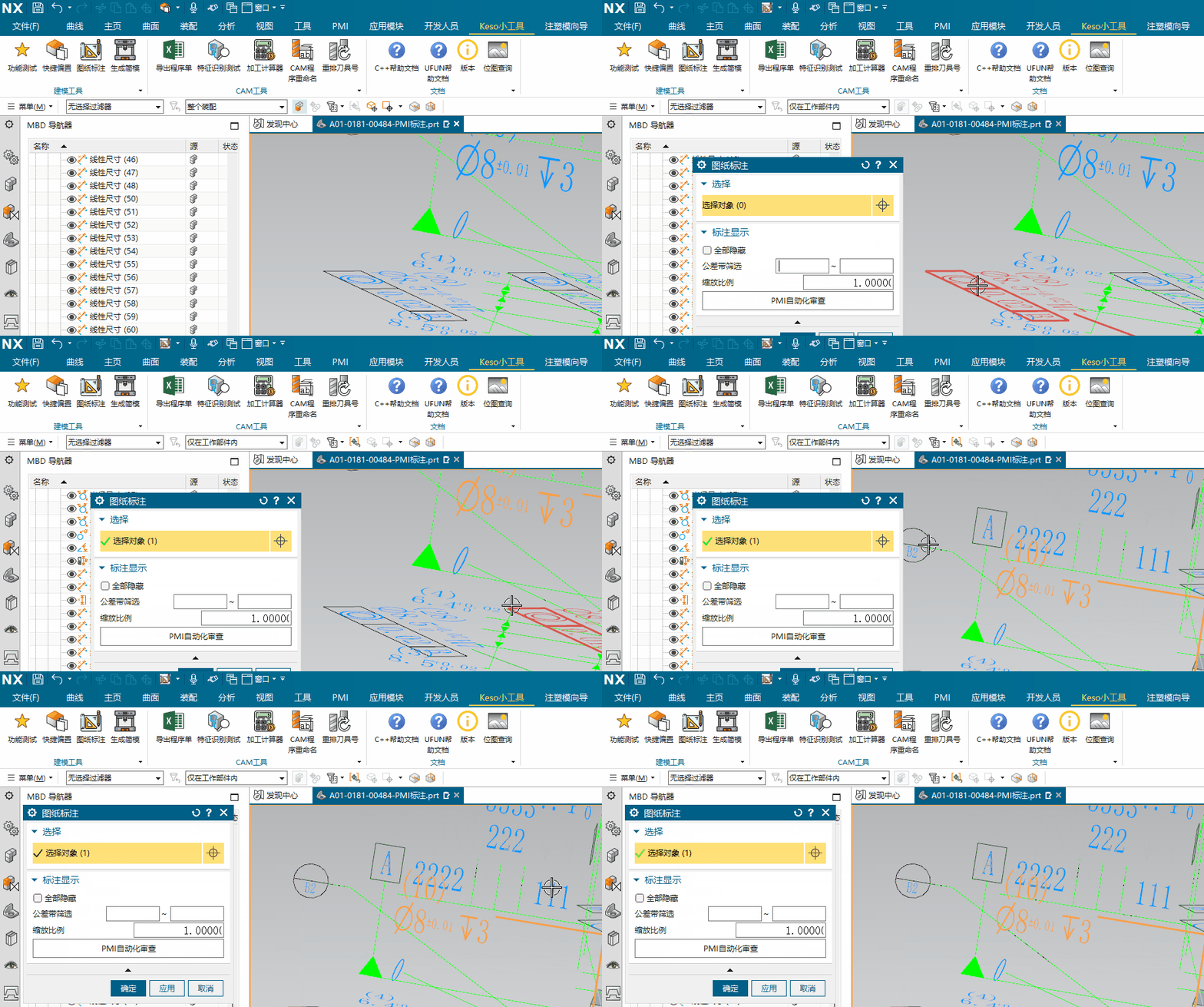
今天有个需求,是需要用选择对象控件选择标注和体,其他的不能选中,所以这里就需要对选择控件可选择的类型进行限制,限制只能选择标注和体。
1、效果展示
这里只筛选了尺寸,不包含注释和表面粗糙度
2、UI编辑
对话框窗口,我们使用选择对象控件,但是这个理论上可以选择所有对象,后面需要通过代码做限制。
3、代码编写
限制选择类型,主要通过控件类的选择筛选器进行类型筛选,该方法是选择对象控件类NXOpen::BlockStyler::SelectObject的方法:
public: void SetSelectionFilter
(
    NXOpen::Selection::SelectionAction maskAction /** Mask action */,
    const std::vector<NXOpen::Selection::MaskTriple> & maskTriples /** Mask triples */
);
其中第一个参数是变更筛选器的类型,有5种:
public: enum SelectionAction
{
    //启用所有选择类型,第二个参数没有意义
    SelectionActionEnableAll/** Populate the filter with all standard types */,
    //在当前选择器基础上使能指定的类型
    SelectionActionEnableSpecific/** Populate the filter with all current or standard types and the specified types or filter members */,
    //在当前选择器基础上禁用指定的类型
    SelectionActionDisableSpecific/** Populate the filter with all current or standard types except the specified types or filter members */,
    //先清空当前选择器,然后使能指定的类型
    SelectionActionClearAndEnableSpecific/** Populate the filter with just the specified types or filter members */,
    //使能所有类型,排除掉指定的类型
    SelectionActionAllAndDisableSpecific/** Populate the filter with all standard types except the specified types or filter members */
};这里我们选择SelectionActionClearAndEnableSpecific,只允许选择我们指定的类型
第二个参数是一个数组,用来指定我们需要的类型
但是到这里就有一个问题,我该如何获取指定的类型呢?
别急,看下NXOpen::Selection::MaskTriple这个对象的说明
/**  Used in selection methods that take filter triples to set the types of objects that are selectable.

	Commonly used:
	 @code
		For C++:
		in order to select...       set...
		any edge                    type=UF_solid_type, subtype=UF_all_subtype, solid_body_subtype=UF_UI_SEL_FEATURE_ANY_EDGE
		any face                    type=UF_solid_type, subtype=UF_all_subtype, solid_body_subtype=UF_UI_SEL_FEATURE_ANY_FACE

		For .NET:
		in order to select...       set...
		any edge                    type=NXOpen.UF.UFConstants.UF_solid_type, subtype=0, solid_body_subtype=NXOpen.UF.UFConstants.UF_UI_SEL_FEATURE_ANY_EDGE
		any face                    type=NXOpen.UF.UFConstants.UF_solid_type, subtype=0, solid_body_subtype=NXOpen.UF.UFConstants.UF_UI_SEL_FEATURE_ANY_FACE
	 @endcode

	*/
public:
struct MaskTriple
{
	public: /** Object type. This can be one of the object types that are listed in
						  uf_object_types.h. For example, for point,
						  use UF_point_type in C++ and
						  NXOpen.UF.UFConstants.UF_point_type in .NET. */int Type;
	public: /** Object subtype. This can either be 0 (UF_all_subtype) for any subtype, or a
							subtype of the selected type.
							The subtypes are listed in uf_object_types.h.
							*/int Subtype;
	public: /** Solid body subtype. This is only meaningful when the type is
						   UF_solid_type.  In that case, this should be set to
						   one of the solid type constants listed in uf_ui_types.h
						   under "Constants for selection solid_type". For example,
						   to select any face, use UF_UI_SEL_FEATURE_ANY_FACE in C++ and
						   NXOpen.UF.UFConstants.UF_UI_SEL_FEATURE_ANY_FACE in .NET */int SolidBodySubtype;
	public: MaskTriple() :
		Type(),
		Subtype(),
		SolidBodySubtype()
	{
	}
	/** Constructor for the MaskTriple struct. */
	public: MaskTriple(int typeInitial /** Object type. This can be one of the object types that are listed in
								  uf_object_types.h. For example, for point,
								  use UF_point_type in C++ and
								  NXOpen.UF.UFConstants.UF_point_type in .NET. */,
			int subtypeInitial /** Object subtype. This can either be 0 (UF_all_subtype) for any subtype, or a
									subtype of the selected type.
									The subtypes are listed in uf_object_types.h.
									*/,
			int solidBodySubtypeInitial /** Solid body subtype. This is only meaningful when the type is
								   UF_solid_type.  In that case, this should be set to
								   one of the solid type constants listed in uf_ui_types.h
								   under "Constants for selection solid_type". For example,
								   to select any face, use UF_UI_SEL_FEATURE_ANY_FACE in C++ and
								   NXOpen.UF.UFConstants.UF_UI_SEL_FEATURE_ANY_FACE in .NET */) :
		Type(typeInitial),
		Subtype(subtypeInitial),
		SolidBodySubtype(solidBodySubtypeInitial)
	{
	}
};这里人家告诉你,你要找的类型都在uf_object_types.h这个头文件里,这个UFun的头文件,果然纯靠C++是搞不定的,还是得用下UFun,人家还贴心的给了一个C++的例子
但但但是这个type和subtype我怎么知道哪个是我想要的呢??也许根据英文名称可以找到几个,但是万一漏了怎么办,所以还是需要找到一个方法,可以返回我想要的对象的类型才行,所以就需要用到UFun的函数:UF_OBJ_ask_type_and_subtype
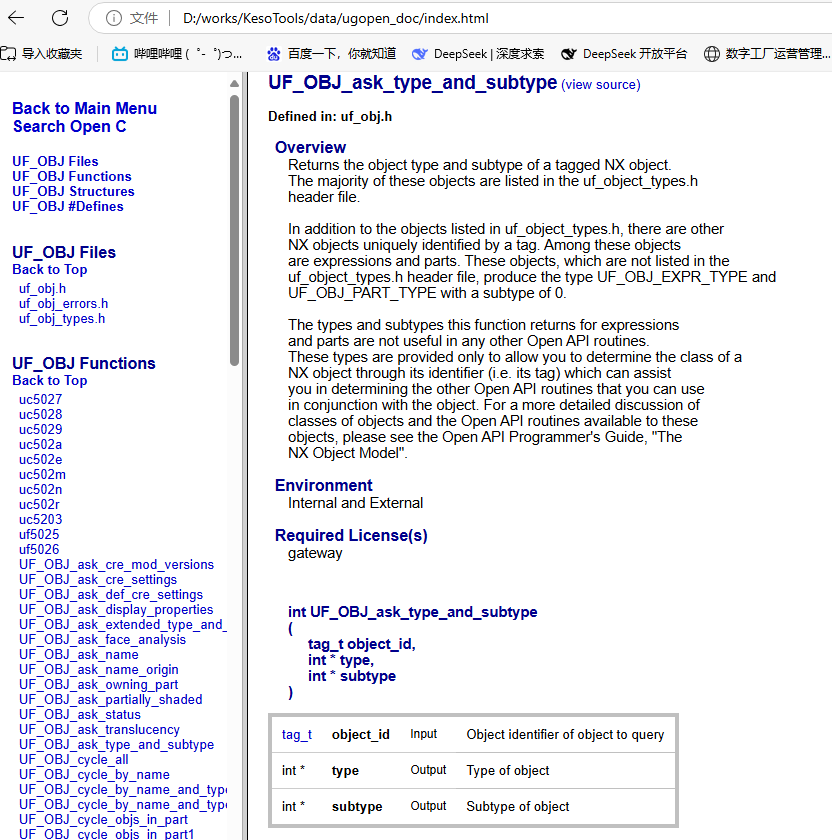
这个方法的头文件是uf_obj.h,使用也很简单,只要把对象的tag值传给这个函数,就可以获取到它的type和subtype,所以这里我就遍历了下图纸中的标注对象
NXOpen::Part *workPart(theSession->Parts()->Work());
//通过Pmi管理器获取所有的pmi对象
NXOpen::Annotations::PmiCollection *pmis = workPart->PmiManager()->Pmis();
if(pmis) {
	for (auto pmi: *pmis) {
        //获取pmi对应的可视对象,从Pmi管理器获取的对象和可视对象不是一个类型
		auto displayInstances = pmi->GetDisplayInstances();
		for (auto displayins: displayInstances) {
			int pmiType = 0;
			int pmiSubtype = 0;
			UF_OBJ_ask_type_and_subtype(displayins->Tag(),&pmiType,&pmiSubtype);

            //打印名称、type和subtype
			Keso::gLog.print(std::string(displayins->Name().GetUTF8Text()) + "|"+std::to_string(pmiType)+"|"+std::to_string(pmiSubtype));
		}
	}
}
最后我得到了一些我想要的类型
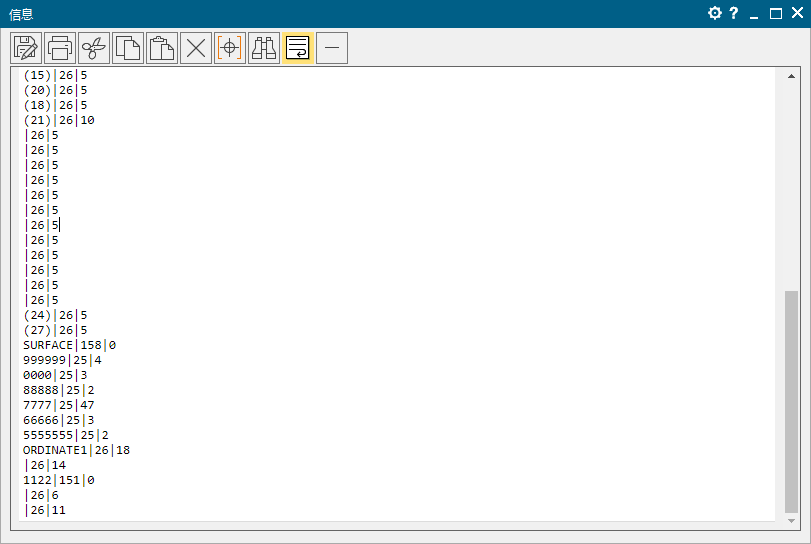
从打印信息中,我们可以获取部分类型,但是重要的是我们找到了需要的大类,下面就可以去uf_object_types.h这个头文件里找了,25是pmi注释、26对应pmi尺寸、158对应表面粗糙度,有大类id就好办了,可以找到大类下的所有子类,例如pmi尺寸
#define UF_dimension_type                        26        /* Dimension entities */
#define    UF_dim_horizontal_subtype                   1   /* Horizontal dimension */
#define    UF_dim_vertical_subtype                     2   /* Vertical dimension */
#define    UF_dim_parallel_subtype                     3   /* Parallel dimension */
#define    UF_dim_cylindrical_subtype                  4   /* Cylindrical dimension */
#define    UF_dim_perpendicular_subtype                5   /* Perpendicular dimension */
#define    UF_dim_angular_minor_subtype                6   /* Angular dimension - minor */
#define    UF_dim_angular_major_subtype                7   /* Angular dimension - major */
#define    UF_dim_arc_length_subtype                   8   /* Arc Length dimension */
#define    UF_dim_radius_subtype                       9   /* Radius dimension */
#define    UF_dim_diameter_subtype                    10   /* Diameter dimension */
#define    UF_dim_hole_subtype                        11   /* Hole dimension */
#define    UF_dim_conc_circle_subtype                 12   /* Concentric Circle dimension */
#define    UF_dim_ordinate_horiz_subtype              13   /* Ordinate dimension - horizontal */
#define    UF_dim_ordinate_vert_subtype               14   /* Ordinate dimension - vertical */
#define    UF_dim_assorted_parts_subtype              15   /* Dimension by parts - only created by converted */
#define    UF_dim_folded_radius_subtype               16   /* Folded radius dimension */
#define    UF_dim_chain_dimensions_subtype            17   /* Obsolete */
#define    UF_dim_ordinate_origin_subtype             18   /* Ordinate origin - point ordinate dimensions are created from */
#define    UF_dim_perimeter_subtype                   19   /* Special dimension used by sketch only */
#define    UF_dim_chamfer_subtype                     20   /* Chamfer dimension */
看着这些子类型也太多了,我一不做二不休直接全部添加进去,就大功告成
std::vector<NXOpen::Selection::MaskTriple> maskVec;
//标注
for(int i=1; i<=20; i++){
	NXOpen::Selection::MaskTriple maskDim(UF_dimension_type,i,-1);
	maskVec.push_back(maskDim);
}
//注释
for(int i=1; i<=48; i++){
	NXOpen::Selection::MaskTriple maskDim(UF_drafting_entity_type,i,-1);
	maskVec.push_back(maskDim);
}
//表面粗糙度及其他
for(int i=0; i<=3; i++){
	NXOpen::Selection::MaskTriple maskDim(UF_smart_model_instance_type,i,-1);
	maskVec.push_back(maskDim);
}
NXOpen::Selection::MaskTriple maskBody(UF_solid_type,UF_solid_body_subtype,UF_UI_SEL_FEATURE_SOLID_BODY);
maskVec.push_back(maskBody);
selectObj->SetSelectionFilter(NXOpen::Selection::SelectionActionClearAndEnableSpecific,maskVec);





 扫一扫
扫一扫


 723
723

 被折叠的 条评论
为什么被折叠?
被折叠的 条评论
为什么被折叠?
 到【灌水乐园】发言





