


目录
本篇文章来分享一下C#的UriComponents枚举,UriComponents是C#中的一个枚举类型,位于System命名空间下,用于指定从Uri对象中提取哪些部分的信息,常见于处理统一资源标识符(URI),例如在进行网络编程、URL解析等场景中。
C#的UriComponents枚举
1.UriComponents枚举的常用成员
| 枚举成员 | 含义描述 | 适用场景 |
| SerializationInfoString | 内部用于URI序列化的标记,外部调用无实际意义(值为int.MinValue)。 | 框架内部序列化逻辑,开发者无需使用。 |
| Scheme | 提取URI的协议部分(如http、https、ftp)。 | 1.判断请求协议类型(如是否为加密的https); 2.根据协议选择不同的处理逻辑(如ftp需登录)。 |
| UserInfo | 提取URI中的用户认证信息(格式:用户名:密码,如user:password)。 | 1.解析包含身份认证的旧版URI; 2.日志记录中提取认证信息(需注意安全风险)。 |
| Host | 提取主机名或IP地址(如example.com、192.168.1.1),不含端口。 | 1.验证服务器域名(如白名单校验);2.统计访问的主机分布。 |
| Port | 提取端口号(如8080),默认端口(如https的443)返回-1。 | 1.检查是否使用非默认端口(如8080需特殊处理); 2.构建网络连接时指定端口。 |
| SchemeAndServer | 组合值,提取协议+用户信息+主机+端口(如https://user@example.com:8080)。 | 1.获取服务的基础访问地址(如拼接新路径); 2.跨域请求时验证服务器标识。 |
| Path | 提取资源路径(如/api/users),不含查询参数或片段。 | 1.解析API路由(如/api/users对应用户模块); 2.验证请求路径的合法性(防止越权)。 |
| Query | 提取查询字符串(如id=123&name=test),不含?分隔符。 | 1.解析URL中的请求参数(如分页、筛选条件); 2.日志记录或分析用户请求参数。 |
| PathAndQuery | 组合值,提取路径+查询字符串(如/api/users?id=123)。 | 1.构建带参数的资源路径; 2.比较两个请求的路径和参数是否一致。 |
| HttpRequestUrl | 组合值,提取HTTP请求完整路径(不含片段,如https://example.com/api?id=1)。 | 1.生成HTTP请求的目标URL; 2.记录完整的请求地址(不含页面内锚点)。 |
| Fragment | 提取片段标识符(如section1),即#后的内容(不含#)。 | 1.网页内锚点定位(如滚动到#chapter2章节); 2.单页应用(SPA)的路由跳转。 |
| AbsoluteUri | 组合值,提取完整URI(包含所有部分)。 | 1.完整复制或记录URI; 2.对URI进行整体格式化或编码转换。 |
| StrongPort | 强制返回实际端口号(即使是默认端口,如https会返回443,而非-1)。 | 1.需要显式展示默认端口的场景(如文档生成); 2.端口相关的精确校验逻辑。 |
| HostAndPort | 组合值,提取主机+显式端口(如example.com:443,含默认端口)。 | 1.展示服务器的主机和端口信息(强制显式端口); 2.比较两个URI的主机和端口是否一致。 |
| StrongAuthority | 组合值,提取用户信息+主机+显式端口(如user:pass@example.com:443)。 | 1.需完整展示认证信息+主机端口的场景; 2.旧版系统的身份验证相关逻辑。 |
| NormalizedHost | 提取标准化主机名(如大写转小写EXAMPLE.COM→example.com,处理国际化域名)。 | 1.域名比较(忽略大小写差异); 2.处理国际化域名(如中文域名的Punycode转换)。 |
| KeepDelimiter | 保留分隔符(如?、#),需与其他成员组合使用(如QueryKeepDelimiter返回?id=123)。 | 1.需要保留原始分隔符的场景(如URL格式化展示); 2.生成带分隔符的查询字符串或片段。 |
2.使用示例
以"https://user:password@example.com:8080/api/users?id=123#section1"为例,是一个完整的URI(统一资源标识符),首先来了解一下各部分含义:
了解完整的URI
| 组成部分 | 示例值 | 说明 |
| 协议(Scheme) | https | 通信协议,https表示加密的HTTP协议(默认端口443)。 |
| 用户信息 | user:password | 登录认证信息(格式:用户名:密码),现代应用中较少使用(不安全)。 |
| 主机名(Host) | example.com | 服务器域名或IP地址,标识资源所在的服务器。 |
| 端口(Port) | 8080 | 服务器端口号,此处为非默认端口(默认端口可省略,如https默认443)。 |
| 路径(Path) | /api/users | 资源在服务器上的路径,通常对应后端接口或文件位置。 |
| 查询字符串 | id=123 | 附加参数(格式:key=value&key2=value2),用于筛选或配置资源。 |
| 片段(Fragment) | section1 | 页面内锚点,用于定位页面中的具体位置(如网页中的章节)。 |
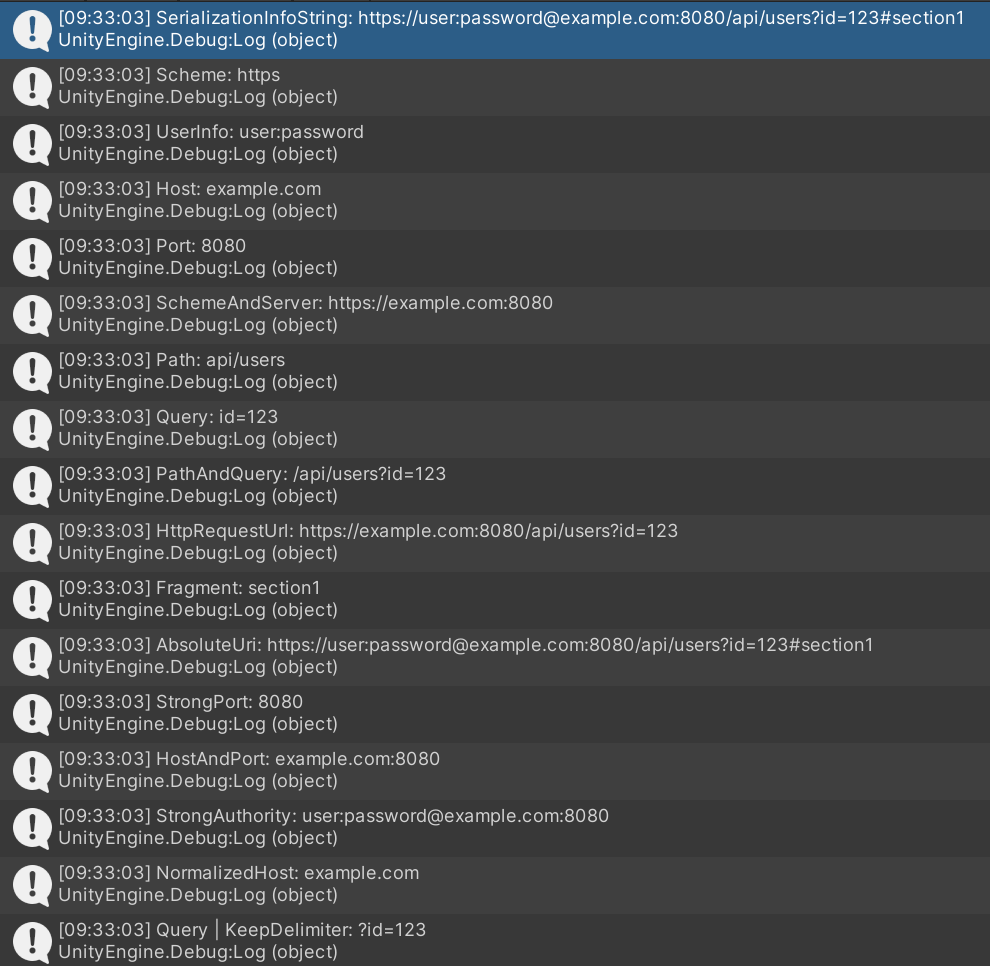
测试代码
using System;
using UnityEngine;

public class UriComponentsTest : MonoBehaviour
{
    private void Start()
    {
        string uriString = "https://user:password@example.com:8080/api/users?id=123#section1";
        Uri uri = new Uri(uriString);
        UriFormat format = UriFormat.Unescaped;//不转义特殊字符

        //1. SerializationInfoString:内部序列化使用(外部调用无实际意义)
        string serializationInfo = uri.GetComponents(UriComponents.SerializationInfoString, format);
        Debug.Log($"SerializationInfoString: {serializationInfo}");
        //输出:SerializationInfoString: https://user:password@example.com:8080/api/users?id=123#section1

        //2. Scheme:提取协议部分
        string scheme = uri.GetComponents(UriComponents.Scheme, format);
        Debug.Log($"Scheme: {scheme}");
        //输出:Scheme: https

        //3. UserInfo:提取用户信息(用户名:密码)
        string userInfo = uri.GetComponents(UriComponents.UserInfo, format);
        Debug.Log($"UserInfo: {userInfo}");
        //输出:UserInfo: user:password

        //4. Host:提取主机名
        string host = uri.GetComponents(UriComponents.Host, format);
        Debug.Log($"Host: {host}");
        //输出:Host: example.com

        //5. Port:提取端口号(默认端口返回-1)
        string port = uri.GetComponents(UriComponents.Port, format);
        Debug.Log($"Port: {port}");
        //输出:Port: 8080

        //6. SchemeAndServer:协议+用户信息+主机+端口(1|2|4|8=13)
        string schemeAndServer = uri.GetComponents(UriComponents.SchemeAndServer, format);
        Debug.Log($"SchemeAndServer: {schemeAndServer}");
        //输出:SchemeAndServer: https://user:password@example.com:8080

        //7. Path:提取路径部分
        string path = uri.GetComponents(UriComponents.Path, format);
        Debug.Log($"Path: {path}");
        //输出:Path: /api/users

        //8. Query:提取查询字符串(不含?)
        string query = uri.GetComponents(UriComponents.Query, format);
        Debug.Log($"Query: {query}");
        //输出:Query: id=123

        //9. PathAndQuery:路径+查询字符串(16|32=48)
        string pathAndQuery = uri.GetComponents(UriComponents.PathAndQuery, format);
        Debug.Log($"PathAndQuery: {pathAndQuery}");
        //输出:PathAndQuery: /api/users?id=123

        //10. HttpRequestUrl:HTTP请求完整路径(13|48=61)
        string httpRequestUrl = uri.GetComponents(UriComponents.HttpRequestUrl, format);
        Debug.Log($"HttpRequestUrl: {httpRequestUrl}");
        //输出:HttpRequestUrl: https://user:password@example.com:8080/api/users?id=123

        //11. Fragment:提取片段(锚点,不含#)
        string fragment = uri.GetComponents(UriComponents.Fragment, format);
        Debug.Log($"Fragment: {fragment}");
        //输出:Fragment: section1

        //12. AbsoluteUri:完整URI(13|48|64=127)
        string absoluteUri = uri.GetComponents(UriComponents.AbsoluteUri, format);
        Debug.Log($"AbsoluteUri: {absoluteUri}");
        //输出:AbsoluteUri: https://user:password@example.com:8080/api/users?id=123#section1

        //13. StrongPort:强制返回实际端口(包括默认端口)
        string strongPort = uri.GetComponents(UriComponents.StrongPort, format);
        Debug.Log($"StrongPort: {strongPort}");
        //输出:StrongPort: 8080

        //14. HostAndPort:主机+显式端口(4|8|128=132)
        string hostAndPort = uri.GetComponents(UriComponents.HostAndPort, format);
        Debug.Log($"HostAndPort: {hostAndPort}");
        //输出:HostAndPort: example.com:8080

        //15. StrongAuthority:用户信息+主机+显式端口(2|132=134)
        string strongAuthority = uri.GetComponents(UriComponents.StrongAuthority, format);
        Debug.Log($"StrongAuthority: {strongAuthority}");
        //输出:StrongAuthority: user:password@example.com:8080

        //16. NormalizedHost:标准化主机名(小写+IDN处理)
        string normalizedHost = uri.GetComponents(UriComponents.NormalizedHost, format);
        Debug.Log($"NormalizedHost: {normalizedHost}");
        //输出:NormalizedHost: example.com

        //17. KeepDelimiter:保留?分隔符(需与其他成员组合)
        string queryWithDelimiter = uri.GetComponents(UriComponents.Query | UriComponents.KeepDelimiter, format);
        Debug.Log($"Query | KeepDelimiter: {queryWithDelimiter}");
        //输出:Query | KeepDelimiter: ?id=123
    }
}
结果
3.总结
UriComponents枚举的核心价值是精确提取URI的特定部分,避免手动切割字符串可能导致的错误(如特殊字符处理、格式差异)。在网络请求、URL解析、路由处理等场景中,使用它能让代码更简洁、可靠。
好了,本次分享到这里就结束啦,希望对你有所帮助~





 扫一扫
扫一扫


 2701
2701

 被折叠的 条评论
为什么被折叠?
被折叠的 条评论
为什么被折叠?
 到【灌水乐园】发言





