
flutter 开发之 Could not build the precompiled application for the device. Error (Xcode): No profiles f

问题:Could not build the precompiled application for the device.
Error (Xcode): No profiles for ‘com.example.ql’ were found: Xcode couldn’t find any iOS App Development provisioning profiles matching ‘com.example.ql’. Automatic signing is disabled and unable to generate a profile. To enable automatic signing, pass -allowProvisioningUpdates to xcodebuild.
/Users/jhon/Desktop/cat/ios/Runner.xcodeproj

It appears that there was a problem signing your application prior to installation on the device.

Verify that the Bundle Identifier in your project is your signing id in Xcode
open ios/Runner.xcworkspace

Also try selecting ‘Product > Build’ to fix the problem.
解决方法:

1.用Xcode打开应用
2.找到Signing&Capabilities
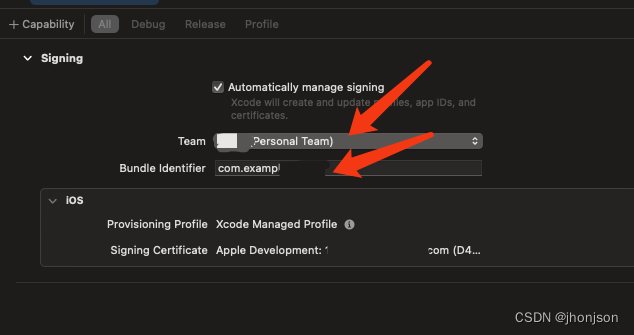
在这里插入图片描述
此处需要两个地方需要处理
1.Team 你申请的apple开发者账号这里可以申请注册
2.Bundle Identifier 此处是包名 唯一值

Flutter 项目中遇到 `Could not resolve all dependencies for configuration 'classpath'` 或 `Could not resolve project :gradle` 等 Gradle 相关的依赖解析失败问题时,通常是由于 Gradle 配置不完整、仓库地址不可达或网络限制导致的。以下是几种有效的解决方法: ### 检查并更新 Gradle 插件版本 确保在 `android/build.gradle` 文件中的 Gradle 插件版本与当前环境兼容。例如,使用较新的 Android Studio 时,建议使用 7.x 版本的插件: ```gradle buildscript { repositories { google() mavenCentral() } dependencies { classpath 'com.android.tools.build:gradle:7.2.1' } } ``` ### 添加正确的仓库配置 在 `settings.gradle`(或 `settings.kts`)文件中添加可信的 Maven 仓库,并允许使用非安全协议下载依赖: ```gradle dependencyResolutionManagement { repositoriesMode.set(RepositoriesMode.FAIL_ON_PROJECT_REPOS) repositories { google() mavenCentral() maven { url "https://jitpack.io" } maven { url "http://maven.aliyun.com/nexus/content/groups/public/" allowInsecureProtocol = true } maven { url "http://maven.aliyun.com/nexus/content/repositories/jcenter" allowInsecureProtocol = true } } } ``` ### 更新 Gradle Wrapper 配置 Gradle 的版本也应与插件版本兼容。检查 `gradle/wrapper/gradle-wrapper.properties` 文件,确保使用的是受支持的 Gradle 版本: ```properties distributionUrl=https\://services.gradle.org/distributions/gradle-7.4-all.zip ``` ### 清理并重新同步 Gradle 缓存 有时本地缓存可能损坏,可以通过以下命令清除缓存并重新构建: ```bash flutter clean cd android ./gradlew cleanBuildCache cd .. flutter pub get flutter build ``` ### 使用代理或更换镜像源 如果网络受限,可以考虑配置全局代理或使用国内镜像源加速依赖下载: ```bash export GRADLE_OPTS="-DsocksProxyHost=127.0.0.1 -DsocksProxyPort=1080" ``` 或者在 `gradle.properties` 中添加: ```properties systemProp.http.proxyHost=127.0.0.1 systemProp.http.proxyPort=1080 systemProp.https.proxyHost=127.0.0.1 systemProp.https.proxyPort=1080 ``` ### 处理项目级依赖冲突 如果错误提示为 `Could not resolve project :gradle`,这通常意味着子模块引用了未正确配置的本地 Gradle 项目。请检查 `pubspec.yaml` 和 `android/settings.gradle` 中的模块引入是否正确。 ---
评论
成就一亿技术人!
拼手气红包6.0元
还能输入1000个字符
 
红包 添加红包
表情包 插入表情
 条评论被折叠 查看
添加红包

请填写红包祝福语或标题

红包个数最小为10个

红包金额最低5元

当前余额3.43前往充值 >
需支付:10.00
成就一亿技术人!
领取后你会自动成为博主和红包主的粉丝 规则
hope_wisdom
发出的红包
实付
使用余额支付
点击重新获取
扫码支付
钱包余额 0

抵扣说明:

1.余额是钱包充值的虚拟货币,按照1:1的比例进行支付金额的抵扣。
2.余额无法直接购买下载,可以购买VIP、付费专栏及课程。

余额充值


